Introduction
This manual provides comprehensive instructions for the installation, operation, and maintenance of your Generic 1002IMPR Operators Manual Canister. This durable, waterproof document holder is designed to protect important documents and small tools in various demanding environments.
Please read this manual thoroughly before installation and use to ensure proper function and longevity of the product.
Product Overview
The Generic 1002IMPR is an injection-molded polyethylene canister engineered for durability and versatility. It offers reliable protection against UV rays, rust, corrosion, chemicals, salt, and road spray, making it suitable for outdoor use on motorcycles, ATVs, tractors, and trailers.
Its compact design (12.5" x 2.2" x 3") makes it ideal for storing operator manuals, insurance and registration documents, small tools, or even a fuel bottle.

Figure 1: The Generic 1002IMPR Operators Manual Canister, shown in black with orange instructional symbols.

Figure 2: Side view of the canister, highlighting the integrated mounting brackets for secure attachment.
Safety Information
- Ensure the canister is securely mounted to prevent detachment during vehicle operation.
- Do not store flammable liquids or hazardous materials unless the canister is specifically rated for such use and appropriate safety precautions are followed.
- Verify that the cap is tightly sealed to maintain waterproof integrity.
- When mounting, avoid interfering with vehicle controls, moving parts, or safety equipment.
Setup and Installation
The 1002IMPR canister offers straightforward installation using either bolts or zip-ties. It features two mounting holes: one 1/4" hole on the front and one 3/8" hole on the back.
Required Tools (Not Included):
- Drill (if creating new mounting points)
- Appropriate bolts, washers, and nuts (for bolt-on installation)
- Heavy-duty zip-ties (for zip-tie installation)
- Measuring tape or ruler
- Marker or pencil
Installation Steps:
- Select Mounting Location: Choose a secure and accessible location on your motorcycle, ATV, tractor, or trailer. Ensure the location does not obstruct vehicle operation, moving parts, or safety features.
- Mark Mounting Points: Hold the canister in the desired position and mark the locations for the two mounting holes.
- Prepare Mounting Surface: If drilling new holes, ensure the surface is suitable and free from electrical wires or fuel lines. Drill holes appropriate for your chosen fasteners (1/4" for the front hole, 3/8" for the back hole).
- Secure the Canister:
- Bolt-on Method: Align the canister's mounting holes with the prepared holes. Insert bolts with washers through the canister and mounting surface, then secure with nuts and washers on the other side. Tighten firmly but do not overtighten.
- Zip-tie Method: Thread heavy-duty zip-ties through the canister's mounting holes and around a secure frame or bar. Pull the zip-ties tight to firmly secure the canister.
- Verify Security: After installation, gently tug on the canister to ensure it is firmly attached and does not wobble.

Figure 3: Example of the canister securely mounted on a forklift, demonstrating a typical installation scenario.

Figure 4: The canister mounted on a stationary pillar, illustrating its versatility for various applications beyond vehicles.

Figure 5: Technical drawing providing detailed dimensions and specifications for mounting, including the 1/4" and 3/8" hole sizes.
Operation
The 1002IMPR canister is designed for simple and secure storage.
- Opening the Canister: Twist the cap counter-clockwise to loosen and remove it.
- Storing Contents: Place your documents, tools, or other items inside the canister. Ensure items are rolled or folded to fit comfortably without forcing.
- Closing the Canister: Place the cap back onto the canister and twist clockwise until it is hand-tight. Ensure the cap is fully seated to maintain its waterproof seal.

Figure 6: The canister with its cap removed, illustrating the opening for content storage.
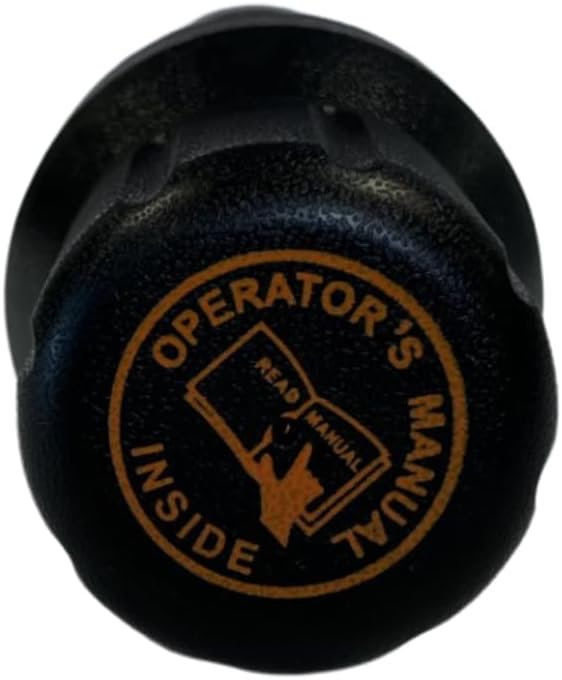
Figure 7: A close-up view of the cap, featuring the "OPERATOR'S MANUAL INSIDE" text and a visual cue for opening.
Maintenance
- Cleaning: Clean the exterior of the canister with mild soap and water as needed. Avoid abrasive cleaners that could damage the polyethylene material.
- Seal Inspection: Periodically inspect the cap's seal for any signs of wear, cracks, or damage. A damaged seal may compromise the waterproof integrity.
- Mounting Hardware: Regularly check the mounting bolts or zip-ties for tightness and signs of corrosion or wear. Tighten or replace as necessary to ensure the canister remains securely attached.
- Storage: When not in use, store the canister in a cool, dry place away from direct sunlight to prolong its lifespan.
Troubleshooting
| Problem | Possible Cause | Solution |
|---|---|---|
| Water inside canister | Cap not fully tightened; damaged seal. | Ensure cap is hand-tight. Inspect seal for damage and replace if necessary. |
| Canister feels loose after mounting | Mounting hardware is loose or worn. | Tighten bolts or replace zip-ties. Ensure mounting surface is stable. |
| Difficulty opening/closing cap | Debris in threads; overtightened. | Clean threads with a soft brush. Do not overtighten the cap. |
Specifications
- Model: 1002IMPR
- Brand: Generic
- Material: Injection-molded Polyethylene (PE)
- Color: Black and Safety Yellow
- Product Dimensions: 12.5" L x 2.2" W x 3" H (31.75 cm L x 5.59 cm W x 7.62 cm H)
- Diameter: 2.2 inches (5.59 cm)
- Weight: Approximately 1 pound (0.45 kg)
- Mounting Holes: 1 x 1/4" (front), 1 x 3/8" (back)
- Installation Method: Bolt-on or Zip-tie
- Resistance: UV rays, rust, corrosion, chemicals, salt, road spray
- UPC: 635322905520
- Manufacturer: National Fleet Products Inc.
Warranty and Support
Specific warranty information for the Generic 1002IMPR Operators Manual Canister is not provided in this document. For warranty details or technical support, please contact the retailer or manufacturer directly.