1. Product Overview
The NUMGMT Wireless Bluetooth Open-Ear Clip-On Sports Earbuds are designed for comfort and high-quality audio. Featuring Bluetooth V5.3, they provide a stable and fast connection for various activities. Their unique clip-on design ensures a secure fit without entering the ear canal, promoting long-term, pain-free wear and healthy listening. These earbuds are equipped with intelligent noise reduction for clear communication and deliver high-fidelity sound, making them suitable for gaming, music, and fitness. Intuitive smart touch controls allow for easy management of music playback, calls, volume, and voice assistant activation. The portable charging case includes a clear LED display to indicate battery levels, ensuring your earbuds are always ready for use.

Image: The NUMGMT Wireless Bluetooth Open-Ear Earbuds, showing both earbuds and their charging case with an LED power display.
2. Specifications
| Feature | Detail |
|---|---|
| Brand | NUMGMT |
| Model Name | Wireless Bluetooth Earbuds |
| Bluetooth Version | V5.3 |
| Transmission Distance | Up to 10 meters (33 feet) |
| Battery Capacity (Charging Case) | 300 mAh |
| Single Earbud Use Time | Approx. 5-6 hours |
| Total Playback Time (with case) | Up to 50 hours |
| Charging Duration | Approx. 1.5 hours |
| Charging Port | Type-C |
| Ear Placement | Open-Ear, Clip-On |
| Noise Control | Active Noise Cancellation (Intelligent Noise Reduction) |
| Water Resistance | Yes (Sport-ready) |
| Included Components | Charging Case, Earbuds |
3. Getting Started (Setup)
3.1 Charging the Earbuds and Case
Before first use, ensure both the earbuds and the charging case are fully charged.
- Place the earbuds into the charging case. Ensure they are correctly seated to make contact with the charging pins.
- Connect the Type-C charging cable to the charging port on the case and plug the other end into a USB power source (e.g., wall adapter, computer USB port).
- The LED display on the charging case will show the current battery level and charging status. A full charge typically takes about 1.5 hours.
- Once fully charged, the LED display will indicate 100%. Disconnect the charging cable.

Image: The earbuds placed inside their charging case, which features an LED power display indicating battery status.
3.2 Pairing with a Bluetooth Device
The earbuds will automatically enter pairing mode when taken out of the charging case.
- Open the charging case and remove both earbuds. They will automatically power on and enter pairing mode.
- On your Bluetooth-enabled device (smartphone, tablet, laptop), go to the Bluetooth settings.
- Search for available devices. You should see "Wireless Bluetooth Earbuds" or a similar name appear in the list.
- Select the earbuds from the list to connect. Once connected, you will hear a confirmation tone, and the earbuds' indicator lights will change.
- If pairing fails, place the earbuds back into the case, close the lid, wait a few seconds, and then repeat the steps.
4. Operation
4.1 Wearing the Earbuds
These earbuds feature an open-ear, clip-on design for comfort and awareness of your surroundings.
- Gently clip each earbud onto your earlobe, ensuring the speaker is positioned near your ear canal without entering it.
- Adjust the position for a comfortable and secure fit. The soft silicone clip is designed for extended wear without discomfort.
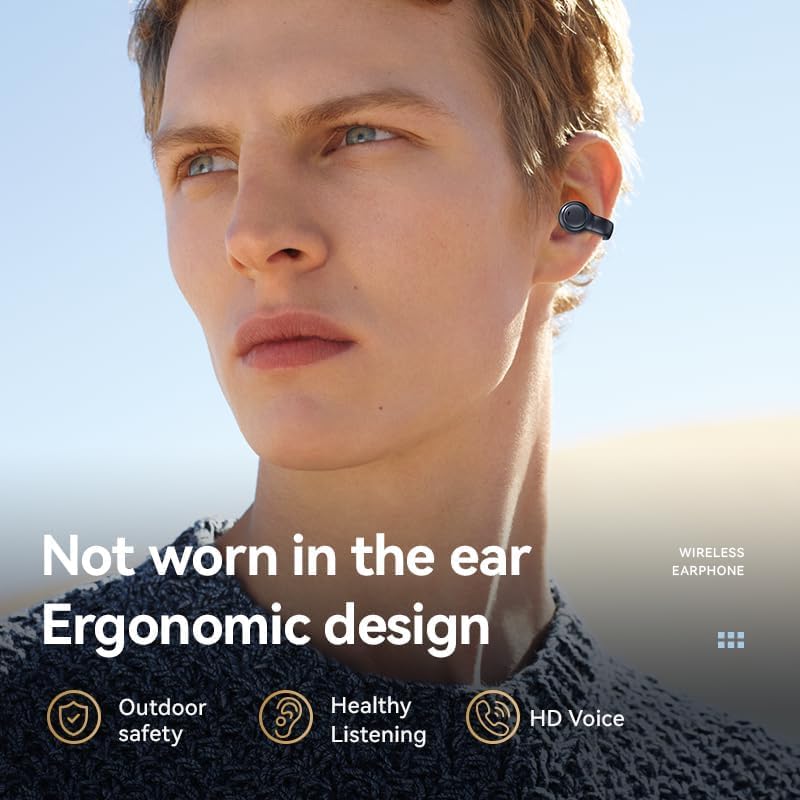
Image: A person wearing one of the open-ear clip-on earbuds, demonstrating its ergonomic design that does not enter the ear canal.
4.2 Smart Touch Controls
The earbuds are equipped with smart touch sensors for easy control of various functions:
| Action | Function |
|---|---|
| Single Tap (Left/Right Earbud) | Play/Pause Music, Answer/End Call |
| Double Tap (Left Earbud) | Previous Song |
| Double Tap (Right Earbud) | Next Song |
| Triple Tap (Left Earbud) | Volume Down |
| Triple Tap (Right Earbud) | Volume Up |
| Long Press (2 seconds) | Reject Call, Activate Voice Assistant |
5. Maintenance
Proper maintenance ensures the longevity and optimal performance of your earbuds.
- Cleaning: Use a soft, dry, lint-free cloth to clean the earbuds and charging case. Do not use abrasive cleaners, alcohol, or chemical sprays.
- Water Resistance: While water-resistant, avoid submerging the earbuds in water. Dry them thoroughly if they get wet from sweat or light rain before placing them back in the charging case.
- Storage: When not in use, store the earbuds in their charging case to protect them from dust and damage. Store in a cool, dry place away from direct sunlight and extreme temperatures.
- Charging: Charge the case regularly, even if not using the earbuds frequently, to maintain battery health. Avoid overcharging for extended periods.
6. Troubleshooting
If you encounter issues with your earbuds, refer to the following common solutions:
- Earbuds not pairing/connecting:
- Ensure Bluetooth is enabled on your device.
- Make sure the earbuds are charged.
- Place earbuds back in the case, close the lid, then open and remove them to re-enter pairing mode.
- Forget the device from your phone's Bluetooth settings and try pairing again.
- Ensure no other Bluetooth devices are interfering.
- No sound or low volume:
- Check the volume level on both your device and the earbuds (using touch controls).
- Ensure the earbuds are properly connected to your device.
- Clean any debris from the earbud speakers.
- Charging case not charging:
- Verify the Type-C cable is securely connected to both the case and the power source.
- Try a different charging cable or power adapter.
- Ensure the power source is active.
- Touch controls not responding:
- Ensure your fingers are clean and dry when touching the sensors.
- Restart the earbuds by placing them in the case and taking them out again.
7. Warranty and Support
For warranty information and customer support, please refer to the purchase documentation or contact the seller directly. Keep your proof of purchase for any warranty claims.
Manufacturer: NUMGMT
ASIN: B0CHK22TSF
For further assistance, you may visit the product page on Amazon.sa: Product Link