
1. Introduction
The HiLetgo JDY-33 is a dual-mode Bluetooth module supporting both Bluetooth 3.0 SPP (Serial Port Profile) and BLE 4.2 (Bluetooth Low Energy). This module is designed for various applications requiring wireless serial communication, including Bluetooth POS systems, thermal printers, smart home control, and automotive ODB testing equipment. It offers compatibility with Bluetooth-enabled devices such as computers (desktops, notebooks), Android mobile phones, and iOS devices.
This manual provides essential information for setting up, operating, and maintaining your JDY-33 Bluetooth module.
2. Key Features
- Dual Mode Operation: Supports Bluetooth 3.0 SPP and BLE 4.2 for versatile connectivity.
- High Throughput: SPP mode achieves up to 16 KB/s communication speed with Android/Windows.
- BLE Speed: BLE communication with iOS or Android devices can reach up to 4 KB/s.
- Serial Communication: Utilizes UART interface for data transmission.
- Wide Operating Voltage: Operates within 1.8V to 3.6V.
- Integrated Antenna: Features a built-in PCB antenna.
- Compact Design: Module dimensions are 26x13x1.7 mm.
- Low Power Consumption: Deep sleep current is less than 10µA.
3. Pinout and Connections
The JDY-33 module requires connection of four primary pins for general application: VCC, GND, RXD, and TXD. Understanding the pinout is crucial for correct integration.
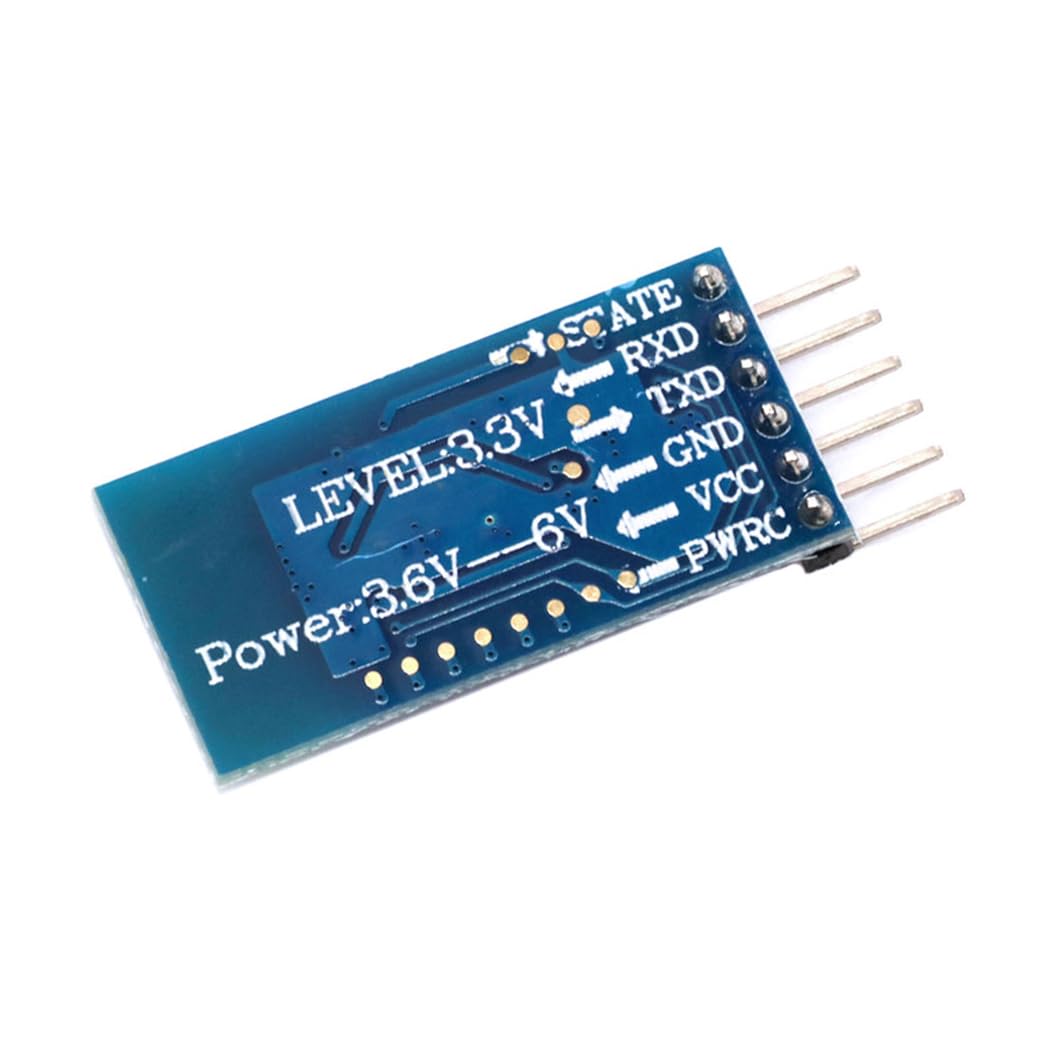
Image 3.1: Pinout diagram of the JDY-33 Bluetooth module. This image shows the labels for each pin: STATE, RXD, TXD, GND, VCC, and PWRC, along with voltage level indicators (LEVEL:3.3V, Power:3.6V-6V).
- VCC: Power supply input (1.8V - 3.6V).
- GND: Ground connection.
- RXD: Receive Data pin (connects to TXD of host microcontroller).
- TXD: Transmit Data pin (connects to RXD of host microcontroller).
- STATE: Indicates connection status.
- PWRC: Power Control pin.
- EN: Enable pin (used for waking up from deep sleep).
4. Setup and Basic Operation
4.1 Initial Connection
To begin using the JDY-33 module, connect the VCC, GND, RXD, and TXD pins to your host system (e.g., microcontroller, Arduino). Ensure the voltage supply is within the specified range of 1.8V to 3.6V.

Image 4.1: Two HiLetgo JDY-33 Bluetooth modules, showing the PIN header configuration for easy integration into breadboards or custom PCBs.
4.2 AT Commands
The JDY-33 module is configured and controlled using AT commands sent via the serial interface (UART). These commands allow you to manage connections, set parameters, and control power states.
- Disconnect Command: To disconnect an active Bluetooth connection, send the command
AT+DISC\r\n. - Deep Sleep Command: To enter deep sleep mode when not connected, send
AT+SLEEP\r\n. - Wake Up from Deep Sleep:
- By applying a falling edge to the EN pin.
- By sending any data through the serial port. For example, sending
AT+VERSION\r\nwill wake up the module.
For a comprehensive list of AT commands and their functions, refer to the official JDY-33 documentation (not provided in this manual).
5. Specifications
| Parameter | Value |
|---|---|
| Model Name | JDY-33 |
| Working Frequency | 2.4GHz |
| Communication Interface | UART |
| Operating Voltage | 1.8V - 3.6V |
| Antenna | Built-in PCB antenna |
| Transmission Distance | Up to 30 meters |
| Master-Slave Support | Slave |
| Module Size (L x W x H) | 26 x 13 x 1.7 mm |
| Bluetooth Version | Bluetooth 3.0 SPP + BLE 4.2 |
| SMT Soldering Temperature | < 260°C |
| Working Current | 6.5mA |
| Deep Sleep Current | < 10µA |
| Transmit Power | 6dB (maximum) |
| Receiving Sensitivity | -96dBm |

Image 5.1: Diagram illustrating the physical dimensions of the JDY-33 Bluetooth module, showing a length of 31.5mm and a width of 16mm for the antenna section.
6. Troubleshooting
If you encounter issues with your JDY-33 module, consider the following troubleshooting steps:
- No Power: Verify that VCC and GND connections are correct and the power supply is within the 1.8V-3.6V range.
- No Connection:
- Ensure the module is not in deep sleep mode. Try sending
AT+VERSION\r\nto wake it up. - Check that the Bluetooth device you are trying to connect to is discoverable and within range (30 meters).
- Confirm that the host device's Bluetooth is enabled and functioning correctly.
- Ensure the module is not in deep sleep mode. Try sending
- Data Transmission Issues:
- Verify RXD and TXD connections are correctly cross-connected (module RXD to host TXD, module TXD to host RXD).
- Check the serial port baud rate settings on both the module and the host device. The module supports continuous data transmission up to 38400 baud rate.
- Ensure proper termination of AT commands with
\r\n.
- Module Not Responding to AT Commands:
- Confirm the module is powered on and not in deep sleep.
- Check serial connection integrity.
7. Maintenance
The JDY-33 Bluetooth module is a low-maintenance device. To ensure its longevity and optimal performance:
- Environmental Conditions: Operate the module within its specified temperature and humidity ranges. Avoid extreme conditions.
- Physical Handling: Handle the module with care to prevent physical damage to components or pins. Avoid static discharge.
- Cleaning: If necessary, gently clean the module with a dry, soft cloth. Do not use liquids or abrasive cleaners.
- Storage: Store the module in a dry, anti-static environment when not in use.
8. Support and Contact Information
For technical support or any issues you encounter with your HiLetgo JDY-33 Bluetooth module, please contact HiLetgo directly.
- Manufacturer: HiLetgo
- Support Email: support@hiletgo.com
- Website: www.hiletgo.com
Please note that the return policy for this product is typically 30 days from the date of purchase, as per standard retail terms.