
Introduction
This document serves as the user manual for the Generic Replacement Remote Control, designed for use with Sharp XL-B710 and XL-B715D All-in-ONE Sound HiFi Systems. This remote control operates via infrared (IR) technology and provides essential functions for your compatible Sharp audio system.
Please read these instructions carefully before using the remote control to ensure proper operation and to familiarize yourself with its features.
Setup
Battery Installation
The remote control requires one (1) CR2 battery for operation. Batteries are not included with the remote control.
- Locate the battery compartment on the back of the remote control.
- Slide the battery compartment cover downwards or in the direction indicated by an arrow to open it.
- Insert one (1) CR2 battery, ensuring the positive (+) and negative (-) terminals align correctly with the markings inside the compartment.
- Slide the battery compartment cover back into place until it clicks securely.

Image: Back view of the remote control, highlighting the battery compartment. This image illustrates where to open the cover and insert the battery.
After installing the battery, the remote control is ready for use. No programming is required for this replacement remote.
Operating Instructions
To operate your Sharp HiFi system with this remote control, point the remote directly at the infrared sensor on your audio unit. Ensure there are no obstructions between the remote and the system.
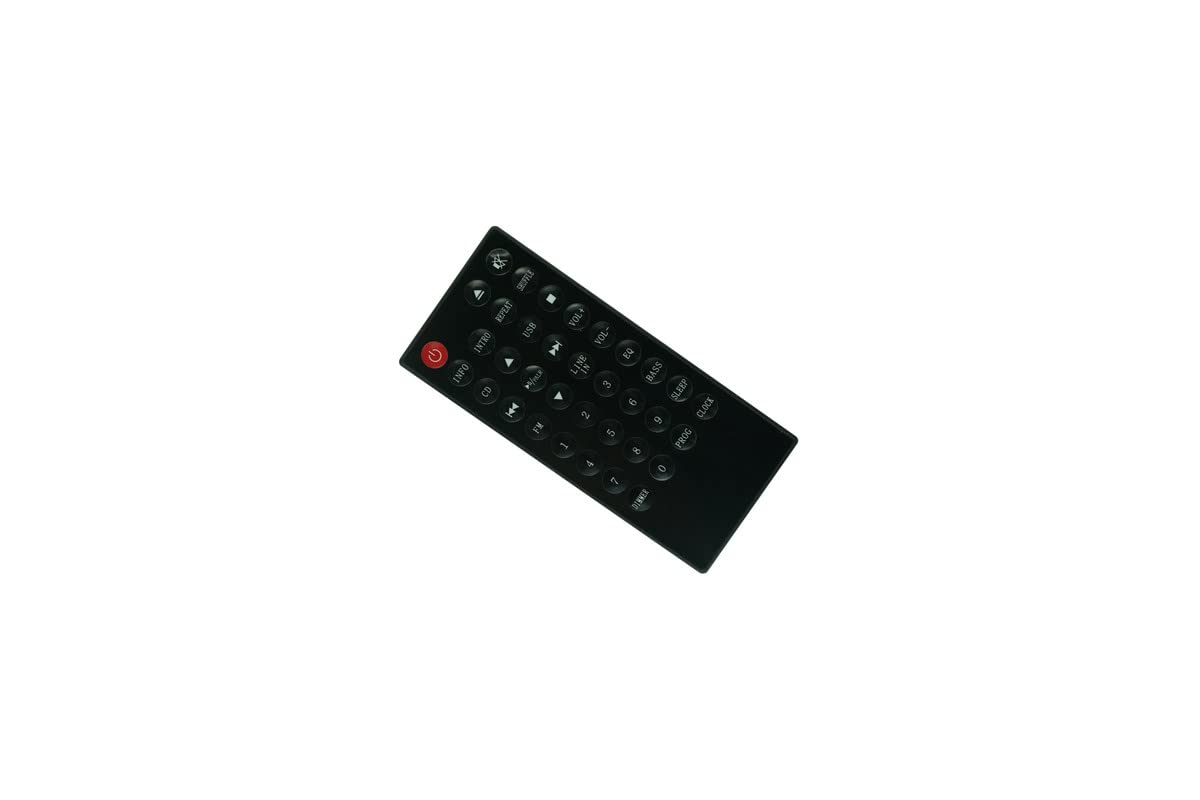
Image: Front view of the replacement remote control, displaying all available buttons and their labels.
Button Functions:
- Power (Red Button): Turns the HiFi system on or off.
- Mute (Speaker Icon with X): Mutes or unmutes the audio output.
- INFO: Displays information about the current track or source.
- INTRO: Plays the beginning of each track.
- REPEAT: Repeats the current track or entire album/playlist.
- SHUFFLE: Plays tracks in a random order.
- CD: Selects the CD player as the audio source.
- USB: Selects the USB input as the audio source.
- FM: Selects the FM radio tuner as the audio source.
- LINE IN: Selects the auxiliary line-in input as the audio source.
- Play/Pause (►/∕∕): Starts or pauses playback.
- Stop (■): Stops playback.
- Skip Forward (►►): Skips to the next track or station.
- Skip Backward (◄◄): Skips to the previous track or station.
- Volume Up (VOL+): Increases the volume.
- Volume Down (VOL-): Decreases the volume.
- Numeric Keypad (0-9): Used for direct track selection, radio station tuning, or other numerical inputs.
- EQ: Cycles through equalizer presets.
- BASS: Adjusts the bass level.
- SLEEP: Sets a sleep timer for the system.
- PROG: Used for programming functions, such as creating a custom playlist.
- CLOCK: Accesses or sets the system clock.
Maintenance
Cleaning
To clean the remote control, use a soft, dry cloth. For stubborn dirt, slightly dampen the cloth with water or a mild cleaning solution, then wipe dry immediately. Do not use abrasive cleaners, alcohol, or solvents, as these can damage the remote's surface or internal components.
Battery Replacement
Replace the battery when the remote control's response becomes sluggish or stops working. Always replace with a fresh CR2 battery. Dispose of old batteries responsibly according to local regulations.
Storage
When not in use for extended periods, it is recommended to remove the battery from the remote control to prevent leakage and potential damage. Store the remote in a cool, dry place away from direct sunlight and extreme temperatures.
Troubleshooting
- Remote control is not working:
- Ensure the battery is correctly installed with the correct polarity (+/-).
- Replace the battery with a new CR2 battery.
- Check for any obstructions between the remote control and the HiFi system's IR sensor.
- Ensure you are within the typical operating range (up to 10 meters / 33 feet) and pointing the remote directly at the system.
- Certain functions are not responding:
- Verify that your Sharp HiFi system model (XL-B710 or XL-B715D) is compatible with this replacement remote.
- Some advanced functions specific to the original remote might not be replicated on a generic replacement. Refer to your HiFi system's original manual for specific function details.
- Interference:
- Bright light sources, especially fluorescent lights or direct sunlight, can interfere with infrared signals. Try operating the remote in different lighting conditions.
Specifications
| Brand | Generic |
| Model Number | Easytry21491 |
| Compatible Devices | Sharp XL-B710, Sharp XL-B715D HiFi Systems, Home Theater, Stereo System |
| Connectivity Technology | Infrared (IR) |
| Color | Black |
| Power Source | 1 x CR2 Battery (not included) |
| Maximum Range | Typical Infrared Range (up to 10 meters / 33 feet) |
| Special Feature | Ergonomic design |
Warranty
This product comes with a 90-day warranty. In case of any defects or issues within this period, hassle-free returns are available. Please retain your proof of purchase for warranty claims.
Support
If you encounter any problems that cannot be resolved using the troubleshooting guide, or if you have questions regarding the compatibility or functionality of this remote control, please contact the seller directly through your purchase platform. Provide your order details and a clear description of the issue for prompt assistance.