
1. Introduction
This manual provides instructions for the Mxfdegf 360-Degree Rotating Tablet Case. This case is designed to protect your tablet and offer versatile viewing options. It is compatible with a wide range of 9 to 10.5-inch tablets.
1.1 Compatibility
The Mxfdegf tablet case is designed for universal compatibility with 9 to 10.5-inch tablets. This includes, but is not limited to, models such as:
- Moderness MB1001 / Okaysea 10.1 Tablet
- OUZRS TAB-M1 / DOOGEE T10 / T20 Tablet 2023
- HAPPYBE / ANYLAKE / Velorim / CZZ / ZZB 10 inch Tablets
- Samsung Galaxy Tab E 9.6" (2015) (SM-T560/T561/T565/T567)
- Samsung Galaxy Tab A 10.1 (2016) (SM-T580/T585/T587)
- Samsung Galaxy Tab A 10.1 (2019) (SM-T510/T515/T517)
- Samsung Galaxy Tab A7 10.4 Inch (SM-T500/T505/T507)
- Samsung Galaxy Tab S5e 10.5 Inch (2019) (SM-T720/T725/T727)
- Samsung Galaxy Tab A8 10.5 inch (2022) (SM-X200/X205/X207)
- Samsung Galaxy Tab S8 (2022) / Tab S7 11 inch (2020) (SM-T870/T875/T878)
- Amazon Kindle Fire HD10 (2015/2017/2019/2021)
Important Note: Please verify your tablet's dimensions before purchase. This case does not feature a back camera opening and does not support auto sleep/wake functionality for any tablet.
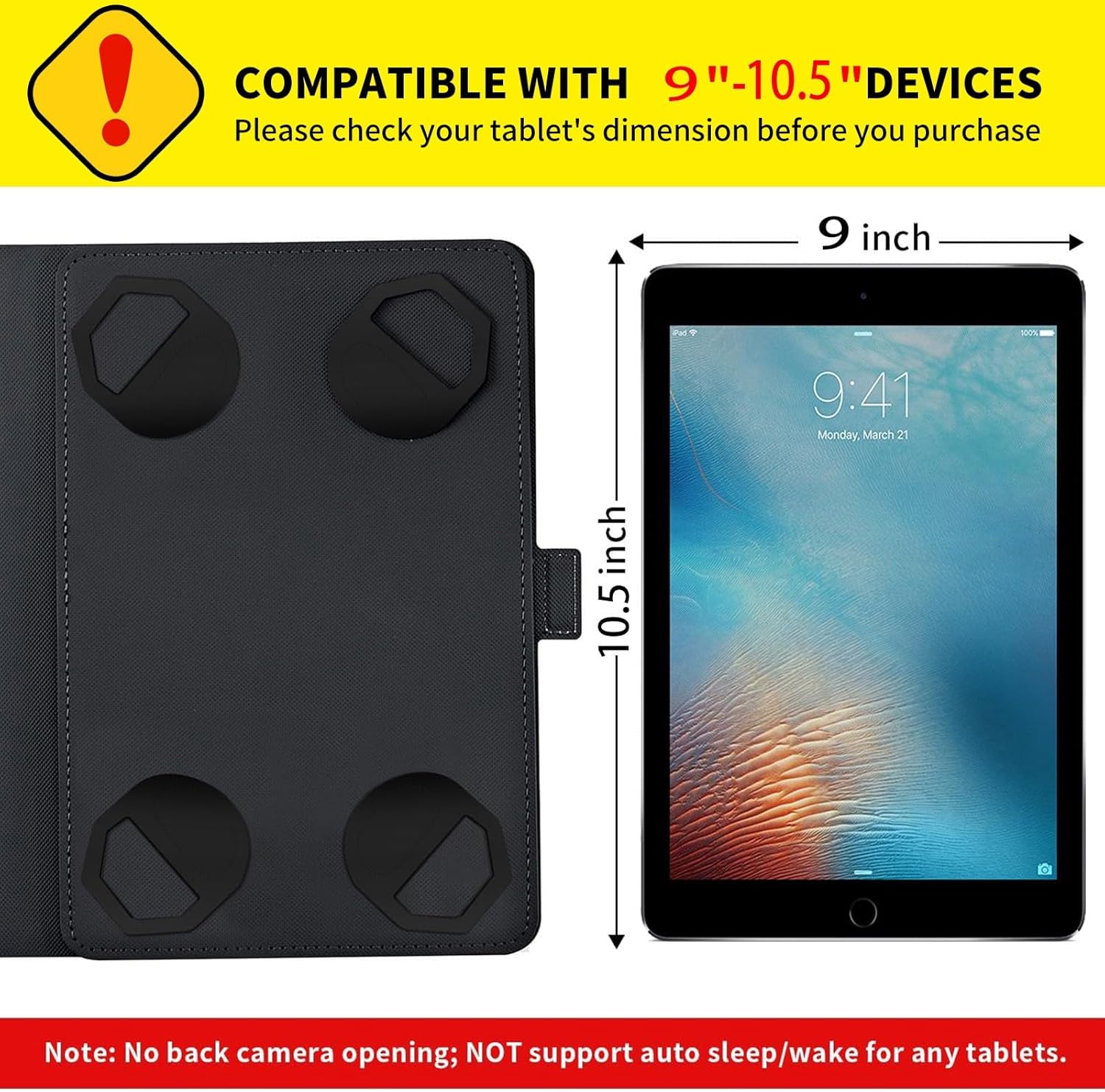
Figure 1: Compatibility diagram illustrating the supported tablet dimensions (9 to 10.5 inches).
2. Setup
2.1 Installing Your Tablet
- Open the Mxfdegf tablet case completely.
- Locate the four adjustable clasps (elastic bands) inside the case, designed to secure your tablet.
- Carefully slide your tablet under the four clasps, ensuring each corner of the tablet is securely held by a clasp. The elastic nature of the clasps allows for a snug fit across various tablet sizes within the 9-10.5 inch range.
- Adjust the clasps as needed to ensure the tablet is centered and firmly held, preventing movement.
- Once the tablet is secured, close the case to ensure the magnetic closure engages properly.

Figure 2: Step-by-step visual guide for installing the tablet using the adjustable corner clasps.
3. Operating Instructions
3.1 Using the 360-Degree Rotating Stand
The case features a built-in 360-degree rotating swivel stand, allowing for both landscape and portrait viewing angles.
- To activate the stand, open the case and gently push the tablet section upwards from the base.
- Rotate the tablet to your desired orientation (landscape or portrait).
- Utilize the three grooves on the case's cover to adjust the viewing angle. These grooves provide stable support for various angles, suitable for watching videos, typing, or video calls.

Figure 3: Illustration of the 360-degree rotation and available viewing angles.

Figure 4: Detail of the anti-slip grooves providing stable stand support.
3.2 Magnetic Closure
The case is equipped with a magnetic button closure. To secure your tablet, simply close the cover, and the magnetic mechanism will hold it firmly in place, protecting your device from accidental opening and potential damage.
4. Maintenance
4.1 Cleaning Instructions
To maintain the appearance and longevity of your Mxfdegf tablet case, follow these cleaning guidelines:
- Use a soft, damp cloth to gently wipe the exterior and interior surfaces of the case.
- For stubborn dirt, a mild soap solution can be applied to the cloth, then wipe the case and immediately dry with a clean, soft cloth.
- Avoid using harsh chemicals, abrasive cleaners, or solvents, as these can damage the synthetic leather material.
- Ensure the case is completely dry before reinserting your tablet.
5. Troubleshooting
5.1 Common Issues and Solutions
- Tablet does not fit: Ensure your tablet's dimensions are within the 9-10.5 inch range. The elastic clasps are designed to stretch, but excessive force should not be used. Refer to the compatibility section.
- Stand is unstable: Ensure the tablet is properly seated in one of the anti-slip grooves. The grooves are designed to provide stability. If the surface is uneven, the stand may be less stable.
- Magnetic closure not holding: Check for any debris or obstructions between the case cover and the tablet that might prevent the magnetic closure from engaging fully.
- No back camera opening: This case is designed for universal fit and does not include a cutout for the back camera. To use the back camera, the tablet must be removed from the case.
- Auto sleep/wake not working: This case does not support the auto sleep/wake function for any tablet model. You will need to manually lock/unlock your tablet.
6. Specifications
| Product Dimensions | 7 x 5 x 0.6 inches |
| Item Weight | 6.8 ounces |
| Compatible Devices | 9-10.5 inch tablets (e.g., Moderness MB1001, OUZRS TAB-M1, DOOGEE T10/T20, various Samsung Galaxy Tab and Amazon Kindle Fire HD models) |
| Material | Durable Synthetic Leather, Plastic |
| Features | 360-Degree Rotating Stand, Magnetic Closure, Heavy Duty Protection, Kickstand |
| Form Factor | Flip Case |
| Color | Funny Black Panda Bamboo (design variant) |
7. Warranty and Support
Specific warranty information for this product is not provided in the available documentation. For any support inquiries or further assistance, please refer to the retailer or manufacturer's customer service channels.