
1. Introduction
Thank you for purchasing the Sanwa Supply CD-ADE5BK Electric Air Duster. This compact, USB-rechargeable device is designed for efficient and environmentally friendly cleaning of electronic equipment, office machinery, and other delicate items. It provides a powerful, consistent air stream without the need for disposable gas cans, offering a cost-effective and safe cleaning solution.
2. Safety Information
Please read all safety instructions carefully before use to prevent injury or damage to the product.
- Keep the device away from water and moisture. Do not operate with wet hands.
- Do not point the air duster directly at people or animals. Avoid direct contact with eyes or skin.
- Do not use the device near flammable liquids, gases, or in explosive environments. Unlike traditional gas dusters, this electric duster eliminates the risk of flammable gas accumulation.
- Ensure the device is fully charged before use for optimal performance. Use only the provided USB Type-C cable for charging.
- Do not attempt to disassemble, modify, or repair the device. Contact customer support for assistance.
- Keep out of reach of children.
- Avoid blocking the air intake or outlet during operation.
Important Note: Traditional gas duster cans should never be used as they can accumulate flammable gas internally, posing a fire hazard. The CD-ADE5BK offers a safer alternative.
3. Package Contents
Verify that all items are present in the package:
- Electric Air Duster Main Unit
- Fine Nozzle
- Brush Nozzle
- Wide Nozzle
- Nozzle Connection Part
- USB Type-C Charging Cable (approx. 80cm)
- Neck Strap
- Instruction Manual (this document)
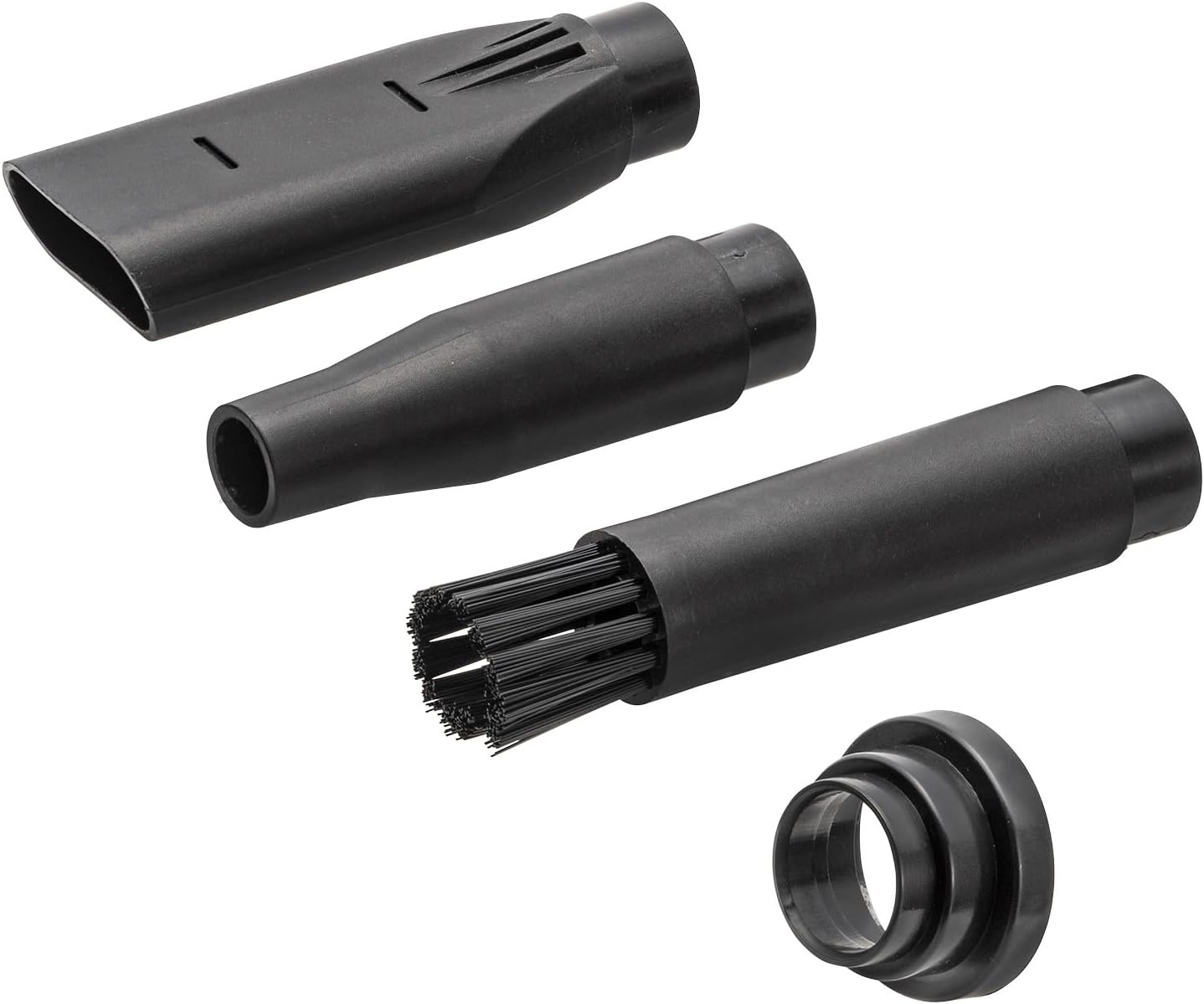
Image: All three nozzles (fine, wide, brush) and the nozzle connection part.

Image: USB Type-C charging cable.

Image: Neck strap for convenient carrying.
4. Product Overview
Familiarize yourself with the main components of your electric air duster:
- Air Outlet: Where the air is expelled.
- Nozzle Attachment Point: Where different nozzles are connected.
- Power Button: To turn the device on/off and adjust air speed.
- LED Display: Shows the current air speed setting.
- Battery Indicator LEDs: Shows the remaining battery level.
- USB Type-C Charging Port: For connecting the charging cable.
- Neck Strap Loop: For attaching the neck strap.

Image: The main unit of the Sanwa Supply CD-ADE5BK Electric Air Duster.

Image: Close-up of the LED display indicating air speed (e.g., '3') and the battery charge indicator LEDs.
5. Setup
5.1 Charging the Device
- Connect the provided USB Type-C cable to the charging port on the air duster.
- Connect the other end of the USB cable to a USB power adapter (DC5V/2A recommended, not included) or a computer's USB port.
- The battery indicator LEDs will show the charging status. They will typically light up sequentially or change color to indicate charging progress and full charge.
- Charging time is approximately 2 hours with a 2A adapter and approximately 4 hours with a 1A adapter.
- Disconnect the cable once fully charged.

Image: The electric air duster connected to a USB power adapter for charging.
5.2 Attaching Nozzles
Select the appropriate nozzle for your cleaning task:
- Fine Nozzle: For precise, concentrated air blasts in tight spaces.
- Brush Nozzle: Ideal for dislodging dust from keyboards, vents, and other surfaces while blowing it away.
- Wide Nozzle: For broader coverage and faster cleaning of larger areas.
To attach a nozzle, align it with the air outlet and push firmly until it clicks into place. To remove, pull it off gently.

Image: The electric air duster with the fine nozzle attached.

Image: The electric air duster with the wide nozzle attached.
6. Operating Instructions
6.1 Power On/Off and Speed Adjustment
- Press and hold the power button for a few seconds to turn on the device. The LED display will light up, showing the current air speed.
- Press the power button briefly to cycle through the three air speed settings (1, 2, 3). The LED display will update accordingly.
- Press and hold the power button again for a few seconds to turn off the device.
6.2 Cleaning Applications
The CD-ADE5BK can be used in various orientations, including inverted, for flexible cleaning. Choose the appropriate nozzle and air speed for your task:
- Computers & Electronics: Use the fine nozzle for delicate components or the brush nozzle for keyboards and vents.
- Office Equipment: Ideal for cleaning printers, shredders, and other office machines.
- Household Items: Dusting hard-to-reach areas, window sills, or car interiors.

Image: Cleaning the interior of a desktop computer with the air duster.

Image: Using the brush nozzle to clean a computer keyboard.

Image: The air duster effectively blowing away wood dust from a workbench.

Image: Performing maintenance on a paper shredder using the air duster.
7. Maintenance
7.1 Cleaning the Device
Wipe the exterior of the air duster with a soft, dry cloth. Do not use harsh chemicals or abrasive cleaners. Ensure the device is turned off and unplugged before cleaning.
7.2 Storage
Store the air duster in a cool, dry place away from direct sunlight and extreme temperatures. If storing for an extended period, ensure the battery is partially charged (around 50%) to prolong battery life. Recharge before next use if stored for several days or weeks.
8. Troubleshooting
| Problem | Possible Cause | Solution |
|---|---|---|
| Device does not turn on. | Battery is depleted. | Charge the device using the provided USB Type-C cable. |
| Weak air output. | Low battery. Incorrect speed setting. Air intake/outlet blocked. | Charge the device. Increase the air speed setting. Ensure air intake and outlet are clear. |
| Device not charging. | Cable not properly connected. Faulty cable or power adapter. | Ensure the USB Type-C cable is securely connected to both the duster and the power source. Try a different USB cable or power adapter. |
| Battery drains quickly when stored. | Normal self-discharge of lithium-ion batteries. | It is recommended to charge the device before each use if it has been stored for an extended period. |
9. Specifications
| Feature | Specification |
|---|---|
| Power Consumption | 56W |
| Battery Capacity | 11.1V 1200mAh |
| Battery Type | Lithium-ion battery |
| Charging Time | Approx. 2 hours (with 2A input), Approx. 4 hours (with 1A input) |
| Input | DC5V/2A |
| Usable Time | Approx. 12 to 130 minutes (depending on speed setting) |
| Noise Level | ≦85dB |
| Motor Power | 56W |
| Motor Speed | 80000rpm |
| Operating Environment Temperature | 0 to 40℃ (32 to 104°F) |
| Storage Temperature | -20 to 60℃ (-4 to 140°F) |
| Relative Humidity | 60 to 70% |
| Dimensions (W×D×H) | 42 × 89 × 140 mm (1.65 × 3.5 × 5.5 inches) |
| Weight | Approx. 227g (0.5 lbs) |
| Cable Length | Approx. 80cm (31.5 inches) |
10. Warranty and Support
10.1 Warranty Information
This product comes with a 6-month warranty from the date of purchase. Please retain your proof of purchase for warranty claims. The warranty covers manufacturing defects under normal use. It does not cover damage caused by misuse, accidents, unauthorized modifications, or improper maintenance.
10.2 Customer Support
For technical assistance, troubleshooting, or warranty inquiries, please contact your retailer or Sanwa Supply customer service. Refer to the contact information provided on the product packaging or the official Sanwa Supply website.
