
1. Introduction
This manual provides comprehensive instructions for the installation, operation, and maintenance of your Pioowirk 10.25-inch Android Car Stereo. This unit is designed to enhance your driving experience by integrating advanced technology into your vehicle's existing system.
Compatibility: This unit is compatible with BMW X5 E70 (2007-2010) and BMW X6 E71 (2007-2010) vehicles equipped with the CCC (Car Communication Computer) system.
2. Package Contents
Please verify that all items listed below are included in your package:
- 1x Head Unit (10.25" Android Car Stereo)
- 1x ISO Wiring Harness
- 1x Audio Cable
- 1x USB Cable with CarPlay Cable
- 1x GPS Antenna
- 1x 4G Antenna
- 1x MIC Cable
- 1x Microphone
- 1x Reversing Camera
- 2x Removing Tools
Note: Optional accessories such as DVR, OBD, TPMS, and DAB are not included in this package.
3. Compatibility Requirements
Before installation, ensure your vehicle meets the following criteria:
- Vehicle Model: BMW X5 E70 (2007-2010) or BMW X6 E71 (2007-2010).
- Original System: Must have the CCC (Car Communication Computer) system.
- LVDS Port: Verify the presence of a 10-pin LVDS port on the back of your original unit.
- AUX Functionality: The original car must have an active AUX input. If your vehicle does not have AUX, installation is not recommended as there will be no audio output from the new head unit.

Image: Identification guide for BMW CCC system, showing the iDrive controller, menu interface, AUX input, and the 10-pin LVDS port.
4. Setup and Installation
Installation of this unit requires technical knowledge. Professional installation is recommended. The unit is designed for plug-and-play setup, retaining original car functions.
Important Installation Notes:
- Audio Output: The sound from the new head unit is transmitted through the car's original AUX. You must activate the car's original AUX function for sound to be present.
- Fiber Optic Cable: If your original system uses a fiber optic cable, it must be transferred to the new connection for sound to function correctly.
- AUX Activation: If there is no sound after installation, enter the original car interface and switch to the AUX state. Press and hold number key 8 or 6 for approximately 5-7 seconds until you hear a tone, indicating successful activation.
- Original Radio: This Android head unit does not have its own radio function. You will continue to use your car's original radio for FM/AM broadcasts.
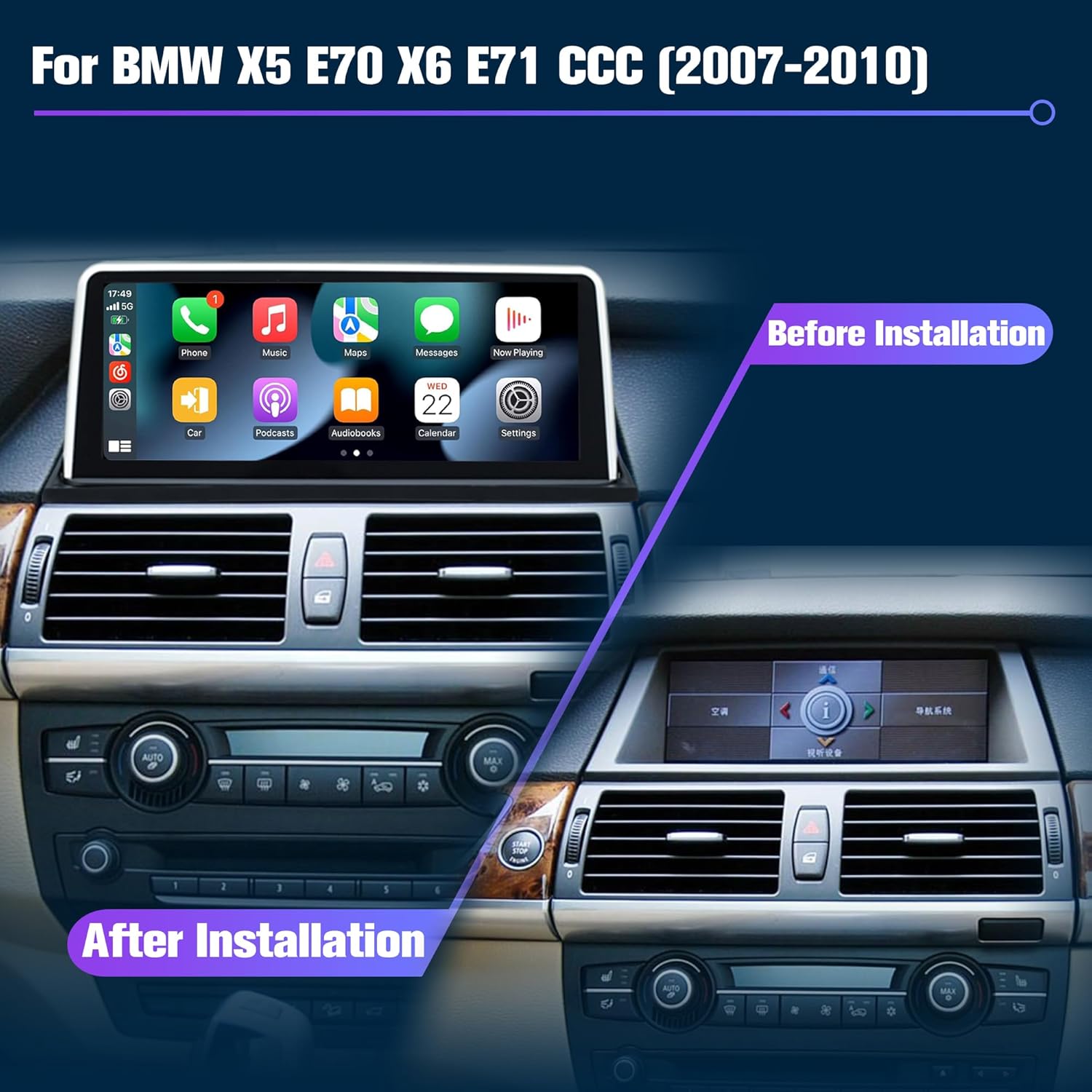
Image: Visual comparison of the vehicle's dashboard before and after the installation of the Pioowirk 10.25" Android Car Stereo.
5. Operating Instructions
The Pioowirk Android Car Stereo offers a range of features for an enhanced in-car experience.
5.1 Core Features
- Android Operating System: The unit runs on a responsive Android OS with an Octa-Core CPU, 8GB RAM, and 128GB ROM, providing a smooth user experience.
- 10.25-inch IPS Touch Screen: A multi-touch capacitive digital IPS screen offers clear visuals and flexible interaction.
- Wireless CarPlay & Android Auto: Access maps, music, calls, and messages directly from your smartphone. Supports both wireless and wired connections.
- GPS Navigation: Integrated GPS functionality for navigation.
- Bluetooth: For hands-free calling and audio streaming.
- Wi-Fi Connection: Connect to Wi-Fi for online services, streaming, and app downloads.
- 4G SIM Card Support: Insert a 4G SIM card for independent internet connectivity.
- Split-Screen Mode: Run two applications simultaneously on the screen.
- Backup Camera Support: Integrates with the included reversing camera for enhanced safety.
- Steering Wheel Control (SWC): Retains original steering wheel control functionality.

Image: The unit displaying the Wireless CarPlay interface, providing access to smartphone applications.
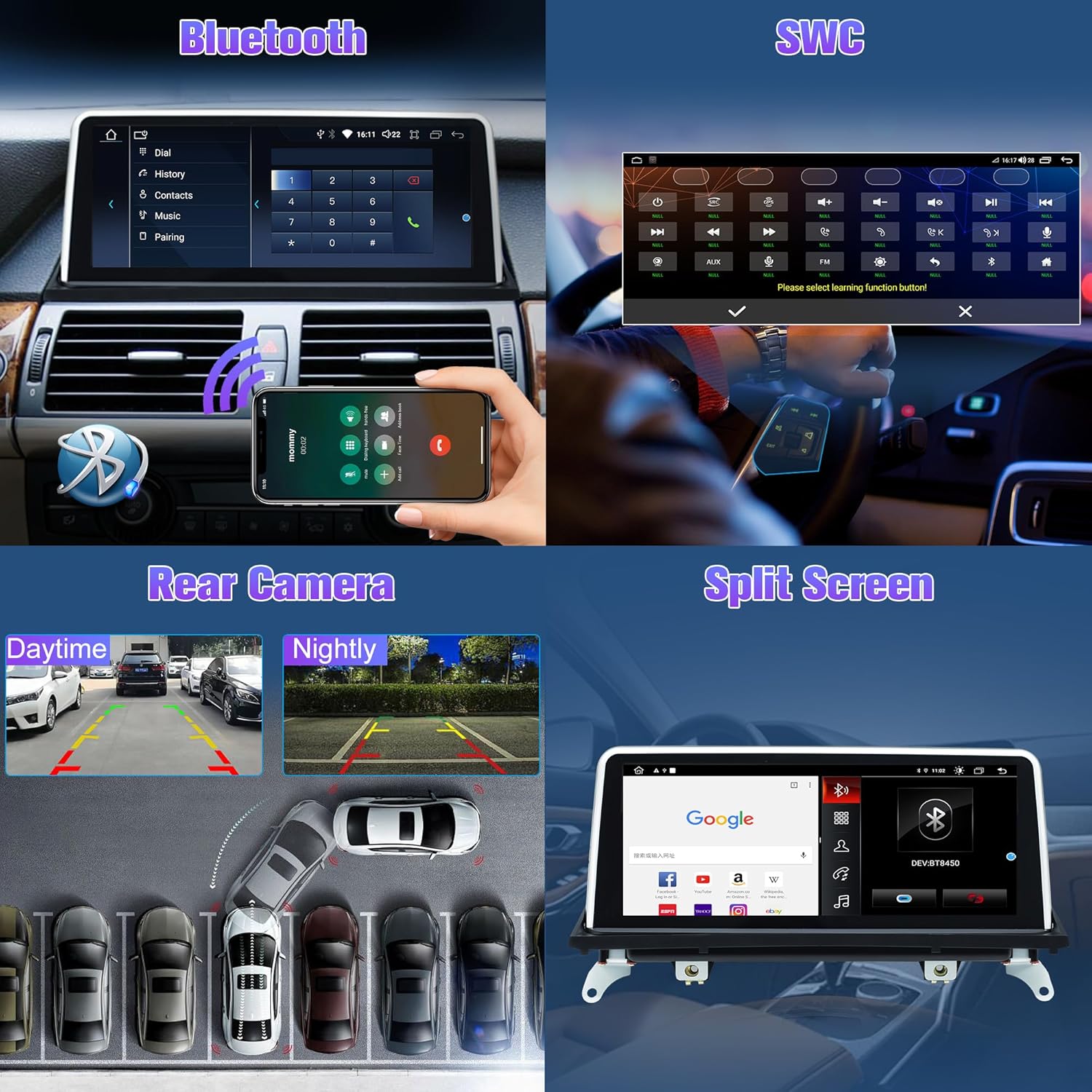
Image: Demonstrates Bluetooth connectivity for calls, steering wheel control integration, day and night views from the rear camera, and the split-screen feature.

Image: Highlights Wi-Fi connectivity, 4G SIM card support for online services, GPS navigation, and the audio equalizer interface.
5.2 Retained Original Car Functions
The Android multimedia player is designed to retain key original vehicle functions:
- iDrive System Control: The original iDrive controller remains functional for navigating the system.
- Amplifier System: Original fiber optic sound systems (e.g., Harman Kardon) are retained.
- Original Car Information Display: Vehicle information such as speed, fuel level, oil pressure, and safety warnings are integrated and displayed on the new screen.
- Original Radio & CD Player: Your vehicle's original radio and CD player functions are retained.
- Original Backup Camera: If your car has an original backup camera, its functionality is maintained.

Image: Illustrates the integration of original car information and the continued support for original car functions within the Android system.
6. Maintenance
To ensure the longevity and optimal performance of your car stereo, follow these maintenance guidelines:
- Screen Cleaning: Use a soft, lint-free cloth to gently wipe the screen. Avoid abrasive cleaners or solvents that could damage the display.
- Software Updates: Periodically check for system updates. Contact Pioowirk customer support for information on the latest software versions and update procedures.
- Environmental Conditions: Avoid exposing the unit to extreme temperatures or direct sunlight for prolonged periods.
7. Troubleshooting
Refer to the following common issues and their solutions:
- No Sound:
- Ensure the original car's AUX function is activated. (Refer to Section 4: Setup and Installation for activation steps).
- Verify that the fiber optic cable (if applicable) has been correctly transferred to the new wiring harness.
- Android Auto / CarPlay Connection Issues:
- For wireless connections, ensure Bluetooth and Wi-Fi are enabled on both the head unit and your smartphone.
- For wired connections, try a different USB cable. Ensure the cable is capable of data transfer.
- Restart both the head unit and your smartphone.
- 4G SIM Card Not Reading:
- Ensure the SIM card is inserted correctly and fully seated in the slot.
- Verify that the SIM card is active and has a data plan.
- Screen Unresponsive:
- Perform a soft reset by pressing and holding the power button until the unit restarts.
If issues persist, please contact Pioowirk customer support for further assistance.
8. Specifications
| Feature | Specification |
|---|---|
| Model Name | 10E70CCC-128G |
| Item Model Number | PI-8259E70CCC-US |
| Display Size | 10.25 Inches |
| Operating System | Android |
| RAM | 8GB |
| ROM | 128GB |
| Connectivity Technology | Bluetooth, Wi-Fi, 4G |
| Special Features | Wireless CarPlay, Android Auto, GPS, 4K Video, Screen Mirroring, Backup Camera, Split-screen mode, Touchscreen |
| Audio Output Mode | AUX |
| Item Weight | 2.2 pounds |
| Product Dimensions | 0.39 x 0.39 x 0.39 inches |
9. Warranty and Support
This Pioowirk car stereo unit comes with a 1-year manufacturer's warranty for the screen.
For technical support, system upgrade software, or any inquiries regarding your product, please contact Pioowirk customer service. You can typically find contact information on the seller's page or through the platform where the product was purchased.
If you wish to update the Android system, please contact the seller to obtain the necessary software and instructions.