
Britânia BVT450
Britânia BVT450 Maxx Force Pedestal Fan User Manual
Model: BVT450 | Brand: Britânia
Introduction
Thank you for choosing the Britânia BVT450 Maxx Force Pedestal Fan. This powerful and efficient fan is designed to provide optimal air circulation and comfort in your home or office. Featuring a 160W motor, 6-blade design, and adjustable settings, it ensures a pleasant environment with minimal noise and energy consumption. This manual provides essential information for the safe assembly, operation, maintenance, and troubleshooting of your new fan.


Figure 1: Britânia BVT450 Maxx Force Pedestal Fan (left) and in a room setting (right).
Important Safety Information
Please read all safety instructions carefully before using this appliance. Failure to follow these instructions may result in electric shock, fire, or serious injury.
- Always ensure the fan is placed on a stable, flat surface to prevent tipping.
- Do not insert fingers or any objects into the fan grille when it is operating.
- Unplug the fan from the power outlet before cleaning, assembling, or disassembling.
- Do not use the fan near water or in excessively humid environments.
- Keep the power cord away from heated surfaces and do not let it hang over the edge of a table or counter.
- This appliance is for household use only. Do not use it outdoors or for commercial purposes.
- In case of overheating, the motor is equipped with an automatic interruption system. If this occurs, unplug the fan and allow it to cool down before resuming use.
- Ensure the voltage of your power supply matches the fan's requirements (110 Volts for this model).

Figure 2: INMETRO SGS Safety Certification for the product.
Package Contents
Before assembly, please check that all components are present and undamaged:
- Fan Head Assembly (Motor, Blades, Grilles)
- Adjustable Pedestal Pole
- Base
- Power Cord (integrated with fan head or pole)
- Fasteners and Screws for assembly
- User Manual
Assembly Instructions
Assembly is required. A Philips head screwdriver may be needed. Follow these steps carefully:
- Attach the Pedestal Pole to the Base: Securely fasten the adjustable pedestal pole to the fan base using the provided screws. Ensure it is stable.
- Mount the Fan Head: Carefully attach the fan head assembly to the top of the pedestal pole. Align the connection points and secure with the designated fasteners.
- Secure the Grilles: Ensure both the front and rear grilles are properly aligned and securely fastened around the fan blades. This is crucial for safety.
- Check Connections: Verify all connections are tight and secure before plugging in the fan.

Figure 3: Fan assembly showing adjustable height mechanism.
Operating Instructions
Once assembled, your Britânia BVT450 Maxx Force fan is ready for use.
- Power On/Off: Plug the fan into a suitable 110V power outlet. Use the control knob or buttons on the fan head to turn the fan on or off.
- Speed Settings: The fan features three speed settings. Rotate the control knob or press the speed buttons to select your desired airflow intensity (Low, Medium, High).
- Oscillation: To activate the automatic horizontal oscillation, pull up the oscillation knob located on top of the motor housing. Push it down to stop oscillation and direct airflow in a fixed direction.
- Vertical Tilt Adjustment: The fan head can be manually tilted up or down to direct airflow vertically. Gently push or pull the fan head to the desired angle.
- Height Adjustment: Loosen the height adjustment collar on the pedestal pole, adjust the pole to your preferred height, and then securely tighten the collar.

Figure 4: Fan head with control knob and oscillation mechanism.
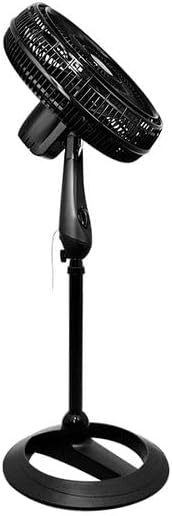
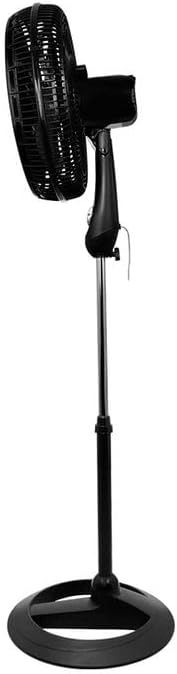
Figure 5: Fan head showing vertical tilt capability (upwards and downwards).
Maintenance and Cleaning
Regular cleaning and maintenance will ensure optimal performance and extend the life of your fan.
- Always unplug the fan before cleaning.
- Cleaning the Grilles and Blades: Dust and debris can accumulate on the grilles and blades, reducing airflow. To clean, carefully remove the front grille (refer to assembly instructions for reverse steps). Wipe the blades and grilles with a soft, damp cloth. Do not use abrasive cleaners or solvents.
- Cleaning the Exterior: Wipe the exterior surfaces of the fan (base, pole, motor housing) with a soft, dry or slightly damp cloth.
- Storage: When not in use for extended periods, store the fan in a cool, dry place, preferably in its original packaging to protect it from dust.
Troubleshooting
If you encounter any issues with your fan, refer to the following common problems and solutions:
| Problem | Possible Cause | Solution |
|---|---|---|
| Fan does not turn on. | Not plugged in; Power outlet not working; Overheating protection activated. | Ensure fan is securely plugged into a working outlet. Check circuit breaker. Unplug and allow fan to cool for 30 minutes if it was recently in use. |
| Weak airflow. | Grilles or blades are dirty; Fan is on a low speed setting. | Clean the grilles and blades as per maintenance instructions. Increase the fan speed setting. |
| Fan is noisy. | Loose parts; Fan not on a stable surface; Debris in fan. | Check all screws and fasteners are tight. Place fan on a flat, stable surface. Unplug and check for any foreign objects inside the grille. |
| Oscillation not working. | Oscillation knob is pushed down. | Pull up the oscillation knob on top of the motor housing. |
Specifications
| Feature | Detail |
|---|---|
| Brand | Britânia |
| Model | BVT450 Maxx Force |
| Power (Watts) | 160W |
| Voltage | 110 Volts |
| Noise Level | 70 dB |
| Energy Efficiency | Class A |
| Number of Blades | 6 |
| Blade Diameter | 40 cm |
| Product Dimensions (L x W x H) | 45.5 x 48 x 162.5 cm |
| Product Weight | 5.76 kg |
| Material | Plastic |
| Special Features | Maxx Force Technology, Automatic Overheating Protection, Adjustable Height, Horizontal Oscillation, Vertical Tilt |
Warranty and Support
Britânia products are manufactured to high-quality standards. For warranty information, extended warranty options, or technical support, please refer to the warranty card included with your product or visit the official Britânia website.
You can also find more information and contact details on the official Britânia store page: Britânia Official Store
Related Documents - BVT450
 |
Britania Hermes 5B Kitchen Appliances: Blender, Mixer, Juicer, and Iron Detailed specifications and features for the Britania Hermes 5B kitchen appliance set, including the Diamante Black Filter Blender, Pérola N Mixer, Bellagio Black Juicer, and Seco FB26 Iron. Covers technical characteristics, logistical information, and benefits. |
 |
Britania Kit Hermes 12 - Product Overview and Specifications Detailed information about the Britania Kit Hermes 12, including features and technical specifications for the Perola Maxx PR Mixer, Diamante Black Filter Blender, FB26 Iron, and Bellagio Black Citrus Juicer. |
 |
Philco FORCE PAG1800A Grass Trimmer User Manual Comprehensive user manual for the Philco FORCE PAG1800A grass trimmer, detailing safety instructions, assembly, operation, maintenance, technical specifications, and warranty information. Designed for domestic use. |
 |
Britânia CP30 Inox Coffee Maker Instruction Manual Instruction manual for the Britânia CP30 Inox coffee maker, covering setup, operation, cleaning, and troubleshooting. |
 |
Britania BS 369 Exploded View and Parts List Exploded view and detailed parts list for the Britania BS 369 audio system, including component codes and descriptions for easy identification and replacement. |
 |
Britania Theater BSI-10000 / BSI-10000K Service Manual Service manual for the Britania Theater BSI-10000 and BSI-10000K home theater system, providing detailed exploded views, parts lists, and circuit diagrams for technical servicing. |