
Product Overview
This document provides essential information for the proper use and maintenance of your replacement bread maker paddle. This paddle is specifically designed to replace the original kneading paddle in compatible bread maker models, ensuring optimal dough mixing and bread preparation.
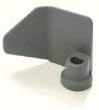
Image: A gray, metal bread maker kneading paddle, designed to fit onto a shaft in the bread pan for mixing dough.
Important Compatibility Information
This replacement paddle is exclusively compatible with the Toastmaster Bread Maker Model 1141s. It is crucial to verify your bread maker's model number before attempting installation or use. Using this paddle with an incompatible model may result in improper function or damage to your appliance.

Image: A textual graphic advising users to identify and record the brand name and model number of their bread maker before placing an order. It states that this information can be found on the outer exterior surface of the machine as an adhesive decal, ink stamp, or embedded impression on the sides, bottom, or push-button control panel.
To ensure proper fit, locate the model number on your existing bread maker. This information is typically found on the bottom, back, or side of the appliance, often on a label or engraved plate.
Setup and Installation
Follow these steps to install the replacement kneading paddle into your Toastmaster Bread Maker Model 1141s:
- Ensure Safety: Before beginning, unplug your bread maker from the power outlet to prevent accidental operation.
- Remove Bread Pan: Open the bread maker lid and carefully lift out the bread pan.
- Remove Old Paddle (if present): If an old paddle is still in the pan, gently pull it upwards to remove it from the drive shaft. If it's stuck, a small amount of warm water can help loosen any baked-on residue.
- Clean Drive Shaft: Ensure the drive shaft at the bottom of the bread pan is clean and free of any dough residue or debris. This will allow the new paddle to seat properly.
- Install New Paddle: Align the opening at the base of the new paddle with the drive shaft in the bread pan. Push the paddle down firmly until it clicks securely into place. It should sit flush against the bottom of the pan and rotate freely.
- Reinsert Bread Pan: Place the bread pan back into the bread maker, ensuring it is securely seated.
- Ready for Use: Your bread maker is now ready for use with the new paddle.
Operating Instructions
Once the paddle is installed, operate your bread maker as per its original instruction manual. The paddle will automatically knead the dough during the designated cycles. Ensure ingredients are added in the correct order and quantities as specified by your recipe.
- Always ensure the paddle is securely attached before adding ingredients.
- After the kneading cycle, the paddle may remain embedded in the bread loaf. It is recommended to remove the paddle after baking and before slicing the bread.
Maintenance and Care
Proper cleaning and maintenance will extend the life of your bread maker paddle:
- Cleaning: After each use, remove the paddle from the bread pan. Wash it immediately with warm, soapy water to prevent dough from drying and hardening on its surface. Use a soft sponge or cloth.
- Stubborn Residue: If dough is stuck, soak the paddle in warm water for 10-15 minutes to loosen the residue before cleaning. Avoid using abrasive scrubbers or harsh chemicals, as these can damage the paddle's non-stick coating (if applicable).
- Drying: Thoroughly dry the paddle before storing it to prevent rust or corrosion.
- Storage: Store the paddle in a clean, dry place, preferably with the bread pan, to ensure it is ready for the next use.
Troubleshooting
Here are some common issues and their potential solutions:
- Paddle Not Fitting:
- Ensure your bread maker is indeed the Toastmaster Model 1141s. This paddle is model-specific.
- Check the drive shaft in the bread pan for any obstructions or dried dough. Clean thoroughly.
- Ensure the paddle is oriented correctly before pushing it onto the shaft.
- Dough Not Mixing Properly:
- Verify the paddle is securely seated on the drive shaft.
- Check your recipe for correct ingredient measurements and order.
- Ensure the bread pan is correctly inserted into the bread maker.
- Paddle Stuck in Bread:
- This is common. Allow the bread to cool slightly, then carefully remove the paddle using a non-abrasive utensil.
- Some users apply a small amount of cooking oil to the paddle shaft before baking to aid removal.
Specifications
| Attribute | Detail |
|---|---|
| Product Type | Bread Maker Kneading Paddle |
| Compatibility | Toastmaster Bread Maker Model 1141s only |
| ASIN | B0CH5VFC5C |
| Date First Available | September 2, 2023 |
Warranty and Support
Specific warranty information for this replacement paddle is not provided in the product details. For any questions regarding warranty, returns, or product support, please contact the seller directly through the platform where the purchase was made. Ensure you have your order details readily available when contacting support.
For general operation and troubleshooting of your Toastmaster Bread Maker Model 1141s, please refer to the original instruction manual provided with your appliance.


