
YMYNY UHPT002B
YMYNY Mobile Printer Stand UHPT002B User Manual
Brand: YMYNY | Model: UHPT002B
1. Introduction
Thank you for choosing the YMYNY Mobile Printer Stand UHPT002B. This 3-tier stand is designed to optimize space in your home or office, providing organized storage for printers, fax machines, computer towers, shredders, and other office supplies. Its mobile design and adjustable features offer flexibility and convenience.
2. Safety Information
- Read all instructions carefully before assembly and use.
- Keep all small parts and packaging materials away from children and pets.
- Ensure all screws and fasteners are securely tightened before use. Periodically check and retighten as necessary.
- Do not overload the shelves. Refer to the specifications for weight limits.
- Avoid standing or climbing on the stand.
- Use on a level surface to prevent tipping.
- When moving the stand, ensure the lockable wheels are unlocked. Lock the wheels once the stand is in its desired position.
3. Package Contents
Please verify that all components are present before beginning assembly.
- MDF Wood Panels (3 tiers)
- Heavy-Duty Iron Frames (vertical supports and crossbars)
- 6 S-Hooks
- 4 Swivel Wheels (2 lockable)
- Assembly Hardware (screws, screwdriver, Allen wrench)
- Instruction Manual
4. Setup and Assembly Instructions
Follow these steps for proper assembly. All parts are labeled to match the instructions.
Step 1: Assemble the Frame
Attach the horizontal crossbars to the vertical iron frames using the provided screws. Ensure all connections are firm but do not overtighten initially.
Step 2: Attach the Shelves
Secure the MDF wood panels to the assembled frame. The middle shelf is adjustable; choose your desired height before fully tightening the screws.

Image: The assembled printer stand in an office setting, showcasing its three tiers and potential for holding plants and office items.

Image: Detail showing the adjustable height feature of the middle shelf, indicated by arrows.
Step 3: Install Wheels or Feet
Decide whether to use the included swivel wheels for mobility or the stationary feet. Attach your chosen option to the bottom of the stand using the appropriate hardware.

Image: Detail of the 360-degree swivel wheel with a locking mechanism, allowing for both mobility and stability.
Step 4: Attach S-Hooks
Hang the 6 S-hooks on the side bars of the stand for additional storage of headphones, keys, or other small items.

Image: Detail showing the included S-hooks attached to the side frame, useful for hanging various accessories.
Step 5: Final Tightening
Once all components are in place, fully tighten all screws to ensure the stand is stable and secure.
5. Operating Instructions
5.1 Storage Utilization
- Top Tier: Ideal for placing your printer, fax machine, or other frequently accessed devices.
- Middle Tier: Features an adjustable shelf. Customize its height to accommodate work supplies, stationery, documents, or smaller devices.
- Bottom Tier: Suitable for larger items such as a computer host, paper shredder, or storage boxes.

Image: The printer stand organized with a printer on the top shelf, a shredder and headphones on the middle shelf, and a computer tower on the bottom shelf, demonstrating its versatile storage capabilities.
5.2 Mobility and Stability
The stand is equipped with four 360-degree swivel wheels, two of which are lockable. To move the stand, unlock the two lockable wheels. To secure the stand in place, press down on the locking mechanism of the two lockable wheels.
6. Maintenance
- Wipe the surface with a clean, damp cloth. Avoid harsh chemicals that may damage the finish.
- Regularly check all fasteners to ensure they remain tight.
- Keep the stand away from direct sunlight and excessive moisture to prolong its lifespan.
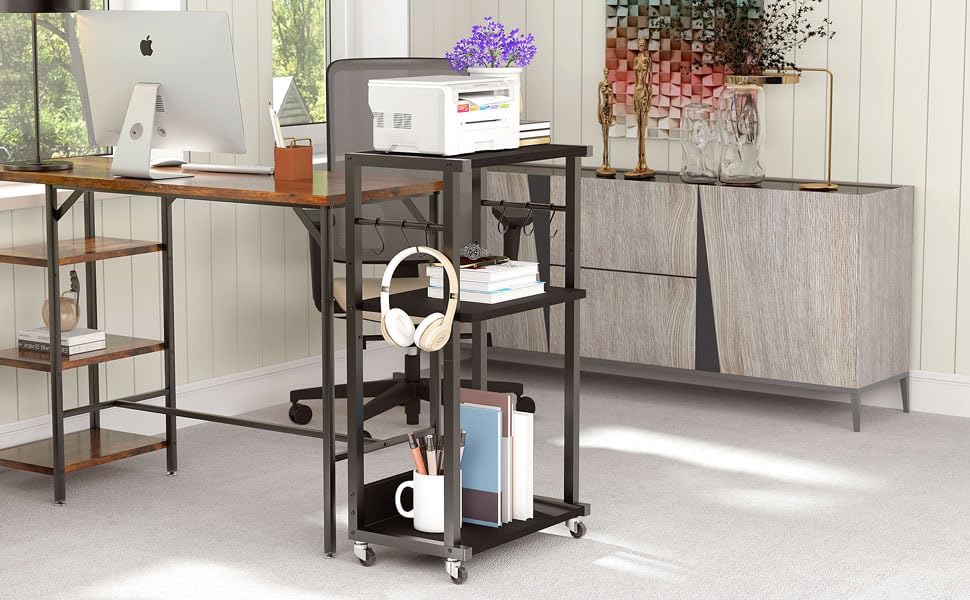
Image: A close-up view of water droplets on the stand's surface, highlighting its water-resistant properties for easy cleaning.
7. Troubleshooting
- Stand is wobbly: Ensure all screws are fully tightened. Check that the stand is on a level surface.
- Wheels not rolling smoothly: Check for any debris caught in the wheels. Ensure the locking mechanism is disengaged.
- Difficulty adjusting shelf: Loosen the screws holding the shelf in place slightly, adjust to the desired height, then retighten firmly.
8. Specifications
| Product Dimensions | 17.32 x 11.81 x 32.28 inches |
| Item Weight | 15.04 pounds |
| Material | MDF Wood Panels, Heavy-Duty Iron Frames |
| Color | Black |
| Special Features | Adjustable Shelf, 6 S-Hooks, Lockable Wheels |
| Compatible Devices | Printers, Fax Machines, Computer Hosts, Shredders |

Image: A technical drawing illustrating the precise dimensions of the printer stand in both centimeters and inches.
9. Warranty and Support
For warranty information or product support, please refer to the contact details provided at the point of purchase or visit the official YMYNY website. Keep your purchase receipt for any warranty claims.