1. Product Overview
The Ktaxon Mini Stepper is a compact exercise machine designed for low-impact aerobic workouts. It features a unique twist movement that engages the waist and legs, and includes resistance bands for a full-body exercise. The integrated digital monitor tracks steps, time, and calories burned.
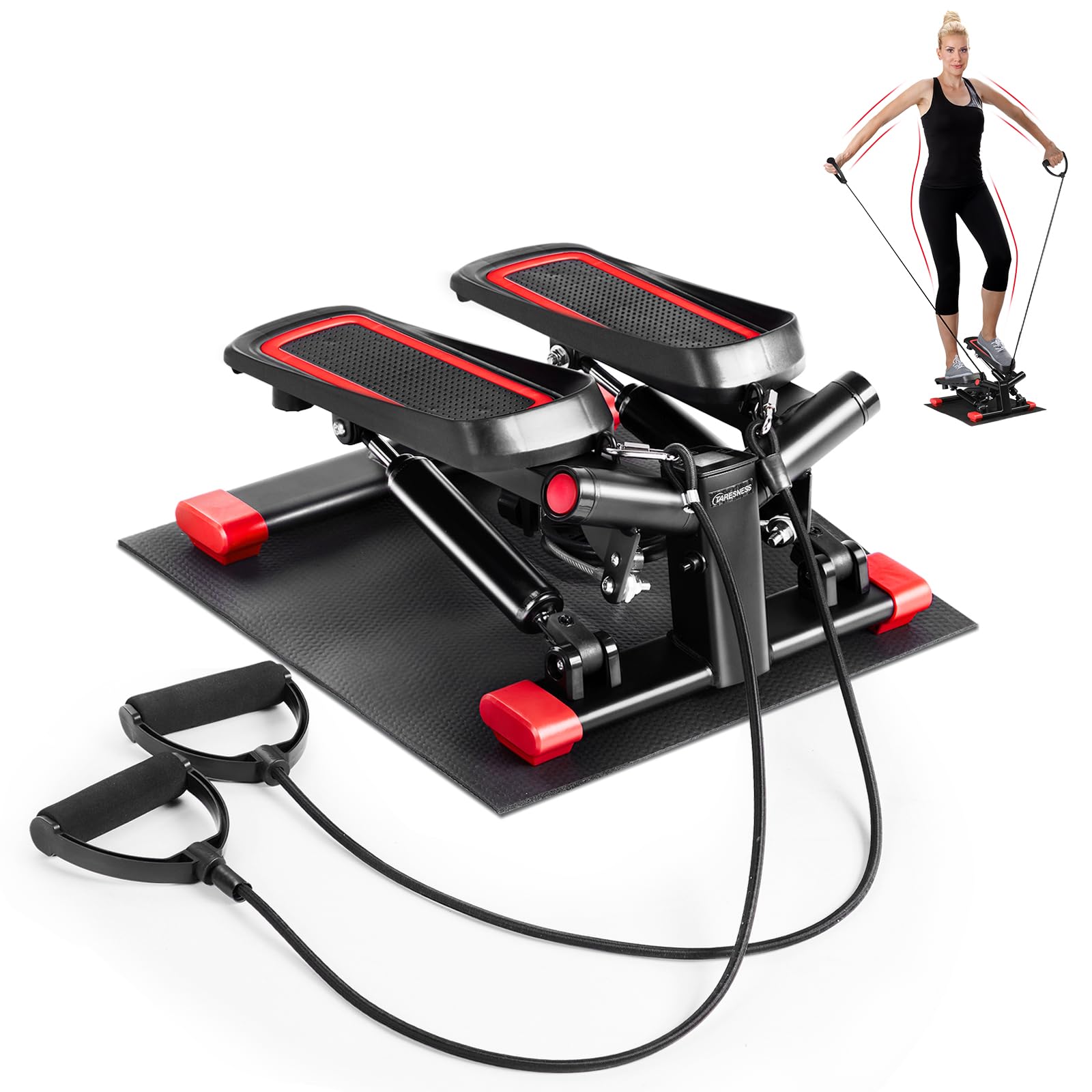
Image: Ktaxon Mini Stepper, showing its compact design and foot pedals.
Key Features:
- Unique Twist Movement: Engages waist and legs for enhanced calorie burning.
- Adjustable Stride Height: Allows customization of workout intensity from shallow steps to steep climbs.
- Digital Training Computer: Monitors steps, exercise time, total count, and calories.
- Silent Operation: Dual hydraulic cylinders and cushion pads reduce noise.
- Stability Design: Features anti-slip footplates and a heavy-duty steel structure for safety and durability.
- Compact and Portable: Easy to store and suitable for limited spaces.
- Resistance Bands: Included for upper body and arm workouts.
2. Safety Information
Read all instructions carefully before using the Ktaxon Mini Stepper. Keep this manual for future reference.
- Consult a physician before starting any new exercise program.
- Ensure the stepper is placed on a flat, stable surface.
- Wear appropriate athletic footwear during use.
- Do not exceed the maximum user weight capacity of 330.69 lbs (150 kg).
- Keep children and pets away from the stepper during operation.
- Stop exercising immediately if you feel pain, dizziness, or shortness of breath.
- Inspect the stepper for any loose or damaged parts before each use. Do not use if damaged.
- Use the resistance bands as instructed to avoid injury.
3. Package Contents
Verify that all components are present in the package:
- 1 x Ktaxon Mini Stepper
- 2 x Resistance Bands (Drawstrings)
- 1 x Silicone Oil (for maintenance)
- 1 x Wrench (for adjustments)
- 1 x Protective Floor Mat (Cushion)
- 1 x Instruction Manual (this document)

Image: The Ktaxon Mini Stepper shown with its dimensions and included accessories: resistance bands, wrench, and protective floor mat.
4. Setup and Assembly
The Ktaxon Mini Stepper comes 100% pre-assembled and is ready for immediate use out of the box. No complex assembly is required.
Initial Setup Steps:
- Remove the stepper and all accessories from the packaging.
- Place the protective floor mat on a flat, stable surface where you intend to exercise.
- Position the stepper on top of the protective floor mat.
- If desired, attach the resistance bands to the designated attachment points on the stepper. Ensure they are securely fastened.
5. Operating Instructions
5.1 Using the Stepper
The stepper provides a unique twist movement that targets various muscle groups.
- Step onto the anti-slip pedals one foot at a time, ensuring you maintain balance.
- Begin stepping up and down, allowing your hips and waist to perform a gentle twisting motion with each step.
- Maintain a steady rhythm and controlled movements.

Image: A user demonstrating the effective twist action of the stepper, engaging the waist and legs.
5.2 Adjusting Stride Height and Resistance
The stepper's resistance and stride height can be adjusted to customize your workout intensity.
- Locate the adjustment knob, typically found at the front or center of the stepper's base.
- Turn the knob clockwise to increase resistance and achieve a higher stride, simulating a steeper climb.
- Turn the knob counter-clockwise to decrease resistance and achieve a shallower stride, suitable for lower intensity workouts.
- Always adjust resistance before starting your workout.

Image: Diagram illustrating the adjustable stride height feature, showing options for low stride jogging and high stride stair workout.
5.3 Using the Digital Monitor
The integrated LCD display helps you track your workout progress.
- The monitor automatically activates when you begin stepping.
- It displays:
- TIME: Duration of your current workout.
- COUNT: Number of steps taken during the current workout.
- CALORIES: Estimated calories burned.
- TOTAL COUNT: Total steps accumulated over all workouts (resets when battery is removed).
- To reset the current workout data, press and hold the button on the monitor for a few seconds.
- The monitor will automatically turn off after a period of inactivity to conserve battery.
5.4 Using Resistance Bands
The included resistance bands allow for a more comprehensive full-body workout.
- Ensure the resistance bands are securely attached to the stepper.
- While stepping, hold the handles of the resistance bands and perform arm exercises such as bicep curls, tricep extensions, or shoulder presses.
- Coordinate arm movements with your stepping rhythm for a dynamic workout.

Image: A user exercising on the Ktaxon Mini Stepper, demonstrating how it can be part of an effective workout routine, similar to running, yoga, swimming, or cycling.
6. Maintenance
Regular maintenance ensures the longevity and smooth operation of your Ktaxon Mini Stepper.
- Cleaning: Wipe down the stepper with a damp cloth after each use to remove sweat and dust. Avoid abrasive cleaners.
- Lubrication: Apply the included silicone oil to the hydraulic cylinders periodically (e.g., every 2-3 months, or if squeaking occurs) to maintain smooth operation and reduce friction. Refer to the specific lubrication points indicated in the diagram below or on the stepper itself.
- Inspection: Regularly check all bolts, nuts, and moving parts for tightness. Tighten any loose components using the provided wrench.
- Storage: Store the stepper in a cool, dry place away from direct sunlight and extreme temperatures. Its compact size allows for easy storage.

Image: Illustration highlighting the silent operation of the stepper due to its unique mute foot mat and hydraulic system, which benefits from proper lubrication.
7. Troubleshooting
If you encounter issues with your Ktaxon Mini Stepper, refer to the following common problems and solutions:
| Problem | Possible Cause | Solution |
|---|---|---|
| Digital monitor not displaying or counting. |
|
|
| Squeaking noise during operation. |
|
|
| Uneven stepping motion or resistance. |
|
|
8. Specifications
| Specification | Detail |
|---|---|
| Model Number | KT-Step Machines-429 |
| Dimensions (L x W x H) | 40 x 33 x 20 cm (15.75 x 12.99 x 7.87 inches) |
| Product Dimensions (Packaged) | 46.48 x 41.91 x 23.62 cm |
| Weight | 6 kg (13.23 lbs) |
| Maximum Load Capacity | 150 kg (330.69 lbs) |
| Resistance Adjustment | Hydraulic Balance Resistance |
| Step Mode | Step Up and Down with Twist Movement |
| Electronic Meter Display | Times/Minute, Browse, Count, Time, Calories |
| Material | Plastic, Steel |
| Color | Red |
| Batteries Included? | No (for monitor) |

Image: The Ktaxon Mini Stepper in a home setting, illustrating its compact dimensions (15.7 inches by 12.2 inches) and suitability for exercise anytime, anywhere.
9. Warranty and Support
For warranty information, technical support, or any questions regarding your Ktaxon Mini Stepper, please contact Ktaxon customer service.
Please have your model number (KT-Step Machines-429) and purchase date available when contacting support.
Contact information for Ktaxon customer service is typically found on the product packaging or the official Ktaxon website.