
1. Product Overview
This product includes a protective case and a tempered glass screen protector designed for the ZTE Blade V50 Design 5G 8150N smartphone. The case offers robust protection with a built-in ring holder and magnetic car mount compatibility. The screen protector provides enhanced display durability.
What's in the Box:
- 1 x Protective Phone Case
- 1 x Tempered Glass Screen Protector
2. Setup and Installation
2.1 Installing the Protective Case
- Ensure your ZTE Blade V50 Design 5G 8150N phone is clean and free of dust or debris.
- Align the phone with the case, starting with the top or bottom edge.
- Gently press the phone into the case, ensuring all corners and edges are securely fitted. The case features precision cutouts for all ports, buttons, and speakers, allowing full access to all phone functions.

Image: The protective case for ZTE Blade V50 Design 5G 8150N, showcasing its design and fit.
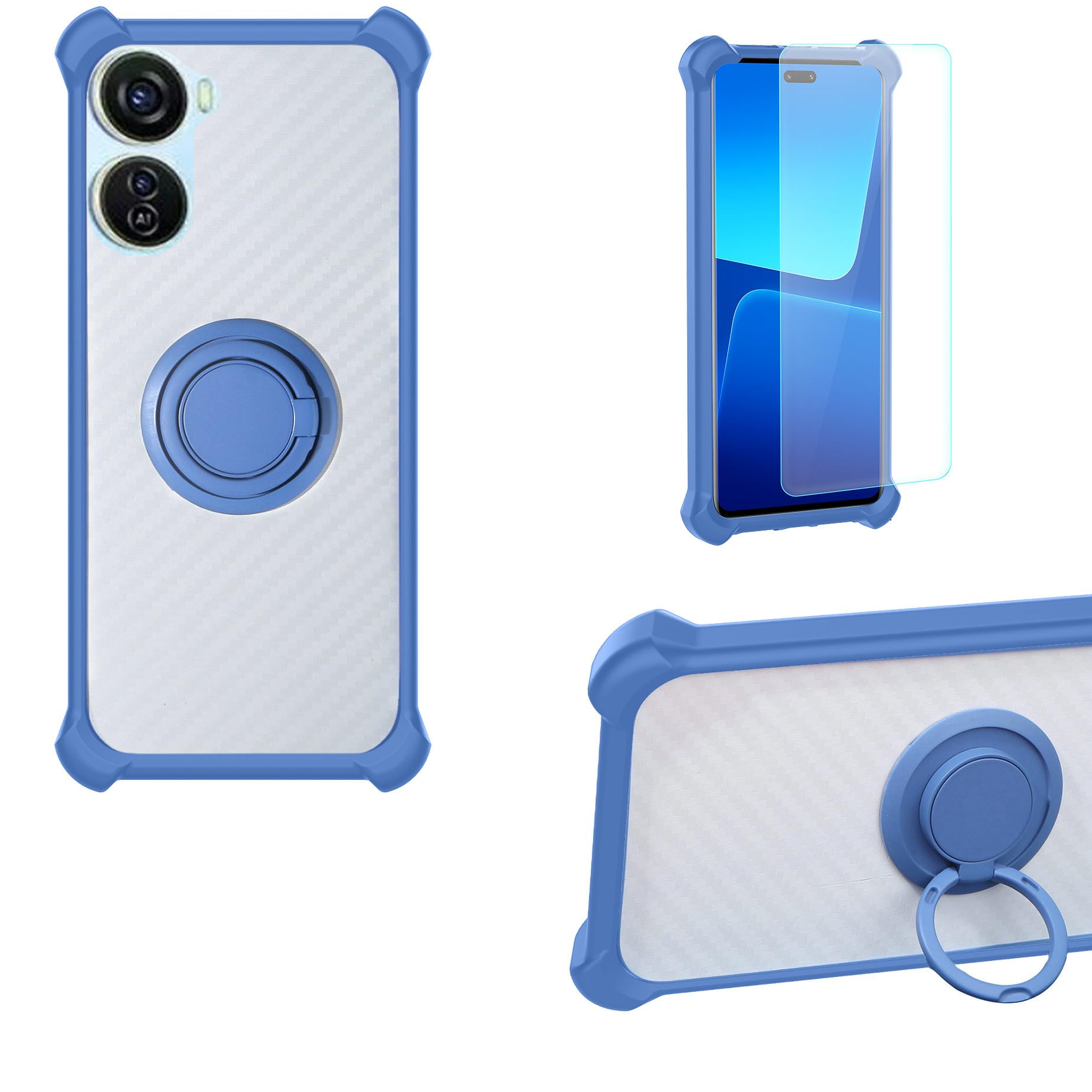
Image: Illustration of the case's shockproof design, highlighting the soft silicone frame, hard PC backplane, thickened four corners, and a silicone buffer layer for enhanced protection.
2.2 Installing the Tempered Glass Screen Protector
- Clean the Screen: Use the provided cleaning wipes (if included) or a microfiber cloth to thoroughly clean your phone's screen. Ensure there are no dust particles, smudges, or fingerprints.
- Remove Protective Film: Carefully peel off the protective film from the adhesive side of the tempered glass. Avoid touching the adhesive surface.
- Align the Protector: Align the tempered glass with your phone's screen, paying close attention to the cutouts for the speaker, camera, and home button (if applicable).
- Apply: Once aligned, gently lower the tempered glass onto the screen. It will adhere automatically due to its perfect adhesion properties.
- Remove Bubbles: If any air bubbles appear, gently push them towards the edges of the screen using a soft cloth or a squeegee card. The protector is designed for 99.9% super transparency and anti-fingerprint properties.

Image: Visual representation of the tempered glass screen protector's features, including 9H High Hardness, Shatterproof, Perfect Adhesion, Case Friendly, 99.9% Super Transparency, and Anti-fingerprint.

Image: A demonstration illustrating the scratch-proof capability of the tempered glass screen protector, showing resistance against sharp objects.
3. Operating Instructions
3.1 Using the 360 Rotatable Ring Holder
The integrated ring holder on the back of the case provides multiple functionalities:
- Secure Grip: Insert your finger through the ring for a more secure hold on your phone, reducing the risk of accidental drops.
- Kickstand Function: Rotate the ring to an appropriate angle to prop up your phone horizontally or vertically, allowing for hands-free viewing of videos or video calls. The ring rotates 360 degrees for optimal positioning.
- One-Hand Operation: The ring holder facilitates easier one-hand operation by allowing you to reach more areas of the screen comfortably.

Image: The phone case featuring its 360-degree rotatable ring holder, demonstrating its versatility.

Image: A visual guide demonstrating how the ring holder improves one-hand operation by extending reach across the phone screen.

Image: A detailed close-up of the 360-degree rotating ring holder on the back of the phone case.
3.2 Magnetic Car Mount Function
The case is designed with a built-in metal plate compatible with magnetic car mounts. This allows for direct adsorption onto a magnetic car mount holder (not included), providing a convenient way to use your phone for GPS navigation or music while driving.
Important Note: A magnetic car mount holder is not included with this product. This case does not support wireless charging due to the integrated metal plate.
Image: The phone case demonstrating its compatibility with a magnetic car mount, showing the integrated metal plate on the back.
4. Maintenance
4.1 Cleaning the Case
To clean the phone case, gently wipe it with a soft, damp cloth. For stubborn dirt, a mild soap solution can be used. Avoid harsh chemicals or abrasive materials, as these may damage the TPU material or the printed design.
4.2 Cleaning the Screen Protector
The tempered glass screen protector can be cleaned with a microfiber cloth to remove fingerprints and smudges. For more thorough cleaning, a screen cleaner spray designed for electronics can be used. Avoid excessive pressure when cleaning.
5. Troubleshooting
5.1 Air Bubbles Under Screen Protector
- Small Bubbles: Many small bubbles will disappear naturally within 24-48 hours.
- Large Bubbles: Gently lift the nearest edge of the screen protector and re-apply, pushing the bubble out with a soft cloth or squeegee. Ensure the screen is free of dust before re-application.
- Dust Particles: If a bubble is caused by a dust particle, carefully lift the screen protector near the particle, use a dust-absorber sticker (if available) to remove the dust, then re-apply.
6. Specifications
| Feature | Description |
|---|---|
| Compatible Phone Models | ZTE Blade V50 Design 5G |
| Material (Case) | Hard PC (Polycarbonate) + Soft Silicone (TPU) |
| Material (Screen Protector) | Tempered Glass |
| Additional Features | 360 Rotating Ring, Magnetic Car Mount Compatibility, Shockproof Design, Precision Cutouts |
| Screen Protector Hardness | 9H High Hardness |
| Water Resistance Level | Not Water Resistant |
| Item Dimensions (Approx.) | 0.39 x 0.39 x 0.39 inches (Case) |
7. Warranty and Support
For warranty information and customer support, please refer to the retailer or manufacturer from whom you purchased this product. Keep your proof of purchase for any warranty claims.