
IPRO Y300 CSKB-HEI
User Manual: IPRO Y300 Phone Case with Tempered Glass Screen Protector
Model: IPRO Y300 CSKB-HEI
1. Product Overview
This product package includes a protective case designed for the IPRO Y300 phone and a tempered glass screen protector. The case features a durable construction with a rotatable ring holder and magnetic car mount compatibility. The screen protector offers enhanced display protection.

Image 1.1: Overview of the IPRO Y300 phone case and included tempered glass screen protector.
2. What's Included
Your package should contain the following items:
- 1 x IPRO Y300 Phone Case
- 1 x Tempered Glass Screen Protector
3. Setup and Installation
3.1 Installing the Phone Case
- Ensure your IPRO Y300 phone is clean and free of dust or debris.
- Align the phone with the case, ensuring the camera cutout and port openings match.
- Gently press the phone into the case, starting from one corner and working your way around until the phone is fully seated.
3.2 Installing the Tempered Glass Screen Protector
- Clean the Screen: Use a microfiber cloth to thoroughly clean your phone's screen, removing all dust, smudges, and fingerprints. Ensure the screen is completely dry.
- Align the Protector: Carefully peel off the protective film from the adhesive side of the tempered glass. Align the screen protector with your phone's screen, paying attention to the speaker, camera, and button cutouts.
- Apply and Smooth: Once aligned, gently lower the screen protector onto the screen. The adhesive will begin to spread. If bubbles appear, gently push them towards the edges using a soft cloth or a credit card wrapped in cloth.

Image 3.1: Proper alignment and installation of the phone case.

Image 3.2: Steps for applying the tempered glass screen protector to ensure proper adhesion.
4. Operating Instructions and Features
4.1 360° Rotatable Ring Holder
The integrated ring holder on the back of the case provides multiple functionalities:
- Kickstand Function: Rotate the ring to a desired angle to prop up your phone for hands-free viewing of videos or video calls. The ring supports 360-degree rotation for versatile positioning.
- Secure Grip: Slip your finger through the ring for a more secure hold on your phone, reducing the risk of accidental drops, especially during one-hand operation.

Image 4.1: Detailed view of the rotatable ring holder, highlighting its design.

Image 4.2: Illustration of how the ring holder facilitates comfortable one-hand operation.
4.2 Magnetic Car Mount Compatibility
The case is designed with a built-in metal plate that allows it to be directly adsorbed onto magnetic car mount holders. This feature provides a convenient and secure way to mount your phone in your vehicle for navigation or hands-free use. Note: A magnetic car mount holder is not included with this product.
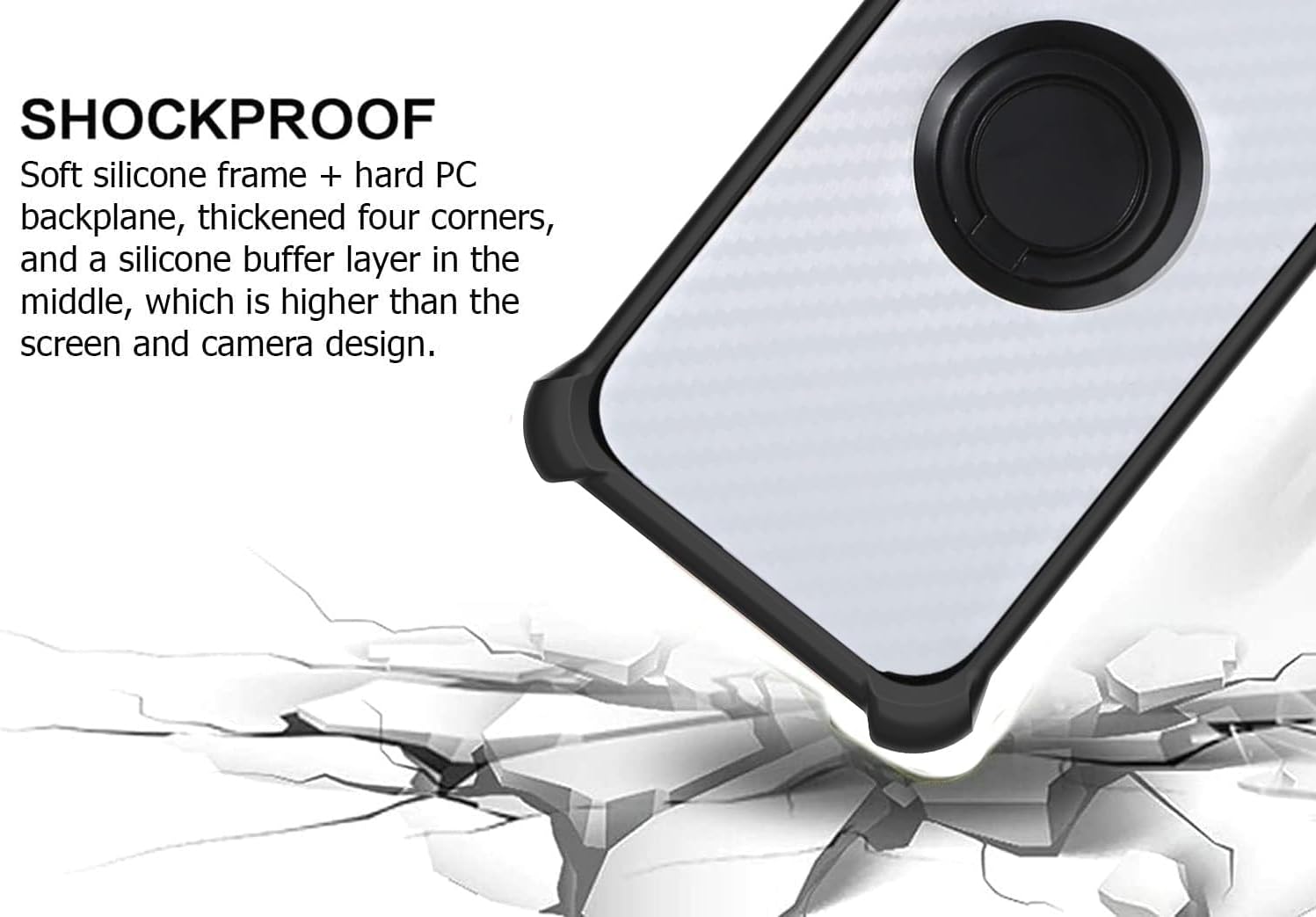
Image 4.3: The case's compatibility with magnetic car mounts for easy vehicle integration.
4.3 Protective Design and Materials
- Material: The case is constructed from a combination of soft silicone (TPU) and hard PC (Polycarbonate) materials, providing a dual-layer protection. This blend offers scratch-proof and fingerprint-resistant properties.
- Shockproof Design: The case features thickened four corners and a silicone buffer layer in the middle, designed to absorb impacts and protect your phone from drops. The raised edges around the screen and camera provide additional protection against direct surface contact.
- Precision Cutouts: All ports, buttons, and speakers are precisely cut out, ensuring full access and unhindered operation of your phone's features.

Image 4.4: Illustration of the shockproof design, highlighting reinforced corners and protective layers.
4.4 Tempered Glass Screen Protector Features
The included tempered glass screen protector offers robust protection for your phone's display:
- 9H High Hardness: Provides superior resistance against scratches and impacts.
- Shatterproof: Designed to resist shattering into sharp pieces upon impact, enhancing safety.
- 99.9% Super Transparency: Maintains the original clarity and brightness of your phone's screen.
- Perfect Adhesion: Ensures a smooth, bubble-free application.
- Case Friendly: Designed to be compatible with most phone cases, preventing lifting or peeling at the edges.
- Anti-fingerprint: Features an oleophobic coating to reduce smudges and fingerprints.
Image 4.5: Icons representing key features of the tempered glass screen protector, such as 9H hardness and anti-fingerprint properties.
Image 4.6: Demonstration of the screen protector's scratch-proof capabilities.
5. Maintenance and Care
- Cleaning the Case: To clean the phone case, remove it from your device. Wipe it gently with a soft, damp cloth. For stubborn dirt, a mild soap solution can be used, followed by rinsing with clean water and air drying. Avoid harsh chemicals or abrasive materials.
- Cleaning the Screen Protector: Use a microfiber cloth to wipe the screen protector. For smudges, a screen cleaning spray designed for electronics can be applied to the cloth (not directly to the screen) and then wiped.
- Avoid Extreme Conditions: Do not expose the case or screen protector to extreme temperatures, direct sunlight for prolonged periods, or corrosive liquids, as this may cause damage or discoloration.
6. Troubleshooting
- Bubbles under Screen Protector: If small bubbles remain after installation, try gently pushing them towards the nearest edge with a soft cloth. For larger bubbles, carefully lift the nearest edge of the protector slightly to release the air, then re-apply. Ensure the screen is dust-free before re-application.
- Case Fit Issues: Ensure you have the correct model of phone (IPRO Y300) for this case. If the case feels loose or too tight, double-check that your phone is properly seated within the case and that no foreign objects are obstructing the fit.
- Ring Holder Stiffness: The ring holder is designed to be firm to maintain its position as a kickstand. If it feels too stiff, gently rotate it a few times to loosen the mechanism. Avoid excessive force.
7. Specifications
| Feature | Detail |
|---|---|
| Product Dimensions | 0.39 x 0.39 x 0.39 inches |
| Item Weight | 2.46 ounces |
| Special Features | 360 Rotating Ring, Car Magnetic Fixing, Stylish Design |
| Form Factor | Basic Case |
| Color | CSKB-HEI |
| Material | Polyurethane (TPU + PC) |
| Compatible Phone Models | IPRO Y300 |
| Compatible Devices | IPRO Y300 |
| Manufacturer | Generic |
| Country of Origin | China |
8. Warranty and Support
For information regarding product warranty, returns, or technical support, please refer to the documentation provided with your purchase or contact the seller directly through the platform where the product was acquired. Warranty terms and support options may vary depending on the retailer and region.