1. Product Overview
This instruction manual provides detailed information for the installation, operation, and maintenance of your FreeYond M5A Phone Case, which includes a built-in ring holder and a tempered glass screen protector. This product is designed to offer comprehensive protection and enhanced functionality for your FreeYond M5A smartphone.
The case features a combination of hard PC and soft silicone materials for robust protection, a 360-degree rotatable ring holder for improved grip and media viewing, and compatibility with magnetic car mounts. The included tempered glass screen protector offers additional defense against scratches and impacts for your device's display.
2. What's in the Box
Please verify that all components are present in the package:
- 1 x FreeYond M5A Phone Case (CSKB-LV)
- 1 x Tempered Glass Screen Protector
3. Key Features
The FreeYond M5A Phone Case and Tempered Glass Screen Protector offer several key features:
- Dual-Layer Protection: Constructed with a hard PC backplane and a soft silicone frame, providing excellent shock absorption and scratch resistance. Thickened corners and a silicone buffer layer enhance drop protection.
- 360° Rotatable Ring Holder: Integrated ring stand allows for comfortable one-hand operation, secure grip, and serves as a kickstand for hands-free viewing in both portrait and landscape orientations.
- Magnetic Car Mount Compatibility: The case is designed to be directly adsorbed onto magnetic car mount holders (magnetic car mount not included), facilitating easy navigation and media control while driving.
- Precision Cutouts: Ensures full access to all phone ports, buttons, speakers, and camera without removing the case.
- High-Definition Pattern: Features a stylish design with a high-definition pattern that resists fading.
- Tempered Glass Screen Protector: Provides 9H high hardness, shatterproof protection, perfect adhesion, case-friendly design, 99.9% super transparency, and anti-fingerprint properties.
4. Setup and Installation
4.1 Installing the Phone Case
- Ensure your FreeYond M5A phone is clean and free of dust or debris.
- Align the phone with the case, starting with the top or bottom edge.
- Gently press the phone into the case, ensuring all corners and edges are securely fitted. Verify that all cutouts align correctly with the phone's ports and buttons.

Image: The FreeYond M5A phone case with its integrated ring holder and the accompanying tempered glass screen protector.
4.2 Applying the Tempered Glass Screen Protector
For best results, apply the screen protector in a dust-free environment.
- Clean the Screen: Use an alcohol wipe (not included) to thoroughly clean your phone's screen. Follow with a microfiber cloth (not included) to remove any smudges or dust. Ensure the screen is completely dry.
- Remove Dust: Use a dust-absorber sticker (not included) to pick up any remaining dust particles from the screen.
- Align the Protector: Carefully peel off the protective film from the adhesive side of the tempered glass. Hold the protector by its edges and align it precisely with your phone's screen, paying attention to the cutouts for the camera and sensors.
- Apply: Once aligned, gently lower the screen protector onto the screen. It will begin to adhere automatically.
- Remove Bubbles: If air bubbles appear, gently push them towards the edges of the screen using a clean, soft cloth or a squeegee (not included). Small bubbles may disappear on their own within 24-48 hours.

Image: Visual representation of the tempered glass screen protector's key attributes, including 9H hardness, shatterproof design, and anti-fingerprint coating.

Image: Demonstration of the screen protector's scratch-proof capability, showing resistance to sharp objects.
5. Operating Instructions
5.1 Using the 360° Rotatable Ring Holder
The integrated ring holder provides multiple functionalities:
- Secure Grip: Insert your finger through the ring to hold your phone more securely, reducing the risk of accidental drops.
- Kickstand Function: Rotate the ring to your desired angle and prop your phone up on a flat surface for hands-free viewing of videos or video calls. The ring rotates 360 degrees for versatile positioning.
- One-Hand Operation: The ring holder allows you to reach more areas of your phone screen with one hand, improving usability.
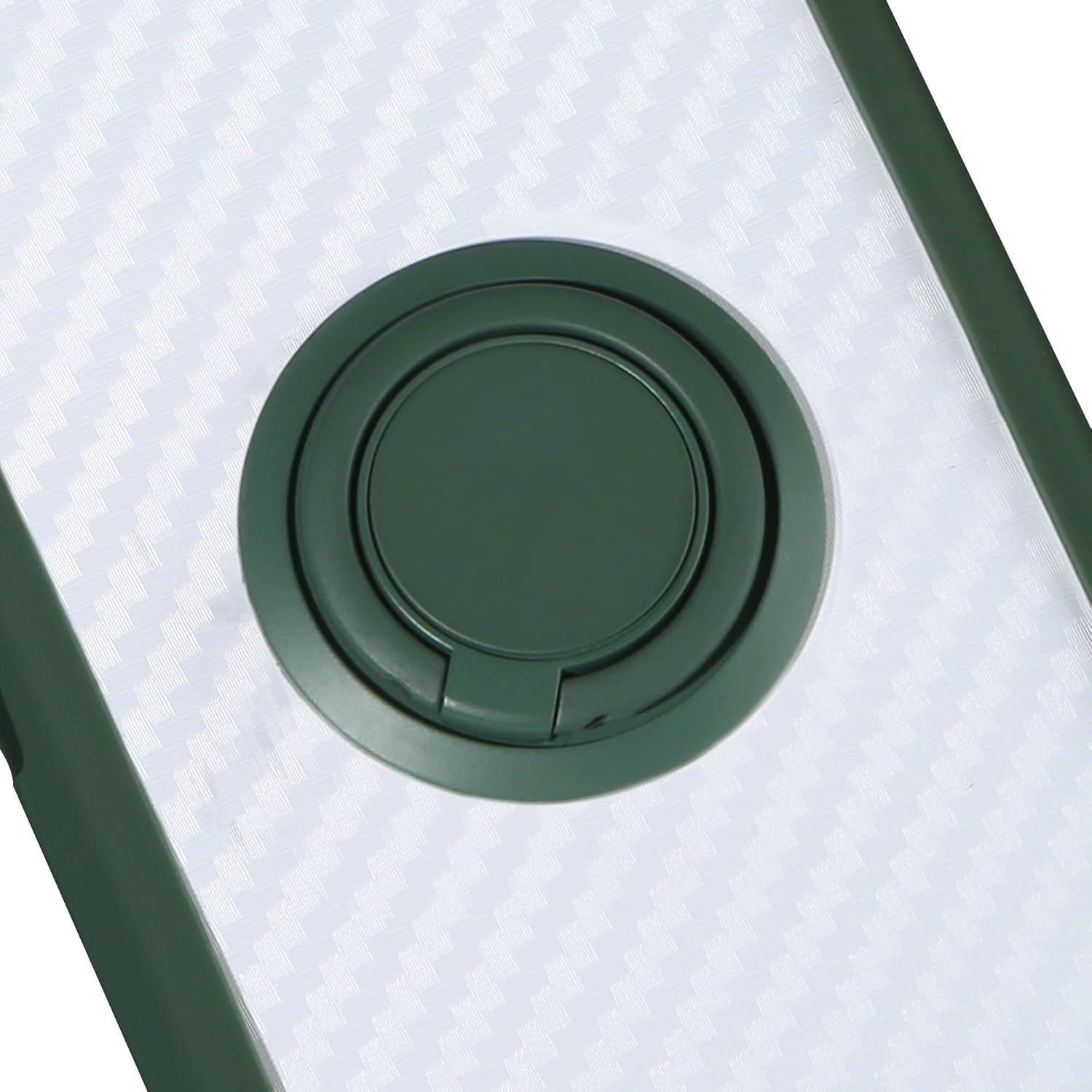
Image: A close-up view of the 360-degree rotatable ring holder integrated into the phone case.
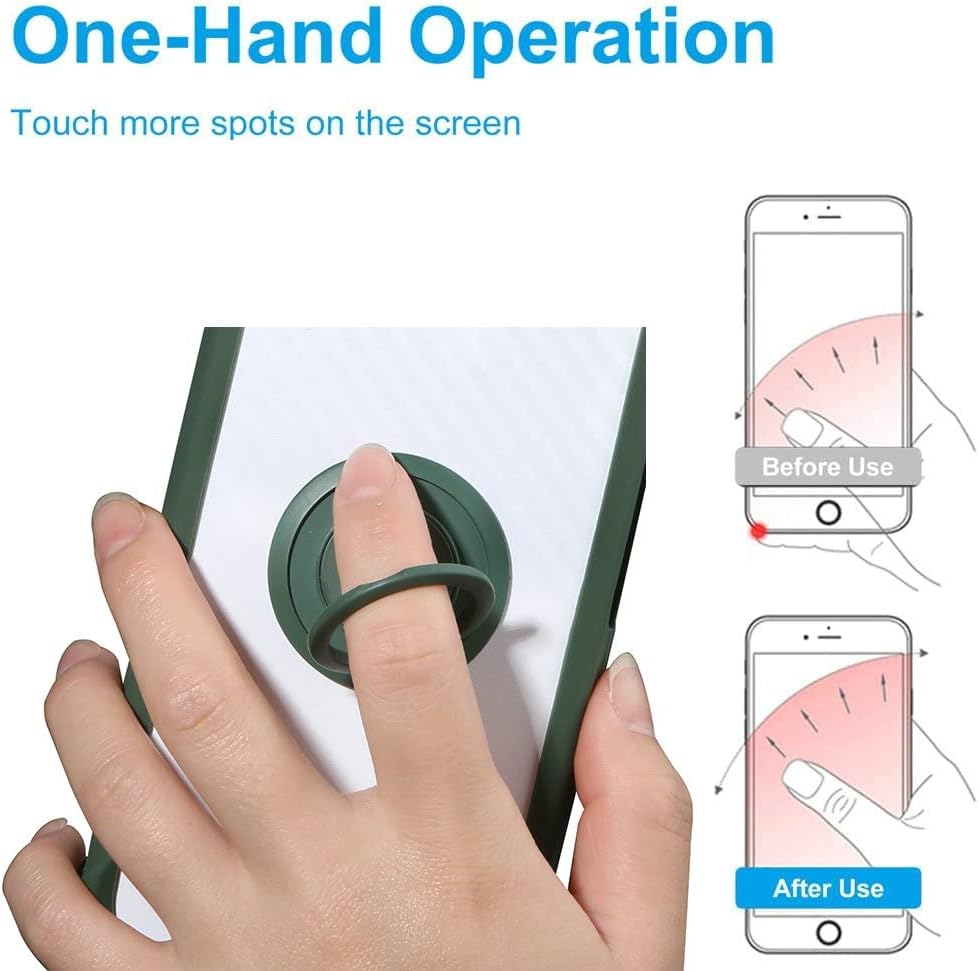
Image: Illustration demonstrating how the ring holder facilitates easier one-hand operation and extended screen reach.
5.2 Using with Magnetic Car Mount
The case is designed with a metal plate integrated into the ring holder base, allowing it to attach directly to magnetic car mounts (not included). Simply place the back of your phone case onto a compatible magnetic car mount for secure attachment. This feature is ideal for GPS navigation or hands-free calling while driving.
Note: This case does not support wireless charging due to the integrated metal plate for magnetic car mount compatibility.

Image: Depiction of the phone case's compatibility with a magnetic car mount, showing how it attaches for hands-free use.
6. Maintenance
Proper care will extend the life and appearance of your phone case and screen protector:
- Cleaning the Case: Wipe the phone case regularly with a soft, damp cloth. For stubborn dirt, a mild soap solution can be used, followed by rinsing with clean water and air drying. Avoid harsh chemicals or abrasive cleaners.
- Cleaning the Screen Protector: Use a microfiber cloth to gently wipe the screen protector to remove fingerprints and smudges. For deeper cleaning, a screen cleaner spray designed for electronics can be used.
- Avoid Extreme Temperatures: Do not expose the case or screen protector to extreme heat or cold, as this may affect their material integrity.
- Inspect Regularly: Periodically check the case and screen protector for any signs of wear or damage. Replace if significant damage is observed to ensure continued protection for your device.
7. Troubleshooting
This section addresses common inquiries and minor issues you might encounter:
- Screen Protector Bubbles: If bubbles persist after installation, try gently lifting the nearest edge of the protector and slowly re-applying it, pushing the bubble out with a soft cloth. Small bubbles often disappear within 24-48 hours.
- Ring Holder Stiffness: The ring holder is designed to be firm to provide stable support. If it feels too stiff, gently rotate it a few times to loosen it slightly. Avoid excessive force.
- Case Fit Issues: Ensure your phone model is FreeYond M5A. If the case does not fit correctly, double-check that the phone is fully seated within the case and that no foreign objects are obstructing the fit.
- Magnetic Mount Adhesion: If the case does not adhere well to your magnetic car mount, ensure the car mount itself is clean and functioning correctly. The case's integrated metal plate is designed for strong magnetic attraction.
8. Specifications
| Attribute | Detail |
|---|---|
| Product Dimensions | 0.39 x 0.39 x 0.39 inches |
| Item Weight | 2.46 ounces |
| ASIN | B0CGXX421Z |
| Special Features | 360 Rotating Ring, Car Magnetic Fixing, Stylish Design |
| Form Factor | Basic Case |
| Color | CSKB-LV |
| Material | Polyurethane (Case), Tempered Glass (Screen Protector) |
| Manufacturer | Generic |
| Compatible Phone Models | FreeYond M5A |
| Whats in the box | 1*Phone Case, 1*Tempered Glass Screen Protector |
9. Warranty and Support
This product is manufactured by Generic. For specific warranty information or technical support, please refer to the seller or contact the manufacturer directly through their official channels. Keep your purchase receipt as proof of purchase.
For any issues not covered in this manual, please reach out to the point of purchase or the manufacturer's customer service for assistance.


