
1. Safety Information
Please read all safety instructions carefully before using the Mapleboom Pro Ear Wax Removal Tool. Improper use can lead to injury.
- Do not insert the ear scoop too deeply into the ear canal.
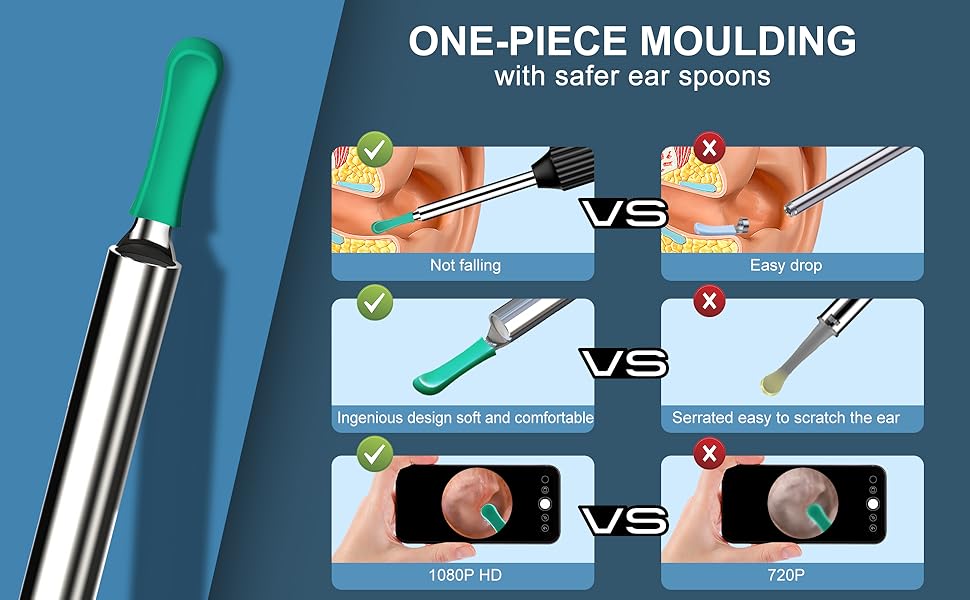
- Always use the soft silicone ear scoops to prevent scratching the ear canal.
- Ensure the ear scoop is securely attached to the device before use.
- Clean the ear scoops thoroughly before and after each use to avoid cross-contamination.
- If you experience pain, discomfort, or bleeding, discontinue use immediately and consult a medical professional.
- Keep out of reach of children. Adult supervision is recommended when used on children.
- Do not use if you have an ear infection, perforated eardrum, or any other ear condition without consulting a doctor.
- The device is IP67 water-resistant; however, avoid prolonged submersion in water.
2. Package Contents
Verify that all items are present in your package:
- 1x Mapleboom Pro Ear Wax Removal Tool (with integrated camera)
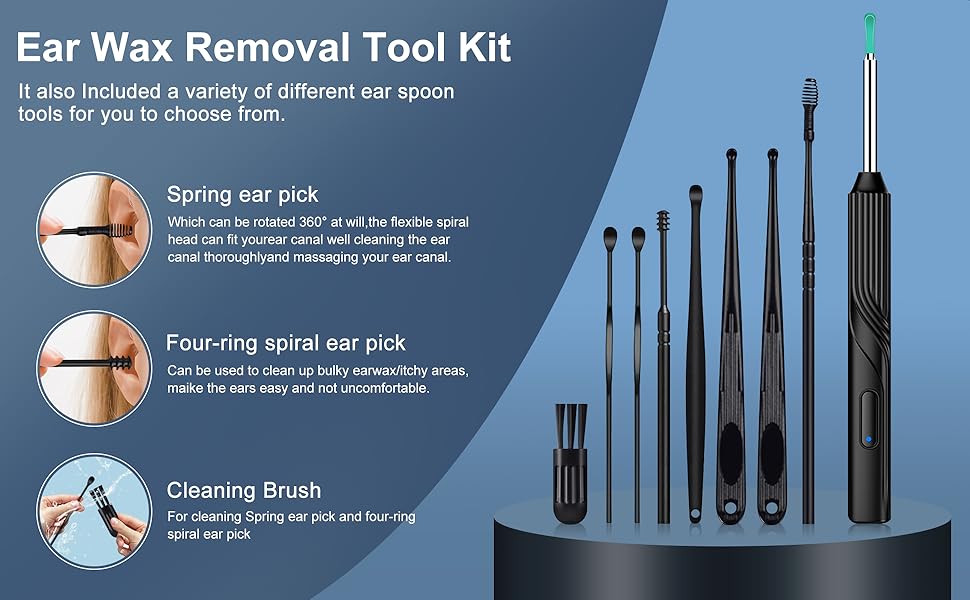
- 6x High-elasticity Soft Silicone Ear Scoops (various curvatures)
- 1x USB Type-C Charging Cable
- 1x Storage Container for Ear Scoops
- Additional Ear Cleaning Tools (e.g., spring ear pick, four-ring spiral ear pick, cleaning brush)
- 1x User Manual

3. Product Overview
The Mapleboom Pro Ear Wax Removal Tool combines a high-definition otoscope camera with soft silicone ear scoops for effective and safe ear cleaning. It features a 1080P HD camera, 6 LED lights, and a 3-axis intelligent gyroscope for stable imaging.
Key Features:
- 1080P HD Camera: Provides clear, detailed visuals of the ear canal.
- 6 LED Lights: Illuminates the ear canal for optimal visibility.
- 3-Axis Intelligent Gyroscope: Ensures a stable image regardless of device orientation.
- Soft Silicone Ear Scoops: Designed for gentle and effective wax removal, preventing scratches.
- Integrated Fuselage Design: Prevents ear scoops from detaching during use.
- Wireless Connectivity: Connects to smartphones (iOS and Android) via Wi-Fi for real-time viewing.
- Type-C Charging: Convenient and fast charging.
- IP67 Water Resistance: Allows for easy cleaning of the camera probe.


4. Setup Guide
Follow these steps to set up your Mapleboom Pro Ear Wax Removal Tool:
- Charge the Device: Before first use, fully charge the device using the provided USB Type-C cable. The charging port is located at the bottom of the device.
- Download the App: Scan the QR code provided in the physical user manual or search for "HNDvisual" in your smartphone's app store (App Store for iOS, Google Play Store for Android) and download the application.
- Power On: Press and hold the power button on the device for 2 seconds. The blue indicator light will flash, indicating it is ready to connect.
- Connect to Wi-Fi:
- Go to your smartphone's Wi-Fi settings.
- Find and select the Wi-Fi network named "HND-NEx-xxxxxx" (the 'xxxxxx' will be unique to your device).
- Once connected, return to the "HNDvisual" app. The blue light on the device will stop flashing and remain solid, confirming a successful connection.
- Start Using: Within the "HNDvisual" app, click "Start Using" to view the live feed from the otoscope camera.
5. Operating Instructions
Once connected, you can begin using your ear wax removal tool:
- Attach an Ear Scoop: Select a suitable soft silicone ear scoop from the provided set and securely attach it to the tip of the device. Ensure it is firmly in place.
- Position the Device: Gently insert the device into your ear canal while observing the live feed on your smartphone. The 1080P HD camera and LED lights will provide a clear view.
- Remove Ear Wax: Using the attached ear scoop, carefully and slowly maneuver to dislodge and remove ear wax. Always move gently and avoid sudden movements. The 3-axis gyroscope helps maintain a stable image, making precise movements easier.
- Monitor Progress: Continuously monitor the ear canal on your smartphone screen to ensure safe and effective cleaning.
- Clean After Use: After each use, remove the ear scoop and clean both the scoop and the camera probe as described in the Maintenance section.
Important Considerations:
- Always maintain a gentle approach. The ear canal is delicate.
- If you feel any resistance or pain, stop immediately.
- Do not push ear wax deeper into the canal. Use a scooping motion to pull it out.
- For children, always have an adult supervise and assist with the process.


6. Maintenance
Cleaning the Device:
- Ear Scoops: Remove the silicone ear scoop after each use. Wash it with mild soap and warm water, then rinse thoroughly. Allow it to air dry completely before storing or reusing.
- Camera Probe: The camera probe is IP67 water-resistant. After removing the ear scoop, you can gently rinse the probe under running water. Use a soft, damp cloth to wipe the lens and the probe body. Do not use harsh chemicals or abrasive materials.
- Main Body: Wipe the main body of the device with a clean, dry cloth. Do not immerse the entire device in water.

Charging the Device:
- Connect the provided USB Type-C cable to the charging port on the device and to a standard USB power adapter (not included) or a computer USB port.
- The indicator light will show charging status (e.g., red for charging, blue for fully charged).
- A full charge typically takes approximately 35 minutes and provides about 90 minutes of continuous use.
7. Troubleshooting
| Problem | Possible Cause | Solution |
|---|---|---|
| Device does not turn on. | Low battery. | Charge the device fully using the Type-C cable. |
| Cannot connect to Wi-Fi. | Incorrect Wi-Fi network selected or device not in pairing mode. | Ensure the device is powered on and the blue light is flashing. Select the correct "HND-NEx-xxxxxx" network in your phone's Wi-Fi settings. Try restarting both the device and your phone. |
| No image in the app. | App not launched or not connected to the device's Wi-Fi. | Verify Wi-Fi connection. Ensure the "HNDvisual" app is open and you have clicked "Start Using". |
| Image is blurry or unclear. | Camera lens is dirty or too far/close to the ear canal. | Clean the camera lens gently with a soft cloth. Adjust the distance of the camera from the ear canal for optimal focus. |
| Ear scoop falls off during use. | Ear scoop not securely attached. | Ensure the silicone ear scoop is firmly pushed onto the device's tip until it clicks into place. |
8. Specifications
| Model Name | Wireless Microscope Camera Ear Wax Removal (Model 1080P1) |
| Camera Resolution | 1080P HD (1296p) |
| Connectivity | Wireless Wi-Fi (IEEE 802.11B/G/N, 2.4GHz) |
| Compatible Devices | iOS and Android Smartphones |
| Battery Capacity | 130mAh |
| Charging Time | Approx. 35 minutes |
| Operating Time | Approx. 90 minutes |
| Sensor | 3-axis Gyroscope |
| Water Resistance | IP67 (Camera Probe) |
| Product Dimensions | 5 x 0.5 x 0.5 inches (approx. 127 x 12.7 x 12.7 mm) |
| Item Weight | 2.08 ounces (approx. 59 grams) |
9. Warranty and Support
Mapleboom products are manufactured with quality and reliability in mind. For specific warranty details and terms, please refer to the warranty card included in your product packaging or visit the official Mapleboom website.
If you encounter any issues or have questions regarding your Mapleboom Pro Ear Wax Removal Tool, please contact our customer support team. Provide your model number (1080P1) and purchase details for faster assistance.
Customer Support Contact: Please refer to your product packaging or the official Mapleboom website for the most current contact information.