
Introduction
The Haino Teko RW-24 Smart Watch is a durable and versatile wearable designed for active lifestyles. Featuring a large display, Bluetooth call functionality, and over 150 sports modes, it helps you track your fitness and stay connected. This manual provides essential information for optimal use of your device.
What's in the Box
Upon unboxing your Haino Teko RW-24 Smart Watch, please ensure all the following items are present:
- Haino Teko RW-24 Smart Watch
- Charging Cable
- Sports Sun Glasses
- Sports Bag
- User Manual (this document)
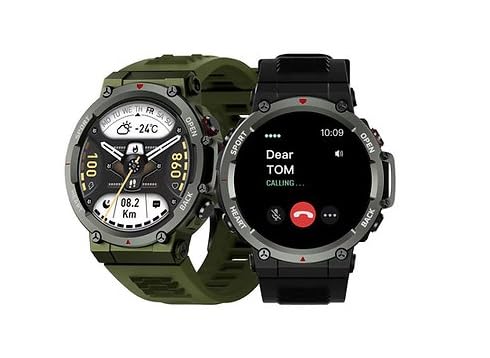
Image: The Haino Teko RW-24 Smart Watch packaging, the watch itself, an additional strap, sports sunglasses, and a sports bag.
Setup Instructions
1. Charging the Smart Watch
Before initial use, fully charge your Haino Teko RW-24 Smart Watch. Connect the charging cable to the watch's charging port and a compatible USB power adapter. The watch display will indicate charging status.
2. App Installation
To unlock the full features of your smart watch, download the companion application on your smartphone. Scan the QR code provided in the watch's packaging or search for the official Haino Teko app in your smartphone's app store (Google Play Store for Android, Apple App Store for iOS).
3. Device Pairing
- Ensure Bluetooth is enabled on your smartphone.
- Open the Haino Teko companion app.
- Follow the in-app instructions to search for and connect to your RW-24 Smart Watch. You may need to confirm a pairing request on both your phone and the watch.
- Once paired, the watch will synchronize time and data with your phone.
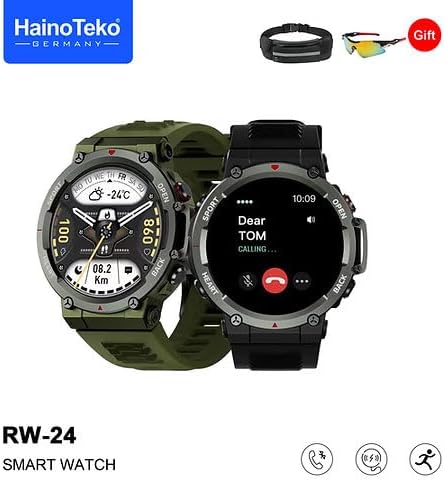
Image: Two Haino Teko RW-24 Smart Watches, one displaying a call notification, illustrating Bluetooth call functionality.
Operating Instructions
Basic Navigation
The RW-24 features a full touchscreen display and side buttons for navigation:
- Swipe Up/Down: Scroll through menus and notifications.
- Swipe Left/Right: Access quick functions or different screens.
- Tap: Select an item or confirm an action.
- Side Buttons: Typically used for power on/off, returning to the home screen, or quick access to sports modes. Refer to the on-screen prompts for specific button functions.
Sports Modes
The watch supports over 150 sports modes, including running, walking, cycling, swimming, and strength training. It can automatically recognize certain movements and count repetitions for strength exercises. To start a sports mode:
- Navigate to the Sports section on your watch.
- Select your desired activity.
- Tap to start tracking. The watch will record data such as steps, calories burned, and duration.
Bluetooth Call Functionality
Once paired with your smartphone, you can make and receive calls directly from your watch:
- Receiving Calls: When a call comes in, the watch will display the caller ID. Tap the green icon to answer or the red icon to reject.
- Making Calls: Access the dialer or contacts list on your watch to initiate a call.
Notifications
Enable notifications in the companion app to receive alerts for calls, messages, and social media directly on your watch.
Watch Face Customization
Personalize your watch by choosing from dozens of pre-installed watch faces or downloading new ones via the app. You can also upload a unique photo to create a custom watch face.
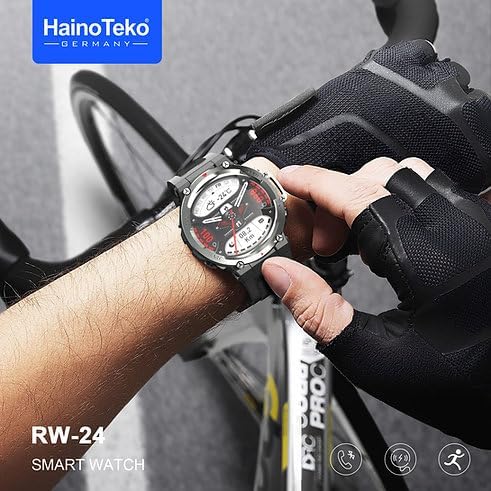
Image: A person wearing the Haino Teko RW-24 Smart Watch on their wrist while cycling, demonstrating its use during sports activities.
Maintenance
Cleaning
Regularly clean your smart watch and strap to prevent skin irritation and maintain functionality. Use a soft, damp cloth to wipe the screen and case. For the silicone strap, mild soap and water can be used. Ensure the watch is completely dry before wearing or charging.
Water Resistance
The Haino Teko RW-24 Smart Watch is rated IP68 for water resistance, meaning it can withstand immersion up to 1.5 meters. It is suitable for swimming in pools but not recommended for diving or high-pressure water activities. Avoid exposing the watch to hot water or steam.
Storage
When not in use for extended periods, store the watch in a cool, dry place. Avoid extreme temperatures.
Troubleshooting
- Watch not turning on: Ensure the watch is fully charged. Connect it to the charger for at least 30 minutes.
- Cannot pair with smartphone: Make sure Bluetooth is enabled on your phone and the watch. Restart both devices and try pairing again through the app. Ensure the app has necessary permissions.
- Inaccurate fitness data: Ensure the watch is worn snugly on your wrist. Check app settings for correct personal information (height, weight, age).
- Notifications not appearing: Verify that notifications are enabled in both the watch's settings and the companion app. Also, check your phone's system settings to ensure the app has permission to send notifications.
- Short battery life: Reduce screen brightness, disable unnecessary features (e.g., continuous heart rate monitoring if not needed), and ensure background app usage is optimized on your phone.
Specifications
| Feature | Specification |
|---|---|
| Model Name | RW-24 |
| Manufacturer | Haino Teko |
| Wearable Computer Type | Smart Watch |
| Operating System | Smart Watch OS |
| Connectivity Technology | Bluetooth |
| Wireless Communication Standard | Bluetooth |
| Battery Cell Composition | Lithium Ion |
| GPS | No GPS |
| Item Shape | Round |
| Screen Size | 45 millimeters |
| Band Material Type | Silicone |
| Case Material Type | Metal |
| Water Resistance Level | Water Resistant |
| Water Resistance Depth | 1.5 meters |
| Sport Type | Multi-Sports |
| Human Interface Input | Touchscreen |
| Clasp Type | Buckle |
| Supported Application | Alarm, Calendar, Contacts, Email, Fitness Tracker, Messages, Multisport Tracker, Music Player, Phone, Reminders, Social Media, Voice Assistant |
| Controller Type | Touch Control |
| Counter Type | Step Count, Calories Burned |
| Compatible Devices | Smartphone |
| Compatible Phone Models | All current smartphone models |
| International Protection Rating | IP68 |
| Target Audience | Men |
| Age Range Description | Adult |
| Style | Modern |
| Color | Black |
| Band Color | Black |
| Display Type | Digital |
| Resolution | 320 x 320 |
| Item Dimensions | 18 x 8 x 18 cm |
| Special Features | Strength Training Recognition |
Warranty and Support
For warranty information and customer support, please refer to the warranty card included in your product packaging or visit the official Haino Teko website. Keep your purchase receipt as proof of purchase for any warranty claims.