
1. Product Overview
The RHAEGON CP12 Electric Air Pump is a compact, lightweight, and portable inflation device designed for various applications, including car tires, bicycle tires, balls, and inflatable floats. Equipped with a built-in rechargeable battery, it offers convenience and reliability on the go. Its intelligent design includes an auto-stop function to prevent over-inflation and a clear digital display for precise pressure monitoring.

Image 1.1: RHAEGON CP12 Electric Air Pump with all accessories.
2. Package Contents
Please verify that all items listed below are included in your package:
- 1 x RHAEGON CP12 Electric Air Pump
- 1 x High Pressure Inflatable Tube (17.7 inches / 450 mm)
- 1 x USB Type-C Charging Cable
- 1 x Schrader Valve
- 1 x Presta Valve
- 1 x Ball Needle Valve
- 1 x Balloon Valve
- 1 x Storage Bag
- 1 x Instruction Manual
3. Product Features
- Fast Inflation: Capable of inflating a 195/55/R15 car tire from 0 to 35 PSI in approximately 6 minutes, with a maximum pressure of 160 PSI (11 bar) and an air flow of 30 L/min.
- High Precision & Digital Display: Features an LED screen that simultaneously displays preset and actual tire pressure values. The built-in pneumatic sensor chip ensures accuracy within ±0.5 PSI.
- Multiple Power Options: Operates cordlessly with its internal 6000mAh (3x 2000mAh) battery or can be powered via a 12V car cigarette lighter socket (adapter not included).
- 5 Inflation Modes & Auto Shut-Off: Pre-programmed modes for bicycles, motorcycles, cars, and balls, plus a custom mode. The pump automatically stops when the preset pressure is reached, preventing over-inflation. Supports PSI, kPa, BAR, and KG/CM² units.
- Portable & Multi-functional: Compact and lightweight (576g, 160 x 63 x 62 mm) for easy transport and storage. Includes an LED flashlight for night use and a 5V/2A USB output port to charge mobile devices.

Image 3.1: Visual representation of the pump's fast inflation capability.
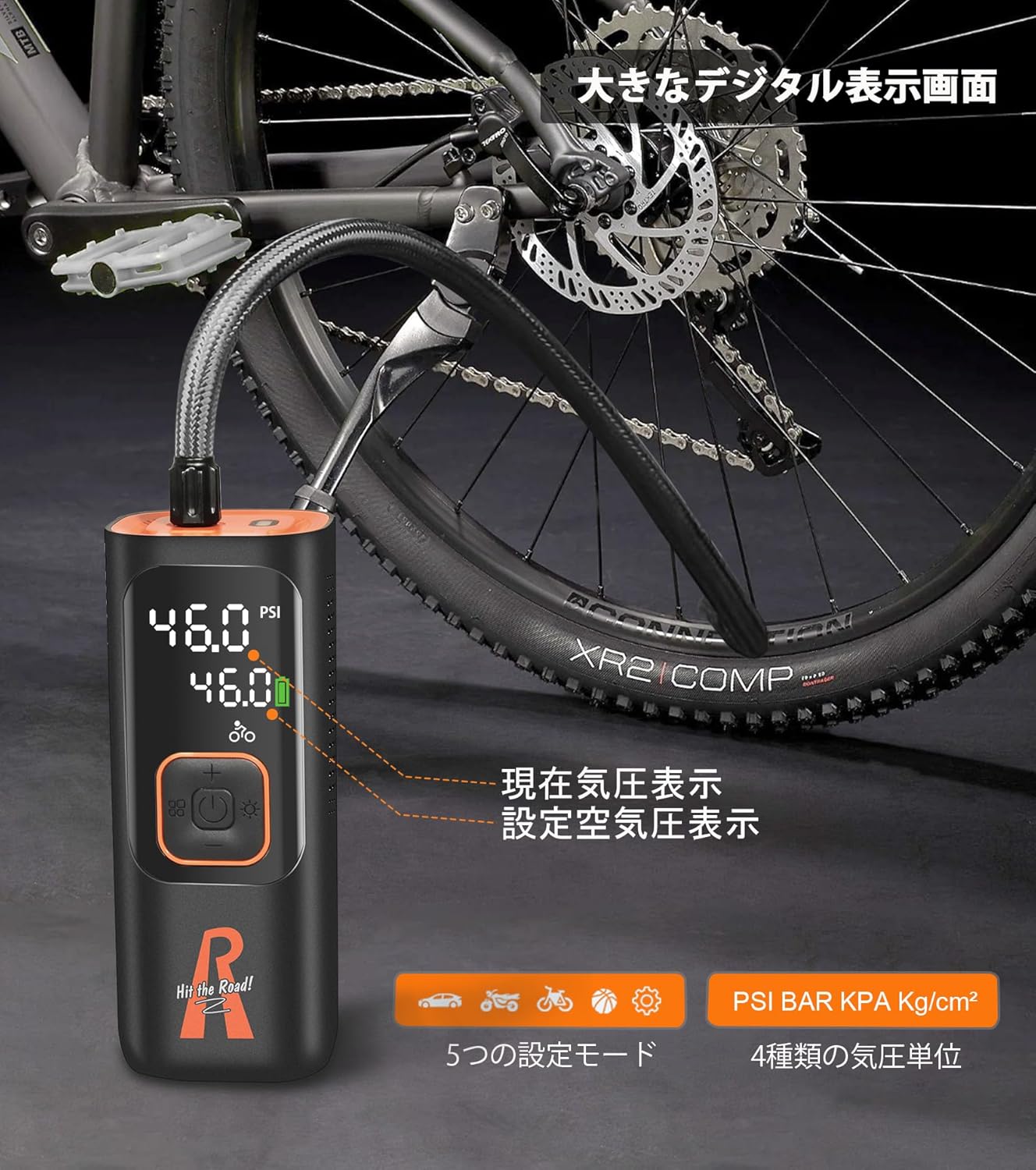
Image 3.2: The clear digital display showing pressure readings.
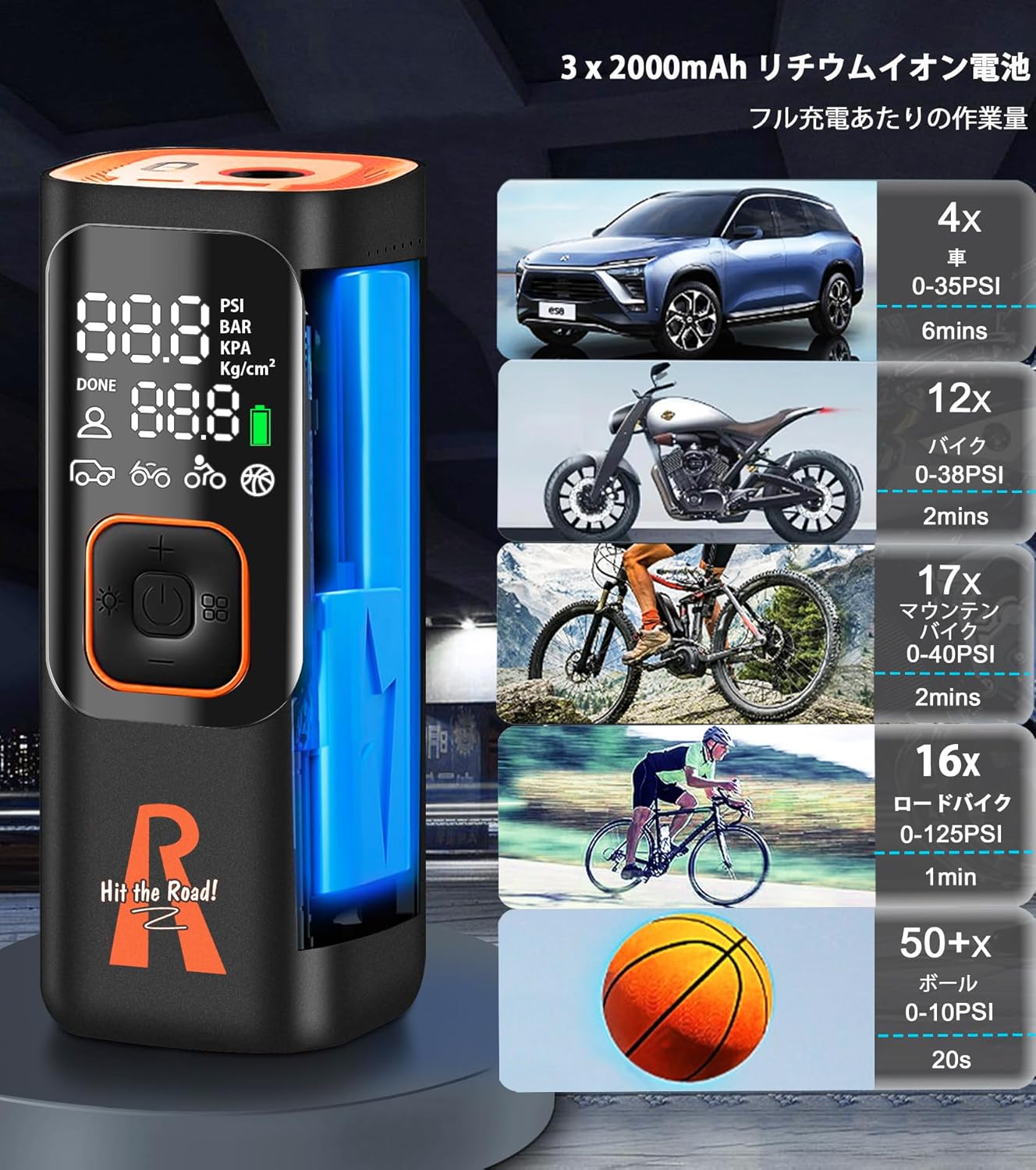
Image 3.3: Battery capacity and estimated inflation counts for different applications.

Image 3.4: The compact dimensions and portability of the air pump.

Image 3.5: The pump's additional functions as a power bank and flashlight.
4. Setup
- Charge the Pump: Before first use, fully charge the air pump using the provided USB Type-C charging cable and a compatible 5V/2A or 9V/1.5A USB power adapter (not included). The battery indicator on the display will show charging status.
- Attach the Air Hose: Screw the high-pressure inflatable tube securely into the inflation port at the top of the pump.
- Select and Attach Valve Adapter: Choose the appropriate valve adapter (Schrader, Presta, Ball Needle, or Balloon Valve) for the item you intend to inflate. Screw it onto the end of the air hose.
5. Operating Instructions
- Power On: Press and hold the power button (⏻) for 2-3 seconds to turn on the pump. The display will light up.
- Select Mode: Press the mode button (M) repeatedly to cycle through the preset inflation modes: Car, Motorcycle, Bicycle, Ball, and Custom. Each mode has a default pressure unit and recommended pressure range.
- Set Target Pressure: Use the '+' and '-' buttons to adjust the target pressure. The value will flash while being adjusted. The pump supports PSI, BAR, KPA, and KG/CM² units. You can switch units by briefly pressing the mode button after selecting a mode.
- Connect to Item: Securely connect the valve adapter to the item you wish to inflate (e.g., tire valve, ball valve). The display will show the current pressure of the connected item.
- Start Inflation: Press the power button (⏻) once to start inflation. The pump will begin to inflate and the display will show the real-time pressure increase.
- Auto Shut-Off: The pump will automatically stop inflating once the preset target pressure is reached.
- Stop Manually: To stop inflation manually at any time, press the power button (⏻) again.
- Power Off: Press and hold the power button (⏻) for 2-3 seconds to turn off the pump. The pump will also automatically power off after a period of inactivity.

Image 5.1: Inflating a car tire using the RHAEGON CP12.

Image 5.2: The pump's versatility across different inflation needs.
Using the LED Flashlight:
Briefly press the flashlight button (💡) to turn the LED light on or off. This is useful for inflating in low-light conditions.
Using as a Power Bank:
Connect your mobile device to the USB-A output port (5V/2A) on the pump using a compatible USB cable to charge your device.
6. Maintenance
- Cleaning: Wipe the exterior of the pump with a soft, damp cloth. Do not use harsh chemicals or abrasive cleaners. Ensure the device is dry before storage.
- Storage: Store the pump and its accessories in the provided storage bag in a cool, dry place, away from direct sunlight and extreme temperatures.
- Battery Care: To prolong battery life, avoid fully discharging the battery frequently. Recharge the pump regularly, even if not in use, at least once every 3 months.
- Hose Inspection: Periodically check the high-pressure hose for any signs of wear, cracks, or damage. Replace if necessary.
7. Troubleshooting
- Pump does not turn on:
- Ensure the battery is charged. Connect to a power source and charge for at least 30 minutes.
- Press and hold the power button for 2-3 seconds.
- Pump inflates slowly or not at all:
- Check that the air hose and valve adapter are securely connected and there are no leaks.
- Ensure the correct inflation mode and target pressure are set.
- Verify the battery level. A low battery can affect performance.
- Inaccurate pressure reading:
- Ensure the valve adapter is fully seated on the item's valve.
- Disconnect and reconnect the pump to reset the reading.
- Pump is noisy during operation:
- It is normal for the pump to produce a noticeable operating sound during inflation due to the internal motor and compressor. This is not indicative of a fault.
- Overheating protection activated:
- If the pump becomes too hot during prolonged use, it may automatically shut down. Allow it to cool down for at least 15-20 minutes before resuming operation. The built-in fan aids in heat dissipation.
8. Specifications
| Parameter | Value |
|---|---|
| Product Name | Cordless Air Pump |
| Model | CP12 |
| Battery | 3x 2000mAh (6000mAh total); 12V; 22.2Wh Lithium Ion |
| Pressure Range | 2-160 PSI / 0.1-11 BAR / 1104 kPa |
| Max Air Flow | 30 L/min (7.8 gal/min) |
| USB Output | 5V/2A |
| Rated Input | 5V/2A; 9V/1.5A (Type-C) |
| Product Weight | 576g (0.6 Kilograms) |
| Product Dimensions | 160 x 63 x 62 mm (16 x 6 x 6 cm) |
| Operating Temperature | -10 °C to +45 °C |
| Hose Length | 450 mm (17.7 inches) |
9. Safety Information
- Do not leave the operating pump unattended.
- Keep out of reach of children. This is not a toy.
- Do not expose the pump to rain, moisture, or extreme temperatures.
- Avoid over-inflating items. Always refer to the recommended pressure for the item being inflated.
- Do not block the air intake or exhaust ports during operation.
- Do not disassemble or attempt to repair the pump yourself. Contact qualified personnel for service.
- The pump may become warm during prolonged use. Avoid direct contact with the hose and pump body immediately after inflation.
10. Warranty and Support
For warranty information, technical support, or any inquiries regarding your RHAEGON CP12 Electric Air Pump, please refer to the purchase platform or contact RHAEGON customer service directly. You can find more information and contact details on the official RHAEGON store page: Visit the RHAEGON Store.