
1. Introduction
The ACPOTEL PF2L Golf Rangefinder is a precision optical instrument designed to measure distances, angles, and heights with high accuracy. Featuring a magnetic strip, slope compensation, and multiple measurement modes, it is suitable for both golf enthusiasts and professional players. This manual provides detailed instructions for the safe and effective use of your rangefinder.

Image 1.1: ACPOTEL PF2L Golf Rangefinder, showing the device, its protective carrying case, and USB charging cables.
2. Safety Information
WARNING: This device uses a laser. Do not stare directly into the laser beam, as it can cause eye damage. Always use the rangefinder responsibly and avoid pointing it at people or animals.
- Keep the device away from children.
- Do not attempt to disassemble or modify the device.
- Use only the specified battery type (CR2 lithium metal battery).
3. Package Contents
Upon opening the package, please verify that all the following items are included:
- 1 x ACPOTEL PF2L Laser Rangefinder
- 1 x Cleaning Cloth
- 1 x Strap
- 1 x User Manual (this document)
- 1 x CR2 Lithium Metal Battery
4. Product Overview
The ACPOTEL PF2L Rangefinder features a robust design with an external LCD screen for easy viewing of measurements. It incorporates a strong magnetic strip for convenient attachment to metal surfaces, such as a golf cart.
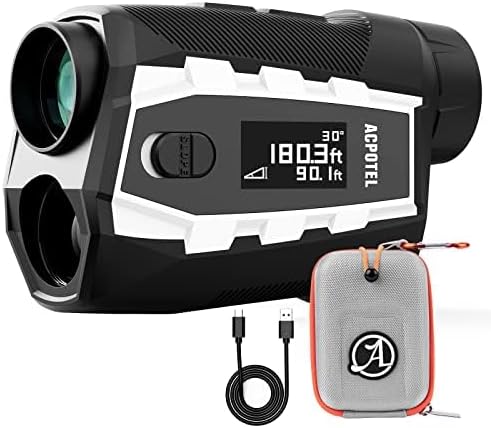
Image 4.1: External LCD display of the rangefinder, showing distance and angle measurements.
Key Features:
- Flag Lock: Quickly locks onto the flagstick.
- Magnetic Strip: For secure attachment to metal surfaces.
- Unit Switching: Easily switch between Feet (FT), Meters (M), and Yards (Yd).
- 6X Magnification: Provides clear and detailed views.
- Continuous Scan: For measuring multiple targets.
- Vibration Confirm: Tactile feedback when flag is locked.
- Slope Compensation: Provides adjusted distances for elevation changes.
- Speed Measurement: Measures the speed of moving objects.

Image 4.2: Visual representation of the rangefinder's main features, including Flag Lock, Magnetic Strip, Unit Switching, 6X Magnification, Continuous Scan, Vibration Confirm, Slope Compensation, and Speed Measurement.
5. Setup
5.1. Battery Installation
- Locate the battery compartment cover on the device.
- Twist or slide the cover to open it.
- Insert the included CR2 lithium metal battery, ensuring the correct polarity (+/-) as indicated inside the compartment.
- Close the battery compartment cover securely.
5.2. Initial Power On
Press the Power button once to turn on the device. The internal display will activate. If the device does not turn on, check the battery installation.
6. Operating Instructions
The ACPOTEL PF2L offers seven distinct measurement modes. Use the 'Mode' button to cycle through these modes.
6.1. Display Indicators
The internal display provides various pieces of information:

Image 6.1: Internal display showing measurement components: 1. Battery Level, 2. Distance, 3. Aiming Reticle, 4. Vertical Height, 5. Angle.
The external LCD screen mirrors key information for easy viewing by others or for quick reference.
6.2. Measurement Units (Feet/Yard/Meter)
To switch between Feet (ft), Yards (Yd), and Meters (m), press and hold the 'Mode' button. The unit displayed on the screen will change accordingly.

Image 6.2: Examples of the internal display showing distance measurements in meters, yards, and feet.
6.3. Measurement Modes
- Standard Distance Measurement: Point the aiming reticle at your target and press the Power button. The distance will be displayed.
- Scan Mode: Press and hold the Power button while sweeping across multiple targets. The display will continuously update distances to various objects. This is useful for quickly assessing a landscape.

Image 6.3: Illustration of a user employing the scan mode on a golf course, demonstrating the rangefinder's ability to measure distances across a wide area.
- Flag Lock Mode with Vibration: In this mode, the rangefinder prioritizes the closest object, making it easier to lock onto a flagstick even with trees in the background. Once locked, the device will vibrate to confirm the measurement.
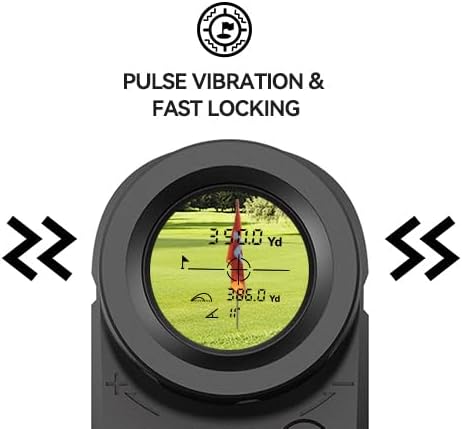
Image 6.4: The internal display indicating successful flag lock with pulse vibration confirmation.
- Slope Compensation (Slope ON/OFF): This mode calculates the slope-adjusted distance, which accounts for uphill or downhill shots, providing a more accurate 'play as' distance. The slope switch on the side of the device allows you to quickly enable or disable this feature.
- Height Measurement: Measures the vertical height of an object.
- Speed Measurement: Measures the speed of a moving target.
- Point-to-Point Measurement: Measures the distance between two points.
6.4. AH Mode (Auto High Mode) for Disc Golf
The AH Mode is specifically designed for disc golf, allowing for the measurement of distance and vertical height in feet. This mode assists disc golf players in obtaining accurate measurements for their throws.

Image 6.5: Diagram illustrating the AH Mode, which measures distance, height, and slope for disc golf applications.
7. Maintenance
7.1. Cleaning
- Use the provided cleaning cloth to gently wipe the lenses. Avoid using abrasive materials or harsh chemicals.
- Wipe the body of the rangefinder with a soft, damp cloth if necessary.
7.2. Storage
- Store the rangefinder in its protective carrying case when not in use.
- Keep the device in a cool, dry place, away from direct sunlight and extreme temperatures.
- If storing for an extended period, it is recommended to remove the battery.
8. Troubleshooting
- Device does not power on: Check if the CR2 battery is installed correctly with the correct polarity. Replace the battery if it is depleted.
- Inaccurate measurements: Ensure the lens is clean and free from obstructions. Make sure you are targeting a clear object. Strong sunlight or fog can affect accuracy.
- Display is dim or flickering: The battery may be low. Replace the CR2 battery.
- Device powers off too quickly: The rangefinder is designed with an automatic power-off feature to conserve battery life. This is typically around 16 seconds of inactivity. This setting cannot be adjusted.
- Flag Lock not working: Ensure you are in Flag Lock mode. Aim steadily at the flagstick, allowing the device to identify the closest target.
9. Specifications
| Feature | Specification |
|---|---|
| Magnification | 6X |
| Field of View | 7° |
| Objective Lens | 22mm |
| Eyepiece Lens | 16mm |
| Exit Pupil Diameter | 3.7mm |
| Laser Type | 905nm |
| Lens Coatings | Fully Multi-Coated (FMC) |
| Battery Type | CR2 Lithium Metal Battery |
| Distance Measuring Accuracy | ±0.5 Yard |
| Angle Measure Range | ±20° |
| Angle Measure Accuracy | ±1° |
| Dimensions | 11.68 x 4.06 x 1.27 cm (4.6 x 1.6 x 0.5 inches) |
| Net Weight | 0.49 lb (approx. 222g) |
| Display Size | 2 Inches (External LCD) |
| Material | Plastic |
| Water Resistance Level | Water Resistant |
| Measuring Range | 5-750 Yards |
10. Warranty and Support
For warranty information and customer support, please refer to the contact details provided with your purchase documentation or visit the official ACPOTEL website. Keep your proof of purchase for any warranty claims.
