
Karrong 001
Karrong Rechargeable Flashlight Model 001 User Manual
Introduction
This manual provides essential instructions for the safe and efficient operation of your Karrong Rechargeable Flashlight, Model 001. Please read this guide thoroughly before use and retain it for future reference.
The Karrong Model 001 is a high-performance LED flashlight designed for various applications, including camping, hiking, general illumination, and tactical situations. It features a super bright, long-range beam, multiple lighting modes, a zoom function, and a built-in power bank capability.
Safety Information
- Do Not Stare Directly into Light: The flashlight emits a powerful beam. Avoid direct eye exposure to prevent temporary vision impairment.
- Keep Out of Reach of Children: This product is not a toy. Store it in a secure location away from children.
- Battery Safety: Use only the specified Lithium-Ion battery. Do not attempt to open, puncture, or short-circuit the battery. Dispose of batteries according to local regulations.
- Charging: Use the provided charging cable and a compatible USB power adapter. Do not charge unattended.
- Operating Temperature: Avoid using or charging the flashlight in extreme temperatures.
- Water Resistance: The flashlight is IPX6 waterproof, meaning it can withstand heavy rain and splashes. It is not designed for submersion.
Package Contents
Verify that all items are present in your package:
- 1 x Karrong Rechargeable Flashlight (Model 001)
- 1 x Lithium-Ion Battery (5000mAh)
- 1 x USB Type-C Charging Cable
- 1 x User Manual (this document)

Image: The Karrong Rechargeable Flashlight, its included battery, USB Type-C charging cable, and user manual, all neatly arranged within a protective carrying case.
Product Overview
Familiarize yourself with the components of your Karrong Rechargeable Flashlight:
- Flashlight Head: Contains the LED emitter and zoomable lens.
- Zoom Mechanism: Slide the head to adjust beam focus.
- Power Button: Controls power and mode selection.
- Digital Power Display: Shows battery charge level (100%, 50%, 20%).
- USB Type-C Port: For charging the flashlight and acting as a power bank output.
- Battery Compartment: Houses the Lithium-Ion battery.
- Tail Cap: Secures the battery compartment.
- Lanyard Attachment Point: For securing the included lanyard.
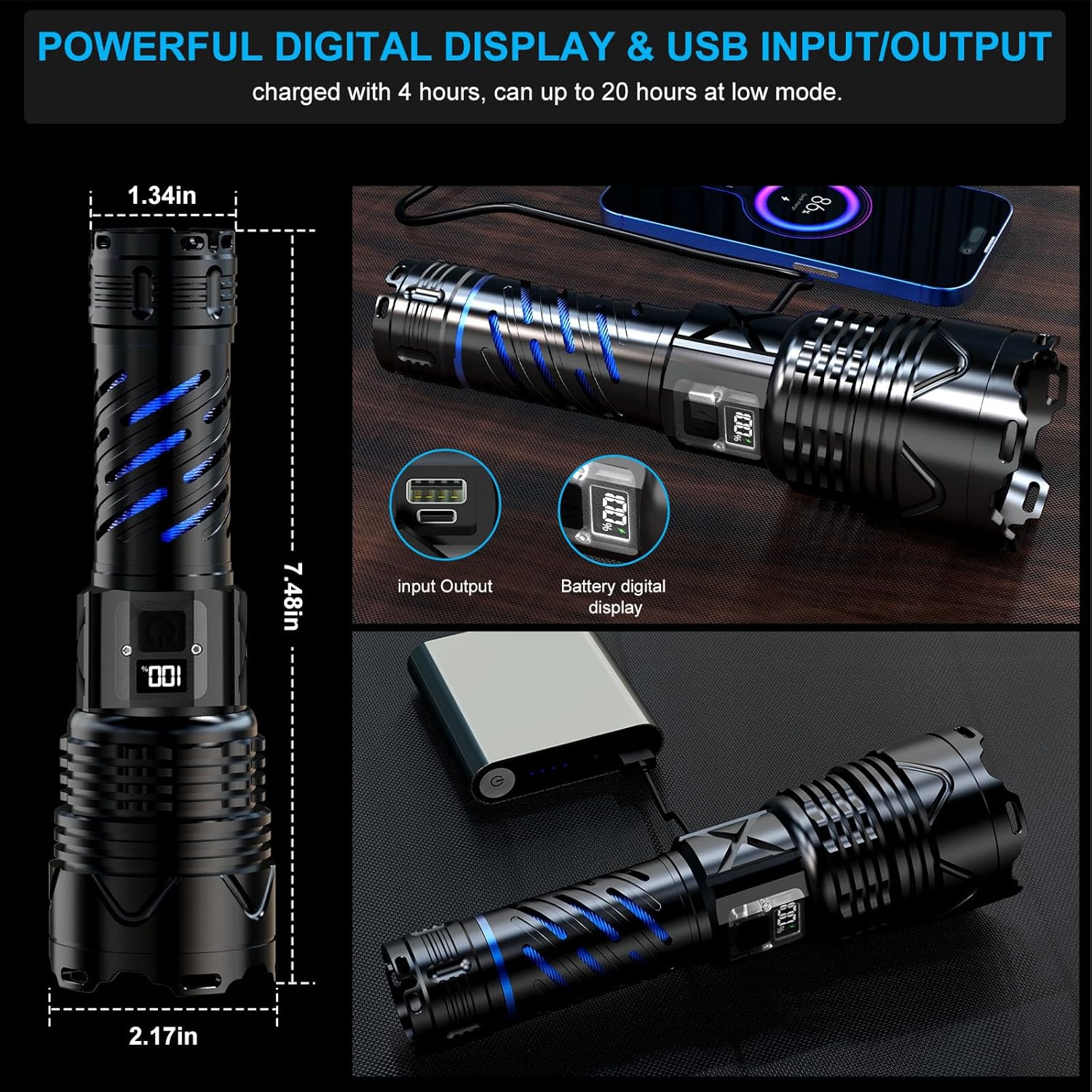
Image: A detailed view of the Karrong flashlight, highlighting the digital power display showing "100%" and the USB Type-C input/output port for charging and power bank functionality.

Image: A close-up of the flashlight's body, showing the digital display indicating battery percentage and a charging icon.

Image: A magnified view of the high-brightness LED chip and focusing lens located within the flashlight head.

Image: A detailed shot of the USB Type-C port, indicating its dual functionality for both input (charging the flashlight) and output (charging external devices).
Setup
1. Battery Installation
- Unscrew the tail cap of the flashlight counter-clockwise.
- Insert the provided 5000mAh Lithium-Ion battery with the positive (+) end facing towards the flashlight head.
- Screw the tail cap back on clockwise until securely tightened.
2. Initial Charging
Before first use, fully charge the flashlight battery.
- Open the rubber cover protecting the USB Type-C port on the flashlight body.
- Connect the smaller end of the provided USB Type-C cable to the flashlight's port.
- Connect the larger end of the USB cable to a compatible USB power source (e.g., wall adapter, computer USB port).
- The digital power display will show the charging progress. Charge until the display indicates 100%.
- Once fully charged, disconnect the cable and securely close the rubber cover to maintain water resistance.
Operating Instructions
1. Power On/Off
Press the power button once to turn the flashlight on. The flashlight will typically start in High mode.
To turn off the flashlight from any mode, press and hold the power button for approximately 3 seconds.

Image: A visual representation of the five lighting modes: High, Medium, Low, Flash (Strobe), and SOS, with a hand holding the flashlight and text indicating to long-press the switch to turn it off.
2. Changing Lighting Modes
With the flashlight turned on, press the power button repeatedly to cycle through the 5 available lighting modes:
- High: Maximum brightness for powerful illumination.
- Medium: Balanced brightness for general use.
- Low: Reduced brightness for extended battery life or close-range tasks.
- Strobe: Flashing light for signaling or disorientation.
- SOS: International Morse code signal for emergencies.
3. Zoom Function
The Karrong Model 001 features a zoomable head to adjust the beam focus:
- Floodlight (Zoom Out): Pull the flashlight head backward to widen the beam, illuminating a larger area.
- Spotlight (Zoom In): Push the flashlight head forward to narrow the beam, concentrating light for long-distance visibility.

Image: A split image showing the flashlight's zoom function. On the left, the flashlight head is pulled back for a wide floodlight beam (zoom out). On the right, the head is extended for a focused spotlight beam (zoom in).

Image: Two scenarios illustrating the flashlight's beam capabilities. The top image shows a wide floodlight illuminating a large area (200 square meters). The bottom image shows a focused long beam reaching up to 1500 meters.
4. Power Bank Function
The Karrong Model 001 can be used to charge other USB-powered devices:
- Open the rubber cover protecting the USB Type-C port.
- Connect your device's charging cable to the flashlight's USB Type-C port.
- The flashlight will begin charging your device. The digital display will show the flashlight's remaining battery level.
- Disconnect the cable once your device is charged or when the flashlight's battery is low.
- Securely close the rubber cover after use.

Image: The Karrong flashlight connected via its USB Type-C port to a smartphone, demonstrating its power bank functionality to charge external devices.
Charging the Flashlight
The Karrong Model 001 features a fast-charging USB Type-C interface and a digital power display for convenient battery monitoring.
- Locate the USB Type-C charging port on the flashlight body, usually protected by a rubber cover.
- Open the rubber cover.
- Insert the provided USB Type-C cable into the port.
- Connect the other end of the cable to a standard USB power adapter (not included) or a computer's USB port.
- The digital display will show the current battery percentage and a charging indicator.
- Charge until the display reads 100%. A full charge typically takes approximately 4 hours.
- Once charging is complete, disconnect the cable and firmly close the rubber cover to maintain the flashlight's IPX6 water resistance.
The 5000mAh battery provides over 8 hours of illumination on high brightness and up to 20 hours on low brightness after a full charge.
Maintenance
1. Cleaning
- Wipe the flashlight body with a soft, damp cloth.
- Do not use abrasive cleaners or solvents, as they may damage the finish or internal components.
- Keep the lens clean for optimal light output. Use a lens cleaning cloth if necessary.
2. Battery Care
- If the flashlight will not be used for an extended period, it is recommended to remove the battery.
- Store the battery in a cool, dry place.
- Recharge the battery every 3-6 months to maintain its health if stored.
3. Storage
- Store the flashlight in a cool, dry environment, away from direct sunlight and extreme temperatures.
- The included protective case is ideal for storage and transport.
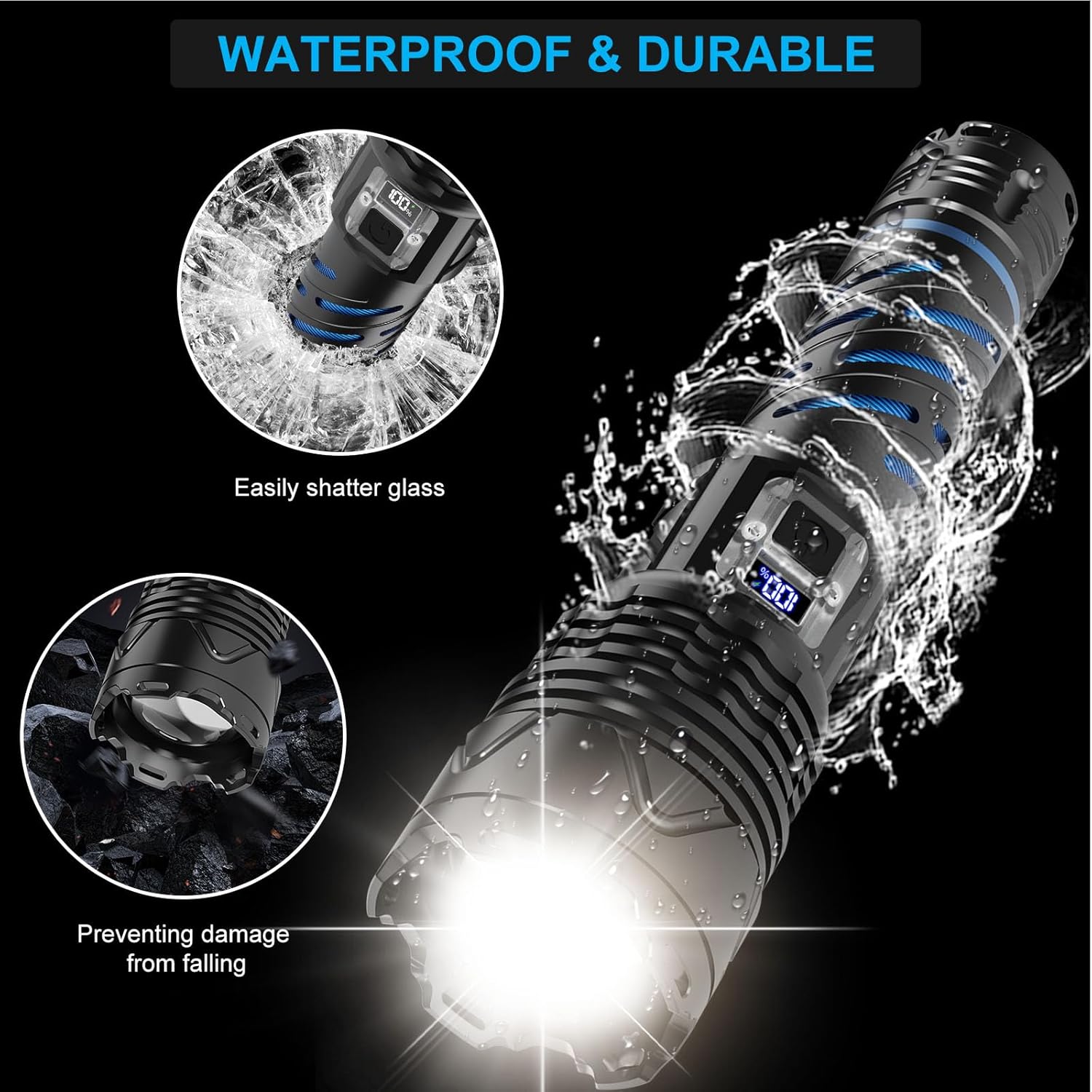
Image: Illustrations showing the Karrong flashlight's durability. One image depicts water splashing over the flashlight, indicating its waterproof nature. Another shows the flashlight on a rocky surface, highlighting its drop-proof design.
Troubleshooting
| Problem | Possible Cause | Solution |
|---|---|---|
| Flashlight does not turn on. | Battery is depleted. | Charge the battery fully. |
| Battery inserted incorrectly. | Ensure the battery's positive (+) end faces the flashlight head. | |
| Tail cap is loose. | Tighten the tail cap securely. | |
| Light is dim or flickers. | Low battery charge. | Recharge the battery. |
| Dirty lens. | Clean the flashlight lens with a soft cloth. | |
| Flashlight not charging. | Charging cable or adapter faulty. | Try a different USB Type-C cable or power adapter. |
| Charging port obstructed. | Check the USB Type-C port for debris and clean gently if necessary. |
Specifications
| Feature | Detail |
|---|---|
| Model | 001 |
| Light Source | LED |
| Brightness | Up to 1000 Lumens |
| Beam Distance | Up to 1500 meters |
| Lighting Modes | High, Medium, Low, Strobe, SOS (5 modes) |
| Special Features | Zoomable, Rechargeable, Power Bank Function, Digital Power Display |
| Power Source | 1 x 5000mAh Lithium-Ion Battery |
| Charging Port | USB Type-C (Input/Output) |
| Material | Aviation-grade Aluminum Alloy |
| Water Resistance | IPX6 (Waterproof) |
| Dimensions (Approx.) | Length: 7.48 inches (19 cm), Head Diameter: 2.17 inches (5.5 cm), Body Diameter: 1.34 inches (3.4 cm) |
| Weight (Approx.) | 1.17 pounds (0.53 kg) |

Image: A diagram illustrating the dimensions of the Karrong flashlight, showing a length of 7.48 inches, a head diameter of 2.17 inches, and a body diameter of 1.34 inches.
Warranty and Support
Karrong products are designed for reliability and performance. If you encounter any issues or have questions regarding your Karrong Rechargeable Flashlight Model 001, please contact our customer service team.
For assistance, refer to the contact information provided with your purchase or visit the official Karrong website. Please have your model number (001) and purchase details ready when contacting support.
We are committed to providing a satisfactory answer to any inquiries.
Ask a question about this manual
Ask about setup, troubleshooting, compatibility, parts, safety, or missing instructions. Manuals+ will review the question and use this page’s manual context to help answer it.