
1. Introduction
Thank you for choosing the Lonnky DC Extension Cable. This manual provides essential information for the proper setup, operation, and maintenance of your 5-meter DC extension cables. These cables are designed to extend the reach of power adapters for various electronic devices requiring a 2.1mm x 5.5mm DC connector.
The package includes two 5-meter white DC extension cables and two additional female DC connectors for flexible installation options.

Image 1: Lonnky 5M DC Extension Cable (2-Pack) with included accessories.
2. Product Features
- Premium Material: Constructed with pure copper for low resistance and enhanced conductivity, ensuring stable power transmission.
- Standard Connectors: Features 2.1mm x 5.5mm DC male and female connectors for easy plug-and-play installation.
- Wide Compatibility: Suitable for a broad range of devices including security cameras, LED strips, routers, and more, that utilize 2.1mm x 5.5mm DC power inputs.
- Flexible Installation: Includes two additional female DC connectors for versatile wiring configurations.
- Durable Design: PVC insulation jacket provides protection and durability.

Image 2: DC Adapter Output Size and Polarity Diagram. This image illustrates the precise dimensions (5.5mm outer, 2.1mm inner) of the DC connector and indicates that the inner pin is positive (+), while the outer barrel is negative (-).
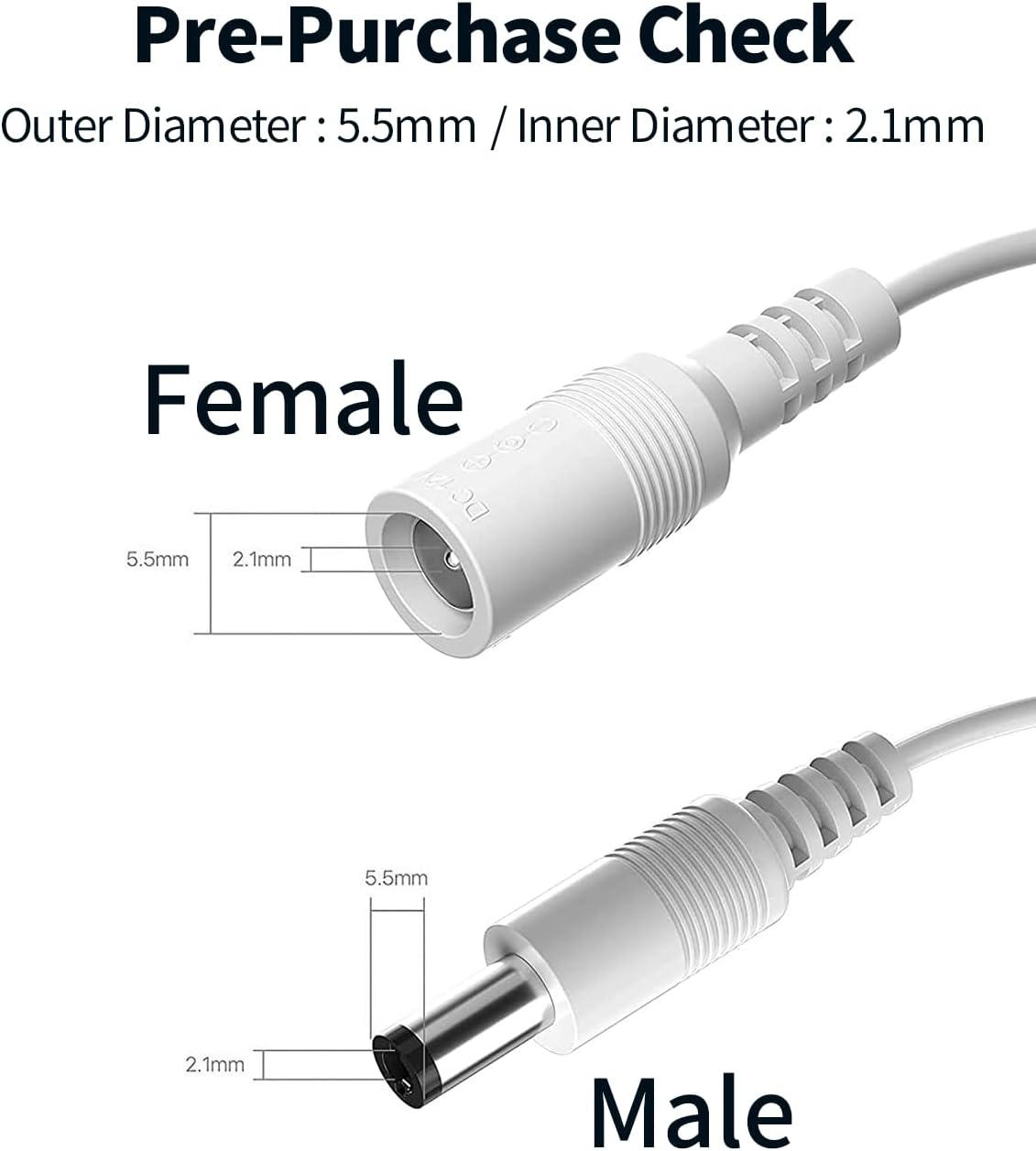
Image 3: Pre-Purchase Check for Connector Dimensions. This image highlights the outer diameter (5.5mm) and inner diameter (2.1mm) for both female and male DC connectors, crucial for ensuring compatibility before purchase.

Image 4: Wide Range of Applications. This diagram illustrates the versatility of the cable, showing its use with various devices such as security cameras, DVRs, routers, and LED lights.

Image 5: Wire Material and Quality. This diagram shows a cross-section of the cable, detailing the PVC insulation jacket and the high-quality copper wires inside, emphasizing stable transmission.
3. Setup and Installation
- Verify Compatibility: Before connecting, ensure your device's power input requires a 2.1mm x 5.5mm DC connector. Refer to your device's manual for specific power requirements.
- Connect the Extension Cable:
- Plug the male end of the Lonnky DC extension cable into the female output of your power adapter.
- Plug the female end of the Lonnky DC extension cable into the male input of your electronic device.
- Using Multiple Cables (Optional): For longer distances, multiple Lonnky extension cables can be connected in series. Ensure that the total length does not cause significant voltage drop, which could affect device performance.
- Using Included Female DC Connectors: The package includes two female DC connectors. These can be used to create custom connections or adapt existing wiring to the 2.1mm x 5.5mm standard.
- Unscrew the terminal blocks on the female DC connector.
- Insert the positive (+) and negative (-) wires from your custom wiring into the corresponding terminals.
- Tighten the screws to secure the wires.

Image 6: Connecting Multiple Extension Cables. This image demonstrates how several extension cables can be linked together to extend the reach of a power adapter to a device.
4. Operating Instructions
Once properly connected, the Lonnky DC Extension Cable functions as a passive extension for your device's power supply. No special operation is required beyond ensuring secure connections.
- Ensure all connections are firm to prevent power interruptions.
- Avoid excessive bending or kinking of the cable, especially near the connectors, to maintain cable integrity and prevent damage.
- Confirm that the power adapter is plugged into a functional power outlet.

Image 7: Close-up of DC Male and Female Connectors. This image provides a detailed view of the male plug and female jack, highlighting their construction for secure connections.

Image 8: Cable Bend Lifespan Test. This diagram illustrates the durability of the cable, indicating it can withstand over 10,000 bends, demonstrating its robust design.
5. Maintenance and Care
- Cleaning: Use a dry, soft cloth to wipe the cable and connectors. Do not use liquid cleaners or solvents.
- Storage: When not in use, coil the cable loosely. Avoid tight coiling or kinking, which can damage the internal wires. Store in a cool, dry place away from direct sunlight and extreme temperatures.
- Inspection: Periodically inspect the cable for any signs of wear, cuts, or damage to the insulation. If damage is observed, discontinue use and replace the cable.
- Environmental Conditions: While the cable is durable, avoid exposing it to harsh weather conditions or environments with excessive moisture or dust unless specifically rated for such use.
6. Troubleshooting
| Problem | Possible Cause | Solution |
|---|---|---|
| Device not receiving power. | Loose connection, incompatible connector size, faulty power adapter, excessive cable length causing voltage drop. |
|
| Intermittent power to device. | Loose connection, damaged cable, internal wire breakage. |
|
| Cable or connectors feel warm. | Overload (device drawing too much current), faulty cable. |
|
7. Specifications
| Feature | Detail |
|---|---|
| Brand | Lonnky |
| Model Number | DC-L25MLED-W-CA |
| Color | White |
| Cable Length | 5 Meters (each cable) |
| Connector Type | DC Barrel Jack (Male to Female) |
| Connector Dimensions | 2.1mm Inner Diameter, 5.5mm Outer Diameter |
| Material | Polychlorure de vinyle (PVC) jacket, Pure Copper wire |
| Number of Conductors | 2 |
| Voltage Compatibility | 12 Volts (typical for DC barrel jacks, but check device requirements) |
| Compatible Devices | TP-Link TAPO WiFi IP Cameras, Reolink Cameras, IMOU 2MP PTZ Camera, Routers & Repeaters, Robot Vacuum Charging Stations, Arduino Boards (e.g., UNO R3, REV 3, Elegoo UNO R3), LED Strips, CCTV Cameras, DVR/NVR, Monitors, Printers. |
8. Warranty and Support
Lonnky products are designed for reliability and performance. For specific warranty information, please refer to the purchase platform or contact Lonnky customer support directly.
If you encounter any issues or have questions regarding the Lonnky DC Extension Cable, please contact our customer support team through the retailer where the product was purchased or visit the official Lonnky website for assistance.
Please have your model number (DC-L25MLED-W-CA) and purchase details ready when contacting support.


