
1. Introduction
This manual provides essential information for the safe installation, operation, and maintenance of the SOBOUR Type A Residual Current Circuit Breaker (RCCB). This device is designed to protect against electric shock by detecting and interrupting residual currents.
The specific model covered in this manual is a 4-pole RCCB with a rated current of 16 Amps and a rated residual operating current of 30mA, suitable for 400V~ 50/60Hz systems.
2. Product Features
- Type A RCCB: Detects both sinusoidal alternating residual currents and pulsating direct residual currents.
- High Sensitivity: 30mA rated residual operating current provides supplementary protection against electric shock.
- Electromagnetic Type: Ensures reliable operation.
- 4-Pole Design: Suitable for three-phase electrical systems with a neutral conductor.
- Test Button: Allows for periodic functional testing of the device.
- Isolation Function: Equipped with an ON-OFF indicating device, suitable for isolation purposes.
3. Safety Information
WARNING: Electrical installation should only be performed by qualified and licensed electricians. Failure to follow these instructions can result in serious injury or death.
- This RCCB is a supplementary protective device. It should be used in conjunction with other protective devices.
- The RCCB provides protection against electric shock resulting from direct contact with protected lines or leakage current between these lines. It does not protect against electric shock from direct contact with both protected lines simultaneously.
- To prevent potential surge voltage and current at the power input side, it is recommended to install particular devices such as surge protective devices or surge arresters upstream of the RCCB.
- Ensure the power supply is completely disconnected before any installation or maintenance work.
- Verify correct wiring according to the diagram provided on the device and in this manual.
4. Specifications
| Parameter | Value |
|---|---|
| Brand | SOBOUR |
| Model Series | TORD4-63 |
| Number of Poles | 4 |
| Rated Current (In) | 16 Amps |
| Rated Residual Operating Current (IΔn) | 30mA |
| Rated Voltage (Un) | 400V~ |
| Rated Frequency | 50/60Hz |
| Rated Short-Circuit Capacity (Icn) | 6KA |
| Rated Residual Breaking Capacity (IΔm) | 6KA |
| Circuit Breaker Type | Standard, Type A |
| Item Weight | 1.1 Pounds (approximately 0.5 kg) |
| UPC | 883323006153 |
5. Installation and Setup
The SOBOUR RCCB is designed for DIN rail mounting in electrical distribution boards. Adhere strictly to local electrical codes and regulations.
5.1 Wiring Instructions
Refer to the wiring diagram printed on the device itself for precise connections. The general principles are:
- Power Supply: Must enter from the top terminals of the RCCB.
- Load Output: Must exit from the bottom terminals of the RCCB.
- Neutral and Live Lines: The neutral line (N) should be connected to the left-most terminal, and the live lines (L1, L2, L3) to the right terminals, as indicated on the device.
Ensure all terminal screws are tightened to the manufacturer's specified torque to prevent loose connections and overheating.

Figure 1: Front view of the SOBOUR 4-pole RCCB, showing the test button, ON/OFF switch, and terminal markings. The device clearly displays its specifications including rated current (In 16A), rated residual operating current (IΔn 30mA), rated voltage (Un 400V~), and breaking capacity (Icn=IΔm=6KA).

Figure 2: Angled front view of the SOBOUR 4-pole RCCB, providing a clearer perspective of the top and bottom terminals and the overall compact design for DIN rail mounting.
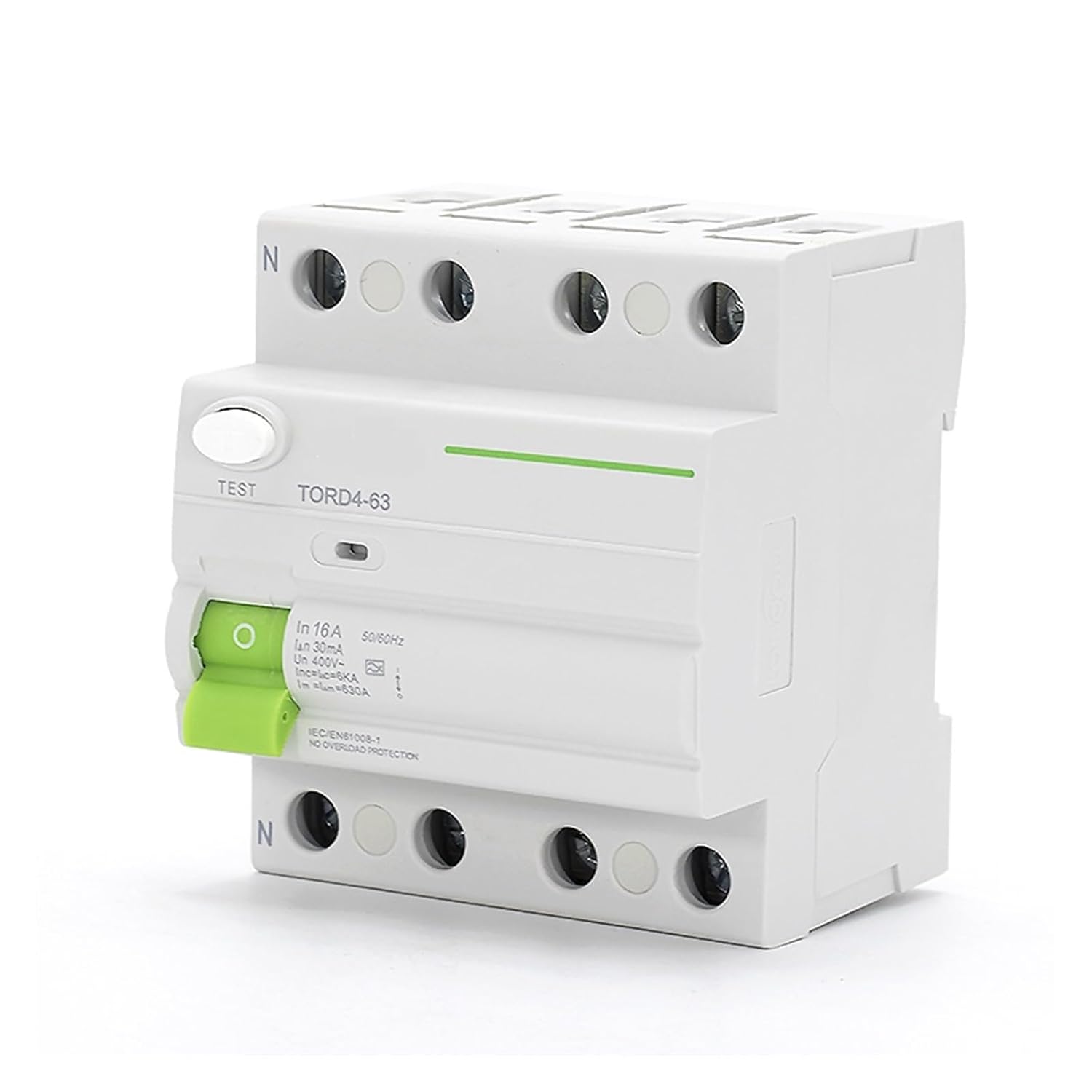
Figure 3: Side view of the SOBOUR 4-pole RCCB, highlighting the mechanism for attaching the device to a standard DIN rail within an electrical panel.

Figure 4: Rear view of the SOBOUR 4-pole RCCB, illustrating the robust terminal connections for secure wiring of the incoming power and outgoing load.

Figure 5: Bottom view of the SOBOUR 4-pole RCCB terminals, showing the connection points for the load side of the circuit.
6. Operation
6.1 Switching On/Off
To switch the RCCB ON, push the green lever upwards. To switch it OFF, push the lever downwards. In case of a fault, the lever will automatically trip to the OFF position.
6.2 Test Function
The RCCB is equipped with a 'TEST' button. This button simulates a residual current fault to verify the proper functioning of the tripping mechanism. It is recommended to press the 'TEST' button periodically (e.g., monthly) to ensure the device is operating correctly. If the RCCB does not trip when the test button is pressed, it should be replaced immediately.
7. Maintenance
The SOBOUR Type A RCCB is designed for household and similar applications and is considered suitable for non-professional operation. No specific maintenance is required for the device itself under normal operating conditions. However, regular visual inspections for any signs of damage or overheating are recommended. Always ensure the test button is operated periodically as described in the Operation section.
8. Troubleshooting
- RCCB Trips Frequently: This indicates a persistent residual current fault in the circuit. Do not repeatedly reset the RCCB without investigating the cause. Common causes include faulty appliances, damaged wiring insulation, or moisture ingress. Consult a qualified electrician to identify and rectify the fault.
- RCCB Does Not Trip During Test: If pressing the 'TEST' button does not cause the RCCB to trip, the device may be faulty. It must be replaced immediately by a qualified electrician.
- No Power After Reset: Ensure the main circuit breaker upstream of the RCCB is also ON. If power is still not restored, there may be another fault in the system.
9. Warranty and Support
For warranty information, technical support, or service inquiries, please contact your retailer or the manufacturer, SOBOUR. Keep your purchase receipt as proof of purchase.