

1. Introduction
This manual provides detailed instructions for assembling and operating your DONGKER DIY Bluetooth Speaker Kit with FM Radio and LED Indicator. This kit is designed to offer an engaging electronic soldering experience while resulting in a functional multimedia speaker. It supports multiple audio input methods including Bluetooth, AUX, USB, and TF cards, and features an integrated FM radio with automatic station search and power-off memory.

Image: The DONGKER DIY Bluetooth Speaker Kit being used as an educational project, with individuals working on electronics.
2. Safety Instructions
Please read and understand these safety instructions before beginning assembly. Improper handling of electronic components and soldering equipment can lead to injury or damage to the product.
- Soldering Safety: Always use soldering equipment in a well-ventilated area. Wear appropriate eye protection to prevent injury from solder splatter. Avoid touching the hot tip of the soldering iron.
- Electrical Safety: Ensure the power supply is disconnected before making any connections or performing maintenance. Use only the specified power input (5V DC).
- Component Handling: Some electronic components can be sensitive to static electricity. Handle them carefully. Observe polarity for components like LEDs and electrolytic capacitors.
- Small Parts: This kit contains small parts that could be a choking hazard for young children. Keep out of reach of children.
3. Package Contents
Verify that all components listed below are present in your package before starting assembly. If any parts are missing or damaged, please contact customer support.

Image: A layout of all individual components included in the DONGKER DIY Bluetooth Speaker Kit, such as acrylic panels, circuit boards, speakers, resistors, LEDs, cables, and a remote control.
- Acrylic Casing Panels
- Main Control Board (pre-soldered Bluetooth module)
- LED Indicator Board
- Speakers (2x 3W 4ohm)
- Resistors, Capacitors, Diodes
- LEDs (12 colorful)
- Power Switch, DC Power Jack
- Audio Cables (3.5mm AUX)
- Remote Control
- Screws and Fasteners
- User Manual (digital via QR code)
4. Assembly Instructions
Follow these steps carefully to assemble your DONGKER DIY Bluetooth Speaker Kit. A detailed digital manual with images is available via QR code (usually found on the product packaging or a small card within the kit).
4.1 Soldering Components
- Identify all resistors, capacitors, and diodes. Match them to their corresponding positions on the LED indicator board using the provided schematic diagram.
- Solder each component securely to the LED indicator board, ensuring correct polarity for diodes and electrolytic capacitors.
- Solder the 12 colorful LEDs to the LED indicator board, paying attention to their polarity (longer leg is positive).

Image: A schematic diagram illustrating the circuit for the LED spectrum display, showing component connections and values.
4.2 Wiring Connections
- Connect the speakers to the main control board. Ensure correct positive and negative terminals.
- Connect the LED indicator board to the main control board.
- Connect the power switch and DC power jack to the main control board.
- For FM radio functionality, crimp a 15 cm wire into a spring shape to create an FM antenna and connect it to the designated FM antenna port on the main control board.

Image: A detailed wiring diagram showing how to connect the main control board, speakers, power switch, and DC jack. The Bluetooth-compatible module board is pre-soldered.
4.3 Casing Assembly
- Carefully mount the assembled circuit boards and speakers into the acrylic casing panels.
- Secure all panels using the provided screws and fasteners. Ensure all connections are firm and no wires are pinched.
5. Operating Instructions
Once assembled, your DONGKER DIY Bluetooth Speaker Kit is ready for use. It offers multiple playback modes and features.
5.1 Power On/Off
- Connect the speaker to a 5V DC power source using the provided DC power jack.
- Flip the power switch to the 'ON' position to power on the device. The LED indicator lights will illuminate.
5.2 Mode Selection
Press the 'MODE' button on the front panel or the remote control to cycle through the available input modes: Bluetooth (BT), FM Radio, AUX, USB, and TF Card.

Image: The DONGKER DIY Bluetooth Speaker Kit displaying icons for its five input and play modes: Bluetooth, FM Radio, AUX, USB, and TF Card.
5.3 Bluetooth Mode (BT)
- Select 'BT' mode. The display will show 'bt' and the Bluetooth indicator will flash.
- On your smartphone or tablet, search for Bluetooth devices and select 'JQ-BT' to pair.
- Once paired, the Bluetooth indicator will stop flashing, and you can play audio from your device.
5.4 FM Radio Mode
- Select 'FM' mode. The display will show the current frequency.
- Press the 'Play/Pause' button to initiate an automatic station search. The radio will scan and save available stations.
- Use the 'Previous' and 'Next' buttons to navigate through saved stations.
- The radio features a power-off memory function, retaining the last channel settings even after being powered off.
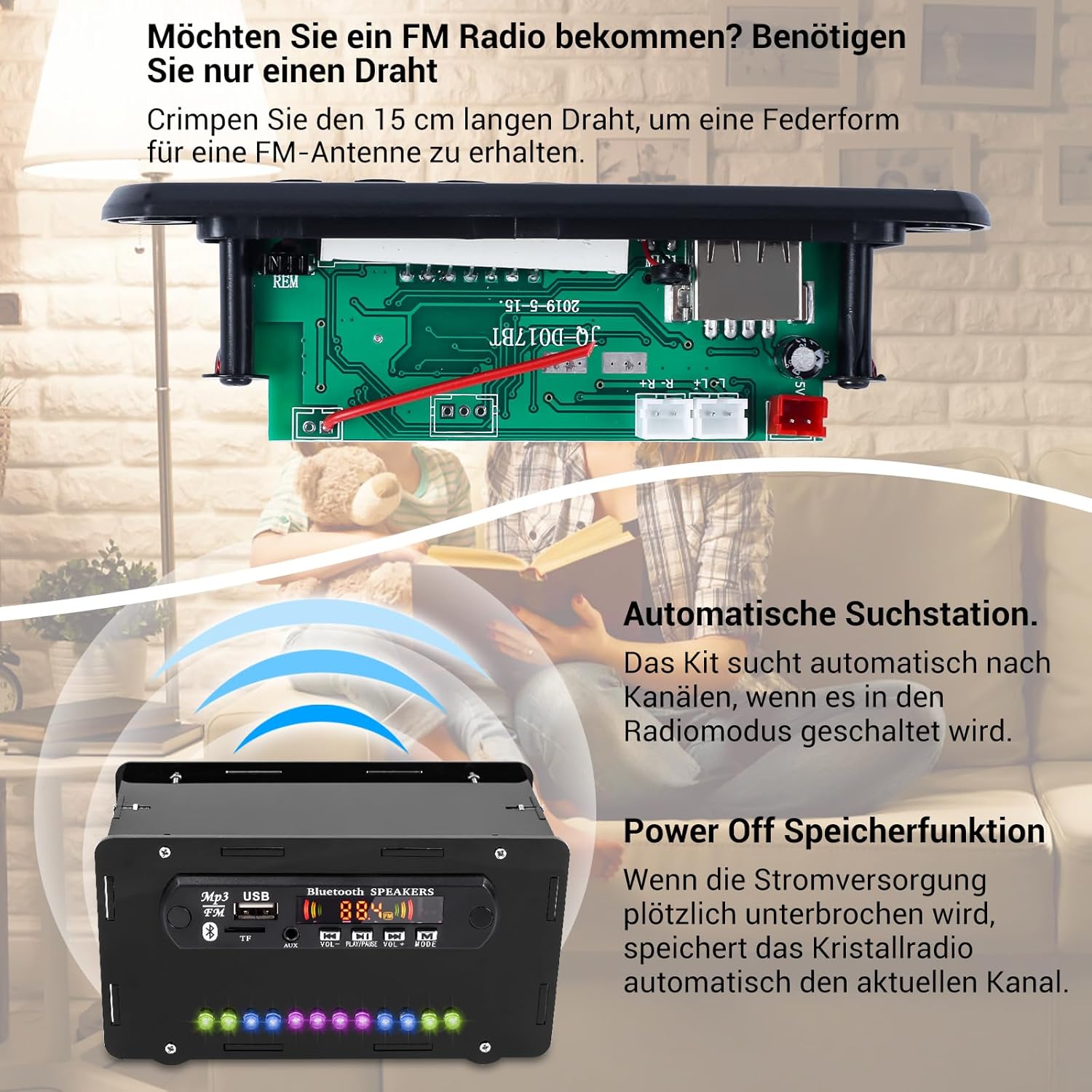
Image: An illustration detailing the FM radio features, including how to create a simple wire antenna, the automatic station search function, and the power-off memory feature.
5.5 AUX Input Mode
- Select 'AUX' mode. The display will show 'AUX'.
- Connect your audio device (e.g., smartphone, MP3 player) to the speaker's 3.5mm AUX input jack using the provided audio cable.
- Play audio from your connected device.
5.6 USB and TF Card Modes
- Insert a USB flash drive into the USB port or a TF (microSD) card into the TF card slot.
- The speaker will automatically switch to USB or TF card mode and begin playing audio files.
- Use the 'Previous', 'Next', and 'Play/Pause' buttons to control playback.

Image: Close-up images of the USB port, TF card slot, and AUX input jack on the speaker's control panel.
5.7 Volume Control and Display
- Use the 'VOL-' and 'VOL+' buttons on the front panel or remote control to adjust the volume.
- The digital display shows various information depending on the mode, including Bluetooth status ('bt'), FM frequency ('87.5 FM'), channel number ('P06'), and volume level ('V08').

Image: The DONGKER DIY Bluetooth Speaker Kit's digital display showing examples of its five display modes: BT Display, FM Display, Channel Display, Volume Display, and AUX Display.
5.8 LED Indicator Lights
The 12 colorful LED lights on the front panel provide a visual effect that reacts to the audio playback.
6. Maintenance
- Cleaning: Use a soft, dry cloth to clean the exterior of the speaker. Do not use liquid cleaners or solvents.
- Storage: Store the speaker in a cool, dry place away from direct sunlight and extreme temperatures.
- Avoid Moisture: This device is not waterproof. Keep it away from water and high humidity.
7. Troubleshooting
- No Power: Ensure the power adapter is correctly connected and the power switch is in the 'ON' position. Check the power source.
- No Sound: Check the volume level on both the speaker and your connected device. Ensure the correct input mode is selected. Verify all speaker wiring connections.
- Bluetooth Not Connecting: Ensure the speaker is in 'BT' mode and discoverable. Turn off and on Bluetooth on your device, then try pairing again. Make sure no other device is currently connected to the speaker.
- Poor FM Reception: Ensure the FM antenna wire is properly connected and positioned. Try moving the speaker to a different location to improve signal.
- USB/TF Card Not Playing: Ensure the USB drive or TF card is inserted correctly. Verify that the audio files are in a compatible format (e.g., MP3).
8. Specifications
| Brand | DONGKER |
| Model Name | Kit de construcción de altavoces Bluetooth (Bluetooth Speaker Building Kit) |
| Model Number | SF20250910B0CGWPMP2X |
| Speaker Type | Multimedia |
| Connectivity Technology | USB, Bluetooth |
| Wireless Communication Technology | Bluetooth |
| Special Feature | Stereo Setup, LED Indicator |
| Recommended Uses | For smartphone or tablet |
| Compatible Devices | Smartphones or tablets |
| Color | Black |
| Components Included | Remote Control |
| Product Dimensions (L x W x H) | 5 x 16 x 5 cm |
| Item Weight | 380 grams |
| Maximum Range | 10 Meters |
| Control Method | Remote Control |
| Speaker Size | 3.5 Millimeters |
| Power Source | Battery Powered (requires 5V DC input) |
| Max Speaker Output Power | 10 Watts |
| Frequency Response | 108 MHz (FM Radio) |
| Audio Output Mode | Stereo |
| Input Voltage | 5 Volts (DC) |
| Mounting Type | Tabletop Mount |
| Material | Plastic |
9. Warranty and Support
This DONGKER DIY Bluetooth Speaker Kit is intended for educational and hobbyist use. While care has been taken to ensure component quality, successful assembly and operation depend on the user's soldering skills and adherence to instructions.
For any questions regarding missing components, damaged parts upon arrival, or technical assistance with the assembly process, please contact DONGKER customer support through your purchase platform. Please have your order number and product model information ready.