
Urbanista 1037551
Urbanista Malibu Small Solar Bluetooth Speaker User Manual
Model: 1037551 | Brand: Urbanista
Introduction
The Urbanista Malibu is a portable Bluetooth speaker designed for outdoor and indoor use, featuring integrated Powerfoyle solar cell technology for continuous charging. It offers robust sound, IP67 dust and waterproof rating, and dual pairing capabilities for an enhanced audio experience. This manual provides essential information for setting up, operating, maintaining, and troubleshooting your Malibu speaker.

Figure 1: Urbanista Malibu Speaker Overview
The image displays the Urbanista Malibu speaker in black, showcasing its compact, rounded design with a textured speaker grille and a smooth top surface that integrates the Powerfoyle solar panel. Control buttons are visible on the top edge.
Key Features
- Solar Charging: Equipped with Powerfoyle solar cell technology for continuous charging from indoor and outdoor light.
- IP67 Rated: Fully dust and waterproof, making it suitable for various environments including beaches, pools, and outdoor adventures.
- Bluetooth 5.2: Ensures stable and efficient wireless connectivity with compatible devices.
- Stereo Link Function: Allows pairing two Malibu speakers for a true stereo sound experience.
- Urbanista App Control: Provides access to EQ settings, battery status, and charging performance data.
- Durable Design: Constructed with recycled plastic and materials, featuring a rugged build and integrated wrist strap for portability.
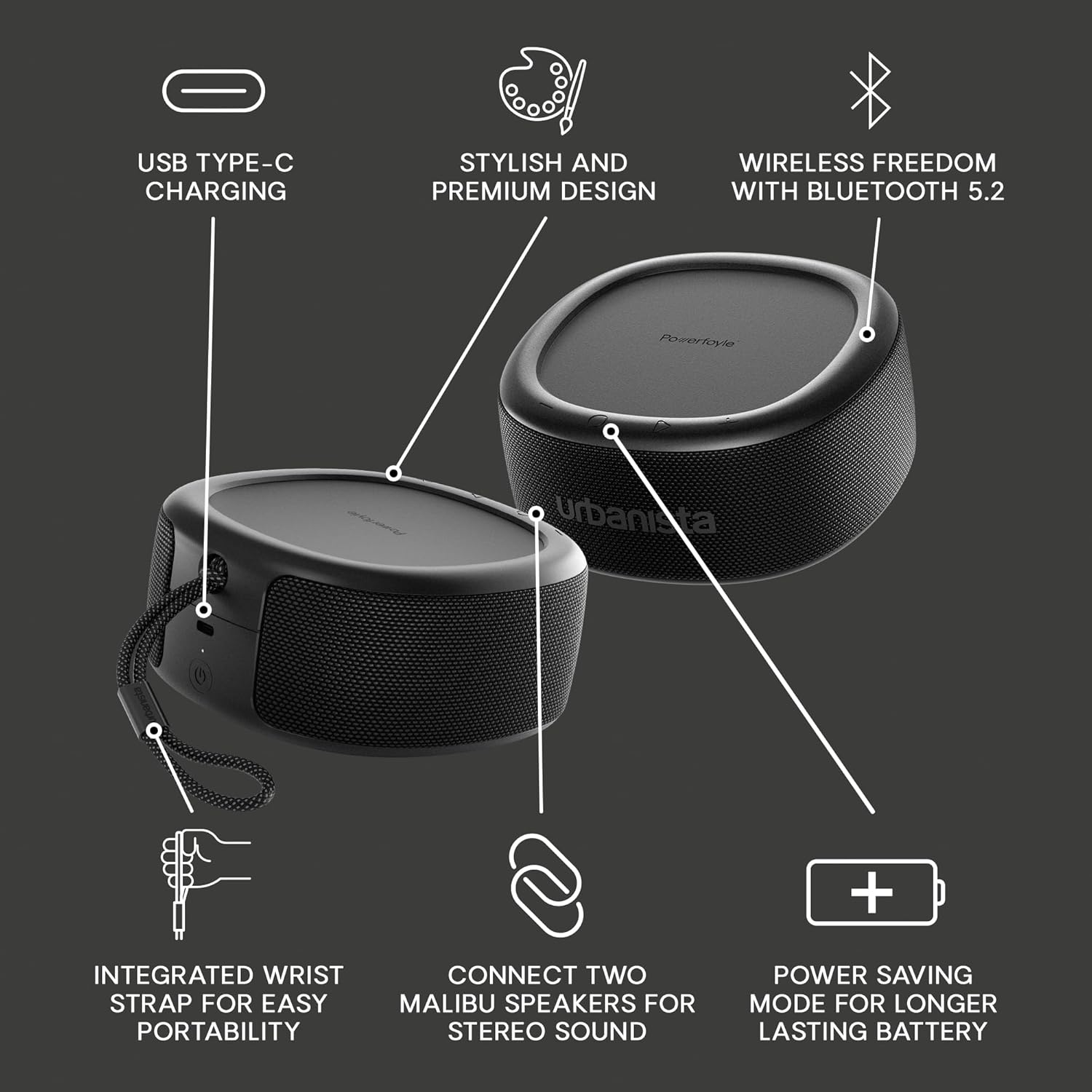
Figure 2: Malibu Speaker Feature Overview
This diagram illustrates the various features of the Malibu speaker, including USB Type-C charging, stylish design, Bluetooth 5.2 wireless freedom, integrated wrist strap, the ability to connect two speakers for stereo sound, and a power-saving mode.
Setup
1. Initial Charging
Before first use, it is recommended to fully charge your Urbanista Malibu speaker using the included USB-C cable. Connect the USB-C end to the speaker's charging port and the other end to a compatible USB power adapter (not included). The charging indicator light will provide feedback on the charging status.
2. Powering On/Off
To power on the speaker, press and hold the power button located on the side until you hear an audible prompt or see the indicator light illuminate. To power off, press and hold the power button again until the speaker shuts down.
3. Bluetooth Pairing
- Ensure the speaker is powered on and in pairing mode (indicated by a flashing LED). If not, press and hold the Bluetooth button.
- On your device (smartphone, tablet, etc.), go to Bluetooth settings.
- Select "Urbanista Malibu" from the list of available devices.
- Once connected, the speaker will provide an audible confirmation, and the LED indicator will turn solid.
4. Urbanista Audio App
For enhanced control and features, download the Urbanista Audio App from your device's app store. The app allows you to monitor solar charging performance, check battery levels, and customize sound settings via an equalizer.

Figure 3: Urbanista App Integration
This image shows the Urbanista Malibu speaker alongside a smartphone running the Urbanista app, demonstrating how users can monitor charging performance and battery levels, as well as change EQ settings to personalize their sound.
Operating Instructions
Basic Controls
| Button/Function | Action |
|---|---|
| Power Button | Press and hold to Power On/Off. |
| Volume Up (+) | Press to increase volume. |
| Volume Down (-) | Press to decrease volume. |
| Play/Pause Button | Press to Play/Pause audio. Double-press for next track. Triple-press for previous track. |
| Bluetooth Button | Press and hold to enter Bluetooth pairing mode. |
Solar Charging
The Malibu speaker features an integrated Powerfoyle solar panel on its top surface. For optimal charging, expose the speaker to direct sunlight or strong indoor light. The speaker will continuously charge as long as it is exposed to light, extending its playtime. Monitor charging efficiency via the Urbanista Audio App.

Figure 4: Solar Charging Capability
This image illustrates the speaker's solar charging feature, showing it being held outdoors with sunlight illuminating its top panel, emphasizing its "Light Powered" functionality.
Stereo Link Function (Dual Pairing)
To achieve a wider soundstage and true stereo audio, you can pair two Urbanista Malibu speakers together:
- Ensure both Malibu speakers are powered on and not connected to any other Bluetooth device.
- On one speaker (this will be your primary speaker), press and hold the Bluetooth button until it enters pairing mode.
- Quickly double-press the Bluetooth button on the primary speaker. It will then search for another Malibu speaker.
- Once connected, both speakers will provide an audible confirmation, and their LEDs will indicate a successful stereo link.
- Now, connect your audio source device to the primary Malibu speaker via Bluetooth as usual.

Figure 5: Dual Speaker Pairing
This image shows two Urbanista Malibu speakers positioned near a pool, illustrating the dual speaker support feature for achieving stereo sound.
Maintenance
Cleaning
Due to its IP67 rating, the Malibu speaker can be rinsed with water to clean off dirt, sand, or dust. Use a soft, damp cloth for general cleaning. Do not use harsh chemicals or abrasive cleaners, as these may damage the speaker's finish or solar panel.
Storage
Store the speaker in a cool, dry place away from extreme temperatures. While the solar panel charges in various light conditions, prolonged storage in complete darkness may lead to battery depletion over time. For long-term storage, ensure the battery is at least 50% charged.

Figure 6: IP67 Water and Dust Protection
This image shows the Urbanista Malibu speaker near a pool, highlighting its IP67 dust and waterproof rating, signifying its durability and suitability for outdoor use.
Troubleshooting
| Problem | Possible Cause | Solution |
|---|---|---|
| Speaker does not power on. | Low or no battery charge. | Charge the speaker using the USB-C cable. Ensure the power adapter is working. |
| Cannot pair via Bluetooth. | Speaker not in pairing mode; device too far; interference. | Ensure speaker is in pairing mode (flashing LED). Move device closer. Turn off other Bluetooth devices. Try restarting both speaker and device. |
| No sound or low volume. | Volume too low; device not connected; audio source issue. | Increase volume on both speaker and connected device. Verify Bluetooth connection. Check audio source playback. |
| Solar charging not effective. | Insufficient light exposure; dirty solar panel. | Place speaker in direct sunlight or strong artificial light. Clean the solar panel surface. Use the Urbanista app to monitor charging performance. |
| Stereo Link not working. | Incorrect pairing procedure; speakers too far apart. | Ensure both speakers are disconnected from other devices. Follow the Stereo Link instructions precisely. Keep speakers within close proximity during pairing. |
Specifications
| Feature | Detail |
|---|---|
| Model Name | Malibu |
| Model Number | 1037551 |
| Connectivity Technology | Bluetooth 5.2 |
| Power Source | Solar Powered (Powerfoyle), USB-C |
| Speaker Maximum Output Power | 20 Watts (2x10W) |
| Water Resistance Level | IP67 (Dustproof and Waterproof) |
| Battery Life | Up to 20 hours (plus solar extension) |
| Product Dimensions | 6.69"D x 2.76"W x 2.76"H |
| Item Weight | 2.4 pounds |
| Material | Recycled Plastic |
Official Product Video
Video 1: Urbanista Malibu - Solar Powered Waterproof Speaker
This official product video from Urbanista showcases the key features of the Malibu speaker, including its solar charging capabilities, IP67 waterproof design, and portability, demonstrating its use in various outdoor settings.
Warranty and Support
Urbanista products are covered by a limited warranty. For detailed warranty information, product registration, and technical support, please visit the official Urbanista website or contact their customer service. Keep your proof of purchase for warranty claims.
For further assistance, you may also refer to the Urbanista Brand Store on Amazon.
Ask a question about this manual
Ask about setup, troubleshooting, compatibility, parts, safety, or missing instructions. Manuals+ will review the question and use this page’s manual context to help answer it.