
Introduction
This manual provides detailed instructions for the assembly, operation, and maintenance of your HOMCOM 63-inch 2-Door Kitchen Pantry Storage Cabinet. Please read all instructions carefully before assembly and use to ensure safe and proper functionality.

Image: The HOMCOM 63-inch 2-Door Kitchen Pantry with its doors closed, positioned in a room next to a plant.
Safety Information
Your safety is paramount. Please adhere to the following guidelines:
- Always follow assembly instructions precisely.
- Ensure all hardware is securely fastened before use.
- This cabinet includes an anti-tipping strap. It is crucial to fix the cabinet to the wall using this strap to prevent accidental tipping, especially in households with children or pets.
- Do not overload shelves. Refer to the 'Specifications' section for weight limits.
- Keep small parts away from children during assembly.

Image: A close-up diagram illustrating the proper installation of the anti-tipping strap to secure the cabinet to a wall.
Package Contents
Before beginning assembly, verify that all components are present and undamaged. If any parts are missing or damaged, contact HOMCOM customer support.
- Cabinet panels (various sizes)
- Shelves (5 total, 2 adjustable)
- Hardware pack (screws, dowels, hinges, handles, anti-tipping strap)
- Assembly instructions (this manual)
Setup and Assembly Instructions
Assembly is required for this product. A Phillips head screwdriver is the only tool generally needed. Please refer to the detailed diagrams in your physical assembly manual for specific steps.
- Unpack and Identify Parts: Carefully remove all components from the packaging. Lay them out on a clean, soft surface to prevent scratches. Refer to the included parts list (if provided separately) to identify each piece.
- Assemble the Frame: Follow the step-by-step diagrams in your physical manual to connect the side panels, top, and bottom panels. Ensure all cam locks and screws are tightened.
- Install Shelves: Insert shelf pins into the desired holes for the fixed shelves. For the two adjustable shelves, you can customize their height. Refer to the 'Operating Instructions' for details on adjusting shelves.
- Attach Back Panel: Secure the back panel to the cabinet frame using the provided fasteners.
- Install Doors: Attach the hinges to the doors and then to the cabinet frame. Ensure doors align properly. Minor adjustments can be made to the hinges if doors are not flush (see 'Troubleshooting').
- Attach Handles: Secure the black metal handles to the doors.
- Install Anti-Tipping Strap: This is a critical safety step. Securely attach the anti-tipping strap to the back of the cabinet and then to a wall stud using appropriate hardware.

Image: A diagram illustrating the three-level adjustability of the shelves within the pantry cabinet.
Operating Instructions
This section details how to effectively use your HOMCOM Kitchen Pantry.
- Accessing Storage: Open the two front doors to access the five tiers of shelving.
- Adjusting Shelves: The two adjustable shelves can be repositioned to accommodate items of varying heights. To adjust, carefully remove items from the shelf, lift the shelf, remove the shelf pins, reposition the pins to the desired height, and then place the shelf back on the pins.
- Cleaning: Wipe surfaces with a soft, damp cloth. Avoid abrasive cleaners.

Image: The interior of the pantry cabinet, showcasing its five tiers of shelving filled with kitchen and dining items.
Maintenance
Regular maintenance will prolong the life of your pantry cabinet.
- Cleaning: Dust regularly with a soft, dry cloth. For spills, wipe immediately with a damp cloth and dry thoroughly. Avoid harsh chemicals or abrasive cleaning materials.
- Hardware Check: Periodically check all screws and fasteners to ensure they remain tight. Retighten as necessary.
- Door Alignment: If doors become misaligned over time, refer to the 'Troubleshooting' section for hinge adjustment instructions.
Troubleshooting
This section addresses common issues you might encounter.
| Problem | Possible Cause | Solution |
|---|---|---|
| Cabinet feels wobbly | Loose fasteners; uneven floor | Ensure all screws are tightened. Use shims under the base if the floor is uneven. Verify anti-tipping strap is securely installed. |
| Doors do not align or close properly | Hinges require adjustment; improper installation | Adjust the hinges using a Phillips screwdriver. Most hinges allow for up/down, front/back, and left/right adjustments. Refer to the hinge diagram. |
| Shelves are not level | Shelf pins not inserted correctly | Remove items, lift the shelf, and re-insert shelf pins ensuring they are fully seated in corresponding holes on both sides. |

Image: A diagram detailing the three types of adjustments (up/down, front/back, left/right) possible with the cabinet hinges to ensure proper door alignment.
Specifications
Refer to the following specifications for your HOMCOM Kitchen Pantry:
- Model Number: 835-540BN
- Overall Dimensions: 23.5" W x 15.75" D x 63" H
- Weight Capacity (Overall): 88 lbs.
- Weight Capacity (Each Shelf): 11 lbs.
- Number of Shelves: 5 (2 adjustable)
- Material: Engineered Wood
- Color: Brown
- Mounting Type: Freestanding (with anti-tipping strap for wall attachment)
- Assembly Required: Yes
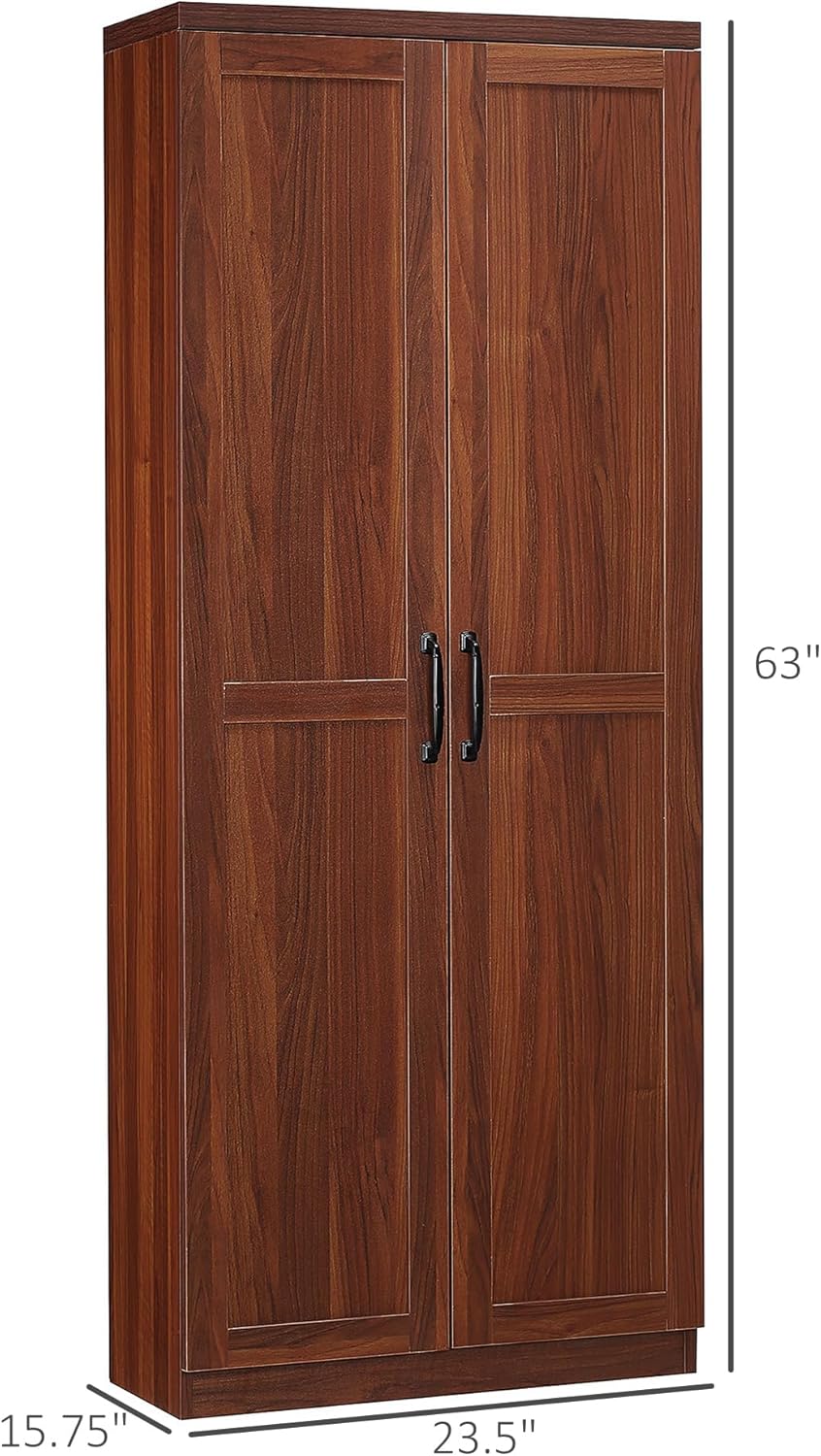
Image: A visual representation of the pantry cabinet with its height (63"), width (23.5"), and depth (15.75") clearly marked.
Warranty and Support
For warranty information or assistance with your HOMCOM product, please refer to the warranty card included with your purchase or visit the official HOMCOM website. You may also contact customer service via the retailer where the product was purchased.
HOMCOM Official Store: https://www.amazon.com/stores/HOMCOM/page/A27FEEF6-8EEC-4816-B1B7-D4E6D0AB8E5D