
1. Introduction
Thank you for choosing the POGOLAB Analog Delay Pedal. This compact and robust pedal is designed to provide warm, natural delay effects for electric guitars, enhancing your sound with rich repetitions. This manual will guide you through the setup, operation, and maintenance of your new pedal, ensuring you get the best performance from it.
2. Product Overview
Key Features
- Analog Delay Sound: Produces warm and natural delay effects.
- Adjustable Repetition Time: Control the delay time with the "TIME" knob.
- Mix Control: Adjust the blend of wet and dry signals using the "MIX" knob.
- Solid Construction: Housed in a durable aluminum alloy casing.
- True Bypass: Ensures signal integrity when the effect is disengaged.
- Compact Design: Mini pedal size for easy integration into any pedalboard.
Controls and Connections
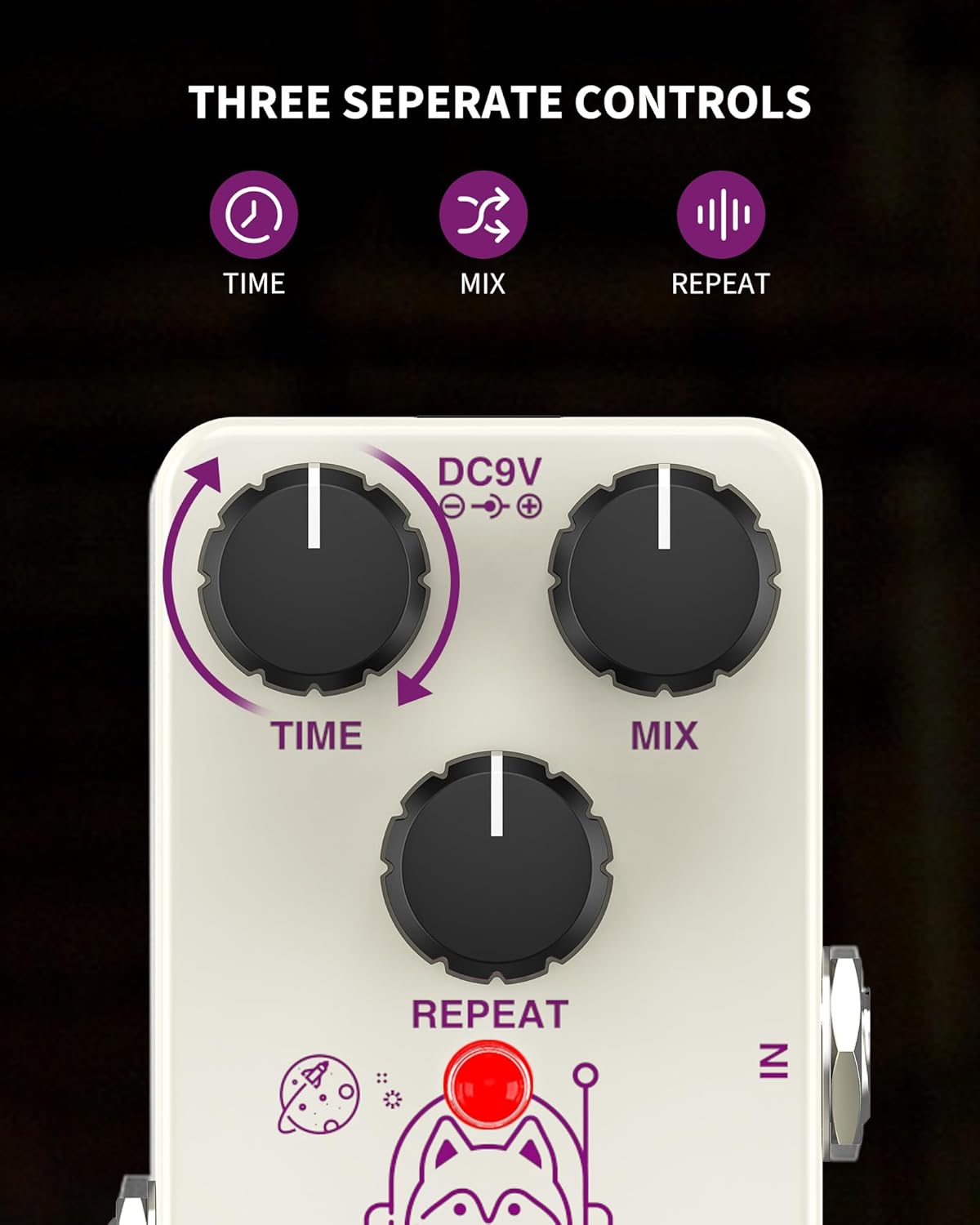
Figure 2.1: Top view of the POGOLAB Analog Delay Pedal showing controls.
- TIME Knob: Adjusts the duration between delay repetitions.
- MIX Knob: Controls the balance between the original (dry) signal and the delayed (wet) signal.
- REPEAT Knob: Determines the number of delay repetitions.
- IN Jack: 1/4 inch input for connecting your guitar or previous effect pedal.
- OUT Jack: 1/4 inch output for connecting to your amplifier or next effect pedal.
- DC 9V Input: Power input for a standard DC 9V (center negative) adapter.
- Footswitch: Engages or disengages the delay effect.

Figure 2.2: POGOLAB Analog Delay Pedal top view.
3. Setup
Connecting Your Pedal
- Ensure your amplifier is turned off or its volume is set to minimum.
- Connect your guitar to the IN jack of the POGOLAB Analog Delay Pedal using a standard 1/4 inch instrument cable.
- Connect the OUT jack of the pedal to your amplifier (or the input of your next effect pedal) using another 1/4 inch instrument cable.
- Connect a DC 9V (center negative) power adapter (not included) to the DC 9V input on the pedal.
- Turn on your amplifier and adjust the volume to a suitable level.

Figure 3.1: Proper connection of the delay pedal in a guitar setup.
4. Operating Instructions
Engaging the Effect
Press the footswitch to toggle the delay effect on or off. The indicator light will illuminate when the effect is active.

Figure 4.1: Engaging the True Bypass footswitch.
Adjusting the Delay Effect
The POGOLAB Analog Delay Pedal allows for versatile sound shaping through its three control knobs:
- TIME: Rotate clockwise to increase the delay time, creating longer intervals between repetitions. Rotate counter-clockwise for shorter, faster delays.
- MIX: Turn clockwise to increase the volume of the delayed signal relative to the dry signal. Turn counter-clockwise to reduce the delayed signal's volume.
- REPEAT: Adjust this knob clockwise to increase the number of repetitions. At higher settings, the pedal can produce self-oscillating feedback for experimental sounds.

Figure 4.2: Visual representation of the delay effect.
Demonstration Videos
Video 4.1: A demonstration on how to use the POGOLAB Analog Delay Pedal, showcasing its sound capabilities and control adjustments.
Video 4.2: A detailed demo of the POGOLAB Mini Guitar Pedal Analog Delay, highlighting its tonal characteristics.
Video 4.3: A demonstration of achieving screaming harmonics on guitar using the POGOLAB Analog Delay Pedal.
5. Specifications
The following are the technical specifications for the POGOLAB Analog Delay Pedal:

Figure 5.1: Technical specifications of the pedal.
| Feature | Specification |
|---|---|
| Power | DC 9V (center negative) |
| Dimensions | 3.62 x 1.93 x 1.85 inches (92x49x46mm) |
| Weight | 6.4 ounces (160g) |
| Input Impedance | 1MΩ |
| Output Impedance | 1KΩ |
| Working Voltage | DC 9V |
| Rated Current Consumption | 12mA |
| Body Material | Aluminum Alloy |
| Connector Type | 1/4 inch audio jack |
| Signal Format | Analog |
6. Troubleshooting
If you encounter any issues with your POGOLAB Analog Delay Pedal, please refer to the following common troubleshooting steps:
- No Sound:
- Check all cable connections (guitar to IN, OUT to amplifier).
- Ensure the power adapter is correctly connected and providing DC 9V (center negative) power.
- Verify that your guitar and amplifier are functioning correctly.
- Confirm the pedal's footswitch is engaged (indicator light on).
- Weak or No Delay Effect:
- Adjust the MIX knob clockwise to increase the delayed signal's presence.
- Adjust the REPEAT knob to increase the number of repetitions.
- Ensure the TIME knob is set to a desired delay duration.
- Unwanted Noise/Hum:
- Use a high-quality, regulated DC 9V (center negative) power supply.
- Ensure all cables are in good condition and properly shielded.
- Try isolating the pedal from other power sources or noisy equipment.
7. What's in the Box
Your POGOLAB Analog Delay Pedal package includes:
- Analog Delay Pedal x 1
8. Warranty and Support
POGOLAB products are designed for reliability and performance. For specific warranty details and support inquiries, please refer to the warranty information provided with your purchase or visit the official POGOLAB store. Keep your purchase receipt as proof of purchase for any warranty claims.
For further assistance, you can visit the POGOLAB Store on Amazon.