Introduction
This manual provides detailed instructions for the TONGVEO PTZ Camera, Model TV-NVMAX-30A. This high-definition camera is designed for professional video conferencing and live streaming, offering versatile connectivity options and advanced features. It is equipped with HDMI, SDI, IP, and USB 2.0 outputs for simultaneous video streaming, supporting POE IEEE802.3a power and IP control. The camera delivers 1080P at 60fps with a 20x optical zoom, making it suitable for various environments including medium to large churches or conference rooms.

Figure 1: TONGVEO PTZ Camera and included IR Remote Control.
Setup and Installation
The TONGVEO PTZ Camera offers multiple installation possibilities to suit various environments. It can be installed on a desktop, mounted on a wall, placed on a monitor, secured on a tripod, or mounted to the ceiling.
Connectivity Options
The camera features a comprehensive set of output ports for flexible integration into your existing setup:
- HDMI Output: For direct connection to a TV or monitor. Plug & Play functionality.
- USB 2.0 Output: For direct connection to a TV or monitor. Plug & Play functionality.
- SDI Output: Allows video transmission up to 100 meters (requires a converter).
- IP (RJ45) Output: Supports IP control and POE (Power over Ethernet) IEEE802.3a for simplified cabling.
- RS485 & RS232 Ports: For joystick control and integration with external control systems.
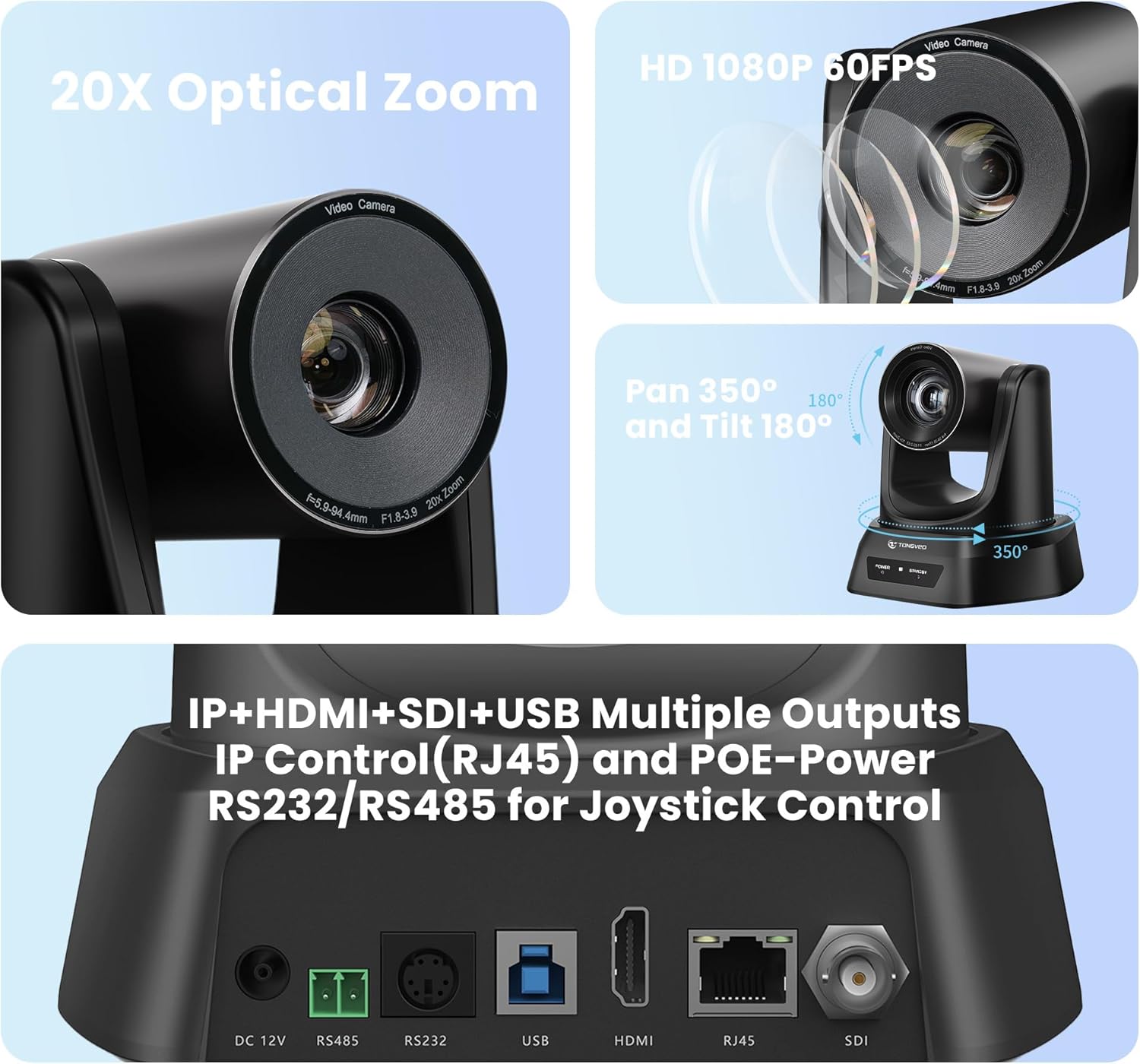
Figure 2: Rear view of the camera showing HDMI, SDI, IP (RJ45), USB, RS485, and RS232 ports, along with key features.
The camera supports video compression formats including YUV, MJPEG, H.264, and H.265. Please note that the camera does not have a built-in microphone.
Installation Methods
The package includes a wall mount with screws for wall installation. For other methods like tripod or ceiling mounting, ensure you use compatible accessories (sold separately).

Figure 3: Various installation options and included accessories in the package.
Operating Instructions
Camera Movement and Zoom
The TONGVEO PTZ camera features smooth and quiet pan, tilt, and zoom capabilities.
- Pan: Horizontal rotation of 350° (±175°).
- Tilt: Vertical rotation of 180° (±90°).
- Optical Zoom: 20x optical zoom lens providing a wide viewing angle from 55.8° (W) to 3.2° (T) without distortion.
- Resolution: Full HD 1080p at 60 frames per second (fps) from a 1/2.8" HD CMOS sensor with 2.38 megapixels (16:9).
Image parameters such as white balance and exposure can be adjusted via the remote control menu.
Remote Control Functions
The included infrared (IR) remote control allows for comprehensive camera operation. One remote can control up to four PTZ cameras.

Figure 4: Functions of the IR Remote Control.
- Camera Select: Buttons 1-4 to select which camera to control.
- Position Presets: Save up to 10 preset positions via the IR remote control. The camera can store 255 presets via PELCO and 64 via Visca protocols. To save a position, press the PRESET key followed by a number key. To recall, press the number key.
- Pan/Tilt Controls: Directional arrows for precise camera movement.
- Zoom/Focus: Controls for 20x optical zoom (slow/fast) and auto/manual focus settings.
- Bright/Mirror: Adjust brightness and image flip settings.
- Menu: Access the on-screen display (OSD) menu to set image parameters or camera address.

Figure 5: Utilizing preset positions with the IR remote control.
Software Compatibility and Applications
The TONGVEO PTZ Camera is highly compatible with most video conferencing and live streaming software.
- Supported Software: Zoom, OBS, Facebook Live, WebEx, Polycom, Microsoft Lync, Cisco, BlueJean, and more.
- Operating System Support: Windows 7, Windows 8.1, Windows 10, Windows 11, Mac OS 10.10 and above.
This camera is suitable for a wide range of applications, including churches, religious services, educational institutions, teaching transfers, conferences, e-sports events, and other live events.
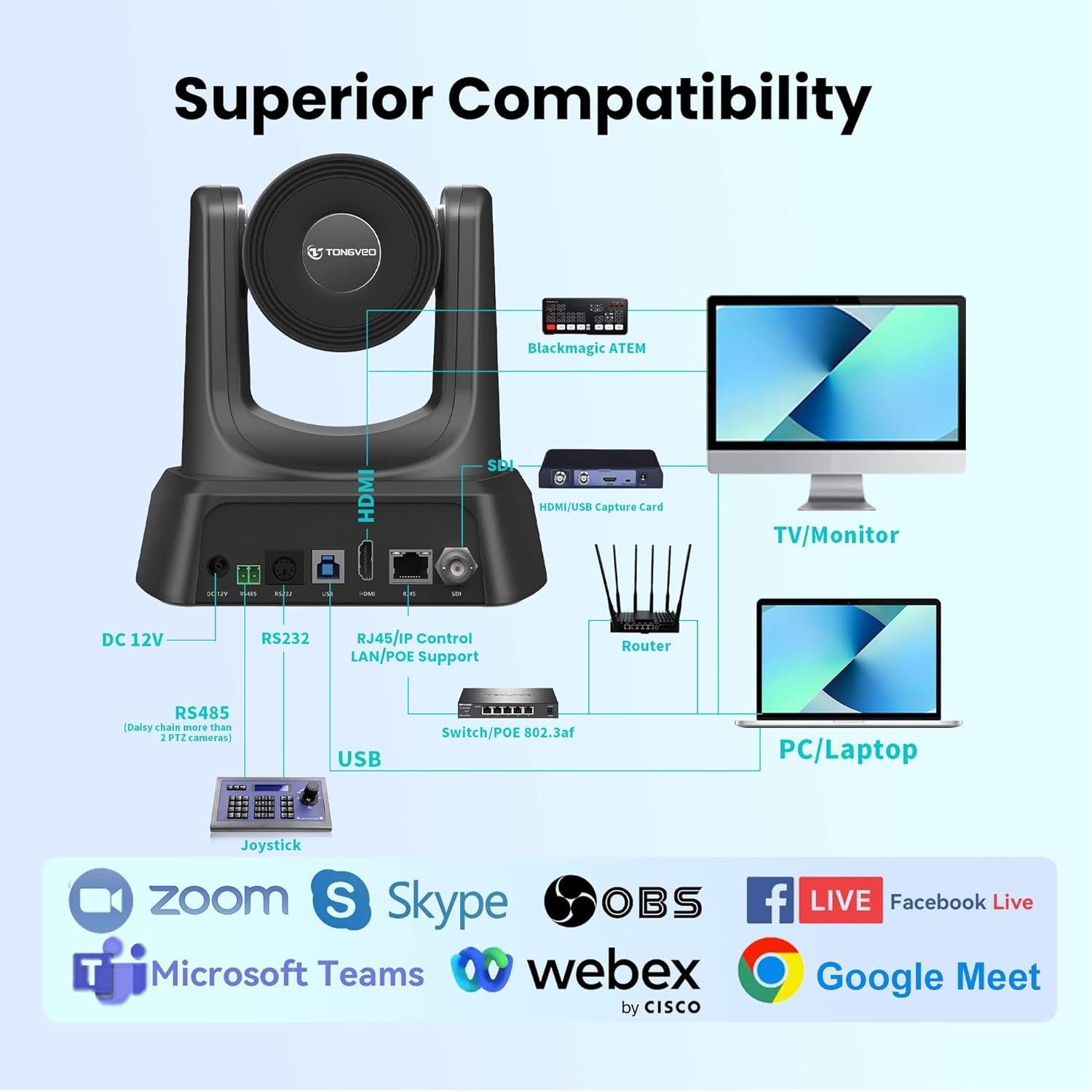
Figure 6: Superior compatibility with various platforms and devices.

Figure 7: Recommended for multiple use cases.
Maintenance
To ensure optimal performance and longevity of your TONGVEO PTZ Camera, follow these general maintenance guidelines:
- Keep the camera lens clean using a soft, lint-free cloth specifically designed for optical surfaces. Avoid abrasive materials or harsh chemicals.
- Ensure the camera is placed in a well-ventilated area to prevent overheating.
- Protect the camera from dust, moisture, and extreme temperatures.
- When not in use for extended periods, disconnect the power adapter.
Troubleshooting
Common Issues and Solutions
- OBS Control Limitations: If you are controlling the camera via OBS, please use the VISCA Serial protocol. The camera currently does not support full OBS control via VISCA TCP or VISCA UDP protocols.
- Bitfocus/Companion Functionality: While the camera can be used with Bitfocus/Companion, the preset functions may be limited.
- Network Control Issues: If you encounter any problems with network control, please contact the TONGVEO technical support team for assistance.
- Firmware Updates: Our technical team continuously releases firmware upgrades to improve functionality and address issues. Check the official TONGVEO website for the latest firmware.
Specifications
| Feature | Specification |
|---|---|
| Brand | TONGVEO |
| Model Number | TV-NVMAX-30A |
| Color | Black |
| Optical Zoom | 20x (This manual refers to the 20x optical zoom model) |
| Video Resolution | 1080p at 60fps |
| Sensor Technology | CMOS (1/2.8" HD CMOS) |
| Pan Movement | 350° (±175°) |
| Tilt Movement | 180° (±90°) |
| Connectivity Technology | USB, HDMI, SDI, IP (RJ45) |
| Control Interfaces | RS485, RS232, IR Remote |
| Power Supply | DC 12V/2A adapter, POE IEEE802.3a |
| Dimensions (L x W x H) | 28.6 x 22.2 x 20.1 cm (11.26 x 8.74 x 7.91 inches) |
| Package Weight | 2.91 kg (6.42 lbs) |
| Special Features | 1080p 60 fps, Universal Compatibility, HDMI+SDI+IP+USB, Live IP Streaming, 20x Optical Zoom |
Warranty and Support
For technical assistance, troubleshooting, or inquiries regarding firmware updates, please contact the TONGVEO technical support team. Refer to the contact information provided with your product packaging or visit the official TONGVEO website for support details.
Information regarding specific warranty terms and conditions is typically provided with the product purchase documentation. Please retain your proof of purchase for warranty claims.