
SIRGAWAIN BP7i
SIRGAWAIN Premium Body Camera Pen User Manual
Model: BP7i
1. Introduction
Thank you for choosing the SIRGAWAIN Premium Body Camera Pen. This device is designed for discreet and convenient recording of Full HD video and high-quality photos. Its compact and portable design makes it suitable for various applications, including personal security, meetings, and documentation. This manual provides detailed instructions to help you set up, operate, and maintain your body camera pen.

Image 1.1: The SIRGAWAIN Premium Body Camera Pen with its packaging and included accessories.
2. Product Overview & Features
The SIRGAWAIN Body Camera Pen combines the functionality of a writing instrument with a high-definition camera. Key features include:
- Full HD 1080p Video Recording: Captures clear and detailed video footage.
- High-Quality Photo Capture: Takes still images at 2560x1440 resolution.
- One-Button Operation: Simplifies recording and photo-taking processes.
- Motion Detection: Automatically records when motion is detected, conserving battery and storage.
- Loop Recording: Overwrites the oldest files when the memory card is full, ensuring continuous recording.
- Long Battery Life: Provides up to 70 minutes of continuous recording on a single charge.
- Wide Viewing Angle: Features a 90-degree lens to capture a broader perspective.
- Plug and Play: Compatible with Mac and PC devices for easy data transfer via USB.
- Multi-functional Pen: Functions as a regular ballpoint pen for writing.

Image 2.1: The camera pen records in genuine 1080p Full HD resolution.

Image 2.2: The camera features a 90-degree viewing angle for comprehensive capture.

Image 2.3: The smart detection feature captures important moments by reacting to motion.
3. Package Contents
Verify that all items are present in the package:
- SIRGAWAIN Body Camera Pen
- USB Charging Cable
- Micro SD Card Reader
- Ink Cartridges (5 pcs)
- Cleaning Cloth
- Pin (for reset)
- User Manual (this document)

Image 3.1: All components included in the product package.
4. Product Diagram
Familiarize yourself with the different parts of the SIRGAWAIN Body Camera Pen:

Image 4.1: Detailed diagram of the camera pen's components.
- Status Indicator: LED light indicating device status (charging, recording, standby).
- Operation Button: Used to power on/off, start/stop recording, and switch modes.
- HD Camera Lens: The primary lens for video and photo capture.
- Micro USB / SD Slot: Port for charging and inserting the Micro SD card.
- Restart Button: Small pinhole button for resetting the device.
- Ballpoint Pen: The functional writing tip of the pen.
5. Getting Started
5.1. Charging the Device
Before first use, fully charge the camera pen. Connect the included USB cable to the Micro USB port on the pen and the other end to a USB power source (e.g., computer USB port, wall adapter). The status indicator will show charging status and turn off when fully charged.
5.2. Inserting Micro SD Card
The device requires a Micro SD card (not included) for storing recordings. It supports up to 128GB. Gently unscrew the pen's body to reveal the Micro USB/SD slot. Insert the Micro SD card into the slot with the gold contacts facing down until it clicks into place.
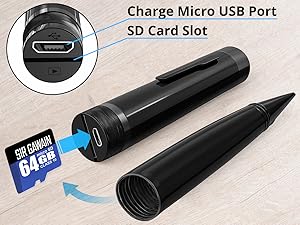
Image 5.1: Inserting the Micro SD card into the designated slot.
5.3. Assembling the Pen
After inserting the SD card, carefully screw the pen's body back together, ensuring it is securely fastened.
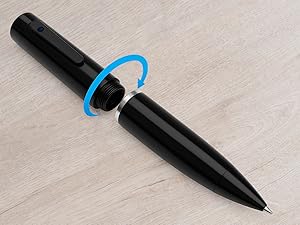
Image 5.2: Assembling the pen after inserting the Micro SD card.
5.4. Powering On/Off
- Power On: Press and hold the Operation Button for approximately 2-3 seconds until the status indicator lights up.
- Power Off: Press and hold the Operation Button again for approximately 2-3 seconds until the status indicator turns off.
6. Operating Instructions
The SIRGAWAIN Body Camera Pen features simple one-button operation for various functions.
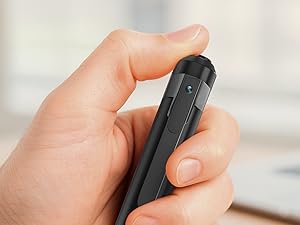
Image 6.1: The pen's operation is controlled by a single button.
6.1. Video Recording (Full HD 1080p)
- Ensure the pen is powered on and in standby mode (status indicator solid).
- Press the Operation Button once briefly to start video recording. The status indicator will flash during recording.
- To stop recording, press the Operation Button once briefly again. The status indicator will return to solid, indicating standby mode.
6.2. Photo Capture (2560x1440)
- Ensure the pen is powered on and in standby mode.
- From standby mode, press and hold the Operation Button for approximately 1 second (shorter than power on/off) to take a photo. The status indicator will flash once to confirm the photo has been taken.
6.3. Motion Detection Recording
This feature allows the camera to record only when motion is detected, saving battery and storage space. Refer to the detailed user manual (PDF) for specific instructions on activating motion detection mode, as it may involve a specific sequence of button presses or a configuration file on the SD card.
6.4. Loop Recording
The camera pen supports loop recording. When the Micro SD card is full, the oldest video files will be automatically overwritten by new recordings. This ensures continuous operation without manual deletion of files. This feature is typically enabled by default.
7. Data Transfer
You can access your recorded videos and photos by connecting the pen to a computer or by using the included Micro SD card reader.
7.1. Connecting to a Computer
- Ensure the pen is powered off.
- Connect the pen to your computer using the supplied USB cable.
- The pen will be recognized as a removable disk. You can then browse, copy, or delete files from the Micro SD card.
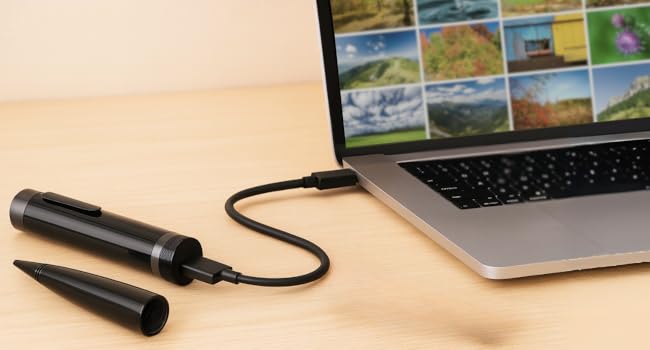
Image 7.1: Connecting the camera pen to a laptop for data transfer.
7.2. Using the Micro SD Card Reader
- Carefully remove the Micro SD card from the pen.
- Insert the Micro SD card into the included USB card reader.
- Plug the card reader into your computer's USB port. The card will appear as a removable disk, allowing you to manage files.
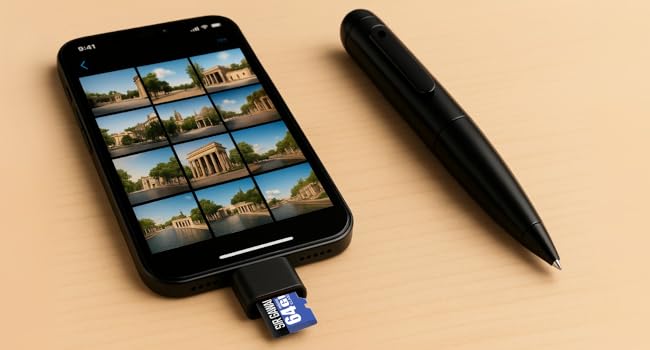
Image 7.2: Using the Micro SD card reader to access files, potentially with a smartphone adapter.
8. Troubleshooting
If you encounter issues with your SIRGAWAIN Body Camera Pen, refer to the following common problems and solutions:
| Problem | Possible Cause | Solution |
|---|---|---|
| Device does not power on. | Low battery; device frozen. | Charge the device fully. Use the reset pin to restart the device. |
| Cannot record video/take photos. | No Micro SD card; Micro SD card full/corrupted; incorrect operation. | Insert a Micro SD card. Format or replace the Micro SD card. Refer to operating instructions. |
| Video quality is poor. | Lens dirty; insufficient lighting; low battery. | Clean the camera lens with the provided cleaning cloth. Ensure adequate lighting. Charge the device. |
| Computer does not recognize the device. | Loose USB connection; driver issue; pen not powered off. | Ensure USB cable is securely connected. Try a different USB port or cable. Ensure the pen is powered off before connecting. |
| Audio is not recorded or is poor. | Microphone obstructed; environmental noise. | Ensure microphone opening is clear. Record in quieter environments. |
If the problem persists after trying these solutions, please contact customer support.
9. Specifications
| Feature | Detail |
|---|---|
| Model Number | BP7i |
| Video Capture Resolution | 1080p Full HD |
| Photo Resolution | 2560x1440 |
| Photo Sensor Technology | CMOS |
| Maximum Focal Length | 12 Millimeters |
| Flash Memory Type | Micro SD (up to 128GB, not included) |
| Video Capture Format | MJPEG |
| Supported Audio Format | Not Supported (for separate audio files, audio is embedded in video) |
| Connectivity Technology | USB (No Wi-Fi) |
| Battery Type | Internal Lithium-ion (Nonstandard Battery) |
| Recording Time per Charge | Up to 70 minutes |
| Item Weight | 1.12 ounces (approx. 31.75 grams) |
| Product Dimensions | 5.71 x 0.51 x 0.51 inches (approx. 14.5 x 1.3 x 1.3 cm) |
| Color | Dark Black |
10. Maintenance
To ensure the longevity and optimal performance of your camera pen, follow these maintenance guidelines:
- Cleaning: Use the provided cleaning cloth to gently wipe the camera lens and the pen's body. Avoid using harsh chemicals or abrasive materials.
- Storage: Store the pen in a cool, dry place away from direct sunlight and extreme temperatures.
- Battery Care: For optimal battery life, avoid fully discharging the battery frequently. Charge the device regularly, even if not in use, to prevent deep discharge.
- Ink Refills: Replace the ballpoint pen ink cartridge when it runs out using the included refills.
11. Warranty & Support
The SIRGAWAIN Body Camera Pen comes with a 12-month warranty from the date of purchase. This warranty covers manufacturing defects and malfunctions under normal use. It does not cover damage caused by misuse, accidents, unauthorized modifications, or natural disasters.
For technical assistance, troubleshooting, or warranty claims, please contact SIRGAWAIN customer support. We offer 24/7 customer support to assist you with any inquiries.
Please refer to your purchase documentation or the official SIRGAWAIN website for the most up-to-date contact information.
12. Legal Disclaimer
This device is intended for video and photo capture only. It is equipped with a visible recording indicator to ensure transparency during use. The camera is designed for lawful and responsible use where video recording is permitted. Users are responsible for adhering to all applicable privacy laws and obtaining necessary permissions before recording in private or restricted areas.
Ask a question about this manual
Ask about setup, troubleshooting, compatibility, parts, safety, or missing instructions. Manuals+ will review the question and use this page’s manual context to help answer it.