
1. Introduction
This manual provides detailed instructions for the installation, operation, and maintenance of your BXLIYER Android 12 Car Stereo. Please read this manual thoroughly before using the product to ensure proper function and safety. This unit is specifically designed for the Iveco Daily VI models manufactured between 2014 and 2021.
2. Setup and Installation
2.1 Compatibility
This car stereo is fully compatible with Iveco Daily VI vehicles from 2014 to 2021. If you are unsure about compatibility, please contact technical support with dashboard images for assistance.
2.2 Package Contents
Before installation, verify that all components are present in the package:
- Auto Radio Head Unit
- Power Socket A
- Power Socket B
- Power Socket C
- RCA Output Socket A
- RCA Output Socket B
- RCA Output Socket C
- RCA Output Socket D
- GPS Antenna
- Rear Camera (LED)
- External Microphone
- USB Cables (2)
- Install Brackets
- Canbus Decoder
- User Manual
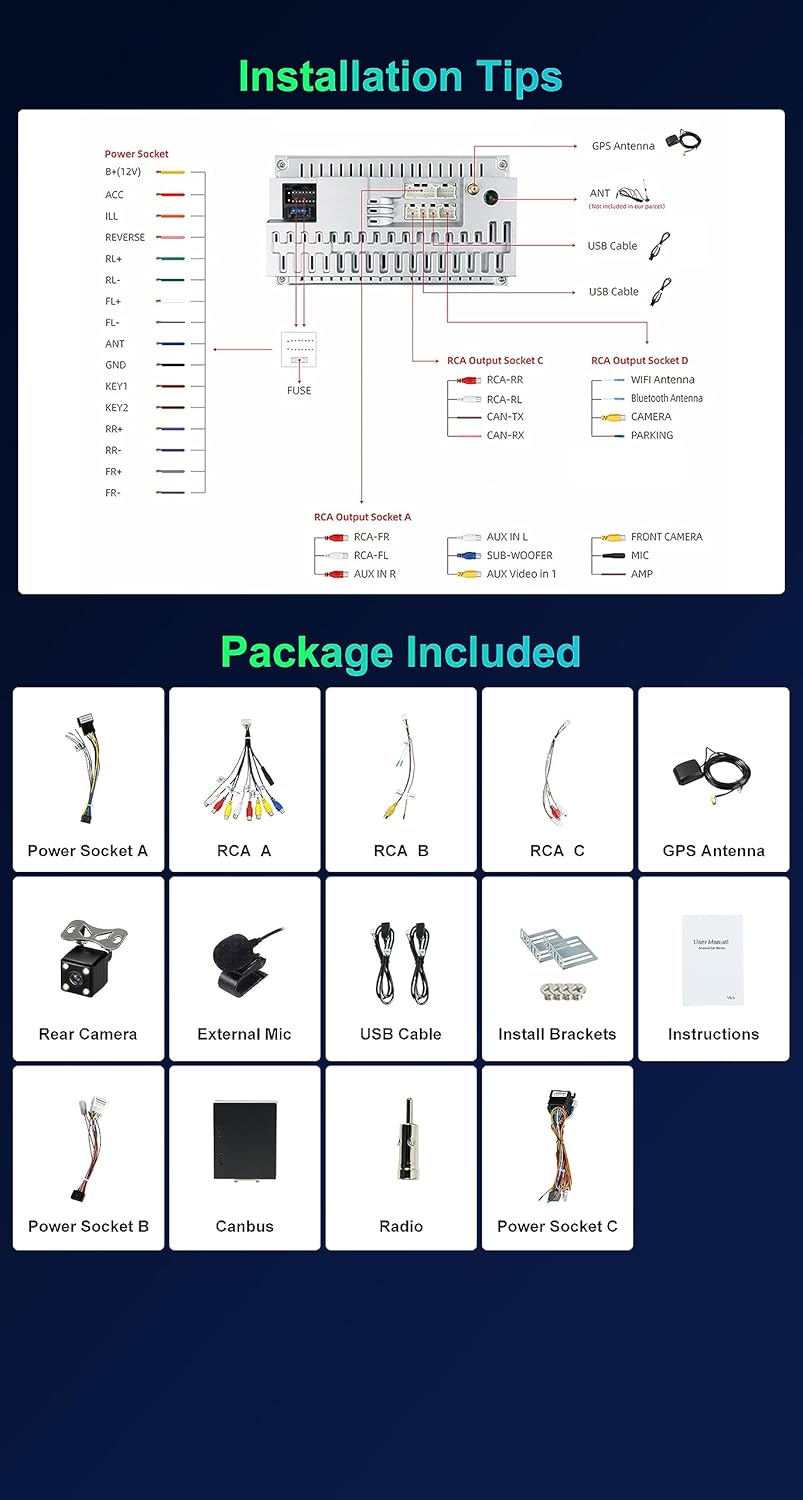
Image: Detailed view of included components and wiring diagram for installation.
2.3 Installation Steps
Refer to the wiring diagram provided in the package contents image for correct connections. Professional installation is recommended.
- Remove the OEM Panel: Carefully detach the original car stereo and its surrounding panel.
- Connect Wiring: Connect the provided power sockets (A, B, C), RCA cables (A, B, C, D), GPS antenna, rear camera, external microphone, and USB cables to the corresponding ports on the new head unit and your vehicle's wiring harness. Ensure the Canbus decoder is correctly connected if your vehicle requires it for steering wheel controls or other integrated functions.
- Install Brackets: Secure the head unit using the provided installation brackets.
- Test Functionality: Before fully reassembling, power on the unit and test basic functions like audio, radio, and touch screen response.
- Reassemble: Once all functions are verified, carefully reassemble the dashboard and secure the new head unit in place.

Image: Comparison of the dashboard before and after installing the BXLIYER car stereo, showing the OEM panel and the new unit.
3. Operating Instructions
3.1 Basic Operation
- Power On/Off: Press and hold the power button on the unit or use the vehicle's ignition. The unit features a fast boot function, allowing access to the Android system in less than 2 seconds.
- Touch Screen: Navigate the Android 12 interface using the responsive IPS touch screen (1280x600 HD resolution).
- Volume Control: Adjust volume using the physical buttons on the unit, steering wheel controls, or on-screen controls.

Image: Key features of the car stereo, highlighting its Android 12 operating system, powerful hardware, and connectivity options.
3.2 Connectivity Features
- Wireless CarPlay & Android Auto: Connect your smartphone wirelessly via Bluetooth or wired via USB to access phone functions like voice control, music, navigation, phone calls, and messages directly on the car stereo screen.
- Bluetooth 5.0: Pair your mobile device for hands-free calling and audio streaming. The advanced Bluetooth 5.0 technology ensures efficient data transmission and improved accuracy.
- Mirror Link: Supports screen mirroring for both Android phones and iPhones. Display your phone's screen content, including music, videos, and phonebook, directly on the head unit. For Android, screen control is also supported.
- Wi-Fi / 4G: Built-in Wi-Fi supports 2.4GHz and 5GHz bands. The unit also supports 4G LTE connectivity for seamless internet access.

Image: Demonstrates the DAB+ radio function, wireless CarPlay/Android Auto, Bluetooth 5.0 connectivity, and Mirror-Link capabilities.
3.3 Navigation and Multimedia
- GPS Navigation: Supports both online and offline navigation systems. You can download popular navigation apps like Waze and IGO from the Play Store.
- Radio: Features a built-in AM/FM tuner with RDS (Radio Data System) for enhanced radio experience. Frequency range: AM 522-1620 KHz, FM 87.5-108 MHz.
- DAB+ Digital Radio: Supports DAB+ digital radio (requires a separate DAB+ adapter, ASIN: B092D31BVX). Connect a DAB+ antenna and adapter for high-quality digital radio reception.
- DSP (Digital Sound Processor): Enjoy cinematic music enjoyment with the integrated DSP chip, offering a full 64-bit dual-precision digital processor for optimal sound customization.
- 4K Video Playback: Supports 4K video playback (3840 x 2160 pixels).
- Split Screen: The Android head unit allows you to split the screen to run two applications simultaneously.

Image: Illustrates the Steering Wheel Control (SWC) functionality, the vibrant IPS screen, the split-screen feature for multitasking, and the Wi-Fi/4G connectivity options.
3.4 Advanced Features
- Steering Wheel Control (SWC): Connect your car's steering wheel remote control to the SXAUTO system for convenient operation.
- Reversing Camera Input: The unit supports a rear-view camera (free LED rear camera included). It automatically switches to the reverse camera view when the vehicle is put into reverse gear.
- 360° Panoramic Camera (Optional): This function provides a clear panoramic view around your car, aiding in parking and maneuvering. Requires the purchase of four optional AHD cameras separately.
- OBD2 Support: Compatible with most WiFi and Bluetooth OBD2 scanners. With a dedicated app (e.g., Torque, available on Play Store) and a Bluetooth OBD2 unit, you can retrieve error memory from your car and view real-time vehicle information on the screen.

Image: Highlights the fast boot capability, the optional 360-degree panoramic camera system, automatic reversing camera display, and GPS navigation features.
4. Maintenance
To ensure the longevity and optimal performance of your car stereo, follow these maintenance guidelines:
- Cleaning: Use a soft, dry cloth to clean the screen and exterior. Avoid abrasive cleaners or solvents that may damage the surface.
- Temperature: Avoid exposing the unit to extreme temperatures, direct sunlight for prolonged periods, or high humidity.
- Software Updates: Periodically check for software updates to ensure the system runs efficiently and has the latest features.
- Avoid Liquids: Do not spill liquids on the unit. In case of accidental spillage, power off the unit immediately and consult a professional.
5. Troubleshooting
If you encounter issues with your car stereo, refer to the following common problems and solutions:
| Problem | Possible Cause | Solution |
|---|---|---|
| Unit does not power on | Incorrect wiring, blown fuse, vehicle power issue. | Check power connections, inspect vehicle fuses, ensure proper grounding. |
| No sound | Speaker wires disconnected, volume too low, incorrect audio settings. | Verify speaker connections, increase volume, check audio output settings (DSP). |
| GPS not working or inaccurate | GPS antenna not connected, poor signal, outdated maps. | Ensure GPS antenna is securely connected and has a clear view of the sky. Update navigation maps. |
| Bluetooth connection issues | Device not in pairing mode, interference, incorrect pairing process. | Ensure both devices are in pairing mode. Delete previous pairings and try again. Move closer to the unit. |
| Steering Wheel Controls not responding | Canbus not connected or configured, incorrect wiring. | Verify Canbus connection and configuration in system settings. |
If the problem persists, please contact technical support.
6. Specifications
| Feature | Detail |
|---|---|
| Operating System | Android 12 |
| CPU | Rockchip AC8257 A53 Octa-Core, 64-bit, 2.0 GHz |
| RAM | 8GB LPDDR4 |
| ROM (Internal Storage) | 256GB SSD |
| Screen | 9-inch IPS, 1280x600 HD Resolution |
| Audio Output Power | 4 x 50W Max (Radio IC-TDA7786, Amplifier IC-TDA7388) |
| Radio Tuner | Built-in AM/FM/RDS (AM: 522-1620 KHz, FM: 87.5-108 MHz) |
| Bluetooth | Bluetooth 5.0 |
| Wi-Fi | Built-in Wi-Fi (2.4GHz & 5GHz) |
| 4G LTE | Supported |
| CarPlay / Android Auto | Built-in Wireless/Wired |
| DSP | Built-in Digital Sound Processor (64-bit dual-precision) |
| USB / MicroSD Support | Up to 500GB |
| Video Playback | Supports 4K (3840 x 2160 pixels) |
| Camera Input | Rear Camera (LED included), AHD Camera support, 360 Camera support (optional) |
| OBD2 | Supported (requires separate OBD2 unit) |
| Weight | 2.1 Kilograms |
| Manufacturer | SXAUTO |
| Part Number | SXAUTO-5I12-D04-8256-BX |
7. Warranty Information
Please refer to the warranty card included with your product for specific warranty terms and conditions. Generally, the product is covered against manufacturing defects for a specified period from the date of purchase. Keep your proof of purchase for warranty claims.
8. Support
For technical assistance, troubleshooting, or any inquiries regarding your BXLIYER Android 12 Car Stereo, please contact our support team:
Email: SXAUTO_TECHSUPPORT@163.com
When contacting support, please provide your product model number (SXAUTO-5I12-D04-8256-BX) and a detailed description of the issue.


