
1. Product Overview
Thank you for choosing the HULALA HOME Mid-Century Modern Nightstand. This nightstand is designed to provide convenient storage and charging capabilities for your bedroom or living space. It features a built-in charging station, multiple storage drawers, and a sturdy construction.
- Integrated Charging Station: Equipped with 2 USB ports and 2 AC outlets for convenient device charging.
- Ample Storage: Includes a top drawer with cable cutouts for organized charging, and two additional sliding drawers for private storage.
- Durable Construction: Features a durable MDF body with solid wood legs and adjustable feet for stability.
- Mid-Century Modern Design: Blends functionality with a classic aesthetic.

Image 1.1: HULALA HOME Mid-Century Modern Nightstand (Acorn finish). This image displays two nightstands, highlighting their design and functionality, including an open top drawer with a charging station.
2. Safety Information
Please read and understand all instructions before assembly and use. Keep these instructions for future reference.
- Ensure all parts are present and undamaged before beginning assembly.
- Assemble on a soft, clean surface to prevent scratches.
- Do not overtighten screws during assembly.
- Always use the product on a level surface. Adjust feet for stability on uneven surfaces.
- Do not exceed the maximum weight recommendation of 150 pounds for the tabletop.
- Keep liquids away from the charging station to prevent electrical hazards.
- Children should not climb or play on the nightstand.
3. Package Contents
Verify that all components are included in your package. If any parts are missing or damaged, please contact customer support.

Image 3.1: Exploded view of nightstand components. This diagram illustrates all individual parts and hardware required for assembly.
The package includes all necessary assembly tools. Two adults are recommended for assembly.
4. Assembly Instructions
Assembly is designed to be straightforward with pre-drilled holes and numbered hardware. Follow the step-by-step illustrated instructions provided in the separate assembly guide. The estimated assembly time for two adults is 45-120 minutes.
- Unpack Components: Carefully remove all parts from the packaging and lay them out on a soft, clean surface.
- Identify Parts: Refer to the parts list and diagrams to identify each component.
- Assemble Frame: Follow the numbered steps to connect the main frame pieces using the provided hardware.
- Install Drawers: Assemble the drawers and install them into the frame. Drawer slides are pre-attached.
- Attach Legs: Securely attach the solid wood legs to the base of the nightstand.
- Install Charging Station: Place the charging station into its designated slot in the top drawer. Ensure the power cord is routed correctly through the integrated cable management system.
- Final Adjustments: Place the nightstand in its desired location and adjust the feet to ensure stability on uneven floors.

Image 4.1: Assembly diagram. This image provides a visual guide for connecting the main components of the nightstand.
5. Operating Instructions
5.1. Using the Charging Station
The nightstand features a built-in charging station for your electronic devices.
- Locate the top drawer with the integrated power strip.
- Plug the nightstand's 3.9 ft power cord into a standard wall outlet.
- Connect your devices to the 2 USB ports or 2 AC outlets within the drawer.
- Utilize the cable management system to keep wires organized and prevent tangling.

Image 5.1: Detail of the charging station. This image shows the two USB ports and two AC outlets available for device charging.

Image 5.2: Cable management system. This image demonstrates how the integrated system helps organize charging cables within the top drawer.
5.2. Storage Options
The nightstand offers various storage solutions:
- Top Open Shelf: Ideal for quick-access items like books, glasses, or a small lamp.
- Equipment Drawer (Top): Designed with cable cutouts, perfect for charging devices discreetly.
- Two Sliding Drawers (Bottom): Provide private storage for personal items.
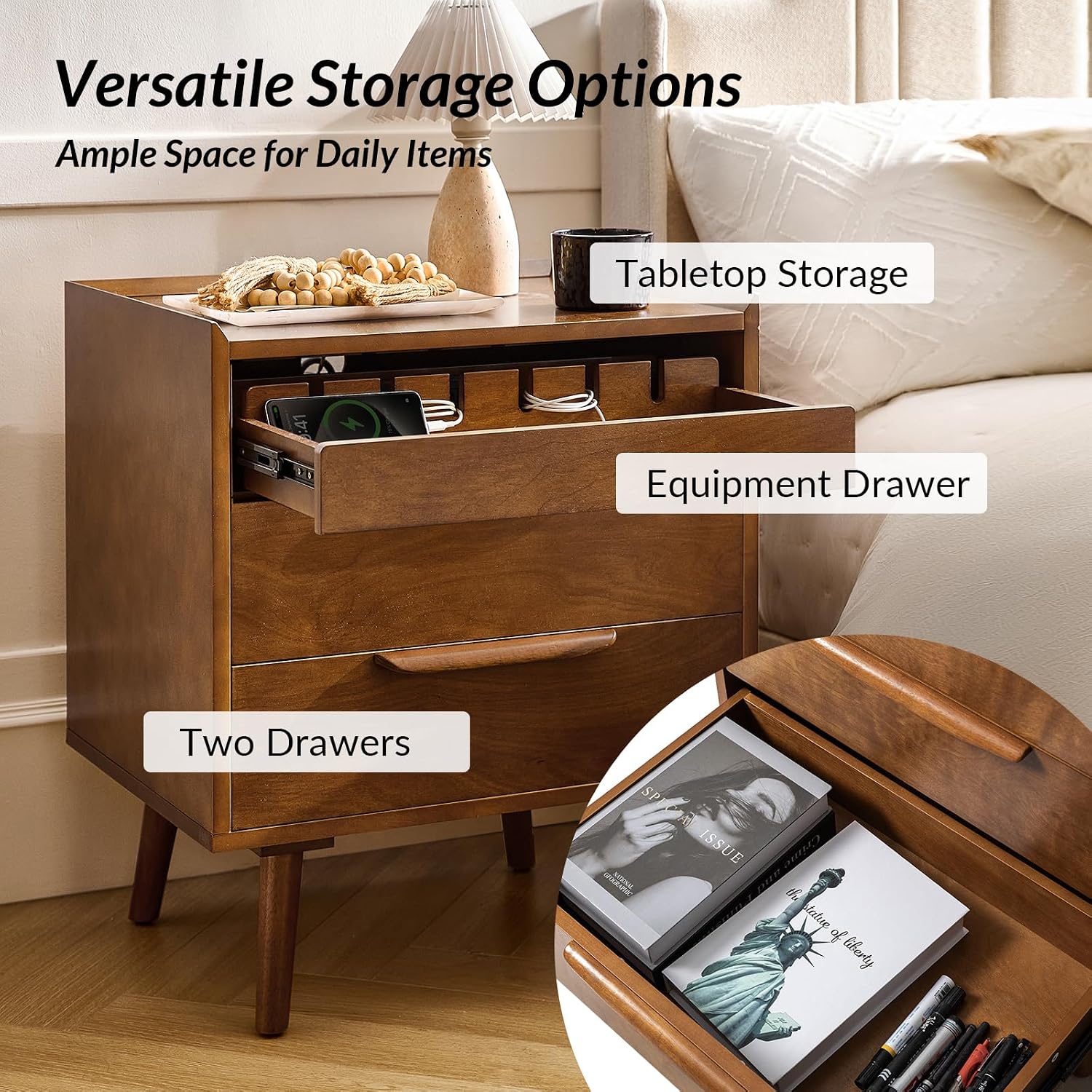
Image 5.3: Versatile storage options. This image highlights the different storage areas, including the tabletop, the top drawer for devices, and the two lower drawers.
6. Maintenance and Care
Proper care will ensure the longevity and appearance of your HULALA HOME nightstand.
- Cleaning: Wipe with a dry cloth. Avoid abrasive cleaners or harsh chemicals that may damage the finish.
- Spills: Immediately wipe up any spills to prevent staining or damage to the wood finish.
- Sunlight: Avoid prolonged exposure to direct sunlight to prevent fading.
- Heat: Do not place hot items directly on the surface without protection.
- Stability: Periodically check and tighten all hardware to ensure the nightstand remains stable. Re-adjust the feet if necessary.
7. Troubleshooting
If you encounter any issues with your nightstand, refer to the following common solutions:
| Problem | Possible Cause | Solution |
|---|---|---|
| Nightstand is wobbly. | Uneven floor or loose leg connections. | Adjust the leveling feet on the bottom of the legs. Ensure all leg screws are tightened. |
| Drawers do not slide smoothly. | Misaligned drawer slides or obstructions. | Check that drawer slides are properly aligned and free of debris. Ensure drawers are assembled correctly. |
| Charging station not working. | Power cord not plugged in, wall outlet issue, or device issue. | Ensure the nightstand's power cord is securely plugged into a functional wall outlet. Test the wall outlet with another device. Check device charging cables. |
| Strong odor from furniture. | New furniture off-gassing. | Allow the nightstand to air out in a well-ventilated area for several days. |
8. Product Specifications
| Feature | Detail |
|---|---|
| Brand | HULALA HOME |
| Model Name | Mid-Century Modern Nightstand with Charging Station |
| Product Dimensions (D x W x H) | 18"D x 24"W x 28"H |
| Item Weight | 56.5 Pounds |
| Maximum Weight Recommendation | 150 Pounds |
| Color | Acorn |
| Material Type | Engineered Wood (Frame, Top), Solid Wood (Legs, Handles) |
| Number of Drawers | 3 |
| Charging Station | 2 USB Ports, 2 AC Outlets |
| Power Cord Length | 3.9 ft |
| Assembly Required | Yes (Recommended 2 people) |
| Product Care Instructions | Wipe with Dry Cloth |
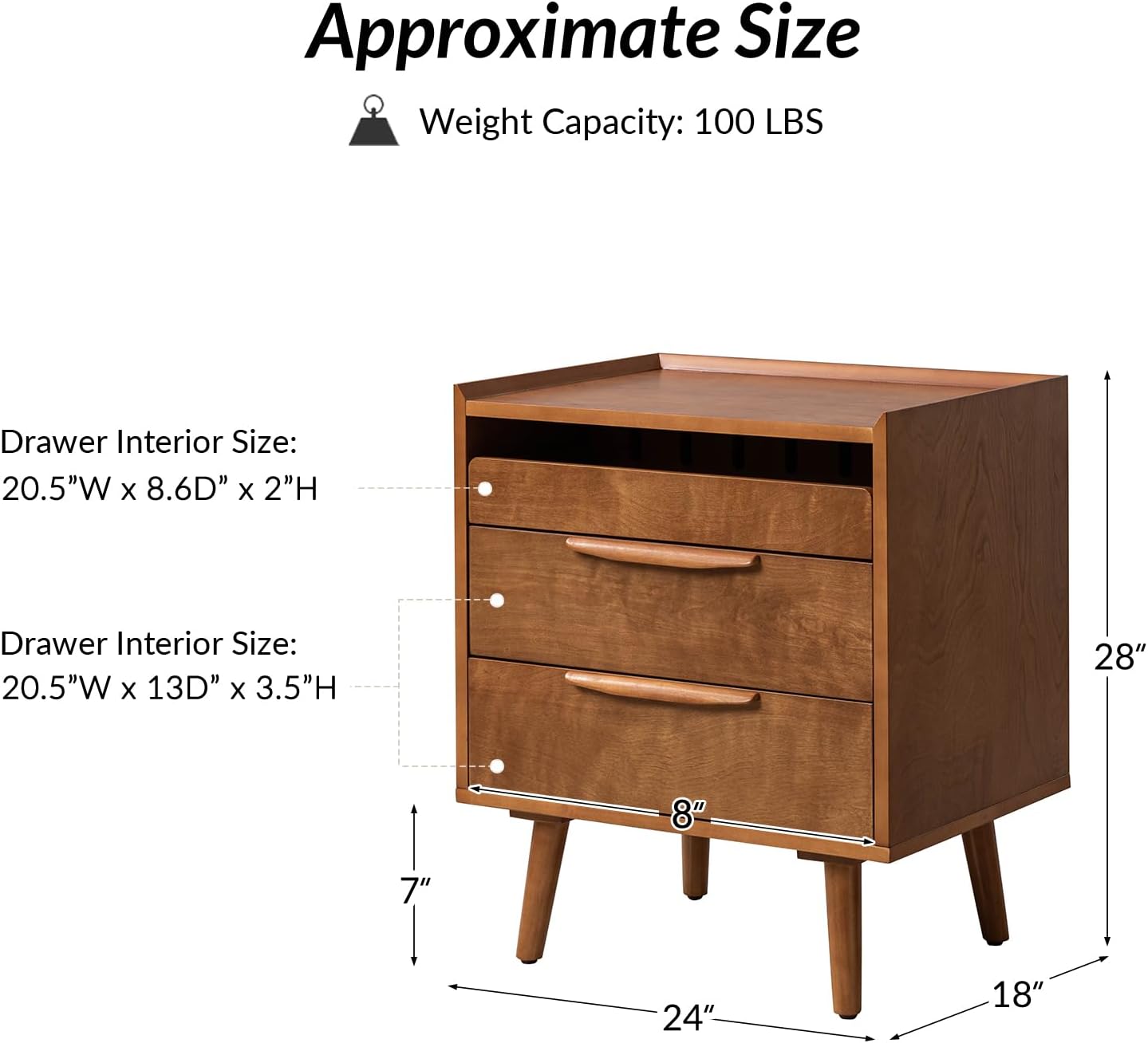
Image 8.1: Approximate product dimensions. This diagram provides key measurements for the nightstand and its drawers.
9. Warranty and Support
HULALA HOME is committed to providing quality products and customer satisfaction.
- Worry-Free Purchase: The product comes with foam-padded, wood-braced packaging to ensure safe delivery.
- Customer Support: For any questions, concerns, or assistance with assembly or product issues, please contact HULALA HOME customer support. Support is available 24/7.
- Returns: This product is returnable until January 31, 2026 (refer to purchase details for specific return window).
For further assistance, please visit the HULALA HOME Store on Amazon.