Introduction
The PORTENTUM Car Phone Holder is designed to provide a stable and convenient mounting solution for your smartphone in your vehicle. It features exceptional suction power for secure attachment to various surfaces, a 360° rotating ball joint for optimal viewing angles, and a robust design for device protection. This manual provides instructions for setup, operation, maintenance, and troubleshooting.
Package Contents
- PORTENTUM Car Phone Holder
Setup
Follow these steps to properly install your PORTENTUM Car Phone Holder:
- Choose a Mounting Location: The holder can be securely mounted on your vehicle's dashboard or windshield. Ensure the surface is clean, dry, and smooth for optimal suction.
- Prepare the Suction Cup: Ensure the suction cup is clean. If it has lost adhesion, rinse it with water and let it air dry.
- Attach the Holder:

Description: The image illustrates two primary mounting options: on the dashboard and on the windshield. Both setups show the phone holder securely attached, providing diverse placement for optimal viewing.
Place the suction cup firmly against the chosen surface. Press down on the suction cup and then push the security lock lever down to create a strong vacuum seal.
Description: This image highlights the ultra-strong suction cup grip, demonstrating its ability to hold significant weight (44 lbs shown with a kettlebell). It also shows the firm security lock mechanism and the 'Wash & Reuse' feature for maintaining suction.
- Adjust the Arm: Loosen the adjustment knobs on the arm to position the holder at your desired height and distance. Tighten the knobs to secure the arm in place.
Operating Instructions
Using your PORTENTUM Car Phone Holder is straightforward:
- Insert Your Phone: Press the release button on the side of the holder to open the clamping arms. Place your smartphone into the holder, ensuring it rests on the bottom support feet. Gently push the clamping arms inward until they securely grip your phone.

Description: This image illustrates how to operate the phone holder with one hand. It shows a hand pushing the clamp arms inward to secure a smartphone, highlighting the ease of use while driving.
- Adjust Viewing Angle: The holder features a 360° rotatable ball joint and a 270° adjustable arm. Loosen the ball joint nut to rotate your phone to a horizontal or vertical orientation, or tilt it for optimal viewing. Tighten the nut to lock the position.
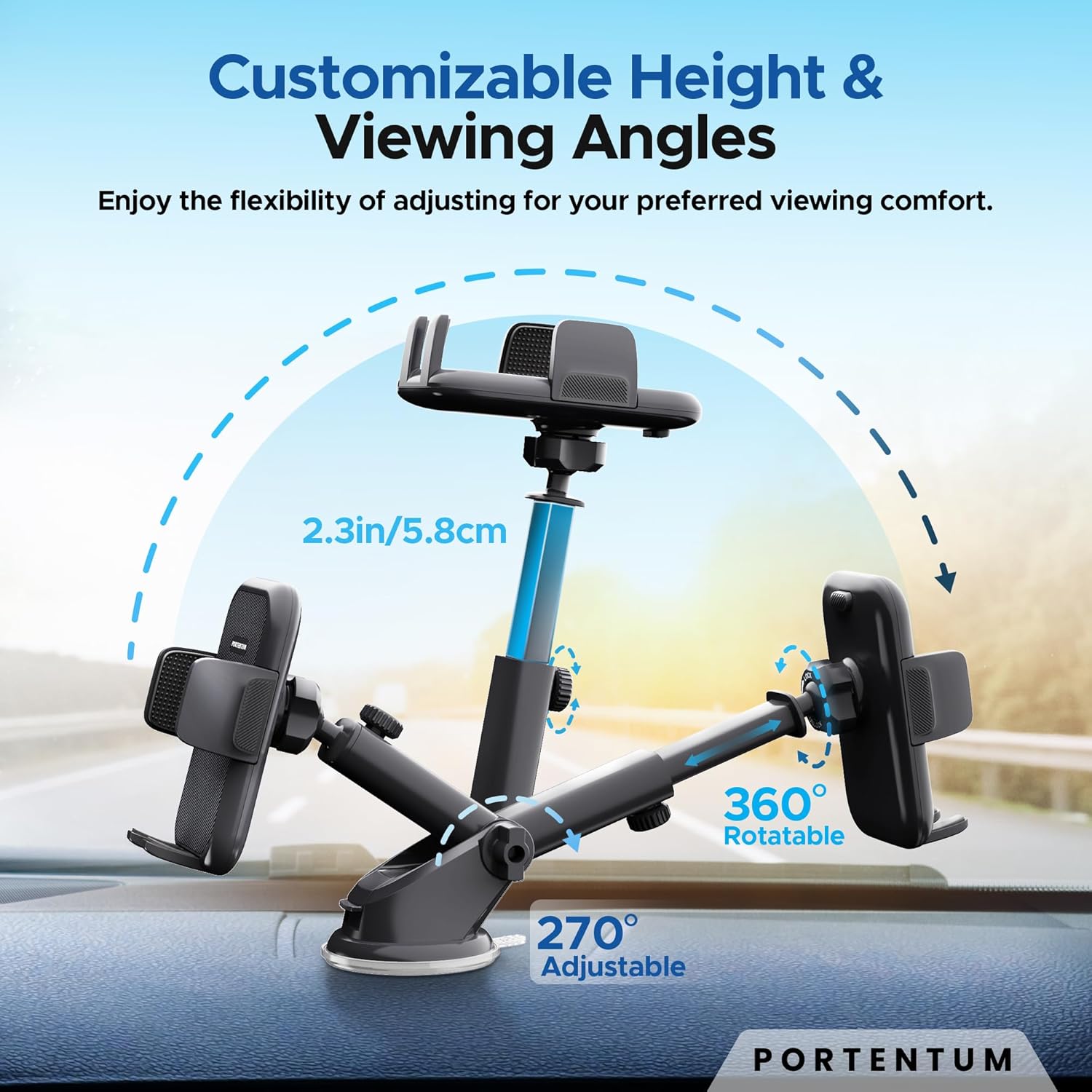
Description: The image displays the holder's flexibility, showing its customizable height and various viewing angles. It highlights the 360° rotatable ball joint and the 270° adjustable arm for personalized comfort.
- Charging Port Access: The design includes an integrated charging port at the bottom, allowing you to charge your phone while it is mounted.

Description: This image details the secure triangular support mechanism, emphasizing the silicone protection on the clamping arms and the integrated charging port at the base of the holder.
- Remove Your Phone: Press the release button to open the clamping arms and carefully remove your phone.
- Compatibility: The holder is compatible with smartphones ranging from 4.0 to 7 inches, including those with thick cases.

Description: The image visually represents the wide compatibility of the phone holder, indicating it can accommodate smartphones with widths between 1.8 to 3.7 inches (4.5 to 9.3 cm), suitable for devices from 4.7 to 6.7 inches diagonally.
Maintenance
To ensure the longevity and optimal performance of your car phone holder:
- Clean the Suction Cup: If the suction cup loses its grip, detach it from the surface, rinse it with lukewarm water, and let it air dry completely. Do not use harsh chemicals or abrasive materials.
Description: This image highlights the ultra-strong suction cup grip, demonstrating its ability to hold significant weight (44 lbs shown with a kettlebell). It also shows the firm security lock mechanism and the 'Wash & Reuse' feature for maintaining suction.
- Clean the Holder: Wipe the holder's body and clamping arms with a soft, damp cloth.
- Avoid Extreme Temperatures: While the holder is made with heat-resistant materials, prolonged exposure to extreme temperatures (very hot or very cold) can affect its performance and lifespan.
Troubleshooting
If you encounter issues with your PORTENTUM Car Phone Holder, refer to the following common solutions:
- Holder is not sticking to the surface:
- Ensure the mounting surface is clean, dry, and smooth. Dust or uneven textures can prevent proper suction.
- Clean the suction cup as described in the Maintenance section.
- Ensure the security lock lever is fully engaged after pressing the suction cup firmly onto the surface.
- Phone is not held securely:
- Ensure the clamping arms are fully closed around your phone.
- Verify your phone's size is within the compatible range (4.0 to 7 inches).
- Holder arm is loose:
- Tighten all adjustment knobs and the ball joint nut firmly.
Specifications
| Feature | Detail |
|---|---|
| Model Number | 280804d8-cf35-4564-b3f5-062ff32f1472 |
| Brand | PORTENTUM |
| Weight | 200 g |
| Dimensions (L x W x H) | 16.4 x 9.1 x 8.5 cm |
| Material | Silicone, Polycarbonate, Acrylonitrile Butadiene Styrene (ABS+PC) |
| Mounting Type | Suction Cup |
| Special Features | Lightweight, Rotatable, Adjustable, Shock-resistant, Heat-resistant |
| Compatible Devices | Smartphone |
| Compatible Phone Sizes | 4.0 to 7 inches |
| Rotation | 360° Ball Joint |
| Arm Adjustment | 270° |
| Weight Limit | 20 Kilograms |
| Water Resistance Level | Waterproof |


