
1. Product Overview
The Beelink SER8 Mini PC is a compact yet powerful computer designed for a wide range of applications, from office productivity and multimedia consumption to gaming and professional tasks. Featuring the AMD Ryzen 7 8845HS processor, it delivers high performance in a small form factor.

Figure 1.1: Beelink SER8 Mini PC, showcasing its compact design and sleek appearance.

Figure 1.2: Promotional banner highlighting the Beelink SER8 8845HS AI PC.
2. What's in the Box
Upon opening your Beelink SER8 Mini PC package, you should find the following items:
- 1 x Beelink 8845HS mini pc
- 1 x Power Adapter
- 1 x HDMI Cables
- 1 x User Manual

Figure 2.1: Visual representation of the items included in the Beelink SER8 Mini PC package.
3. Setup Guide
Follow these steps to set up your Beelink SER8 Mini PC:
- Connect to Power: Plug the power adapter into the DC IN port on the back of the Mini PC, then connect it to a power outlet.
- Connect to Display: Use the provided HDMI cable to connect your Mini PC to a monitor or TV. The SER8 supports HDMI 2.1 and DP 1.4 for 4K UHD triple display output.
- Connect Peripherals: Plug in your keyboard and mouse into the available USB ports.
- Network Connection: For a wired connection, connect an Ethernet cable to the RJ45 2.5G LAN port. For wireless, the device supports WiFi 6 and Bluetooth 5.2.
- Power On: Press the power button located on the front of the Mini PC.
- Initial Setup: Follow the on-screen instructions to complete the operating system setup (e.g., Windows OS).

Figure 3.1: Front view of the Beelink SER8 Mini PC, showing the power button, audio jack, and USB ports.

Figure 3.2: Rear view of the Beelink SER8 Mini PC, detailing the various input/output ports including HDMI, DP, USB, and LAN.
4. Operating Instructions
Your Beelink SER8 Mini PC comes pre-installed with an operating system (OS). Once powered on and connected to a display, you can interact with it like any standard desktop computer.
4.1. Basic Operation
- Power On/Off: Press the power button on the front of the device to turn it on. To shut down, use the operating system's shutdown function. A short press on the power button can also put the device to sleep.
- Restart: Use the operating system's restart function.
- CLR CMOS: A small button is available for clearing CMOS settings, typically used for troubleshooting boot issues. Consult advanced guides if needed.
4.2. Audio Connections
The Beelink SER8 features dual 3.5mm audio jacks. Plugging into the front audio jack will automatically power off the rear audio jack, allowing for convenient headphone use.
Video 4.1: This video, titled "Beelink 6900HX mini pc" by "Beelink Online", demonstrates various features of a Beelink Mini PC, including port functionality, cooling system, and performance benchmarks. While the video references a different model (6900HX), many of the features shown, such as the dual audio jacks and cooling technology, are applicable to the SER8 model.
5. Key Features
5.1. Processor and Performance
The Beelink SER8 Mini PC is powered by the AMD Ryzen 7 8845HS processor, featuring 8 cores and 16 threads with a max boost clock of up to 5.1GHz. This powerful processor is designed to handle demanding tasks, including office applications, graphic design, and video editing, with ease.

Figure 5.1: Detailed view of the AMD Ryzen™ 7 8845HS processor, highlighting its core specifications and AI capabilities.

Figure 5.2: Information on the AMD Radeon™ 780M RDNA3 graphics, including CINEBENCH R23 and CPU-Z benchmark results.

Figure 5.3: Visual comparison of AMD Ryzen 7 8845HS performance against previous generations.

Figure 5.4: Specifications for the AMD Radeon™ 780M Graphics, including GPU cores and frequency.
5.2. Advanced Cooling System (MSC2.0)
The SER8 Mini PC incorporates an advanced MSC2.0 cooling system, utilizing a copper tube and fan combination with high-specification cooling silicone grease. This design ensures efficient heat dissipation, keeping the CPU temperature low even under high loads, while maintaining near-silent operation.

Figure 5.5: Diagram illustrating the new MSC2.0 airflow design for efficient heat dissipation.

Figure 5.6: Graphic demonstrating the 32dB near-silent operation of the SER8, allowing for tranquility during use.
5.3. Connectivity and Display Support
The SER8 Mini PC offers a comprehensive set of interfaces for versatile connectivity, including multiple USB 3.2 and USB 2.0 ports, a 2.5G LAN port, HDMI 2.1, DP 1.4, and two Type-C ports (one USB4 40G, one 10Gbps). It supports triple UHD display output via HDMI, DisplayPort, and Type-C, enabling extensive multi-monitor setups.
- USB4 (40Gbps): Full-featured USB4 ports support high-speed data transfer, power delivery (PD3.0), and DisplayPort 1.4.
- WiFi 6 & Bluetooth 5.2: Enjoy fast and stable wireless connectivity for networking and peripherals.

Figure 5.7: Illustration of the 4K triple screen display capability of the Beelink SER8 Mini PC.

Figure 5.8: Overview of the various connectivity features including USB4, WiFi 6, Bluetooth 5.2, and dual audio jacks.
5.4. Storage and Memory Expansion
The Mini PC is equipped with two SO-DIMM DDR5 5600MHz slots, supporting up to 256GB RAM (2x128GB). It also features dual M.2 PCIe 4.0 SSD slots, allowing for up to 8TB of fast internal storage, providing ample space and speed for all your applications and data.

Figure 5.9: Exploded view showing the internal structure and components of the Beelink SER8, including RAM and SSD slots.
5.5. AI Capabilities
Equipped with an AI chip, the Beelink SER8 supports various AI frameworks such as ONNX, TensorFlow, and PyTorch, making it suitable for AI-accelerated applications and development.

Figure 5.10: Visual representation of the AI chip and its compatibility with popular AI frameworks.
5.6. Application and Gaming Performance
The Beelink SER8 is designed to meet diverse needs, from professional design and video editing to casual and competitive gaming. Its powerful hardware ensures smooth performance across various demanding applications and games.

Figure 5.11: Examples of various applications and software that can be run on the Beelink SER8 Mini PC, including design, video editing, and gaming.

Figure 5.12: Estimated Frames Per Second (FPS) for popular games like CS:GO, League of Legends (LOL), DOTA2, and PUBG on the Beelink SER8.

Figure 5.13: Estimated Frames Per Second (FPS) for games such as CrossFire, Grand Theft Auto V (GTA5), Fortnite, and Destiny 2 on the Beelink SER8.
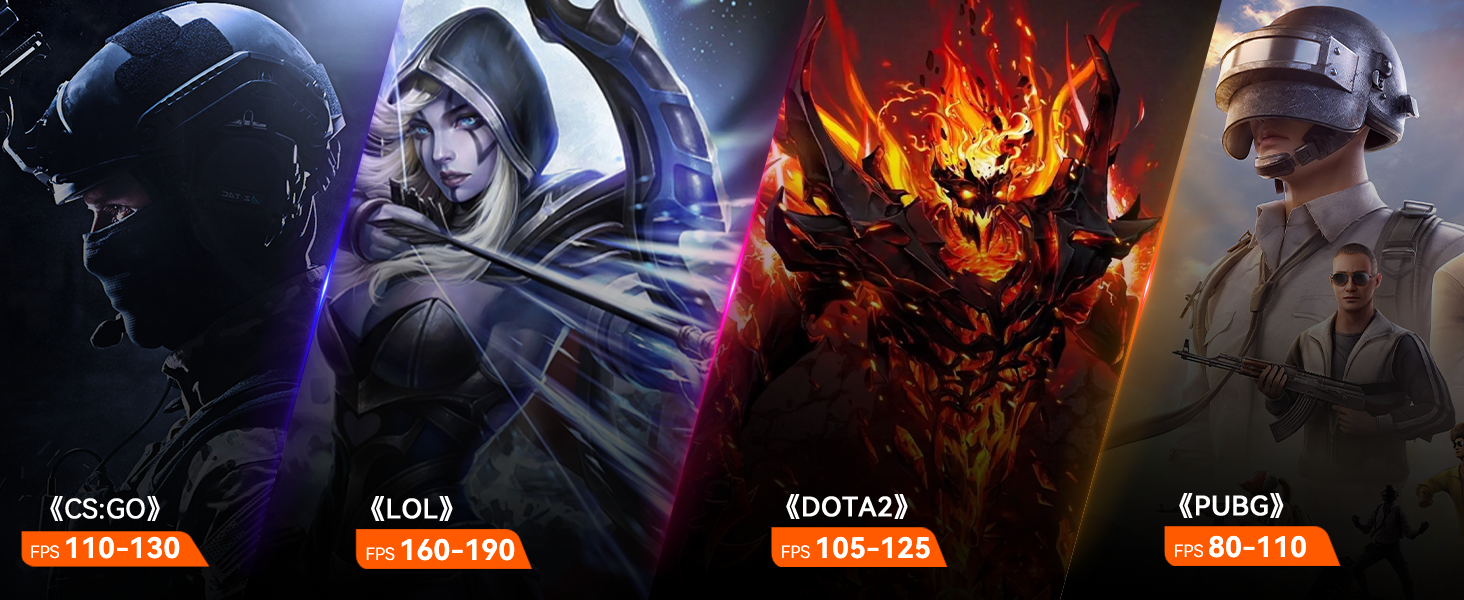
Figure 5.14: Various multi-purpose usage scenarios for the Beelink SER8 Mini PC, including home entertainment, office work, and creative tasks.
6. Maintenance
Regular maintenance helps ensure the longevity and optimal performance of your Beelink SER8 Mini PC.
- Keep Clean: Regularly clean the exterior of the Mini PC with a soft, dry cloth. Ensure air vents are free from dust and obstructions to maintain proper airflow.
- Software Updates: Keep your operating system and drivers updated to the latest versions. This improves security, performance, and compatibility.
- Avoid Extreme Conditions: Do not expose the Mini PC to extreme temperatures, humidity, or direct sunlight.
- Proper Shutdown: Always shut down the system properly through the operating system to prevent data corruption.
7. Troubleshooting
If you encounter issues with your Beelink SER8 Mini PC, try the following common troubleshooting steps:
- No Power:
- Ensure the power adapter is securely connected to both the Mini PC and a working power outlet.
- Verify the power outlet is functional by plugging in another device.
- No Display:
- Check that the HDMI/DP/Type-C cable is securely connected to both the Mini PC and the monitor.
- Ensure the monitor is powered on and set to the correct input source.
- Try a different display cable or monitor if available.
- System Slowdown:
- Close unnecessary applications running in the background.
- Check for and install any pending operating system updates.
- Ensure adequate ventilation around the Mini PC to prevent overheating.
- Peripheral Not Detected:
- Try plugging the peripheral into a different USB port.
- Restart the Mini PC.
- Ensure the peripheral's drivers are installed and up to date.
8. Specifications
Detailed technical specifications for the Beelink SER8 Mini PC:
| Feature | Specification |
|---|---|
| Brand | Beelink |
| Series | SER |
| Model Number | SER |
| Processor | AMD Ryzen 7 8845HS (3.8 GHz, up to 5.1GHz) |
| Number of Processors | 8 |
| Graphics Coprocessor | AMD Radeon Vega (AMD Radeon 780M 12-core 2700MHz) |
| Screen Resolution | 3840 x 2160 pixels (4K UHD) |
| Hard Drive | 1 TB SSD (Dual M.2 PCIe 4.0 SSD slots, up to 8TB) |
| Memory Type | SODIMM DDR5 5600MHz (2 slots, MAX 256GB) |
| Operating System | OS (Pre-installed) |
| Wireless Type | 802.11ax (WiFi 6), Bluetooth 5.2 |
| Interfaces | USB3.2 x 2, USB 2.0 x 2, RJ45 2.5G LAN x 1, HDMI 2.1 x 1, DP x 1, Type-C (USB4 40G) x 1, Type-C (10Gbps) x 1, 3.5mm Audio Jack x 2 |
| Dimensions | 135x135x44.7mm (Without Rubber Feet) |
| Item Weight | 3.15 pounds |
| Color | Black (Frost Silver/Space Gray options may exist) |

Figure 8.1: Official product specification sheet for the Beelink SER8 Mini PC.
9. Warranty & Support
Beelink is committed to providing excellent customer service and support for your Mini PC.
- Warranty: The product comes with 3 years of technical support.
- Lifetime After-Sales Service: Free and reliable lifetime after-sales service is provided.
- Online Customer Service: 24/7 online customer service is available for assistance.
- Certifications: All products have FCC, ROHS, CE certification.
For further assistance, you can contact Beelink support:
- Telephone: +86-0755-36633117, +86 18165710592
- Email: Support-PC@bee-link.com
- Amazon Support: Login to your Amazon account, go to "Your Orders", then "Get Help" for your product.

Figure 9.1: Contact information and details for Beelink's after-sales service.