
UC7058RY
UC7058RY Ceiling Fan Receiver Instruction Manual
Model: UC7058RY | Brand: Generic
1. Introduction
This manual provides detailed instructions for the installation, operation, and maintenance of the UC7058RY Ceiling Fan Receiver. This specific model is designed for ceiling fans with a two (2) light kit version, supporting both up and down lights. Please read this manual thoroughly before installation and use to ensure proper function and safety.
2. Product Overview
The UC7058RY is a remote control receiver module for ceiling fans, enabling wireless control of fan speeds and lighting. It is a black, crescent-shaped unit designed to fit within the canopy of most compatible ceiling fans.
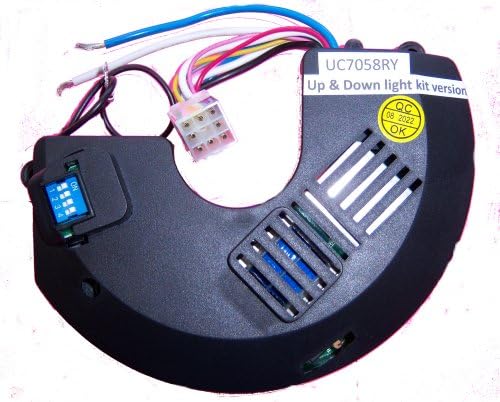
Figure 2.1: UC7058RY Ceiling Fan Receiver Module. This image displays the UC7058RY ceiling fan receiver module. It is a black, crescent-shaped unit with various colored wires extending from one end. A small blue DIP switch block with numbers 1-4 is visible on the left side. On the right, a yellow 'QC OK' sticker is present, along with slots for fuses and other internal components.
Key Features:
- Designed for ceiling fans with two (2) light kit versions (up and down lights).
- Enables remote control functionality for fan speed and light operation.
- Compact design for easy installation within fan canopy.
- Features DIP switches for code matching with a compatible remote.
3. Setup and Installation
Important Safety Information:
- Always disconnect power at the circuit breaker before installing or servicing the receiver.
- If you are unsure about wiring, consult a qualified electrician.
- Ensure all electrical connections are secure and comply with local electrical codes.
Installation Steps:
- Prepare the Fan: Turn off power to the ceiling fan at the main circuit breaker. Remove the fan's canopy to access the wiring compartment.
- Match DIP Switches: Locate the DIP switches on the UC7058RY receiver and on your compatible remote control (remote not included). Ensure the switch settings on both devices match exactly. This is crucial for the receiver and remote to communicate.
- Wire the Receiver: Connect the receiver's wires to the ceiling fan and household wiring according to the wiring diagram provided with your ceiling fan or the receiver's specific instructions. Typically, this involves connecting the receiver's input wires to the household power and its output wires to the fan motor and light kit.
- Black wire (AC IN) to household hot wire.
- White wire (AC IN) to household neutral wire.
- Blue wire (Light) to fan light kit wire.
- Red wire (Fan) to fan motor wire.
- Green/Yellow wire (Ground) to ground wire.
- Position the Receiver: Carefully tuck the wired receiver into the fan's canopy, ensuring no wires are pinched and there is adequate space for air circulation.
- Secure Canopy: Reattach the fan canopy securely.
- Restore Power: Turn the power back on at the circuit breaker.
4. Operating Instructions
Once the UC7058RY receiver is correctly installed and paired with a compatible remote control, you can operate your ceiling fan and lights wirelessly.
Fan Control:
- Fan ON/OFF: Press the fan ON/OFF button on your remote.
- Fan Speed: Use the speed control buttons (typically Low, Medium, High) on your remote to adjust the fan's rotation speed. This receiver supports 3 power levels.
Light Control:
- Light ON/OFF: Press the light ON/OFF button on your remote to toggle the lights.
- Dimming (if supported by remote and light kit): Some remotes may have dimming functions. Refer to your remote's manual for specific instructions. This receiver is compatible with two (2) light kit versions (up and down lights).
5. Maintenance
The UC7058RY receiver requires minimal maintenance. Follow these guidelines to ensure longevity:
- Cleaning: Keep the receiver free from dust and debris. Ensure the fan canopy is clean to prevent overheating.
- Environment: Avoid exposing the receiver to excessive moisture, extreme temperatures, or direct sunlight. This product is designed for indoor usage.
- Fuses: The receiver may contain internal fuses for protection. If the unit stops functioning, and all other troubleshooting steps fail, a qualified technician may need to inspect or replace the fuses. (Note: Fuse replacement should only be performed by a professional if you are not experienced with electrical components).
6. Troubleshooting
If you experience issues with your UC7058RY receiver, refer to the following common problems and solutions:
| Problem | Possible Cause | Solution |
|---|---|---|
| Fan or lights do not respond to remote. |
|
|
| Fan operates at incorrect speeds or inconsistently. |
|
|
| Lights do not turn on. |
|
|
7. Specifications
| Attribute | Value |
|---|---|
| Model Name | UC7058RY |
| Brand | Generic |
| Color | Black |
| Product Dimensions | 5"D x 5"W x 1"H |
| Item Weight | 1 pounds |
| Power Source | AC |
| Control Method | Remote |
| Number of Power Levels | 3 |
| Included Components | Light Kit (Receiver is for 2-light kit version) |
| Indoor/Outdoor Usage | Indoor |
| Manufacturer | Rhine |
8. Warranty and Support
For information regarding warranty coverage, please refer to the documentation provided at the time of purchase or contact the seller directly. As this product is manufactured by Rhine and sold under the Generic brand, specific warranty terms may vary.
If you require technical support or have questions not covered in this manual, please contact the retailer or manufacturer through their official support channels. Always provide your product model number (UC7058RY) when seeking assistance.