
1. Introduction
The KETOTEK B0306PRO is a multi-functional digital energy meter designed to help you monitor and manage your electricity consumption. It accurately measures power usage, calculates total energy costs based on set electricity rates, and provides real-time data on various electrical parameters. This device is ideal for identifying energy-hungry appliances and optimizing household electricity usage.
Key Features:
- Measures energy (kWh), power (W), current (A), voltage (V), frequency (Hz), power factor (PF), and cost.
- Large LCD display for clear readability.
- Overload, kWh, and cost alarm functions for enhanced safety and awareness.
- Memory function retains accumulated data and settings even when unplugged.
- Suitable for a wide range of household appliances.
2. Product Overview
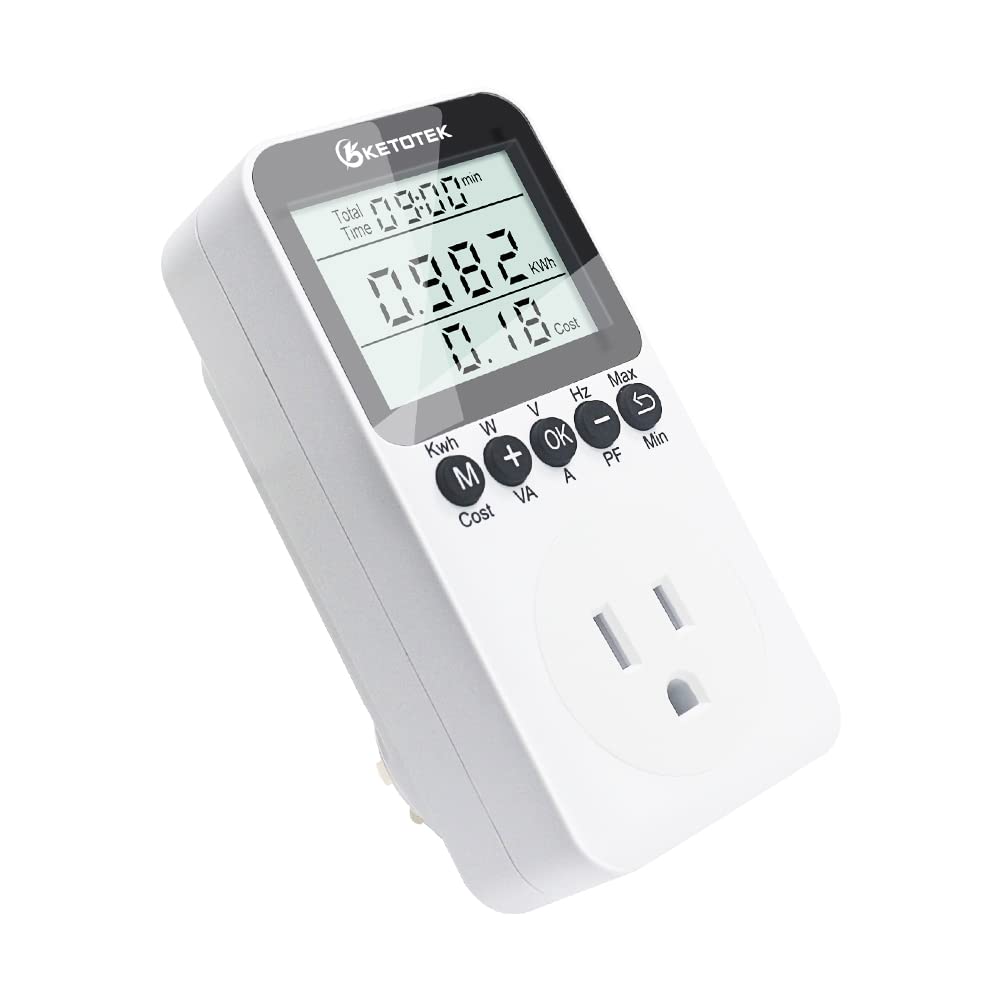
Figure 2.1: Front view of the KETOTEK B0306PRO Power Consumption Monitor, showing the LCD display and control buttons.

Figure 2.2: Back view of the KETOTEK B0306PRO, illustrating the US-style 3-pin plug and product specifications label.

Figure 2.3: Dimensions of the KETOTEK B0306PRO, showing its compact size for easy integration into outlets.
3. Setup
The KETOTEK B0306PRO is designed for simple plug-and-play operation. Follow these steps to begin monitoring your power consumption:
- Unpack: Carefully remove the device from its packaging.
- Plug In: Insert the KETOTEK B0306PRO into a standard wall outlet (100~250VAC, 50/60Hz).
- Connect Appliance: Plug the appliance you wish to monitor into the socket on the front of the KETOTEK B0306PRO.
- Set Electricity Cost (Optional but Recommended): To calculate energy costs, you need to set your local electricity rate per kWh.
- Press and hold the M button for 3 seconds to enter setting mode.
- Press M repeatedly until the 'Cost/KWh' tab is displayed.
- Press OK to start setting.
- Use the + and - buttons to adjust the value. Use OK or the return arrow button to move between digits.
- Press M to save the setting and exit.

Figure 3.1: The KETOTEK B0306PRO is a plug-and-play device, ready to measure various electrical parameters as indicated by the icons.
4. Operating Instructions
The large LCD display shows various data points. Use the control buttons to navigate through the different display modes and access information.
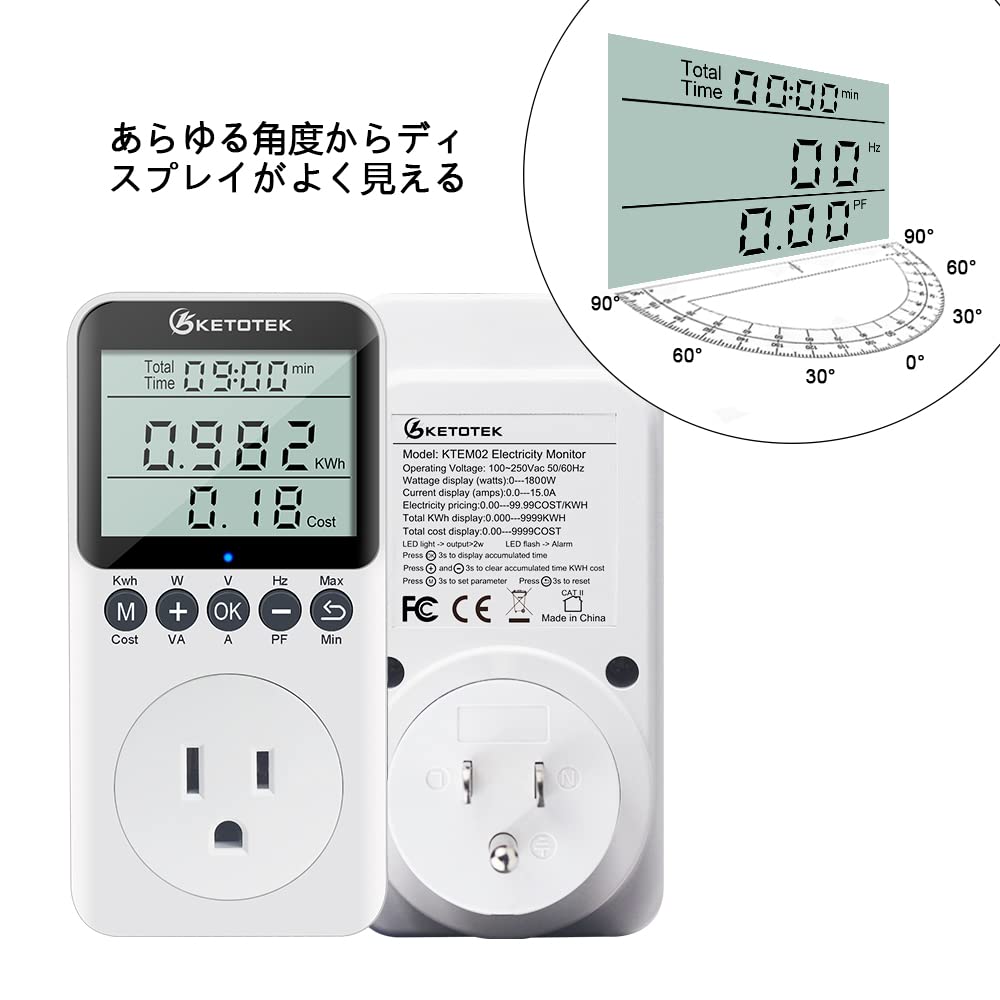
Figure 4.1: The display offers excellent visibility from various viewing angles.

Figure 4.2: Examples of different data screens available on the monitor, including accumulated time, energy, cost, and real-time power metrics.
4.1. Button Functions
- M (Mode) Button: Cycles through display modes (Energy/Cost, Watts/VA, Volts/Amps, Hz/PF, Max/Min Power). Press and hold for 3 seconds to enter setting mode.
- + Button: In display mode, shows instantaneous power (W) and VA. In setting mode, increases value.
- OK Button: In display mode, shows Voltage (V) and Current (A). In setting mode, confirms selection or moves to the next digit.
- - Button: In display mode, shows Frequency (Hz) and Power Factor (PF). In setting mode, decreases value.
- Return Arrow Button: In display mode, shows Max and Min power. In setting mode, moves back to the previous digit.
4.2. Clearing Accumulated Data
To clear the accumulated energy (kWh) and cost data, press and hold the OK and Return Arrow buttons simultaneously for 3 seconds. This will reset the readings to zero.
4.3. Overload Warning
The device features a multi-protection system. If the load power, energy consumption, or electricity cost reaches predefined alarm values, the display will flash "OVERLOAD", "KWH Alarm", or "Cost Alarm" respectively, and an LED indicator will blink to alert the user. This protects the connected appliance from potential damage.

Figure 4.3: Visual representation of the overload alarm feature, indicating a warning for excessive power consumption.
5. Maintenance
To ensure the longevity and accurate performance of your KETOTEK B0306PRO, follow these maintenance guidelines:
- Cleaning: Wipe the device with a soft, dry cloth. Do not use abrasive cleaners or solvents, as they may damage the surface or internal components.
- Storage: Store the device in a cool, dry place away from direct sunlight and extreme temperatures when not in use for extended periods.
- Avoid Moisture: Do not expose the device to water or high humidity. This is an electrical device and is not waterproof.
- Handle with Care: Avoid dropping or subjecting the device to strong impacts.
- Data Retention: The built-in memory function ensures that accumulated data and settings are retained even if the device is unplugged or power is interrupted. No battery replacement is typically needed for data retention under normal use.
6. Troubleshooting
If you encounter issues with your KETOTEK B0306PRO, refer to the following common troubleshooting tips:
- No Display/Device Not Turning On:
- Ensure the device is securely plugged into a live wall outlet.
- Check if the wall outlet itself is functioning by plugging in another appliance.
- Inaccurate Readings:
- Ensure the connected appliance is within the specified operating voltage (100~250VAC) and current (max 15A) limits.
- Note that this product is designed for daily household use and may not be suitable for measuring instantaneous voltage, current, or power fluctuations. Accuracy is rated at 1%.
- Overload Alarm Constantly Triggering:
- The connected appliance might be drawing more power than the set overload threshold. Reduce the load or adjust the overload alarm setting if appropriate (refer to Section 3. Setup for setting adjustments).
- Ensure the total power consumption does not exceed 15A/120V.
- Cost Calculation Incorrect:
- Verify that the electricity cost per kWh is correctly entered into the device (refer to Section 3. Setup).
- Data Not Clearing:
- Ensure you are pressing and holding the OK and Return Arrow buttons simultaneously for at least 3 seconds.
7. Specifications
| Parameter | Value |
|---|---|
| Brand | KETOTEK |
| Model | B0306PRO (KTEM02USPRO) |
| Operating Voltage | 100~250VAC |
| Frequency | 50/60Hz |
| Max Output Current | 15A |
| Max Output Power | 120V |
| Measurement Accuracy | 1% |
| Energy Display Range | 0.00~9999kWh |
| Cost Display Range | 0.00~99.99COST/KWH |
| Total Cost Display Range | 0.00~9999COST |
| Product Weight | 180 g |
| Package Dimensions | 13.9 x 8.2 x 6.4 cm |
| Battery (for memory) | 1 CR2032 (included) |
8. Application Examples
The KETOTEK B0306PRO can be used to monitor the power consumption of various household and office appliances. This helps in understanding energy usage patterns and making informed decisions to reduce electricity bills.

Figure 8.1: The monitor can be used with appliances such as refrigerators, washing machines, water heaters, and ovens to track their energy usage.
9. Warranty and Support
KETOTEK products are manufactured to high-quality standards. For any questions, technical support, or warranty claims, please refer to the contact information provided with your purchase or visit the official KETOTEK website. Please retain your proof of purchase for warranty purposes.