
Introduction
This manual provides essential instructions for the safe and effective use of your OM System Tough TG-7 Digital Camera. The TG-7 is a rugged compact camera designed for durability and high-quality imaging in challenging environments. It features a waterproof, shockproof, freezeproof, and dustproof construction, making it suitable for various outdoor activities and underwater photography.
Product Overview
Camera Components

Figure 1: Front view of the OM System Tough TG-7 Digital Camera, red body with black lens and controls.
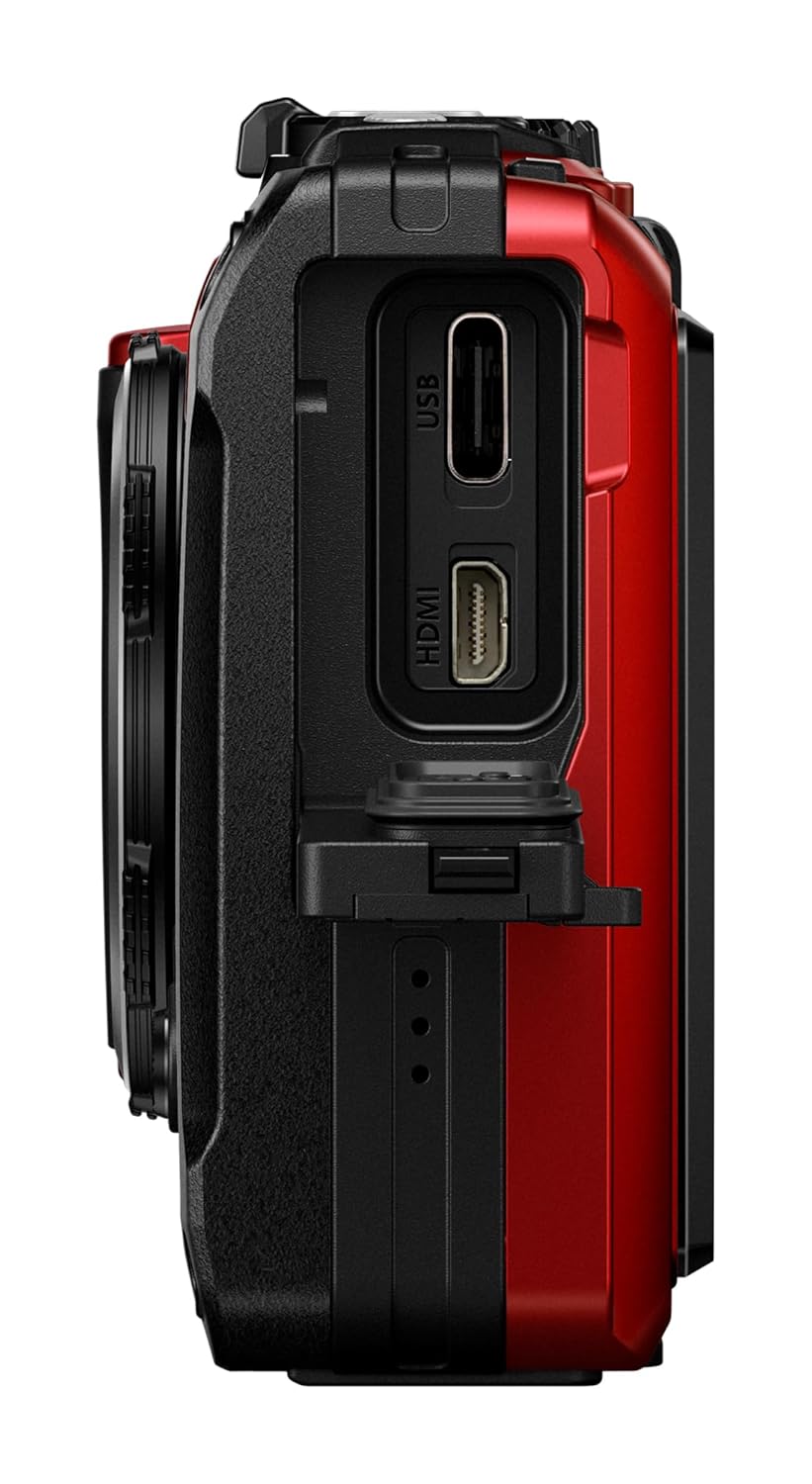
Figure 2: Side view of the OM System Tough TG-7 Digital Camera, showing the USB-C and HDMI ports under a protective flap.
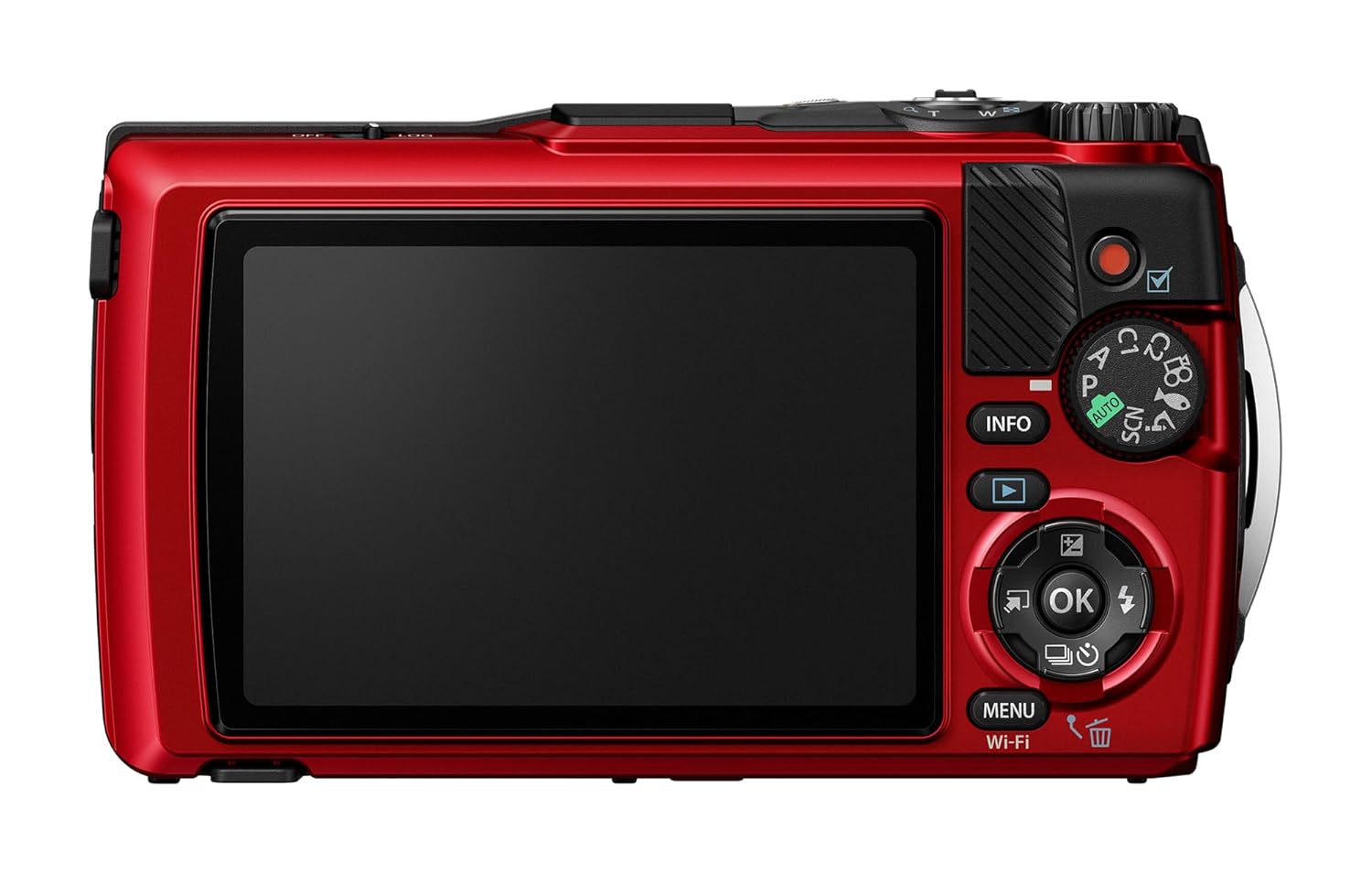
Figure 3: Rear view of the OM System Tough TG-7 Digital Camera, displaying the LCD screen and control buttons.
Box Contents
- OM System Tough TG-7 Camera Body
- Li-92B Rechargeable Battery
- Hand Strap
- USB Type-C Cable (for charging and data transfer)
- Basic Instruction Manual
Setup
1. Battery Installation and Charging
- Open the battery/card compartment cover on the side of the camera. Ensure the cover is dry before opening.
- Insert the Li-92B battery with the correct orientation, matching the indicator.
- Close the compartment cover securely until it clicks into place.
- Connect the camera to a USB power source using the supplied USB Type-C cable to charge the battery. The charging indicator will illuminate.
2. Memory Card Insertion
- Open the battery/card compartment cover.
- Insert a compatible SD/SDHC/SDXC memory card into the slot with the label facing the correct direction.
- Close the compartment cover securely.
3. Initial Power On
- Press the power button to turn on the camera.
- Follow the on-screen prompts to set the date, time, and language.
Basic Operation
1. Powering On/Off
- To turn on, press the [POWER] button.
- To turn off, press and hold the [POWER] button until the screen goes blank.
2. Taking Photos
- Select your desired shooting mode using the mode dial.
- Frame your shot using the LCD monitor.
- Press the shutter button halfway to focus. The focus indicator will light up.
- Press the shutter button fully to capture the image.
3. Recording Videos
- Press the dedicated movie record button to start recording.
- Press the movie record button again to stop recording. The camera supports 4K video recording.
4. Shooting Modes
- AUTO: Fully automatic mode for simple point-and-shoot operation.
- P (Program Auto): Camera sets aperture and shutter speed, while allowing exposure compensation.
- A (Aperture Priority): User sets aperture (limited options: f/2, f/2.2, f/8 at 25mm), camera sets shutter speed.
- SCN (Scene Modes): Optimized settings for specific scenes (e.g., Portrait, Landscape, Night Scene).
- MACRO: Dedicated modes for close-up photography, offering four distinct options.
- C1/C2 (Custom Modes): Save preferred shooting parameters for quick recall.
5. Special Features
- Interval Shooting: Capture a series of images at set intervals.
- Time Lapse Movie: Automatically create time-lapse videos from interval shots.
- Vertical Video: Record videos in a vertical orientation.
- RAW Format: Capture images in RAW format for greater post-processing flexibility.
Advanced Features
1. Rugged Capabilities
The TG-7 is built to withstand harsh conditions:
- Waterproof: Up to 15 meters (50 feet) without additional housing.
- Shockproof: Withstands drops from up to 2.1 meters (7 feet).
- Freezeproof: Operates in temperatures down to -10°C (14°F).
- Crushproof: Withstands pressure up to 100 kgf (220 lbf).
- Dustproof: Prevents ingress of dust and sand.

Figure 4: The OM System Tough TG-7 camera submerged in water, demonstrating its waterproof capability.

Figure 5: The OM System Tough TG-7 camera appearing to break through cracked ground, symbolizing its shockproof design.

Figure 6: The OM System Tough TG-7 camera covered in snow, illustrating its freezeproof performance.
2. Macro Photography
The TG-7 offers advanced macro modes for capturing intricate details of small subjects. Utilize the dedicated MACRO mode on the dial for optimal results.

Figure 7: A close-up macro shot of a small, colorful sea slug, showcasing the camera's macro capabilities.
3. Field Sensor System
The camera is equipped with a field sensor system to record environmental data:
- GPS: Records location data with your photos and videos.
- Manometer: Measures atmospheric pressure and depth (when underwater).
- Temperature Sensor: Records ambient temperature.
- Compass: Provides directional information.
4. Connectivity
- Wi-Fi: Use the OI.Share app to transfer images to a smartphone or tablet and for remote control.
- Bluetooth: Enables wireless control with optional remote control RM-WR1.
- USB-C: For charging the battery and transferring data to a computer.

Figure 8: The OM System Tough TG-7 camera next to a smartphone displaying an image, indicating connectivity for image transfer.
Maintenance and Care
1. Cleaning After Water Exposure
After using the camera in water, it is crucial to clean it properly to maintain its waterproof integrity:
- Within one hour of removing the camera from water, rinse it thoroughly with fresh, clean water.
- Gently wipe the camera dry with a soft, clean cloth. Pay special attention to the seals and compartment covers.
- Do not use detergents or abrasive cleaners.
2. General Cleaning
- Wipe the camera body with a soft, dry cloth.
- For the lens and LCD screen, use a lens brush or a soft, lint-free cloth specifically designed for optical surfaces.
3. Storage
Store the camera in a cool, dry place away from direct sunlight and extreme temperatures.
Troubleshooting
If you encounter issues with your OM System Tough TG-7, consider the following basic troubleshooting steps:
- Camera does not power on: Ensure the battery is fully charged and correctly inserted.
- Cannot take photos: Check if a memory card is inserted and has sufficient free space. Ensure the lens cap (if any accessory is attached) is removed.
- Image quality issues: Verify lens cleanliness and check shooting mode settings.
- Connectivity problems: Ensure Wi-Fi/Bluetooth is enabled on both the camera and the connected device.
For more detailed troubleshooting or persistent issues, please refer to the comprehensive digital manual available on the OM System support website.
Specifications
| Feature | Specification |
|---|---|
| Model Name | OM SYSTEM Tough TG-7 |
| Photo Sensor Resolution | 12 MP |
| Optical Zoom | 4x |
| Maximum Aperture | F2.0 |
| Video Capture Resolution | 2160p (4K) |
| Waterproof Depth | Up to 15 meters |
| Shockproof Height | Up to 2.1 meters |
| Freezeproof Temperature | Down to -10°C |
| Connectivity | Wi-Fi, USB Type-C |
| Field Sensors | GPS, Manometer, Temperature Sensor, Compass |
| Image Stabilization | Optical |
| Battery Type | Lithium Ion (Li-92B) |
| Item Weight | 249 Grams |
Warranty and Support
For detailed warranty information, please refer to the warranty card included with your product or visit the official OM System website. Technical support and additional resources, including firmware updates and a comprehensive digital manual, are available on the OM System support page.


