
Laffizz B0CGLTTFML
Laffizz Waterproof Lighter Instruction Manual
Model: B0CGLTTFML
1. Product Overview
The Laffizz Waterproof Lighter is a versatile and durable electric arc lighter designed for various outdoor and indoor activities. It features a retractable flexible neck for easy ignition in hard-to-reach areas, a multi-mode flashlight, and a USB-rechargeable battery with a power indicator. Its waterproof and windproof design ensures reliable performance in challenging conditions.

Image: The Laffizz Waterproof Lighter, showcasing its flexible neck and robust design.
2. Package Contents
- 1 x Laffizz Waterproof Lighter
- 1 x USB Type-C Charging Cable
- 1 x User Manual

Image: Contents of the Laffizz Lighter package, including the lighter, charging cable, and instruction manual.
3. Product Components

Image: Detailed diagram illustrating the various components of the Laffizz Waterproof Lighter.
- Arc Flame: Generates the flameless electric arc for ignition.
- Retractable Hose: Flexible neck that extends for reaching difficult angles.
- Battery Indicator: LED lights showing remaining battery charge (100%, 75%, 50%, 25%).
- Type-C Charging Port: For recharging the lighter's internal battery.
- Arc Switch: Button to activate the electric arc.
- Flashlight: Integrated light source with multiple modes.
- Retaining Ring: Secures the lighter's cap for waterproof sealing.
- Lanyard: For convenient carrying.
- Flashlight Switch: Button to control the flashlight modes.
4. Setup and Charging
4.1 Initial Charge
Before first use, fully charge the lighter. The battery indicator lights will show the charging progress.
4.2 Charging Procedure
- Locate the Type-C Charging Port: Find the Type-C charging port on the side of the lighter, near the ignition button.
- Connect the Cable: Connect the provided USB Type-C cable to the lighter's charging port.
- Connect to Power: Connect the other end of the USB cable to a compatible USB power source (e.g., computer, wall adapter, power bank).
- Monitor Charging: The LED battery indicator lights will illuminate to show the current charge level and will progressively light up as the lighter charges. All four lights will be solid when fully charged.
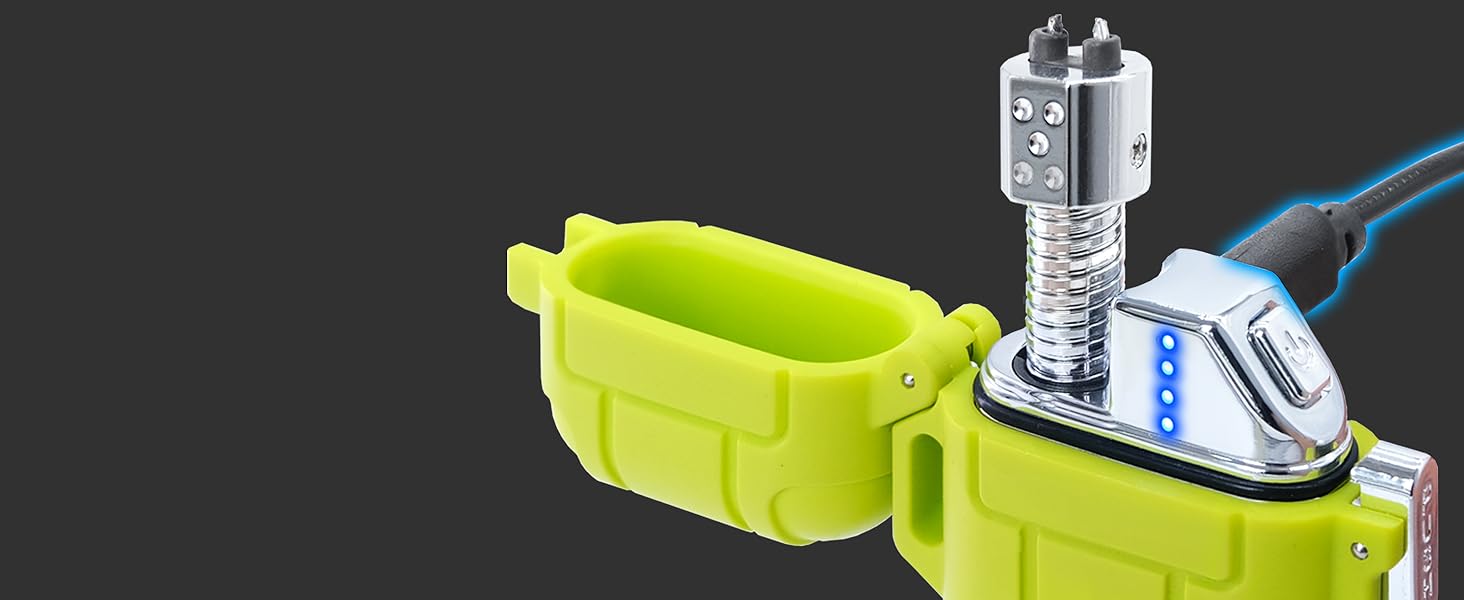
Image: The lighter being charged via its Type-C port, with the LED battery indicator showing charge status.
4.3 Battery Indicator
The four LED lights indicate the battery charge level:
- 4 lights: 75%-100% charge
- 3 lights: 50%-75% charge
- 2 lights: 25%-50% charge
- 1 light: Below 25% charge, recharge soon.

Image: Close-up of the LED battery indicator, detailing the charge levels.
5. Operating Instructions
5.1 Using the Electric Arc Lighter
- Unlock the Safety Clasp: Ensure the safety clasp lock is disengaged to open the lighter.
- Open the Latch Cover: Press the latch cover to open the lighter, revealing the flexible neck.
- Extend and Adjust the Flexible Neck: Pull out the 2.13-inch retractable arc hose and bend it to the desired angle for easy access to the item you wish to ignite.
- Activate the Arc: Press the Arc Switch (ignition button) to generate the flameless electric arc.
- Ignite: Position the arc near the material to be ignited. Release the Arc Switch when done.
- Close and Secure: After use, retract the flexible neck, close the latch cover, and engage the safety clasp lock to maintain waterproof sealing.

Image: Step-by-step visual guide on operating the lighter, from opening to ignition.

Image: The lighter in use, demonstrating its ability to light a candle with the flexible neck.

Image: Illustration of the lighter's 360-degree flexible neck design.
5.2 Using the Flashlight
The flashlight is located at the bottom of the lighter and features three modes:
- Activate: Press the Flashlight Switch (button on the side) once for Strong Light mode.
- Cycle Modes: Press the Flashlight Switch again to cycle through Low Light mode, then Strobe mode.
- Turn Off: Press the Flashlight Switch a fourth time to turn off the flashlight.

Image: The lighter's flashlight demonstrating its three modes: High, Low, and Strobe.
6. Maintenance and Care
- Charging: Recharge the lighter when the battery indicator shows low power to ensure optimal performance.
- Cleaning: Use a soft, dry cloth to clean the lighter's exterior. Do not use abrasive cleaners or solvents.
- Waterproof Seal: Always ensure the safety clasp lock is engaged and the latch cover is securely closed when not in use, especially in wet environments, to maintain its waterproof integrity.
- Storage: Store the lighter in a cool, dry place away from direct sunlight and extreme temperatures.

Image: The lighter submerged in water, highlighting its IP56 waterproof capability when properly sealed.
7. Troubleshooting
| Problem | Possible Cause | Solution |
|---|---|---|
| Lighter does not ignite. | Low battery. Safety clasp not disengaged. Latch cover not fully open. | Recharge the lighter. Ensure safety clasp is open. Fully open the latch cover. |
| Flashlight does not turn on. | Low battery. Flashlight switch not pressed correctly. | Recharge the lighter. Press the flashlight switch firmly. |
| Lighter not charging. | Cable not connected properly. Faulty charging cable or adapter. | Ensure cable is securely connected. Try a different USB Type-C cable and/or power adapter. |
8. Specifications
| Feature | Detail |
|---|---|
| Brand | Laffizz |
| Model | B0CGLTTFML |
| Color | Green |
| Material | Metal |
| Fuel Type | Electric (Plasma Arc) |
| Charging Method | USB Type-C |
| Flexible Neck Length | 2.13 inches (retractable) |
| Flashlight Modes | Strong Light, Low Light, Strobe |
| Waterproof Rating | IP56 (when safety clasp is locked) |
| Item Weight | 4.2 ounces (0.12 Kilograms) |
| Product Dimensions | 2"L x 1"W x 0.4"Th |
9. Safety Information
- Keep out of reach of children.
- Do not touch the electric arc as it can cause burns.
- Do not expose to temperatures above 122°F (50°C).
- Do not disassemble or modify the lighter.
- Do not immerse in water unless the safety clasp is fully engaged and sealed.
- Avoid prolonged exposure to direct sunlight.
- Do not use if damaged.
10. Warranty and Support
For warranty information or product support, please contact Laffizz customer service through the retailer's platform or visit the official Laffizz brand store. Please have your purchase details and product model number (B0CGLTTFML) ready when contacting support.
Laffizz Brand Store: Visit Store
Ask a question about this manual
Ask about setup, troubleshooting, compatibility, parts, safety, or missing instructions. Manuals+ will review the question and use this page’s manual context to help answer it.