
Introduction
This manual provides essential instructions for the safe and efficient operation, setup, maintenance, and troubleshooting of your GOYOJO FA2204 Analytical Balance. This precision instrument is designed for accurate weight measurements in laboratory environments, offering 0.0001g readability and a 220g capacity.
Key features include:
- Precise 0.0001g readability for accurate measurements down to 0.1mg.
- 220g capacity to handle a wide range of analytical samples.
- Superb 0.0002g repeatability for consistent, reliable results.
- Excellent 0.0003g linearity ensuring precise readings across the full range.
- 80mm pan accommodates various containers and sample sizes.
- External calibration for routine validation with traceable weights.

Figure 1: Front view of the GOYOJO FA2204 Analytical Balance. This image shows the balance with its protective draft shield, the weighing pan, and the digital display.
1. Setup
1.1 Unpacking and Inspection
Carefully remove the analytical balance from its packaging. Inspect all components for any signs of damage during transit. Ensure all accessories, such as the weighing pan, draft shield components, and power adapter, are present.
1.2 Placement
Place the balance on a stable, level, and vibration-free surface. Avoid locations near air currents (e.g., air conditioning vents, open windows), direct sunlight, or heat sources, as these can affect measurement accuracy.
1.3 Leveling the Balance
Use the adjustable feet at the base of the balance and the built-in spirit level (usually located near the display) to ensure the balance is perfectly level. Adjust the feet until the air bubble in the spirit level is centered.
1.4 Assembly
Assemble the draft shield components according to the diagrams provided with your balance. Carefully place the weighing pan onto the pan support. Ensure all parts are clean and properly seated.
1.5 Power Connection
Connect the power adapter to the balance's power input port and then plug it into a suitable electrical outlet. Allow the balance to warm up for at least 30 minutes after connecting power before performing any measurements or calibration. This ensures thermal stability for accurate readings.

Figure 2: Rear view of the balance. This image highlights the power input port and a serial communication port, essential for connecting the device to power and potentially other instruments.
2. Operating Instructions
2.1 Powering On/Off
- To power on: Press the ON button. The display will show a self-test sequence and then settle at 0.0000g.
- To power off: Press and hold the OFF button until the display turns off.
2.2 External Calibration
Regular external calibration is crucial for maintaining accuracy. Refer to your balance's specific calibration procedure, typically involving a certified external calibration weight.
- Ensure the balance is level and has warmed up.
- Clear the weighing pan.
- Press the CAL button (or follow the menu prompts for calibration).
- The display will prompt you to place the specified calibration weight (e.g., 200g) on the pan.
- Carefully place the calibration weight on the center of the pan.
- Wait for the balance to stabilize and complete the calibration process.
- The display will indicate successful calibration, then prompt you to remove the weight.
- Remove the weight. The balance should return to 0.0000g.
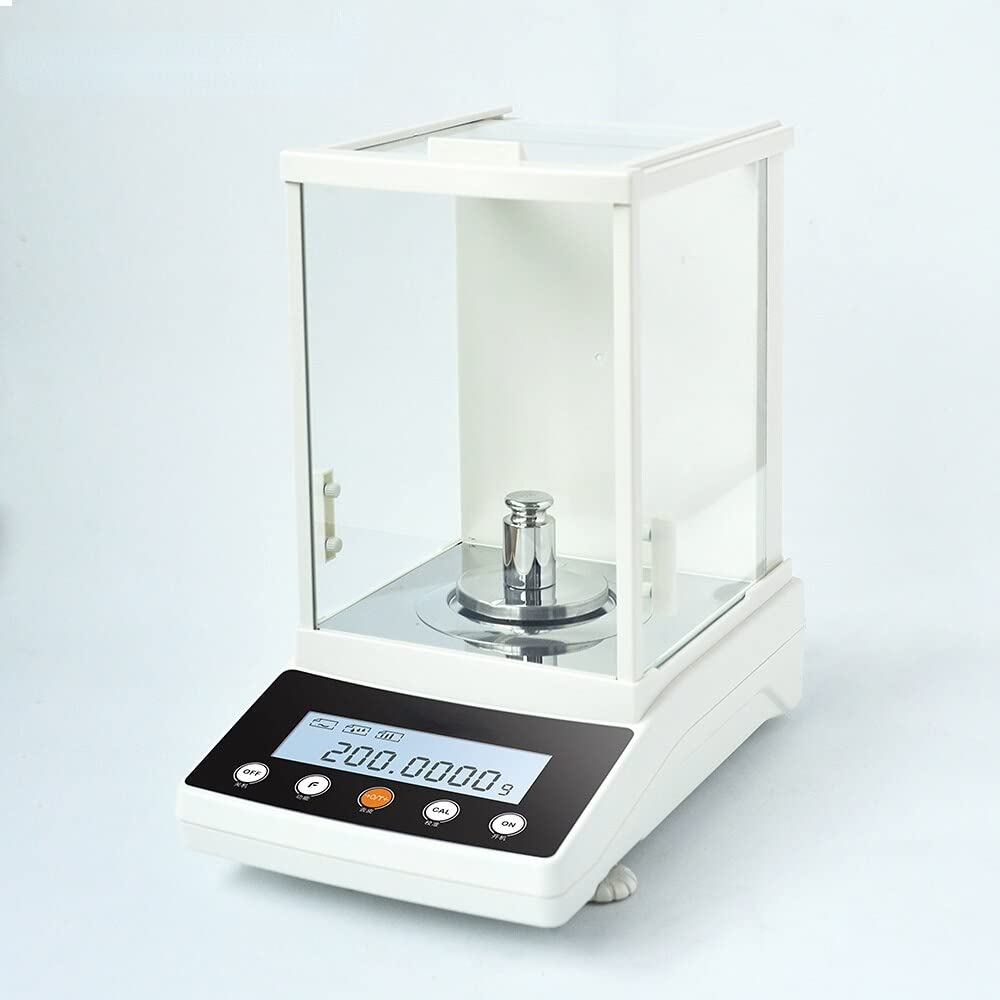
Figure 3: Balance during calibration. This image shows the analytical balance with a standard calibration weight placed on the weighing pan, illustrating the calibration process.
2.3 Basic Weighing Procedure
- Ensure the balance is level, warmed up, and calibrated.
- Press the TARE button to zero the display if it's not already at 0.0000g.
- If using a container, place the empty container on the weighing pan. Wait for the reading to stabilize, then press the TARE button again to zero the display (this subtracts the container's weight).
- Carefully place the sample to be weighed onto the center of the weighing pan (or into the tared container).
- Wait for the reading to stabilize. The displayed value is the net weight of your sample.
- Record the measurement.
- Remove the sample and container.
2.4 Unit Selection
Your balance may support multiple weighing units (e.g., grams, milligrams, carats). Consult your balance's specific instructions for changing units, typically done via a UNIT or MODE button.
3. Maintenance
3.1 Cleaning
- Always disconnect the balance from the power supply before cleaning.
- Use a soft, lint-free cloth dampened with a mild detergent solution or isopropyl alcohol to clean the exterior surfaces, weighing pan, and draft shield.
- Do not use abrasive cleaners, solvents, or harsh chemicals.
- Ensure no liquids enter the balance housing or display area.
- The weighing pan and draft shield glass panels can often be removed for more thorough cleaning. Refer to your balance's specific instructions for removal and reassembly.
3.2 Storage
When not in use, keep the balance covered with a dust cover (if provided) to protect it from dust and debris. Store in a dry, temperature-controlled environment.
3.3 Regular Checks
Periodically check the balance's level and perform external calibration to ensure continued accuracy, especially if the balance has been moved or subjected to environmental changes.
4. Troubleshooting
| Problem | Possible Cause | Solution |
|---|---|---|
| Unstable readings / Drifting display |
|
|
| Balance does not turn on |
|
|
| Inaccurate readings |
|
|
If problems persist after attempting these solutions, please contact the seller or manufacturer for further assistance.
5. Specifications
| Parameter | Value |
|---|---|
| Model | FA2204 |
| Capacity | 220g |
| Readability | 0.0001g (0.1mg) |
| Repeatability | 0.0002g |
| Linearity | 0.0003g |
| Pan Size | 80mm |
| Calibration Type | External |
| Manufacturer | GOYOJO |
6. Warranty and Support
For detailed warranty information, please refer to the documentation provided with your purchase or contact the seller directly.
For technical support or service inquiries, please contact the GOYOJO customer support or the authorized reseller from whom you purchased the analytical balance.