Introduction
This manual provides comprehensive instructions for the CAMECHO Portable 6.86-inch Wireless Carplay Android Auto Screen. This device enhances your driving experience by integrating smartphone functionalities directly into your vehicle's dashboard. It features a high-definition touchscreen, 4K front camera, Bluetooth connectivity, AUX and FM transmitter options, and supports Mirror Link for various applications. Please read this manual thoroughly before installation and operation to ensure proper use and optimal performance.
Setup and Installation
The CAMECHO portable screen is designed for easy installation, compatible with a wide range of vehicles (7-32V) including cars, trucks, RVs, and vans. No complex installation skills are required.
Package Contents:
- 6.86-inch Smart Screen Player
- Universal Stand (2x)
- User Manual
- Cigarette Lighter Power Adapter
- AUX Cable
- 64GB TF Card
- Mounting Bracket
- Accessories (e.g., bracket fixing stickers)
Mounting Options:
The device supports various mounting methods to suit your vehicle's interior and personal preference. Common methods include dashboard mounting, suction cup installation, and windshield installation. The universal stand allows for telescopic and multi-angle adjustment to optimize viewing without obstructing your driving view.

Image: This image illustrates different installation methods for the portable car screen, showing how it can be mounted on the dashboard using telescopic adjustment, a suction cup, or directly on the windshield. It also highlights the multi-angle adjustment capability for optimal positioning.
Power Connection:
Connect the device to your vehicle's power supply using the provided cigarette lighter adapter. Ensure the connection is secure before turning on the vehicle's ignition.
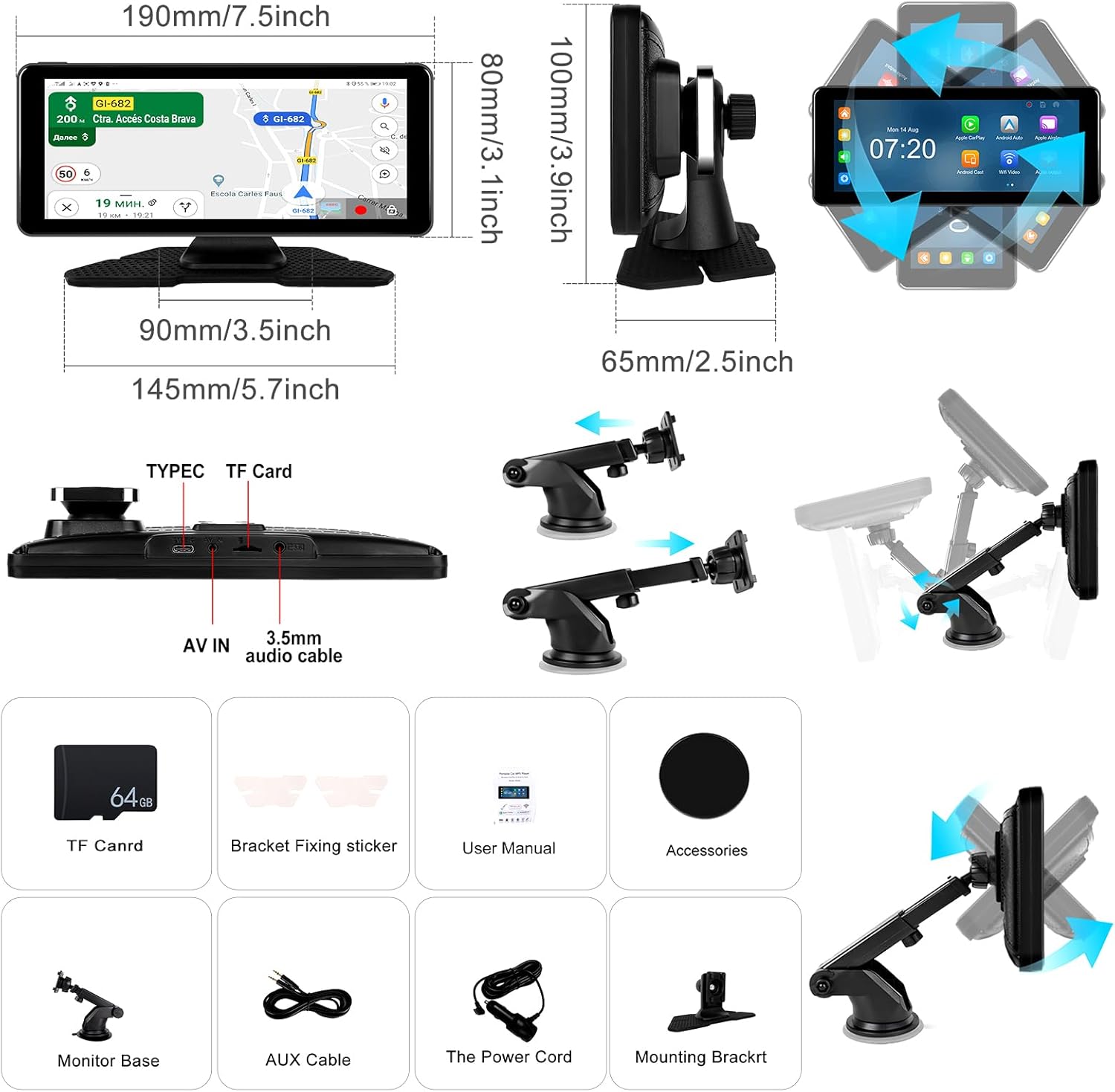
Image: This diagram displays the physical dimensions of the portable car screen and details the various accessories included in the package, such as the TF card slot, AV IN port, 3.5mm audio cable, power cord, monitor base, and different mounting brackets.
Related Documents - A3483G64-2EU-C236
 | Single Din Android 13 Car Stereo 9.5" Touchscreen Receiver - User Manual Comprehensive user manual for the Single Din Android 13 car stereo receiver (Model 9510A) featuring a 9.5" touchscreen, wireless CarPlay, Android Auto, GPS navigation, Bluetooth, WiFi, and mirror link functionality. Includes installation, operation, and troubleshooting guides. |
 | Audi A3 S3 RS3 Android Car Stereo User Manual Install and operate your Audi A3 S3 RS3 Android car stereo with this comprehensive user manual. Covers installation, wiring, Carplay, Android Auto, basic functions, and troubleshooting. |
 | CAMECHO Android Car Stereo for Audi TT MK2 8J (2006-2012) - User Manual User manual for the CAMECHO Android car stereo system, designed for Audi TT MK2 8J (2006-2012). Covers installation, safety, wiring, CarPlay, Android Auto, and other features. |
 | T86DVR 9.3 Inch Smart Player User Manual This user manual provides comprehensive instructions for the T86DVR 9.3 Inch Smart Player, covering product overview, composition, specifications, wiring, installation, interface functions like Apple CarPlay and Android Auto, DVR capabilities, Bluetooth, FM transmit, settings, troubleshooting, and product parameters. Learn how to set up and operate your smart player for an enhanced driving experience. |
 | CAMECHO Android 11 Car Stereo for Ford Mustang (2010-2014) - Instruction Manual Comprehensive instruction manual for the CAMECHO Android 11 car stereo system, designed for Ford Mustang models (2010-2014). Features include a 10.1-inch touchscreen, 2GB RAM, 32GB ROM, GPS, WiFi, Bluetooth, HiFi audio, Carplay, Android Auto, and backup camera support. Covers installation, wiring, safety, and troubleshooting. |
 | Android Car Stereo Installation and User Manual for Honda Civic (2000-2005) Comprehensive guide for installing and operating an Android car stereo system designed for Honda Civic models (2000-2005). Covers safety, wiring, GPS, Bluetooth, Carplay, Android Auto, and troubleshooting. |