URBN Beat 700 ANC TWS Earbuds User Manual
Model: UBT700
1. Introduction
Thank you for choosing the URBN Beat 700 ANC True Wireless Stereo (TWS) Earbuds. These earbuds are designed to provide a superior audio experience with features like Active Noise Cancellation (ANC), long playtime, and a dedicated gaming mode. This manual will guide you through the setup, operation, and maintenance of your new earbuds to ensure optimal performance.
2. What's in the Box
- URBN Beat 700 ANC TWS Earbuds (Left and Right)
- Charging Case
- USB Charging Cable
- User Manual
3. Product Overview
The URBN Beat 700 earbuds feature a sleek design with intuitive touch controls and a compact charging case. They are equipped with 12mm dynamic drivers for rich audio and hybrid quad microphones for clear calls.

Image: URBN Beat 700 ANC TWS Earbuds and their charging case.
4. Setup
4.1 Initial Charging
Before first use, fully charge the earbuds and the charging case. Place the earbuds into the charging case and connect the USB charging cable to the case and a power source. The LED indicator on the case will show charging status.

Image: Visual representation of the URBN Beat 700's impressive 60-hour total playback time and superfast charging capability, providing 180 minutes of playback from just 10 minutes of charge.
4.2 Bluetooth Pairing
- Ensure the earbuds are charged.
- Open the charging case. The earbuds will automatically enter pairing mode (LED indicators will flash).
- On your device (smartphone, tablet, etc.), enable Bluetooth.
- Search for "URBN Beat 700" in the list of available devices and select it to connect.
- Once connected, the LED indicators on the earbuds will turn off or show a steady light, and you will hear a confirmation tone.

Image: Depicts the URBN Beat 700's Bluetooth V5.3 for amplified wireless performance and Type-C port for fast charging.
4.3 App Support
Enhance your experience by downloading the URBN companion app. The app allows for control customization, EQ options, ANC control, and battery notifications.
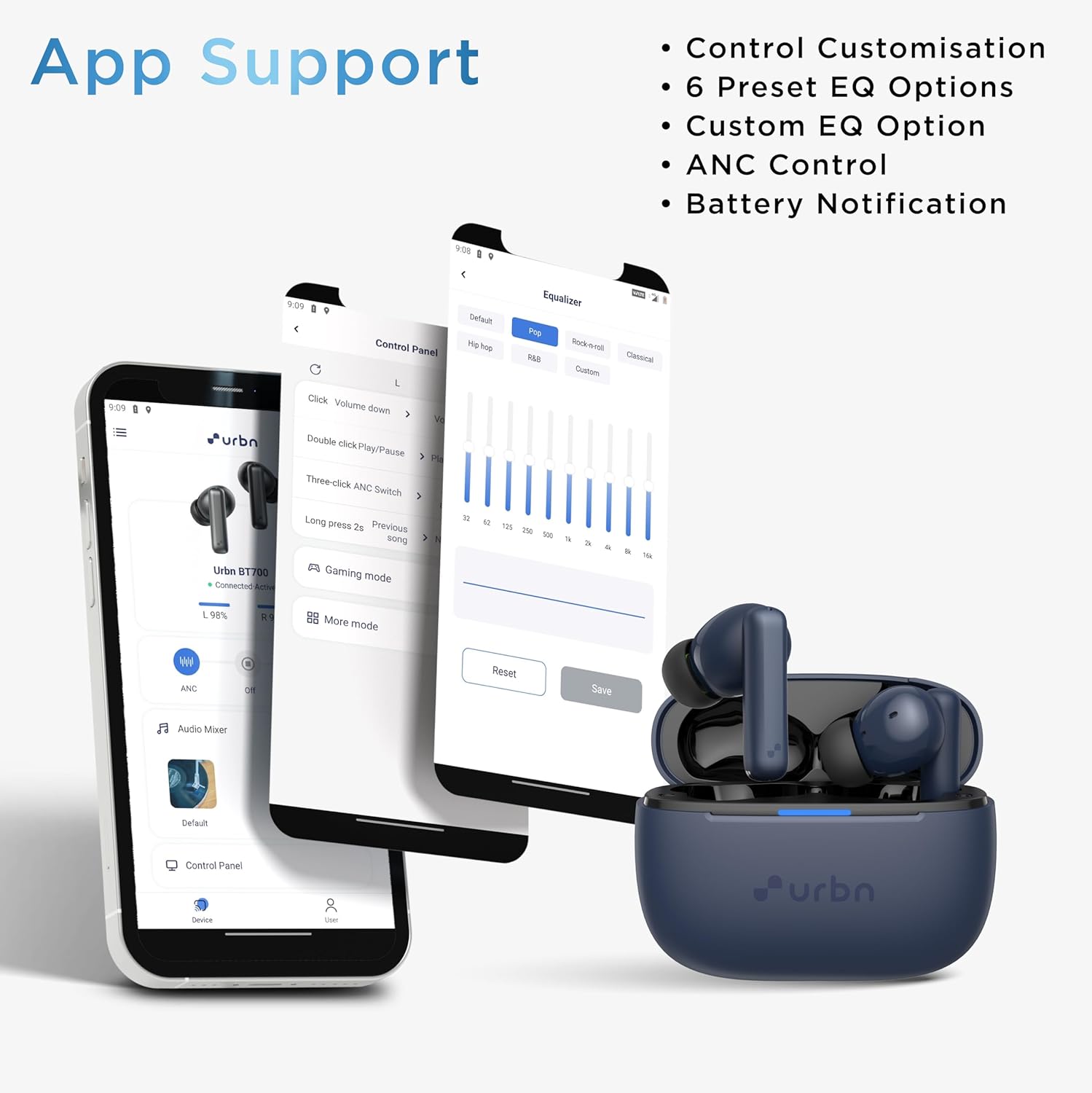
Image: Illustrates the URBN app interface, highlighting features like control customization, preset EQ options, custom EQ, ANC control, and battery notifications.
5. Operating Instructions
5.1 Touch Controls
The URBN Beat 700 earbuds feature intuitive touch controls on each earbud. Refer to the diagram below for specific functions:

Image: Detailed diagram of the touch controls for the left and right URBN Beat 700 earbuds, including single tap for volume/calls, double tap for play/pause/calls, long press for track/reject call, triple tap for noise modes, and four taps for EQ modes. Also shows three clicks for voice assistant activation.
- Single Tap (L/R): Volume Decrease (L) / Volume Increase (R), Answer/End Calls
- Double Tap (L/R): Play/Pause, Answer/End Calls
- Long Press (L): Previous Track / Reject Call
- Long Press (R): Next Track / Reject Call
- Triple Tap (L/R): Cycle through Noise Isolation (Default) / Transparency Mode / ANC Mode
- Four Taps (L/R): Cycle through EQ Mode (Default) / Bass EQ Mode / Gaming Mode
- Three Clicks (L/R): Activate Siri/Google Assistant
5.2 Noise Control Modes
The URBN Beat 700 offers three distinct noise control modes to adapt to your environment:

Image: Illustrates the three noise control modes of the URBN Beat 700: ANC Active Noise Cancellation Mode (for airplane/train), Ambient Noise Isolation Mode (for home/office), and Transparency Mode (for street/station).
- ANC Active Noise Cancellation Mode: Reduces external noise by up to 28dB, ideal for noisy environments like airplanes or trains.
- Ambient Noise Isolation Mode: Provides a balanced sound experience, suitable for indoor use or office environments.
- Transparency Mode: Allows you to hear your surroundings clearly while still enjoying your audio, perfect for outdoor activities or when you need to be aware of your environment.
5.3 Gaming Mode
Activate Gaming Mode for an ultra-low latency experience of 65ms, ensuring seamless audio synchronization for gaming and media consumption.

Image: Shows a smartphone screen with a game, emphasizing the 65ms ultra-low latency feature of the URBN Beat 700 earbuds, ideal for gaming.
6. Maintenance
6.1 Cleaning
- Gently wipe the earbuds and charging case with a soft, dry, lint-free cloth.
- Do not use abrasive cleaners, alcohol, or chemical solvents.
- Clean the charging contacts on both the earbuds and the case regularly with a dry cotton swab to ensure proper charging.
6.2 Storage
When not in use, store the earbuds in their charging case to protect them and keep them charged.
6.3 Water Resistance (IPX5)
The URBN Beat 700 earbuds are IPX5 water and sweat-resistant, making them suitable for workouts and outdoor activities. However, they are not designed for submersion in water. Avoid exposing them to excessive moisture or liquids.

Image: Depicts the URBN Beat 700 earbuds with water splashing, illustrating their IPX5 water resistance rating.
7. Troubleshooting
- Earbuds not pairing: Ensure both earbuds are in the case, then open the lid to initiate pairing mode. Check your device's Bluetooth settings and try reconnecting.
- Only one earbud working: Place both earbuds back into the charging case, close the lid, wait a few seconds, then open it again. This often re-syncs them.
- No sound: Check the volume level on your device and the earbuds. Ensure the earbuds are properly connected to your device.
- Charging issues: Clean the charging contacts on both the earbuds and the case. Ensure the charging cable is securely connected and the power source is active.
- ANC not effective: Ensure the earbuds are properly seated in your ears to create a good seal. Try cycling through the ANC modes using the touch controls or the app.
8. Specifications
Key technical specifications for the URBN Beat 700 ANC TWS Earbuds:

Image: Exploded view of an URBN Beat 700 earbud, highlighting the 12mm Dynamic Driver and internal components.
| Feature | Specification |
|---|---|
| Model Name | Beat 700 |
| Connectivity Technology | Wireless (Bluetooth V5.3) |
| Active Noise Cancellation (ANC) | 28dB |
| Driver Size | 12MM Dynamic Driver |
| Microphone | Hybrid Quad Mic (ENC Technology) |
| Total Playtime | Up to 60 Hours |
| Gaming Mode Latency | 65ms |
| Water Resistance Rating | IPX5 |
| Control Type | Touch Controls, Voice Control |
| Charging Port | USB Type-C (Fast Charging) |
| Item Weight | 25 Grams |
9. Warranty and Support
The URBN Beat 700 ANC TWS Earbuds come with a 1-year replacement warranty, ensuring peace of mind. For any support inquiries, technical assistance, or warranty claims, please contact URBN customer service through their official channels or visit the URBN store on Amazon.
Manufacturer: Veeflex Electrikals Pvt Ltd
Address: Rajprabha Enclave, Building No. 6, Unit No. 209&210, 1st Floor, Bhoidapada, Sativali Road, Vasai (East), Palghar 401208, Maharashtra, India
Amazon Store: URBN Official Store