
Boseyway xd
Boseyway Spy Camera Mini Hidden WiFi Camera User Manual
Model: xd
1. Introduction
This manual provides comprehensive instructions for the operation and maintenance of your Boseyway Spy Camera Mini Hidden WiFi Camera. This device is designed for discreet surveillance, offering HD 1080P video recording, night vision, and motion detection capabilities. It can function as a nanny cam or baby monitor, featuring upgraded AI human motion detection for enhanced security monitoring.
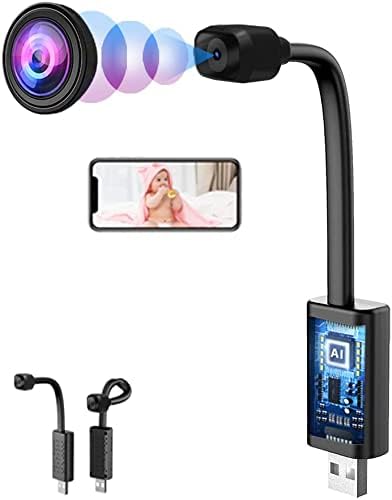
Image 1.1: Overview of the Boseyway Spy Camera Mini Hidden WiFi Camera, illustrating its compact design and potential use cases such as baby monitoring.
2. Product Features
- High Definition Video: Records video at 1920x1080 resolution via APP and 1280x720 resolution via TF card.
- Night Vision: Equipped with 940NM lightless infrared night vision, effective up to 3-5 meters.
- Motion Detection: Features advanced AI Human Motion Detection for precise alerts.
- WiFi Connectivity: Allows remote monitoring with a WiFi distance of up to 10 meters (AP mode) and unlimited remote access.
- Compact and Adaptable Design: Small and discreet, with various configurations (L, U, Z shapes) suitable for different hidden camera applications.
- Flexible Power Options: Can be powered by power banks, wall chargers, or power sockets for continuous operation.
- Storage: Supports TF (MicroSD) cards up to 128GB for local storage.
- Plug and Play: Simple setup for immediate use.

Image 2.1: Demonstration of the camera's day and night vision capabilities, highlighting its infrared night vision for low-light conditions.

Image 2.2: Different physical configurations of the DIY Mini Camera, showcasing its adaptability for various discreet placements.
3. Package Contents
Upon opening the package, please verify that all the following items are included:
- 1 x Boseyway Spy Camera Mini Hidden WiFi Camera (Model: xd)
- 1 x Power Cord (USB cable)
- 1 x Instructions Manual
- 1 x Packing Box
4. Setup Guide
4.1 Powering the Device
This camera does not have a built-in battery. It requires continuous power supply for operation. Connect the camera using the provided Micro USB2.0 5PIN power cord to a suitable power source.
- Power Bank: For extended portable use (e.g., 10000mAh provides 35-40h, 20000mAh provides 85-90h).
- Power Sockets: Connect to AC100-250V, AC50-60HZ for 24/7 operation.
- Wall Charger: Use a 5V/1A~2A wall charger for continuous 24/7 power.

Image 4.1: Illustration of the camera's USB interface and multiple power supply options, including power banks, power sockets, and wall chargers.

Image 4.2: Visual representation of the camera's universal USB plug-and-play functionality, demonstrating its compatibility with common power sources.
4.2 Inserting a Memory Card
To enable local video recording, insert a TF (MicroSD) card into the designated slot. The camera supports cards up to 128GB. Ensure the card is inserted correctly before powering on the device.
4.3 Initial Connection (WiFi)
For remote monitoring and advanced features, connect the camera to your WiFi network. Refer to the specific instructions in the included manual for the companion mobile application setup. The camera supports an AP (Access Point) mode with a range of 10 meters for direct connection, and remote access is unlimited once connected to your home WiFi.
5. Operating Instructions
5.1 Video Recording
The camera supports continuous video recording without time limitations, provided there is sufficient power and storage. Video resolution is 1920x1080 when viewed via the mobile application and 1280x720 when recorded directly to the TF card. Videos are saved in AVI (M-JPEG) format.
5.2 Night Vision Mode
The camera automatically activates its 940NM lightless infrared night vision in low-light conditions. This feature allows for clear video capture in darkness, with an effective range of 3-5 meters.
5.3 Motion Detection and Alerts
Utilize the AI Human Motion Detection feature for intelligent alerts. When human motion is detected, the camera can trigger recording and send notifications to your connected mobile device via the application. Configure alert settings within the mobile application.
6. Maintenance
To ensure optimal performance and longevity of your camera, follow these maintenance guidelines:
- Cleaning: Gently wipe the camera lens and body with a soft, dry cloth. Avoid using harsh chemicals or abrasive materials.
- Temperature: Operate the camera within the specified working temperature range of -10℃ to 50℃. Store it between -10℃ to 70℃.
- Humidity: Maintain a humidity environment of 5%-90% (non-condensing).
- Storage: When not in use for extended periods, store the camera in a cool, dry place away from direct sunlight and extreme temperatures.
- Firmware Updates: Check the mobile application periodically for any available firmware updates to ensure the camera operates with the latest features and improvements.
7. Troubleshooting
If you encounter issues with your camera, please refer to the following common troubleshooting steps:
| Problem | Possible Cause / Solution |
|---|---|
| Camera not powering on. | Ensure the power cord is securely connected to a working power source. Verify the power source (e.g., wall outlet, power bank) is active. |
| Cannot connect to WiFi. | Check if the camera is within 10 meters of the WiFi router in AP mode. Ensure correct WiFi password is entered. Restart the camera and router. |
| No video recording to TF card. | Verify that a TF card is inserted correctly and is not full. Format the TF card if it's new or corrupted (refer to app instructions). Ensure recording settings are enabled. |
| Poor night vision quality. | Ensure there are no obstructions in front of the lens. The effective night vision distance is 3-5 meters; objects beyond this range may appear less clear. |
| Motion detection not working. | Check motion detection settings in the mobile application. Ensure the camera's field of view covers the desired area. Adjust sensitivity if needed. |
8. Specifications
| Feature | Detail |
|---|---|
| Product Name | Camera |
| Model Number | xd |
| Photoreceptor | BF3A03 |
| Focal Length | 3.2mm |
| Field of View (FOV) | 90 degrees |
| Main Control Chip | BK7252UQN68 |
| Memory Support | TF Card, up to 128GB |
| USB Interface | Micro USB2.0 5PIN |
| Microphone | Built-in |
| Battery Capacity | No battery (requires external power) |
| Picture Resolution | 1280x720 (JPG) |
| Video Resolution | 1920x1080 (APP) / 1280x720 (TF) |
| Video Compression Format | AVI (M-JPEG) |
| Recording Time | Unlimited (with continuous power) |
| Working Temperature | -10℃ to 50℃ |
| WiFi Distance | 10 meters (AP mode), Remote no limited |
| Night Vision Distance | 3-5 meters |
| Storage Temperature | -10℃ to 70℃ |
| Humidity Environment | 5%-90% (No condensation) |
| Dimensions (L x W x H) | 3.8 x 3.1 x 1.1 cm (1 x 1 x 1.1 inches) |
| Net Weight | 12g (0.42 oz) |
| Color | Night Vision WiFi Camera (Black) |
| UPC | 765157236541 |

Image 8.1: Technical drawing illustrating the precise dimensions of the camera unit.
9. Warranty and Support
For information regarding warranty coverage, technical support, or service inquiries, please contact the seller or manufacturer directly. Details for contacting Boseyway can typically be found on their official website or through the platform where the product was purchased.
Ask a question about this manual
Ask about setup, troubleshooting, compatibility, parts, safety, or missing instructions. Manuals+ will review the question and use this page’s manual context to help answer it.