
1. Product Overview
The IC ICLOVER Astronaut Galaxy Projector Night Light creates a captivating starry sky and nebula effect, transforming any room into a cosmic environment. It features adjustable projection angles, multiple lighting modes, and a convenient timer function.

Image 1.1: The IC ICLOVER Astronaut Galaxy Projector in operation, projecting a colorful nebula and stars onto a surface.
Package Contents:
- Astronaut Projector (Black) x 1
- Base Support x 1
- Remote Control x 1 (Batteries not included)
- USB Cable x 1
- User Manual x 1
2. Setup Instructions
2.1 Assembly
- Carefully remove all components from the packaging.
- Attach the Astronaut Projector to its Base Support. The head of the astronaut is magnetically attached and can be rotated 360 degrees for multi-angle projection. The arms are also adjustable.

Image 2.1: Diagram illustrating the 360-degree magnetic rotation of the astronaut's head and arm adjustment for multi-angle projection.
2.2 Power Connection
- Connect the provided USB cable to the Power Jack located on the back of the astronaut projector.
- Plug the other end of the USB cable into a compatible USB power adapter (not included) or a USB port.

Image 2.2: Rear view of the astronaut projector showing the Power Switch, Nebular Switch, Star Switch, Timing Indicator, and Power Jack.
2.3 Remote Control Battery Installation
The remote control requires two AAA batteries (not included). Open the battery compartment on the back of the remote and insert the batteries, ensuring correct polarity.
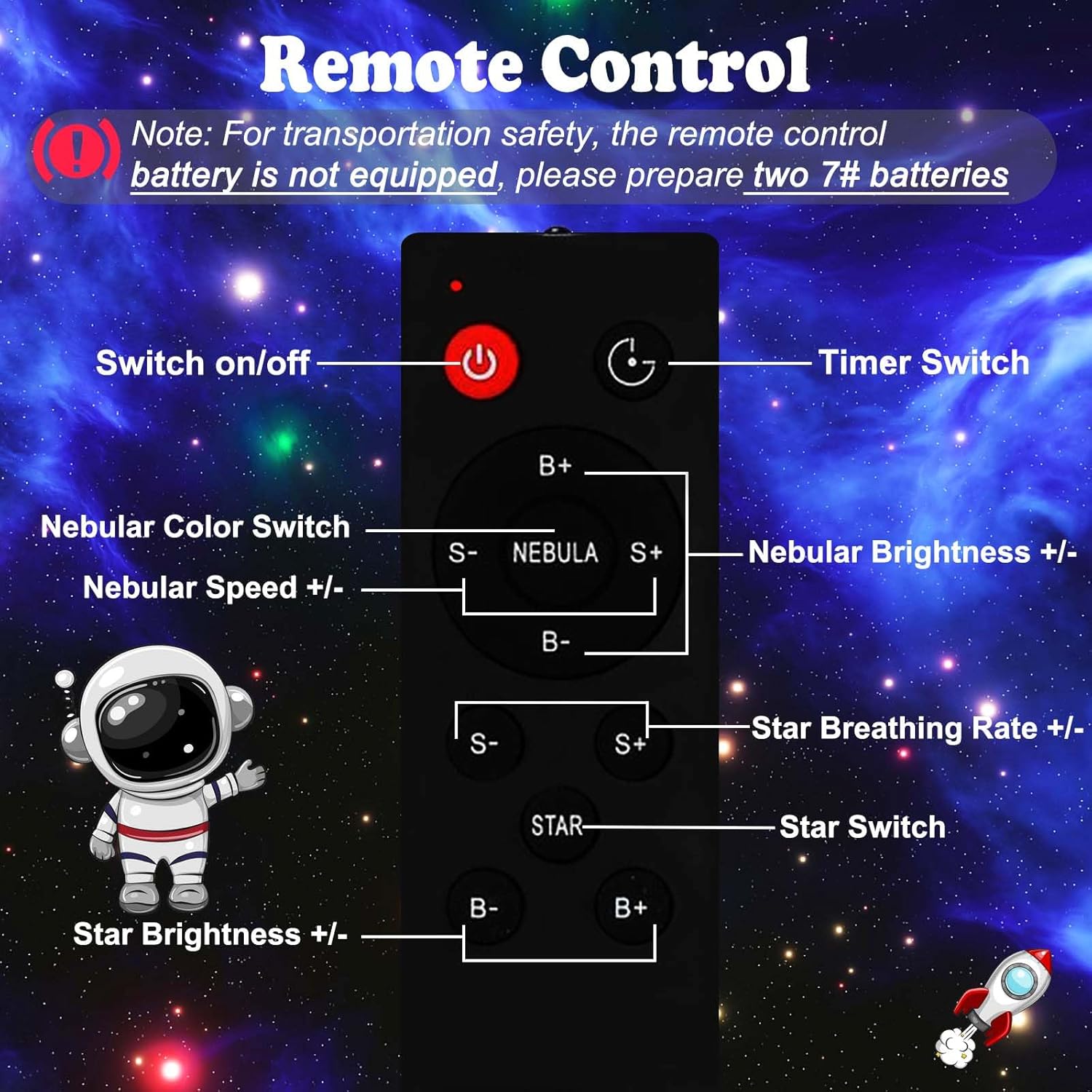
Image 2.3: Diagram of the remote control indicating buttons for power, timer, nebular color/speed/brightness, and star breathing rate/brightness.
3. Operating Instructions
3.1 Power On/Off
- On-device: Short press the 'Power Switch' button on the back of the astronaut to turn on or change modes. Long press to turn off.
- Remote Control: Press the red power button (⏻) on the remote control.
3.2 Adjusting Nebula and Star Effects
The projector features 8 stunning nebula effects and twinkling green stars. These can be used simultaneously or separately.

Image 3.1: Examples of various nebula and star projection effects available from the projector.
- Nebula Control: Use the 'Nebular Switch' on the device or the 'NEBULA' buttons (S-, S+, B-, B+) on the remote to adjust color, speed, and brightness of the nebula.
- Star Control: Use the 'Star Switch' on the device or the 'STAR' buttons (S-, S+, B-, B+) on the remote to adjust the breathing rate and brightness of the stars.
3.3 Timer Function
Set an automatic shut-off timer for 45 or 90 minutes using the remote control. This allows the projector to turn off automatically after you fall asleep.

Image 3.2: A child sleeping peacefully with the galaxy projector active, illustrating the auto-off timer feature set to 45 or 90 minutes.
3.4 Multi-Angle Projection
The astronaut's head can be rotated 360 degrees due to its magnetic attachment, allowing you to project the nebula and stars onto any wall or ceiling without repositioning the base unit.
4. Maintenance
- Cleaning: Use a soft, dry cloth to clean the projector's surface. Do not use abrasive cleaners or solvents.
- Storage: When not in use, store the projector in a cool, dry place away from direct sunlight.
- Remote Control Batteries: Replace batteries in the remote control when its functionality diminishes. Ensure correct battery type (AAA) and polarity.
5. Troubleshooting
- Projector does not turn on:
- Ensure the USB cable is securely connected to both the projector and a working power source.
- Verify the power source is active.
- Remote control is not working:
- Check if the batteries are inserted correctly and are not depleted. Replace if necessary.
- Ensure there are no obstructions between the remote control and the projector.
- Projection is blurry or dim:
- Ensure the projector lens is clean and free of dust or smudges.
- Adjust the distance of the projector from the projection surface.
Safety Note: Do not look directly at the light source.
6. Specifications
| Feature | Specification |
|---|---|
| Brand | IC ICLOVER |
| Model | B0CGLJXDDG |
| Product Dimensions | 2.9"D x 3.3"W x 4.9"H |
| Item Weight | 1.3 pounds |
| Material | Acrylonitrile Butadiene Styrene (Plastic) |
| Light Source Type | LED |
| Number of Light Sources | 8 |
| Control Method | Remote |
| Special Features | Adjustable, Timer |
| Power Source | Corded Electric |
| Voltage | 240 Volts |
| Indoor/Outdoor Usage | Indoor |
| Water Resistance Level | Not Water Resistant |
7. Product Videos
7.1 IC ICLOVER Astronaut Projector Overview
Video 7.1: An official video from IC ICLOVER demonstrating the Astronaut Projector's features, including unboxing, assembly, and various light effects.