
Foxtheon iGo3600+BAT 1.8
Foxtheon iGo3600 Power Station User Manual
Model: iGo3600+BAT 1.8 | Brand: Foxtheon
Introduction
This user manual provides comprehensive instructions for the safe and efficient operation, maintenance, and troubleshooting of your Foxtheon iGo3600 Power Station. Designed for versatility and portability, the iGo3600 is a powerful solar generator suitable for home use, RVs, outdoor adventures, and emergency backup. Please read this manual thoroughly before using the product to ensure optimal performance and longevity.
Safety Information
Always adhere to the following safety guidelines to prevent injury, electric shock, fire, or damage to the unit:
- Do not disassemble, repair, or modify the unit.
- Keep the unit away from fire, heat sources, and direct sunlight.
- Avoid exposure to water, rain, or high humidity.
- Do not use the unit if it has been damaged or dropped.
- Ensure proper ventilation during use and charging. Do not block air vents.
- Keep out of reach of children and pets.
- Use only specified accessories and charging cables.
- Dispose of the unit and batteries according to local regulations.
Package Contents
Verify that all items listed below are included in your package:

Figure 1: All components included in the iGo3600 Power Station package.
- Foxtheon iGo3600 Power Station Host
- Station Protective Cover
- BAT-1.8 Removable Battery (x2)
- Battery Protective Cover (x2)
- AC 15A Charging Cable
- Car Charging Cable
- Alligator Clip Connector
- EC5 to Cigarette Lighter Socket Cable
- User Manual
- Qualification Certificate
Product Overview
The Foxtheon iGo3600 is a high-capacity portable power station designed to meet diverse energy needs. It features a robust 3600Wh capacity and a powerful 2500W output, capable of supporting 99% of common appliances.

Figure 2: The iGo3600 Power Station alongside its removable BAT-1.8 battery.
Key Features:
- High Capacity & Output: 3600Wh capacity and 2500W power output to support a wide range of devices and appliances.
- Removable Battery Design: Includes two BAT-1.8 removable battery packs, each adding 1800Wh capacity. These can be used independently for flexible power solutions.
- Advanced Battery Technology: Utilizes semi-solid state batteries with 42% higher energy density than traditional lithium batteries, offering enhanced stability and a lifespan of 10 years or more.
- Multiple Charging Options: Supports various charging methods including AC, solar panel, car, and EV.
- Fast Charging: Dual inverting technology allows for a full charge of 3600Wh in less than 2 hours via AC input.
- Built-in Solar Panel: Integrated solar panel on top for convenient charging anytime, even with minimal light.
- E-Ink Display: Features an E-ink display for clear status visibility in both indoor and outdoor conditions.
- UPS Function: Provides uninterrupted power supply for critical devices during power outages.
- Durable and Portable: Lightweight design with a customized IPX5 protective cover for outdoor situations.

Figure 3: The iGo3600 meets the standard of any wall outlet, powering high-demand tools.

Figure 4: Illustration of the semi-solid state battery technology, emphasizing its high energy density and protective features.

Figure 5: The E-ink display provides clear and easy-to-read information about the power station's status.

Figure 6: The iGo3600 comes with a portable protective bag for easy transport and protection.

Figure 7: The integrated solar panel allows for convenient charging from ambient light.
Product Video:
Video 1: Official product video showcasing the features and versatility of the Foxtheon iGo3600 Portable Power Station, including its large capacity, removable batteries, and various use cases.
Setup
- Unpacking: Carefully remove all components from the packaging. Retain packaging for future storage or transport.
- Initial Charge: Before first use, fully charge the iGo3600 Power Station using the provided AC charging cable. Connect the AC input port to a standard wall outlet. The E-ink display will show charging progress.
- Inserting Removable Batteries: The iGo3600 features two slots for BAT-1.8 removable batteries. Gently slide each battery into its designated slot until it clicks into place.
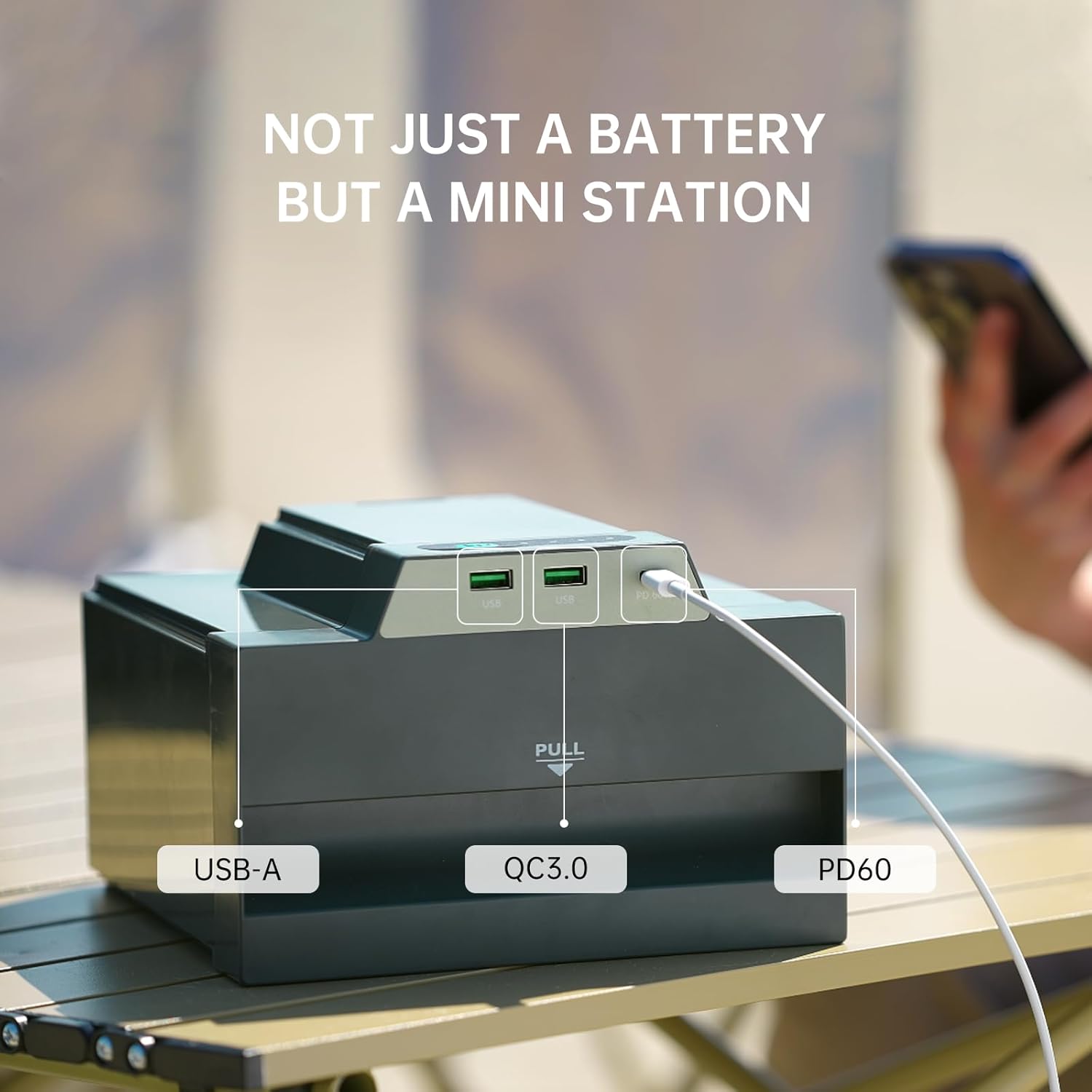
Figure 8: Easy operation for inserting the removable battery.
- Protective Cover Installation: For enhanced durability and protection, especially during outdoor use, place the station protective cover over the main unit and the battery protective covers over the individual battery packs.
Operating Instructions
1. Charging the iGo3600
The iGo3600 supports multiple charging methods:
- AC Wall Outlet: Connect the AC charging cable to the AC input port. The dual inverting technology allows for a full charge in under 2 hours.
- Solar Panel: Utilize the built-in solar panel on top of the unit for convenient charging from sunlight. For faster solar charging, connect an external customized solar panel (sold separately) to the DC input port.

Figure 9: Solar charging capabilities of the iGo3600.
- Car Charging: Use the car charging cable to charge the unit from your vehicle's 12V cigarette lighter socket.

Figure 10: Charging the iGo3600 using a car charger.
- EV Charging: The unit can also be charged via EV charging stations (adapter may be required, not included).
2. Using Outputs
The iGo3600 provides various output ports to power your devices:
- AC Outlets: Press the "AC Switch" button to activate the AC outlets. Plug in your AC-powered appliances.
- USB-C & USB-A Ports: The BAT-1.8 removable batteries feature independent USB-C (Max 60W), USB-A (9V/2A), and QC3.0 outputs. Simply plug your devices into the respective ports.

Figure 11: The removable battery offers versatile USB charging options.
- DC Outputs: Use the DC output ports for compatible DC-powered devices.
3. Removable Battery Usage
The BAT-1.8 batteries can be used independently from the main power station. This provides extreme flexibility for charging smaller devices on the go. To remove a battery, pull the designated "PULL" tab and slide the battery out.

Figure 12: Quick and easy battery replacement or removal for independent use.
4. UPS Function
The iGo3600 features an Uninterruptible Power Supply (UPS) function. When connected to an AC wall outlet and simultaneously powering devices, the unit can seamlessly switch to battery power in the event of a power outage, ensuring continuous operation for connected devices. This is ideal for sensitive electronics or medical equipment like CPAP machines.

Figure 13: The iGo3600 provides reliable backup power for essential devices like CPAP machines.
Maintenance
- Cleaning: Use a soft, dry cloth to clean the exterior of the unit. Do not use abrasive cleaners or solvents.
- Storage: Store the power station in a cool, dry place, away from direct sunlight and extreme temperatures. For long-term storage, it is recommended to charge the unit to 50-80% every 3-6 months to maintain battery health.
- Battery Care: While the semi-solid state batteries are designed for longevity, avoid fully discharging the unit frequently to prolong battery life.
- Ventilation: Ensure the air vents are clear of dust and debris to prevent overheating.
Troubleshooting
| Problem | Possible Cause | Solution |
|---|---|---|
| Unit not turning on | Battery is completely discharged. | Connect to AC power and charge for at least 30 minutes. |
| No output from AC/DC/USB ports | Output port not activated or overloaded. | Ensure the respective output switch (e.g., AC Switch) is ON. Reduce load if overloaded. |
| Slow charging | Using a low-power charging source (e.g., car charger vs. AC). | Use the AC charging cable for fastest charging. Ensure solar panels are in direct sunlight. |
| E-ink display not clear | Extreme temperature or display refresh needed. | The E-ink display is designed for clarity in various light conditions. If unclear, try cycling power. |
If the problem persists after attempting these solutions, please contact Foxtheon customer support.
Specifications
| Feature | Detail |
|---|---|
| Brand | Foxtheon |
| Model Name | iGo3600+BAT 1.8 |
| Capacity | 3600Wh |
| Output Wattage | 2500W |
| Voltage | 110 Volts (AC) |
| Fuel Type | Electric |
| Power Source | AC |
| Item Weight | 23.4 Kilograms (51.5 pounds) |
| Product Dimensions | 8.85"L x 7.5"W x 5"H |
| Total Power Outlets | 4 AC Outlets |
| Battery Type | Semi-Solid State NMC Lithium Ion |
| Charging Time (AC) | Less than 2 hours (to full charge) |
| Special Features | Portable and Lightweight Design, Versatile Charging Ports, Rugged and Durable Build, Long-lasting Battery Capacity, High Power Output, UPS Function, E-ink Display, Built-in Solar Panel |
| Usage | Outdoor Adventures, Emergency, Home Use, RV |
Warranty and Support
The Foxtheon iGo3600 Power Station comes with a 2-year warranty from the date of purchase. This warranty covers defects in materials and workmanship under normal use.
For technical support, warranty claims, or any inquiries, please contact Foxtheon customer service. Refer to the contact information provided on the product packaging or the official Foxtheon website.
We are committed to providing 24-hour friendly service to ensure a risk-free purchase experience.