
1. Introduction
Thank you for choosing the Nicebay EV-6803 Cordless Vacuum Cleaner. This manual provides essential information for the safe and efficient operation, maintenance, and troubleshooting of your new vacuum cleaner. Please read this manual thoroughly before first use and keep it for future reference.
The Nicebay EV-6803 is a versatile 4-in-1 cordless stick vacuum designed for efficient cleaning of various surfaces, including hardwood floors and carpets. It features a powerful 25kPa suction brushless motor, a digital touchscreen for intelligent feedback, and smart induction auto-adjustment for optimized cleaning performance.
2. Safety Information
Always follow basic safety precautions when using electrical appliances to reduce the risk of fire, electric shock, or injury.
- Do not use outdoors or on wet surfaces.
- Do not allow to be used as a toy. Close attention is necessary when used by or near children.
- Use only as described in this manual. Use only manufacturer's recommended attachments.
- Do not use with damaged cord or plug. If appliance is not working as it should, has been dropped, damaged, left outdoors, or dropped into water, return it to a service center.
- Do not pull or carry by cord, use cord as a handle, close a door on cord, or pull cord around sharp edges or corners. Do not run appliance over cord. Keep cord away from heated surfaces.
- Do not unplug by pulling on cord. To unplug, grasp the plug, not the cord.
- Do not handle plug or appliance with wet hands.
- Do not put any object into openings. Do not use with any opening blocked; keep free of dust, lint, hair, and anything that may reduce air flow.
- Keep hair, loose clothing, fingers, and all parts of body away from openings and moving parts.
- Do not pick up anything that is burning or smoking, such as cigarettes, matches, or hot ashes.
- Do not use to pick up flammable or combustible liquids, such as gasoline, or use in areas where they may be present.
- Do not pick up toxic material, such as chlorine bleach, ammonia, or drain cleaner.
- Do not use without dust cup and/or filters in place.
- Turn off all controls before unplugging.
- Use extra care when cleaning on stairs.
- Do not use to pick up hard or sharp objects such as glass, nails, screws, coins, etc.
3. Product Components
Familiarize yourself with the components included with your Nicebay EV-6803 Cordless Vacuum Cleaner:

Figure 3.1: Included Components
- Main Motor with battery
- Electric brush (V-shaped floor brush with LED lighting)
- Folding tube
- 2-in-1 brush (crevice tool and dusting brush)
- Mini cleaning brush
- Wall Bracket + Screws
- Charging Adapter
- User Manual (this document)
4. Setup and Assembly
Follow these steps to assemble your vacuum cleaner and prepare it for first use:
4.1 Assembly
- Insert the folding tube into the main motor unit until it clicks securely into place.
- Attach the electric brush head to the bottom end of the folding tube, ensuring it clicks firmly.
- For handheld use, detach the folding tube and attach desired accessories (e.g., 2-in-1 brush) directly to the main motor unit.

Figure 4.1: Assembled Vacuum Cleaner
4.2 Initial Charging
Before first use, fully charge the battery. The battery is removable for independent charging.

Figure 4.2: Removable Battery and Charging
- Connect the charging adapter to the battery or the vacuum cleaner directly.
- Plug the adapter into a power outlet.
- The digital touchscreen will indicate the charging status. A full charge typically takes less than 6 hours.
- The battery provides a runtime of 11-50 minutes depending on the power setting.
4.3 Wall-Mounted Storage
The included wall bracket allows for convenient storage and charging. Secure the bracket to a wall using the provided screws. The vacuum can be hung on the bracket for storage and charging, or charged independently without hanging.
5. Operating Instructions
Your Nicebay EV-6803 offers flexible cleaning modes and intelligent feedback for an optimized cleaning experience.
5.1 Powering On/Off and Mode Selection

Figure 5.1: Digital Touchscreen Display
- Press the power button to turn the vacuum on.
- The digital touchscreen allows you to adjust power settings and view status.
- Manual Mode: Select from 5 gears (power levels) to manually control suction.
- Automatic Mode: The vacuum automatically adjusts suction power based on the amount of dust detected, optimizing cleaning efficiency and battery life.
5.2 Digital Touchscreen Feedback
The intelligent touchscreen provides real-time monitoring and alerts:
- BRUSHROLL-TANGLE: Indicates if the brush roll is tangled and needs cleaning.
- BATTERY-LEVEL: Displays the current battery charge.
- DUSTY-REMINDER: Alerts when the dust cup is full and needs emptying.
- FILTER-BLOCKAGE: Indicates if the filter is blocked and requires cleaning or replacement.
- Remaining Runtime: Shows the estimated remaining operating time.
5.3 Cleaning Various Surfaces

Figure 5.2: Versatile Cleaning Applications
The Nicebay EV-6803 is designed for versatile cleaning:
- Hardwood Floors & Tiles: The V-shaped electric floor brush is effective for hard surfaces.
- Carpets: The powerful suction and brush roll efficiently clean carpets.
- Furniture & Upholstery: Use the 2-in-1 brush or mini cleaning brush for sofas, chairs, and other upholstered items.
- Under Furniture & Tight Spaces: The folding tube design allows for easy cleaning under beds and tables without excessive bending. The LED lighting on the brush head illuminates dark areas.
- Car Interiors: Detach the main motor unit and use appropriate attachments for cleaning car interiors.

Figure 5.3: Smart Cleaning Adjustment
6. Maintenance
Regular maintenance ensures optimal performance and extends the lifespan of your vacuum cleaner.
6.1 Emptying the Dust Cup
- When the DUSTY-REMINDER indicator appears on the touchscreen, or when the dust cup is visibly full, it's time to empty it.
- Press the release button to detach the dust cup from the main motor unit.
- Position the dust cup over a trash bin and press the release latch to open the bottom flap, allowing debris to fall out.
- Close the flap and reattach the dust cup to the vacuum cleaner until it clicks into place.
6.2 Filter Cleaning and Replacement
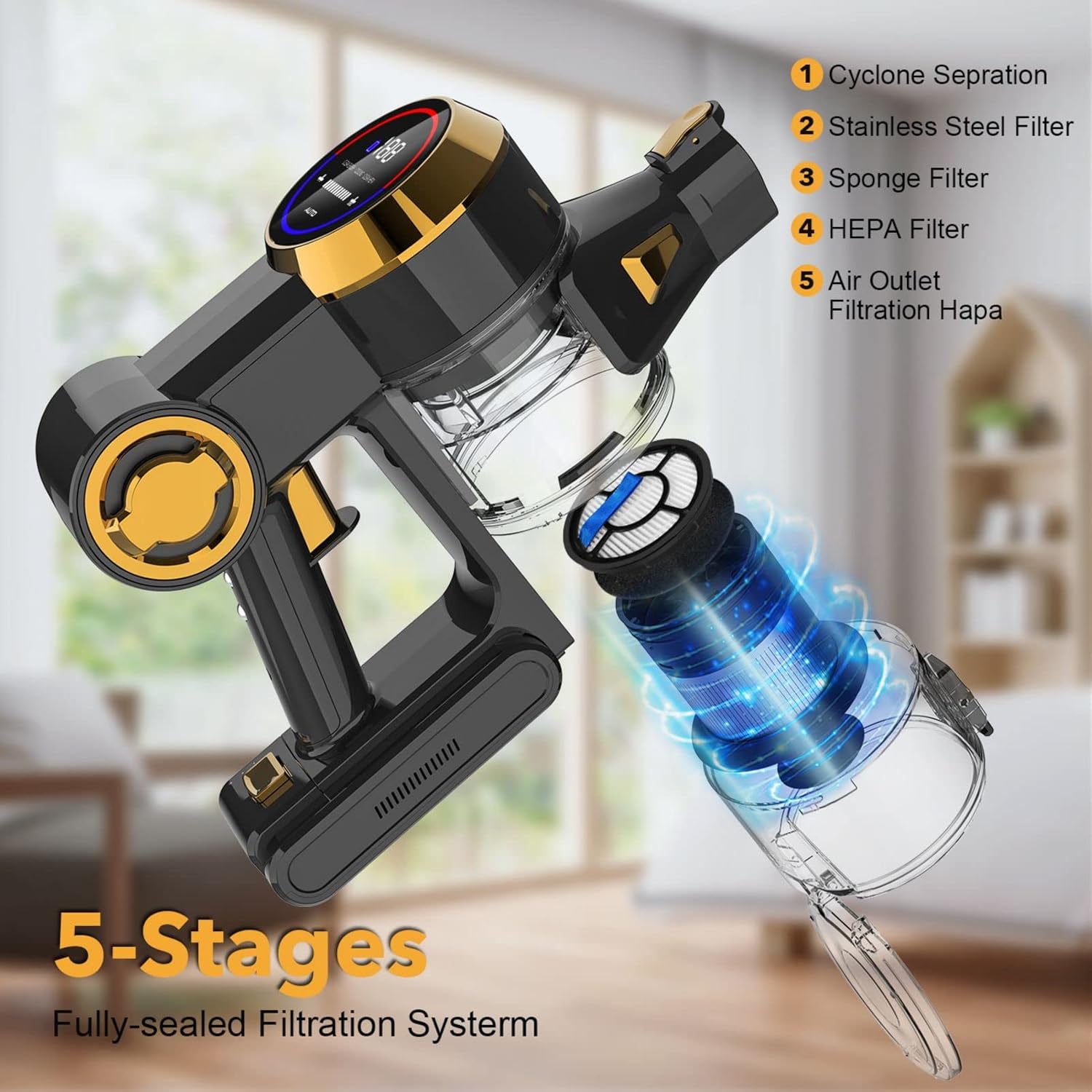
Figure 6.1: 5-Stage Filtration System
The vacuum features a multi-stage filtration system:
- Cyclone Separation
- Stainless Steel Filter
- Sponge Filter
- HEPA Filter
- Air Outlet Filtration HEPA
- Regularly check and clean the filters, especially if the FILTER-BLOCKAGE indicator appears or suction power decreases.
- Remove the filters from the dust cup. Tap off loose dirt.
- The stainless steel mesh filter, sponge filter, and HEPA filter can be rinsed with cold water. Ensure they are completely dry before reassembling.
- It is recommended to clean and replace the HEPA filter regularly. An additional HEPA filter is provided as a gift.
6.3 Brush Roll Maintenance
- If the BRUSHROLL-TANGLE indicator appears, or if the brush roll is not spinning freely, it needs cleaning.
- Turn off the vacuum and detach the electric brush head.
- Use scissors or the mini cleaning brush to remove any tangled hair or debris from the brush roll.
- Ensure the brush roll spins freely before reattaching the head.
7. Troubleshooting
If you encounter issues with your Nicebay EV-6803, refer to the following common problems and solutions:
| Problem | Possible Cause | Solution |
|---|---|---|
| Vacuum does not turn on | Battery is not charged; Battery not properly installed; Power button not pressed correctly. | Charge the battery fully; Ensure battery is securely clicked into place; Press the power button firmly. |
| Low suction power | Dust cup is full; Filters are blocked; Attachments are clogged; Brush roll is tangled. | Empty the dust cup; Clean or replace filters; Clear any blockages from attachments or tubes; Clean the brush roll. |
| Brush roll not spinning | Brush roll is tangled; Brush head is not properly attached. | Remove tangled hair/debris from brush roll; Ensure brush head is securely attached to the tube. |
| Battery life is short | Using high power mode continuously; Battery not fully charged; Battery degradation over time. | Use automatic mode or lower power settings when possible; Ensure battery is fully charged before use; Consider purchasing an additional battery for extended runtime. |
| Digital screen shows error/alert | Specific issue indicated by the icon (e.g., BRUSHROLL-TANGLE, FILTER-BLOCKAGE). | Refer to the specific indicator on the screen (Figure 5.1) and perform the corresponding maintenance action (e.g., clean brush roll, clean filter). |
If the problem persists after attempting these solutions, please contact Nicebay customer support.
8. Specifications
| Feature | Specification |
|---|---|
| Brand | Nicebay |
| Model Name | EV-6803 |
| Special Feature | Bagless, Digital Touchscreen, Smart Induction Auto-Adjustment, Folding Tube |
| Filter Type | HEPA Filter |
| Is Cordless? | Yes |
| Capacity (Dust Cup) | 0.8 Liters |
| Runtime | Up to 55 minutes (depending on setting) |
| Maximum Suction | 25kPa (280W high power) |
| Form Factor | Stick |
| Color | Black |
| Battery Type | Lithium-Ion (Removable) |
| Control Method | Touch |
| Number of Speeds/Power Levels | 6 (5 manual gears + Auto mode) |
| Item Weight | 9.5 pounds |
| Product Dimensions | 9.84 x 6.69 x 44.49 inches |
| Indoor/Outdoor Usage | Indoor |
9. Warranty and Support
9.1 Warranty Information
The Nicebay EV-6803 Cordless Vacuum Cleaner comes with a 90-day limited warranty. Please retain your proof of purchase for warranty claims. This warranty covers manufacturing defects and issues arising from normal use within the specified period.
9.2 Customer Support
For any questions, concerns, or technical assistance not covered in this manual, please contact Nicebay customer support through the retailer's platform or the official Nicebay website. Provide your product model number (EV-6803) and a detailed description of the issue for faster service.