
JIAWEN JIAWEN-Night Light Projector-US
JIAWEN Galaxy Projector Light User Manual
Model: JIAWEN-Night Light Projector-US
Brand: JIAWEN
Introduction
The JIAWEN Galaxy Projector Light is designed to create a dynamic and immersive lighting experience in your space. It projects various light patterns, including ocean waves and aurora effects, transforming your room into a serene or vibrant environment. This device offers a range of customizable settings to suit different moods and preferences.
Key features include:
- 16 distinct colors and 30 lighting modes for diverse visual effects.
- 6 levels of adjustable brightness to control light intensity.
- Unique cube-shaped design with 5 luminous surfaces for 360-degree illumination.
- Integrated warm and white light options for use as a night light.
- Double-layered motor design for reduced operational noise.
- Convenient remote control operation.
Package Contents
Please verify that all items are present in the package:
- JIAWEN Galaxy Projector Light Unit
- Remote Control (batteries not included, typically requires 2x AAA or CR2025 coin cell)
- USB Power Cable
- User Manual (this document)

Image: The JIAWEN Galaxy Projector Light, a cube-shaped device with a wooden base, shown alongside its remote control. The projector is illuminating a bedroom with colorful aurora effects.
Setup Instructions
- Unpack the Device: Carefully remove the projector light and all accessories from the packaging.
- Insert Remote Batteries: Open the battery compartment on the back of the remote control and insert the required batteries (not included). Ensure correct polarity.
- Connect Power: Plug the USB power cable into the projector light's power input port. Connect the other end of the USB cable to a compatible USB power adapter (e.g., phone charger, computer USB port) or a power bank.
- Placement: Place the projector light on a stable, flat surface. For optimal projection, position it where its light can reach the desired ceiling or wall area without obstruction. The device offers 360-degree illumination.
- Power On: Press the "ON" button on the remote control to activate the projector light.
Operating the Projector Light
The JIAWEN Galaxy Projector Light is operated using the included remote control. Familiarize yourself with the remote's buttons for full functionality.
Remote Control Functions:
- ON/OFF: Powers the device on or off.
- Color Selection: Buttons for 16 different colors (Red, Green, Blue, White, and various combinations).
- Brightness Adjustment: Increase or decrease light intensity through 6 levels.
- Lighting Modes: Select from 30 different projection modes, including static colors, color transitions, and dynamic wave effects (Flash, Strobe, Fade, Smooth).
- Warm Light Mode: Activates a soft, warm white light, suitable for a night light function.
Adjusting Lighting Effects:
Experiment with the color and mode buttons on the remote to discover the various projection effects. The projector can display a single color, a blend of colors, or cycle through different patterns. The 360-degree illumination ensures that the entire ceiling and walls can be covered, creating an immersive experience.
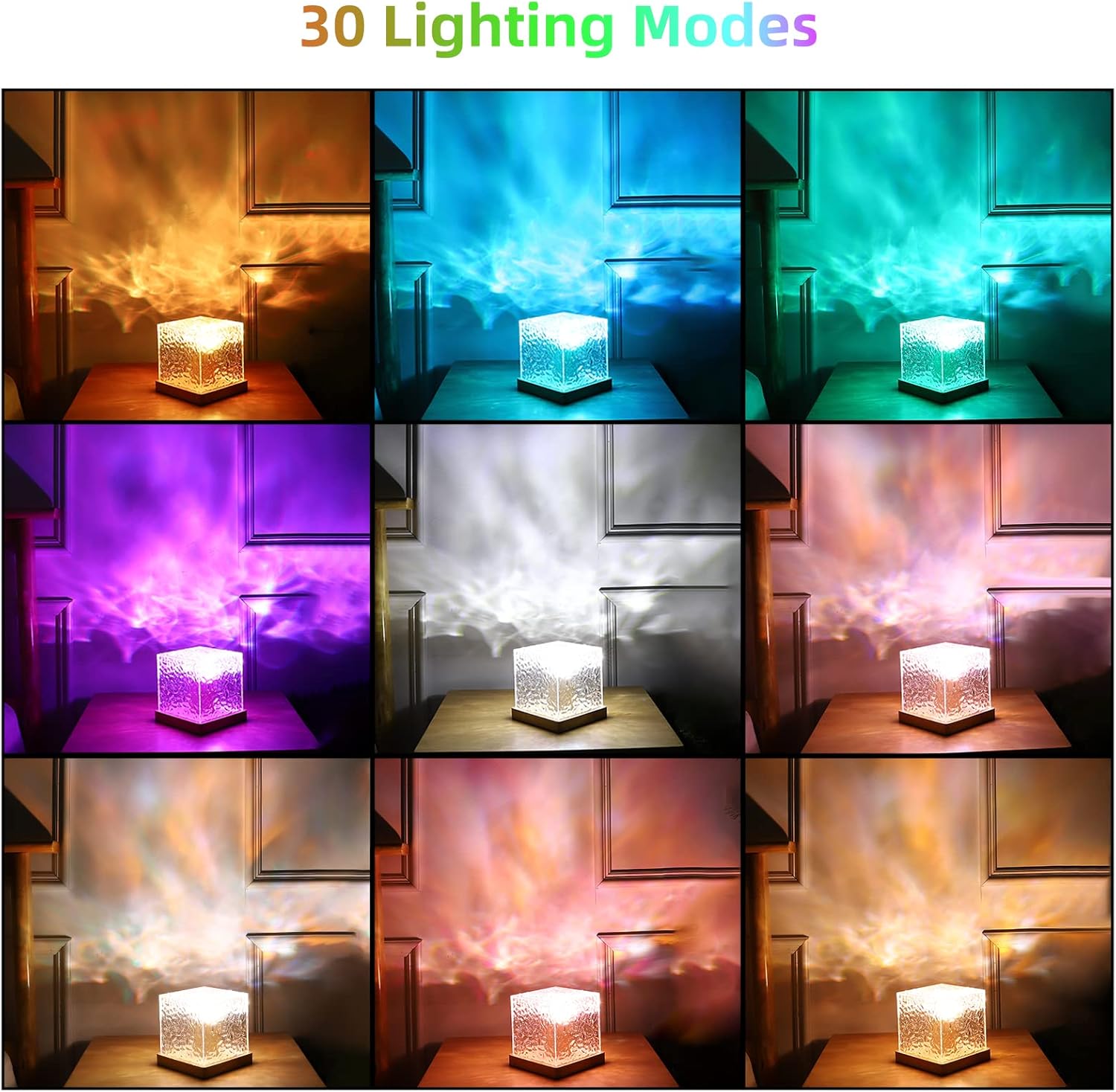
Image: A grid of nine images showing the JIAWEN projector light illuminating a room with various colors and patterns, demonstrating its 30 lighting modes.

Image: The JIAWEN projector light casting blue light patterns, with a visual representation of 6 brightness levels ranging from 10% to 100% intensity.

Image: The JIAWEN projector light emitting a soft, warm orange glow, highlighting its functionality as a night light.

Image: The JIAWEN projector light casting blue water wave patterns across an entire wall and ceiling, illustrating its 360-degree illumination capability.
Noise Reduction:
The projector light features a double-layered motor design, with the inner layer wrapped in wood and the outer layer encased in acrylic. This design significantly reduces operational noise, providing a quieter environment for relaxation or sleep.

Image: A person and child sleeping peacefully in a room illuminated by the JIAWEN projector light, with text indicating 60% noise reduction compared to other products.
Maintenance and Care
- Cleaning: Disconnect the power before cleaning. Use a soft, dry cloth to wipe the exterior of the projector light. Do not use liquid cleaners or abrasive materials, as they may damage the surface.
- Storage: When not in use for extended periods, store the projector light in a cool, dry place, away from direct sunlight and extreme temperatures.
- Handling: Handle the device with care. Avoid dropping it or subjecting it to strong impacts.
- Power Source: Only use the provided USB cable and a compatible power adapter (5V DC).
Troubleshooting
| Problem | Possible Cause | Solution |
|---|---|---|
| Device does not power on. | No power, loose connection, faulty cable/adapter. |
|
| Remote control is not working. | Dead batteries, remote out of range, obstruction. |
|
| Light projection is dim or unclear. | Brightness setting too low, dirty lens, ambient light. |
|
| Colors or modes are not changing. | Remote control issue, internal malfunction. |
|
Specifications
| Feature | Detail |
|---|---|
| Brand | JIAWEN |
| Model Number | JIAWEN-Night Light Projector-US |
| Product Dimensions | 5.12"D x 5.12"W x 5.12"H (approx. 13 x 13 x 13 cm) |
| Item Weight | 1.34 pounds (approx. 0.61 kg) |
| Material | Acrylic, Wood |
| Light Source Type | LED |
| Light Color | RGB + White (16 colors) |
| Lighting Modes | 30 modes (including Flash, Strobe, Fade, Smooth) |
| Brightness Levels | 6 levels |
| Control Method | Remote Control |
| Power Source | Corded Electric (USB 5V DC) |
| Indoor/Outdoor Usage | Indoor Use Only |
| Water Resistance Level | Not Water Resistant |

Image: A diagram showing the dimensions of the JIAWEN Galaxy Projector Light, indicating it is a 5-inch cube with a wooden base.
Warranty and Support
Warranty Information:
JIAWEN products are typically covered by a limited warranty against defects in materials and workmanship. Please refer to the product packaging or the seller's information for specific warranty terms and duration. Keep your purchase receipt as proof of purchase for warranty claims.
Customer Support:
For any questions, technical assistance, or warranty claims, please contact JIAWEN customer support through the platform where you purchased the product or refer to the contact information provided on the product packaging or the official JIAWEN brand store. When contacting support, please have your model number (JIAWEN-Night Light Projector-US) and purchase details ready.