1. Introduction
This manual provides essential information for the proper installation, operation, and maintenance of your Honeywell Home HR35 ETRV Smart Radiator Thermostatic Valve. The HR35 ETRV is designed to offer precise temperature control for individual rooms, enhancing comfort and energy efficiency in your home. It features programmable schedules, various operating modes, and a user-friendly interface.
Please read this manual thoroughly before using the device to ensure safe and optimal performance.
2. Setup and Installation
The Honeywell Home HR35 ETRV is designed for easy, tool-free installation on most standard radiator valves. No specialized knowledge or tools are required, and the installation can be performed without draining your heating system.
2.1 Compatibility
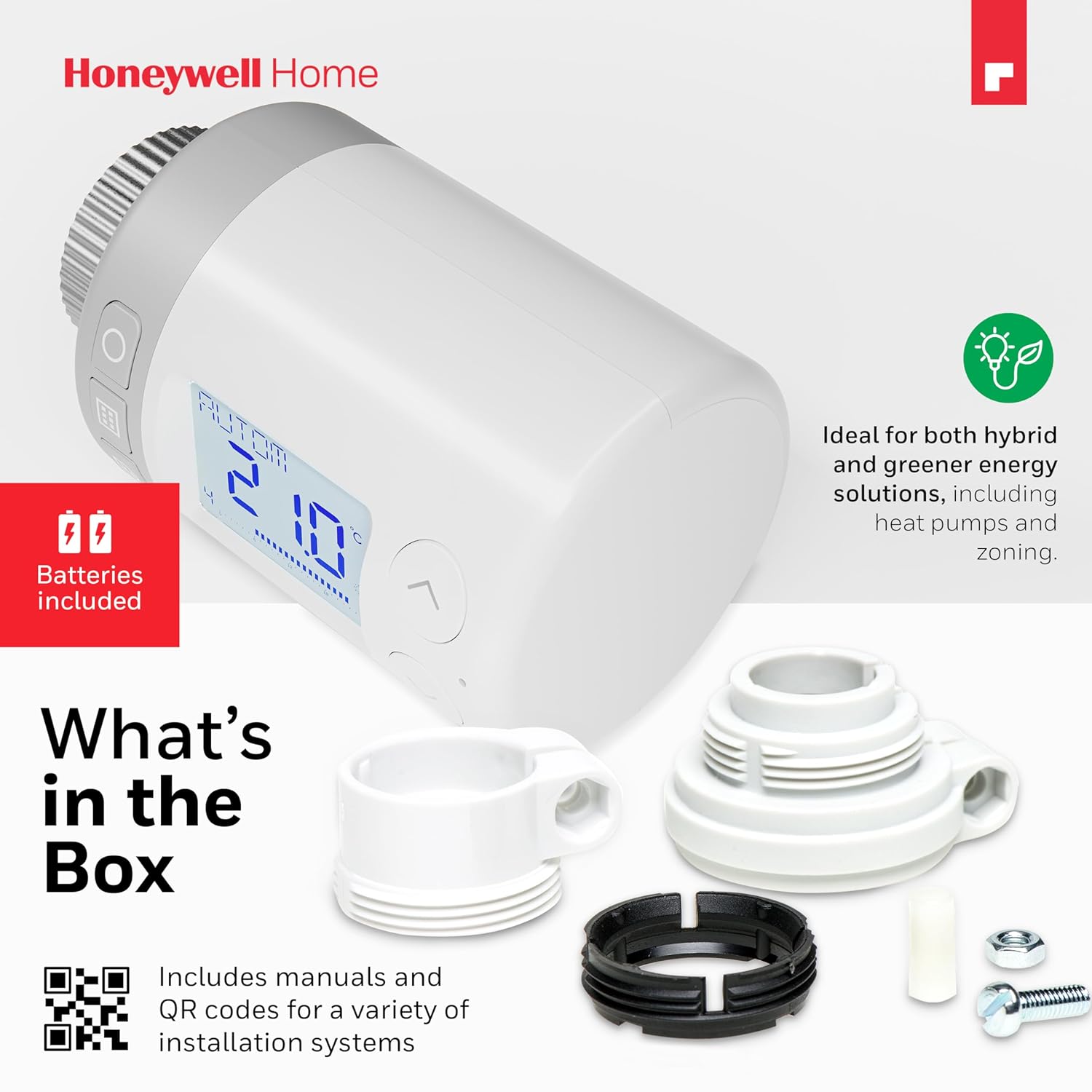
The HR35 ETRV is compatible with most heating systems and radiator valves, including those from Honeywell Home, Danfoss (RA, RAV, RAVL), MNG, and Heimeier. Additional adapters for other manufacturers' valves are included in the package.
2.2 Installation Steps
- Prepare the Radiator Valve: Ensure your existing thermostatic radiator valve (TRV) head is removed. The HR35 ETRV is designed to screw directly onto valves with an M30 x 1.5 connection thread.
- Attach the HR35 ETRV: Carefully screw the HR35 ETRV onto the radiator valve. Hand-tighten until secure. Do not overtighten.
- Insert Batteries: Open the battery compartment and insert the provided batteries, ensuring correct polarity.
- Initial Setup: The device will perform an initial setup sequence. Follow any on-screen prompts. The display can be rotated 180 degrees to suit your mounting orientation.

3. Operating Instructions
The HR35 ETRV features a large, backlit LCD display and intuitive controls for easy temperature management and programming.
3.1 Basic Operation
The device operates without the need for an app or Wi-Fi. All controls are accessible directly on the unit.
- Temperature Adjustment: Use the 'Rondostat' knob or the up/down arrow buttons to manually adjust the desired room temperature. The temperature can be set precisely between 5°C and 30°C.
- Display: The large LCD shows the current mode (e.g., AUTOM for automatic, MANU for manual) and the set temperature. The display can be rotated 180° for optimal viewing depending on the installation angle.


3.2 Programming Schedules
The HR35 ETRV allows for flexible programming to match your daily routine, helping to reduce energy consumption.
- 7-Day Programming: Set individual temperature schedules for each day of the week.
- Multiple Time Slots: Up to 6 adjustable temperature changes can be programmed per day.
- Setting Programs: Refer to the detailed instructions in the included installation manual for step-by-step guidance on setting up your desired heating programs.

3.3 Special Features and Modes
- Frost Protection: Automatically activates to prevent pipes from freezing when the temperature drops too low.
- Open Window Detection: The device detects sudden drops in temperature (e.g., when a window is opened) and temporarily reduces heating to save energy.
- Child Lock: Prevents unauthorized changes to settings.
- Holiday Mode: Maintains a reduced temperature during your absence to save energy.
- Party Mode: Allows for a temporary temperature override for a set period.
- Economy Mode: Operates at a reduced ambient temperature for energy-saving.

4. Maintenance
Regular maintenance ensures the longevity and optimal performance of your HR35 ETRV.
- Cleaning: Wipe the device with a soft, dry cloth. Do not use abrasive cleaners or solvents.
- Battery Replacement: The HR35 ETRV has a battery life of up to 18 months. When the battery indicator appears on the display, replace the batteries promptly with new ones of the same type. Refer to the installation manual for specific battery replacement instructions.
- Seasonal Checks: Before the heating season, ensure the valve moves freely and the device is securely attached.
5. Troubleshooting
If you encounter issues with your HR35 ETRV, try the following common troubleshooting steps:
- No Display/Device Unresponsive: Check the batteries. Replace them if they are low or depleted. Ensure they are inserted with correct polarity.
- Incorrect Temperature Reading: Ensure the device is not exposed to direct sunlight or drafts, which can affect its internal temperature sensor.
- Radiator Not Heating/Overheating: Verify that the set temperature is appropriate. Check if any special modes (e.g., Holiday Mode, Open Window Detection) are active. Ensure the valve is not stuck; manually turn the 'Rondostat' knob to its maximum and minimum settings a few times to free it.
- Programming Issues: Double-check your programmed schedules. If issues persist, a factory reset might be necessary (refer to the full manual for instructions on performing a reset).
For persistent problems, please contact Honeywell Home customer support.
6. Specifications
| Model Name | Rondostat HR35-2AMZ |
| Model Number | HR35 |
| Dimensions (L x W x H) | 9.05 x 7.8 x 7.8 cm |
| Weight | 250 grams |
| Temperature Control Type | Programmable |
| Special Feature | Programmable |
| Controller Type | Mechanical Button |
| Connectivity Technology | None (No Wi-Fi/App required) |
| Power Source | Battery (up to 18 months life) |
| Color | White |
| Included Components | Thermostatic valve, adapters for various manufacturers (e.g., RA, RAV, RAVL), installation manual, batteries |
7. Warranty and Support
Honeywell Home products are built to high standards and are designed for durability.
- Warranty: The Honeywell Home HR35 ETRV comes with a 2-year availability for spare parts. For specific warranty terms and conditions, please refer to the documentation included with your product or visit the official Honeywell Home website.
- Customer Support: For technical assistance, troubleshooting beyond this manual, or warranty claims, please contact Honeywell Home customer support through their official website or the contact information provided in your product packaging.