
1. Introduction
This manual provides comprehensive instructions for the installation, operation, and maintenance of the BIGTREETECH Smart Filament Runout Sensor V2.0 and the BIQU H2 500℃ Direct Drive Extruder. These components are designed to enhance the performance and reliability of your 3D printer, offering advanced filament detection and high-temperature printing capabilities.

Image: The BIGTREETECH Smart Filament Runout Sensor V2.0 and the BIQU H2 500℃ Direct Drive Extruder, shown as separate components.
2. Key Features
- 500℃ High Temperature Printing: The BIQU H2 500° direct drive extruder supports printing at temperatures up to 500 degrees Celsius, enabling the use of high-temperature filaments such as TPE, PEEK, PEI, carbon fiber, and nylon.
- All-Metal Hotend: Features a heat break made of grade A copper-titanium alloy for excellent heat insulation and a nickel-coated red copper heating block for faster melting and better heat conduction.
- Hardened Steel Nozzle: The upgraded hardened steel nozzle resists high-temperature printing, reduces clogging, and ensures smooth extrusion.
- Smart Filament Sensor (SFS V2.0): Detects not only filament runout but also breakage, clogging, tying, and extruder malfunctions. It provides error alerts and automatically stops printing to prevent waste.
- Wide Compatibility: The SFS V2.0 sensor is compatible with both Bowden and direct drive extruders and supports various motherboards with available I/O ports (e.g., SKR MINI E3 V3.0, SKR3, Manta E3EZ, Octopus Pro) and firmware like Klipper, Marlin, and RepRap.
- Bi-directional Filament Feeding (SFS V2.0): Allows for quicker installation and flexible positioning, optimizing space utilization.

Image: Illustration highlighting the 500°C maximum printing temperature capability of the hotend, indicating compatibility with MAX31865 and PT100 sensors.
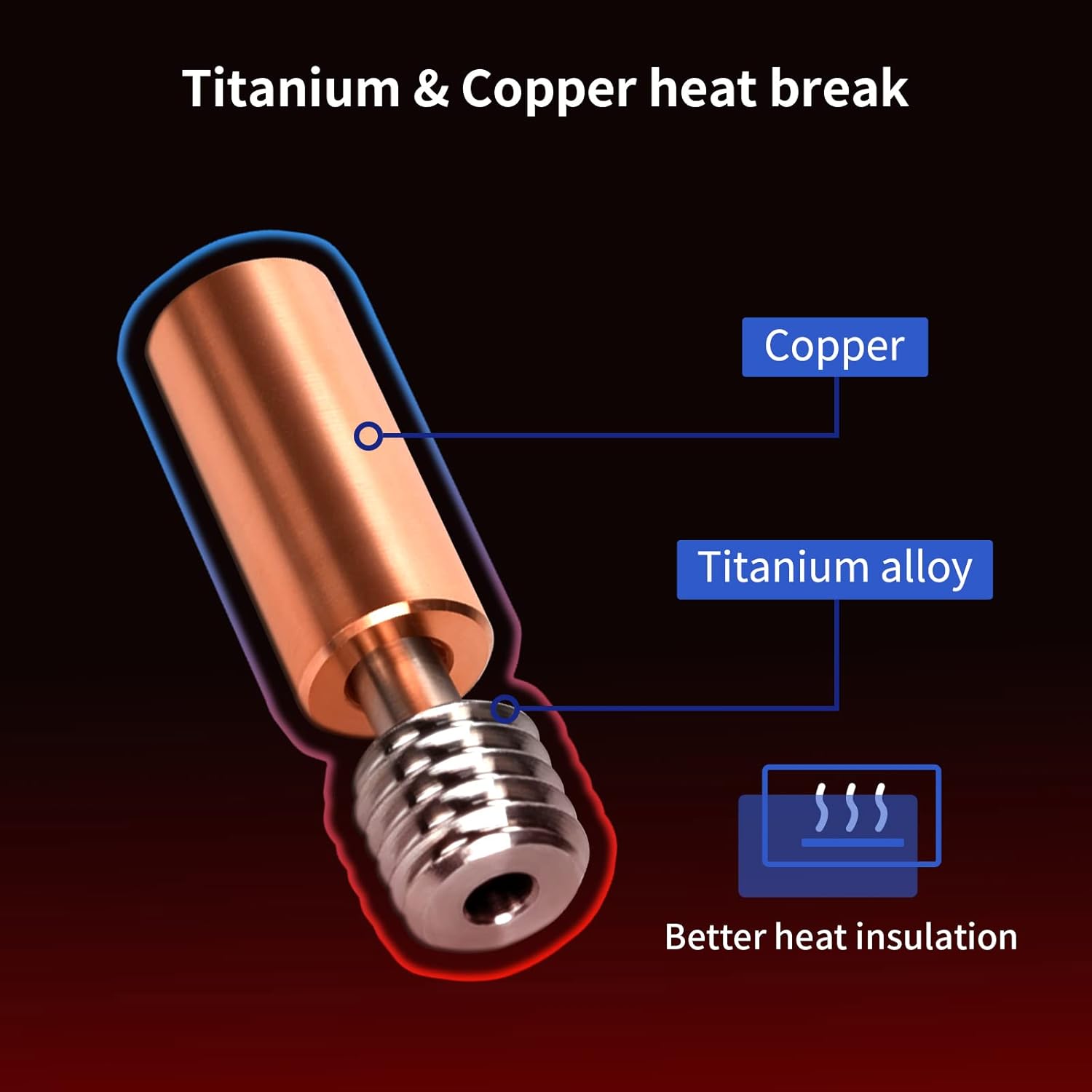
Image: A cross-section diagram illustrating the titanium alloy and copper components of the heat break, emphasizing better heat insulation.

Image: A diagram showing the nickel-plated copper heat block, indicating its role in better heat conduction for the extruder.

Image: A detailed view of the hardened steel nozzle, designed for high-temperature resistance and smooth extrusion.

Image: An infographic demonstrating the comprehensive detection capabilities of the smart filament sensor, including filament runout, extruder trouble, filament tying, and nozzle clogging, with an on-screen alert example.

Image: A cutaway view of the highly precise photoelectric sensor, highlighting its internal mechanism and theoretical detection length of 2.88mm.

Image: An illustration demonstrating the compatibility of the filament sensor with both Bowden and Direct-Drive extruder setups on 3D printers.

Image: A comparison showing the bi-directional filament feeding capability of the SFS V2.0 sensor, allowing flexible IN/OUT configurations, contrasted with the uni-directional SFS V1.0.
3. Setup and Installation
3.1 BIQU H2 500℃ Direct Drive Extruder Installation
- Preparation: Ensure your 3D printer is powered off and disconnected from the mains. Gather necessary tools (screwdrivers, wrenches, cable ties).
- Remove Old Extruder (if applicable): Carefully disconnect wiring and mounting screws of your existing extruder.
- Mount the H2 Extruder: Attach the BIQU H2 500℃ Extruder to your printer's carriage using the provided mounting hardware. Ensure it is securely fastened and aligned.
- Connect Wiring: Connect the stepper motor, heater cartridge, thermistor, and cooling fan wires to the appropriate ports on your printer's mainboard. Refer to your printer's wiring diagram and the H2 extruder's specific pinout. Pay close attention to polarity for thermistor and heater.
- Firmware Configuration: Update your printer's firmware (Marlin, Klipper, etc.) to reflect the new extruder's steps per millimeter (E-steps), thermistor type, and PID tuning settings. This is crucial for accurate temperature control and extrusion.
3.2 BIGTREETECH Smart Filament Runout Sensor V2.0 Installation
- Mounting: Choose a suitable location for the SFS V2.0 sensor. It can be mounted before the extruder (for Bowden setups) or close to the extruder (for direct drive setups). Use the provided mounting brackets or design your own. The bi-directional feeding allows flexible orientation.
- Filament Path: Ensure the filament can pass smoothly through the sensor without excessive friction or sharp bends.
- Wiring: Connect the sensor to an available I/O port on your printer's mainboard (e.g., Endstop, filament detection, BL touch, or induction sensor port). Consult the SFS V2.0 wiring diagram and your mainboard's pinout.
- Firmware Configuration: Enable filament runout detection in your printer's firmware. Configure the correct pin for the sensor and set up the desired behavior upon detection (e.g., pause print, move head).
4. Operating Instructions
4.1 Filament Loading
- Preheat the hotend to the appropriate temperature for your filament.
- Insert the filament into the SFS V2.0 sensor's input port. Ensure it passes through smoothly.
- Feed the filament into the BIQU H2 extruder until it engages with the gears.
- Manually extrude a small amount of filament to ensure it flows freely from the nozzle and that the sensor detects its presence.
4.2 High-Temperature Printing
- The BIQU H2 500℃ Extruder is capable of printing high-temperature filaments. Always refer to the filament manufacturer's recommended printing temperatures.
- Ensure your printer's enclosure and bed heating capabilities are suitable for high-temperature materials to prevent warping and improve print quality.
- Allow sufficient time for the hotend to reach and stabilize at higher temperatures before starting a print.
- Note: The heating block (metal) may change color at high temperatures, which is a normal phenomenon and does not indicate a defect.
4.3 Smart Filament Sensor Functionality
- The SFS V2.0 continuously monitors filament movement.
- Upon detecting an anomaly (runout, breakage, clogging, tying, or extruder malfunction), the sensor will trigger an alert on your printer's screen (if configured) and pause the print.
- Follow the on-screen prompts to resolve the issue (e.g., load new filament, clear clog) and resume printing.
5. Maintenance
5.1 Nozzle Maintenance
- Regularly inspect the hardened steel nozzle for wear or damage.
- Clean the nozzle exterior of any accumulated plastic. For clogs, perform a cold pull or use a nozzle cleaning needle at printing temperature.
- Replace the nozzle if it shows signs of significant wear, which can affect print quality.
5.2 Extruder Maintenance
- Periodically check the extruder gears for debris or filament residue. Clean with a brush if necessary.
- Ensure the heat break and heating block are free from plastic buildup.
- Verify that the cooling fan on the extruder is functioning correctly to prevent heat creep.
5.3 Filament Sensor Maintenance
- Inspect the filament path through the SFS V2.0 sensor for any obstructions or debris.
- Ensure the internal photoelectric sensor is clean and free from dust or filament particles. Use compressed air or a soft brush if needed.
6. Troubleshooting
6.1 Filament Detection Issues
- Sensor not detecting filament:
- Check wiring connections to the mainboard.
- Verify firmware configuration for the sensor pin.
- Ensure filament is passing through the sensor correctly and smoothly.
- Clean the sensor's internal optics.
- False filament runout alerts:
- Check for excessive friction in the filament path before or after the sensor.
- Ensure the sensor is securely mounted and not vibrating excessively.
- Adjust sensor sensitivity in firmware if applicable.
6.2 Extrusion Problems
- No filament extrusion:
- Check if the hotend is at the correct temperature.
- Verify the extruder motor wiring and E-steps in firmware.
- Inspect for a clogged nozzle or heat break. Perform a cold pull or clean.
- Ensure the extruder gears are gripping the filament.
- Under-extrusion:
- Increase flow rate or E-steps in firmware.
- Check for partial nozzle clog.
- Ensure filament diameter setting in slicer matches actual filament.
- Verify the extruder tension is adequate.
- Over-extrusion:
- Decrease flow rate or E-steps in firmware.
- Check filament diameter setting in slicer.
7. Specifications
| Feature | Specification |
|---|---|
| Product Name | BIGTREETECH Smart Filament Runout Sensor V2.0 + BIQU H2 500℃ Direct Drive Extruder |
| Extruder Type | Direct Drive |
| Max Printing Temperature | 500°C |
| Hotend Material | Copper-Titanium Alloy Heat Break, Nickel-Coated Red Copper Heating Block |
| Nozzle Material | Hardened Steel |
| Filament Sensor Type | Smart Photoelectric Sensor (SFS V2.0) |
| Sensor Detection Capabilities | Filament runout, breakage, clogging, tying, extruder malfunction |
| Sensor Compatibility | Bowden and Direct Drive extruders, various motherboards (SKR MINI E3 V3.0, SKR3, Manta E3EZ, Octopus Pro), Klipper, Marlin, RepRap firmware |
| ASIN | B0CGJ15LMP |
| Date First Available | August 24, 2023 |
8. Warranty and Support
For detailed warranty information, please refer to the official BIQU or BIGTREETECH website or contact your point of purchase. Warranty terms typically cover manufacturing defects for a specified period.
If you encounter any issues not covered in this manual or require further assistance, please contact BIQU customer support through their official channels. When contacting support, please provide your product model number (BIQU H2 500℃ Extruder & BIGTREETECH SFS V2.0) and a detailed description of the problem.
Official BIQU Store: Visit the BIQU Store on Amazon