
Introduction
Thank you for choosing the Powdeom 300W Portable Power Station. This device is designed to provide reliable power for various applications, including outdoor activities, home emergencies, and portable charging needs. Please read this manual thoroughly before using the product to ensure safe and optimal operation. Keep this manual for future reference.
Important Safety Instructions
Failure to follow these instructions may result in electric shock, fire, or serious injury. Retain these instructions for future reference.
- Do not disassemble, repair, or modify the unit.
- Do not place the unit near fire or expose it to heat.
- Do not use or store the unit in a bathroom or in an area exposed to water or rain.
- Do not use the unit if it is damaged or has been dropped.
- Keep out of reach of children and pets.
- Use only original or certified chargers and cables.
- Ensure proper ventilation during use and charging. Do not cover the unit.
- Avoid extreme temperatures. Operate and store the unit within the recommended temperature range.
- In case of fire, use a dry powder fire extinguisher.
- Dispose of the product according to local regulations.
What's Included
Verify that all items listed below are present in your package:
- 1x Powdeom 300W Portable Power Station
- 1x DC Adapter
- 1x User Manual
Product Overview
The Powdeom 300W Portable Power Station features multiple output ports and a clear display for monitoring. Familiarize yourself with the components before operation.

Image: Front view of the Powdeom 300W Portable Power Station, showing the display, various ports, and carrying handle.
Port Layout and Indicators
The power station is equipped with a variety of input and output ports to accommodate different devices and charging methods.

Image: Detailed diagram illustrating the location and type of each port on the Powdeom 300W Portable Power Station, including USB-A, USB-C, AC outlets, DC outputs, and input ports.
- Power Button: Turns the unit on/off.
- LCD Display: Shows battery level, input/output power, and status indicators.
- USB-A Ports (2x): 5V/3A output for charging standard USB devices.
- QC 3.0 Port (1x): Quick Charge 3.0 compatible USB port.
- PD 65W Port (1x): Power Delivery 65W input/output for fast charging laptops and other compatible devices.
- PD 18W Port (1x): Power Delivery 18W output.
- AC Outlets (2x): 300W Pure Sine Wave AC output (110V).
- DC Output Ports (2x): 12V output.
- DC Input Port: For charging the power station via DC adapter or solar panel.
- LED Light: Integrated flashlight with multiple modes.
Setup
Before first use, it is recommended to fully charge your Powdeom Portable Power Station.
- Unpack: Carefully remove the power station and all accessories from the packaging.
- Initial Charge: Connect the provided DC adapter to the DC input port on the power station and plug it into a wall outlet. The LCD display will indicate charging status.
- Full Charge: Allow the unit to charge until the battery indicator shows 100%. This ensures optimal battery performance from the start.
Charging the Power Station
The Powdeom 300W Portable Power Station offers multiple flexible recharging options.
1. Rapid Dual-Input Charging (DC + PD)
For the fastest recharge, combine the DC input and PD 65W input simultaneously. This method can charge the power station from 0% to 60% within approximately 1 hour, achieving a maximum input rate of 185W.

Image: Illustration showing the power station being recharged simultaneously via its DC input (120W) and PD 65W USB-C input, achieving a rapid charge time of 1.6 hours for a full charge.
2. Wall Outlet Charging (DC 120W)
Use the provided DC adapter to charge the power station from a standard wall outlet. This method provides up to 120W input.
3. PD 65W USB-C Charging
The PD 65W USB-C port can also be used as an input for charging the power station. This is a convenient option for fast charging using a compatible USB-C power adapter.

Image: The power station being recharged via its PD 65W USB-C port, showing estimated recharge times to 80% and full charge.
4. Solar Panel Charging
Connect a compatible 60W solar panel (not included) to the DC input port for environmentally friendly charging outdoors. Ensure the solar panel is positioned to receive maximum sunlight.
5. Car Charger Charging
Charge the power station using a car charger by connecting it to your vehicle's 12V cigarette lighter socket. This is ideal for recharging while traveling.

Image: Visual representation of the five recharging methods: PD+DC, DC, PD, Solar Panel, and Car Charger.
Operating the Power Station
To use the Powdeom 300W Portable Power Station, follow these general steps:
- Power On: Press and hold the main power button until the LCD display illuminates.
- Select Output: For AC devices, press the "AC ON/OFF" button. For DC devices, press the "DC ON/OFF" button. USB and PD ports are typically active once the unit is powered on.
- Connect Device: Plug your device into the appropriate output port. Ensure the device's power requirements do not exceed the power station's output limits (e.g., 300W for AC).
- Monitor Display: The LCD display will show the current output wattage and remaining battery capacity.
- Power Off: After use, disconnect all devices and press and hold the main power button to turn off the power station. Turn off AC/DC outputs when not in use to conserve battery.
Using AC Outlets (300W Pure Sine Wave)
The two AC outlets provide a stable 300W pure sine wave output, suitable for sensitive electronics. Ensure your appliance's rated power is less than 300W.

Image: The power station connected to a coffee maker, projector, and lamp, demonstrating its capability to power various AC devices with estimated run times.
Using USB and PD Ports
The power station features multiple USB ports, including QC 3.0 and PD 65W, for efficient charging of mobile phones, tablets, and laptops.

Image: The power station charging a smartphone, MacBook Pro, laptop, camera, and Nintendo Switch, illustrating its 299.7Wh capacity and versatility.
LED Light Modes
The integrated LED light provides illumination for various situations. To activate and cycle through modes:
- Turn On: Press the LED light button once to activate the Strong Mode (bright light).
- Cycle Modes: Press the button again to switch to Flash Mode. Press a third time for SOS Mode.
- Turn Off: Press the button a fourth time to turn off the LED light.

Image: A person using the power station's LED light in a dark outdoor setting, with icons depicting Strong Mode, SOS Mode, and Strobe Mode.
Maintenance and Storage
- Cleaning: Use a dry, soft cloth to clean the exterior of the unit. Do not use abrasive cleaners or solvents.
- Storage: Store the power station in a cool, dry place, away from direct sunlight and extreme temperatures.
- Long-Term Storage: If storing for extended periods, charge the unit to approximately 50-80% every 3-6 months to maintain battery health.
- Avoid Drops: Protect the unit from physical shocks and drops.
Troubleshooting
If you encounter issues with your Powdeom Portable Power Station, refer to the following common solutions:
- Unit Not Turning On: Ensure the battery is charged. If not, connect it to a power source using one of the charging methods.
- No Output from Ports: Verify that the specific output (AC/DC) is turned on. Check if the device you are trying to power exceeds the power station's output limits.
- Slow Charging: Ensure you are using the correct adapter and cable. For faster charging, consider using the dual-input (DC + PD) method.
- Overload Protection: If the unit shuts down unexpectedly, it may be due to an overload. Disconnect the device, restart the power station, and ensure the connected device's power consumption is within the unit's limits.
- Overheating: If the unit feels excessively hot, disconnect all devices and allow it to cool down in a well-ventilated area. Ensure vents are not blocked.
If problems persist, please contact customer support.
Specifications
Technical specifications for the Powdeom 300W Portable Power Station (Model 320A-PD):
| Feature | Detail |
|---|---|
| Model Number | 320A-PD |
| Battery Capacity | 299.7Wh (81000mAh) |
| AC Output | 2x 300W Pure Sine Wave (110V) |
| DC Output | 2x 12V Output |
| USB-A Output | 2x 5V/3A |
| QC 3.0 Output | 1x Quick Charge 3.0 Port |
| PD USB-C Output/Input | 1x 65W Power Delivery |
| PD USB-C Output | 1x 18W Power Delivery |
| DC Input | Up to 120W (15V/8A) |
| Max Combined Input | 185W (DC 120W + PD 65W) |
| Recharging Ways | Wall Outlet, PD Port, Car Charger, Solar Panel (60W max) |
| Dimensions (L x W x H) | 9.84 x 4.8 x 4.76 inches |
| Weight | 7.7 pounds |
| Battery Cell Composition | Lithium Ion |
| Special Feature | Portable, 3-Mode LED Light, BMS Protection |
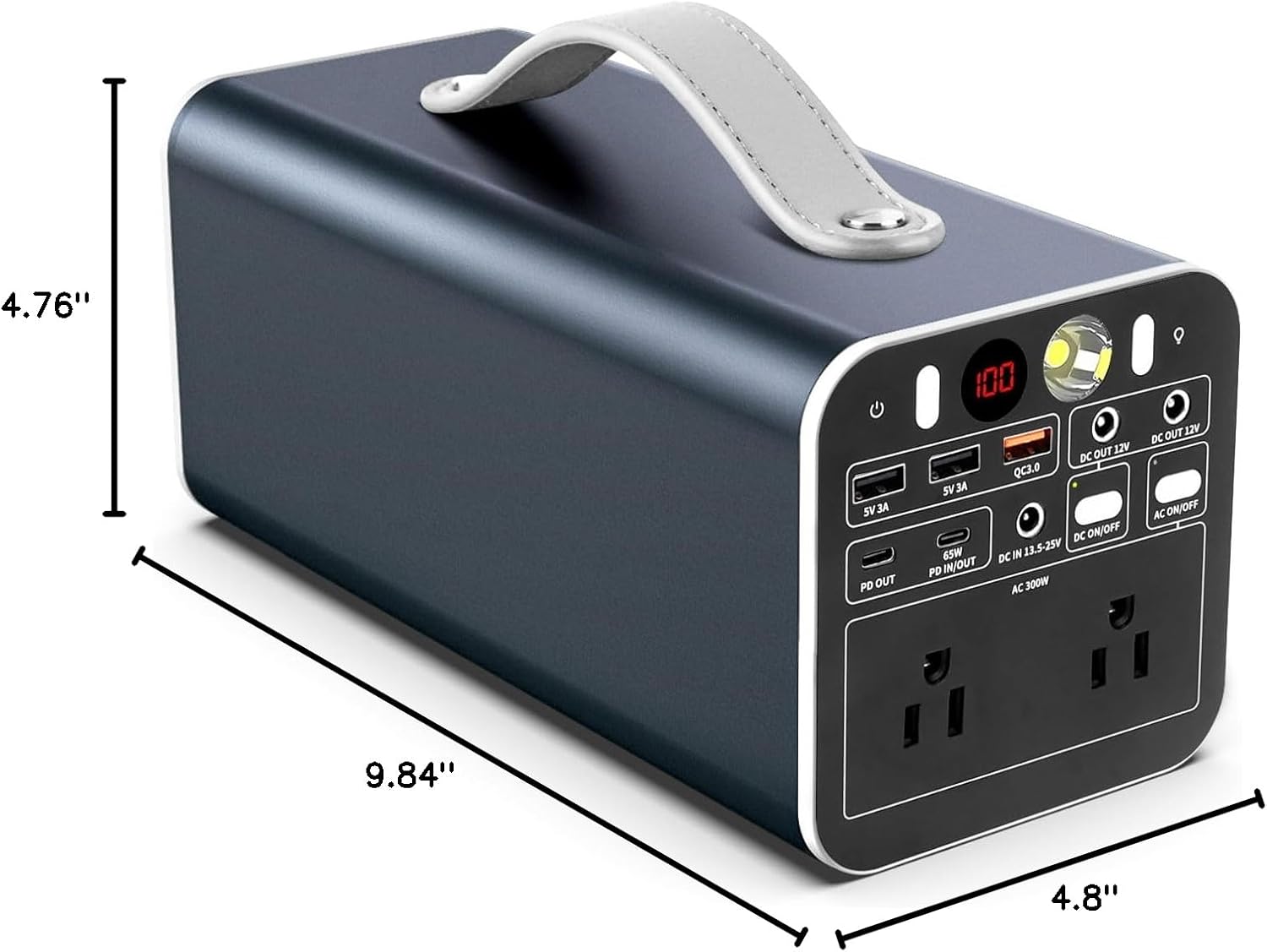
Image: Diagram showing the physical dimensions (length, width, height) of the Powdeom 300W Portable Power Station.
Warranty and Customer Support
Powdeom provides a warranty of 12 months from the date of purchase for the 300W Portable Power Station.
For any questions, technical assistance, or warranty claims, please contact Powdeom customer service. Refer to the contact information provided on the official Powdeom website or your purchase documentation.
Manufacturer: Guangzhou Aokaidun Electric Appliance Co., Ltd.