
1. Introduction
This manual provides essential information for the safe and efficient operation, maintenance, and troubleshooting of your VOCIC V62 Pro Electric Wheelchair. Please read it thoroughly before first use and keep it for future reference.

Image: The VOCIC V62 Pro Electric Wheelchair designed for user independence.
2. Safety Information
Important Safety Precautions:
- Ensure the correct delivery address, phone number, and email are provided for transport company contact. Incorrect information may lead to delivery failure.
- If you receive damaged parts or encounter installation issues, contact customer support immediately for a resolution within 24 hours.
- The VOCIC electric wheelchair complies with CE requirements.
- For first use, charge the batteries for 6 to 8 hours. If not used frequently, charge the battery once a month.
- Always ensure the wheelchair is in 'D' mode (electric mode) for operation. Otherwise, the electric wheelchair will emit continuous warning sounds and will not start correctly.
- Always wear the safety belt when operating the wheelchair.
- Be aware of your surroundings and avoid obstacles.
3. Package Contents
Verify that all components are present upon unboxing:
- VOCIC V62 Pro Electric Wheelchair (pre-installed)
- 2 x 24V/10Ah Lithium Batteries
- Joystick Controller
- Charger
- Anti-roll wheels
- User Manual
4. Assembly and Setup
The VOCIC V62 Pro Electric Wheelchair comes largely pre-assembled. Follow these steps for final setup:
- Positioning: Place the folded wheelchair as shown in the video, ensuring stability.
- Install Anti-Roll Wheels: Attach the anti-roll wheels to the designated points at the rear of the wheelchair.
- Connect Power Cord: Locate the power cord connection points and securely plug them in.
- Unfold Wheelchair: Grasp the backrest with one hand and the seat with the other. Apply force in opposite directions until the wheelchair is fully unfolded and locked into position.
- Attach Controller: Unscrew the pre-installed screws on the armrest. Insert the joystick controller into the armrest slot and tighten the screws to secure it. The controller can be installed on either the left or right armrest.
- Install Battery: Press the red button inwards to release the battery compartment. Slide the battery into place until it clicks securely.
- Adjust Footrest: The footrest can be tilted 90 degrees for comfort and storage.
- Fasten Safety Belt: Secure the safety belt around your waist before operating.
Video: Step-by-step assembly and setup guide for the VOCIC V62 Pro Electric Wheelchair.

Image: The VOCIC V62 Pro Electric Wheelchair in its fully unfolded state, ready for use.
5. Operation
The V62 Pro features an intuitive joystick control for easy maneuverability.
- Power On/Off: Use the designated button on the joystick controller to power the wheelchair on or off.
- Joystick Control: The 360° intelligent joystick allows for smooth turns and flexible control in tight spaces. Push the joystick forward to move forward, pull back to reverse, and move left or right to turn.
- Speed Adjustment: Use the speed up and speed down buttons on the controller to adjust your travel speed.
- Horn: Press the horn button for an audible warning.
- Battery Display: The controller features a battery display to monitor the remaining charge.
- Mode Switch: The wheelchair has two modes: 'D' for electric mode and 'N' for manual mode. To switch between modes, simultaneously operate the switches on both the left and right sides of the motor. Ensure both are switched for proper function.
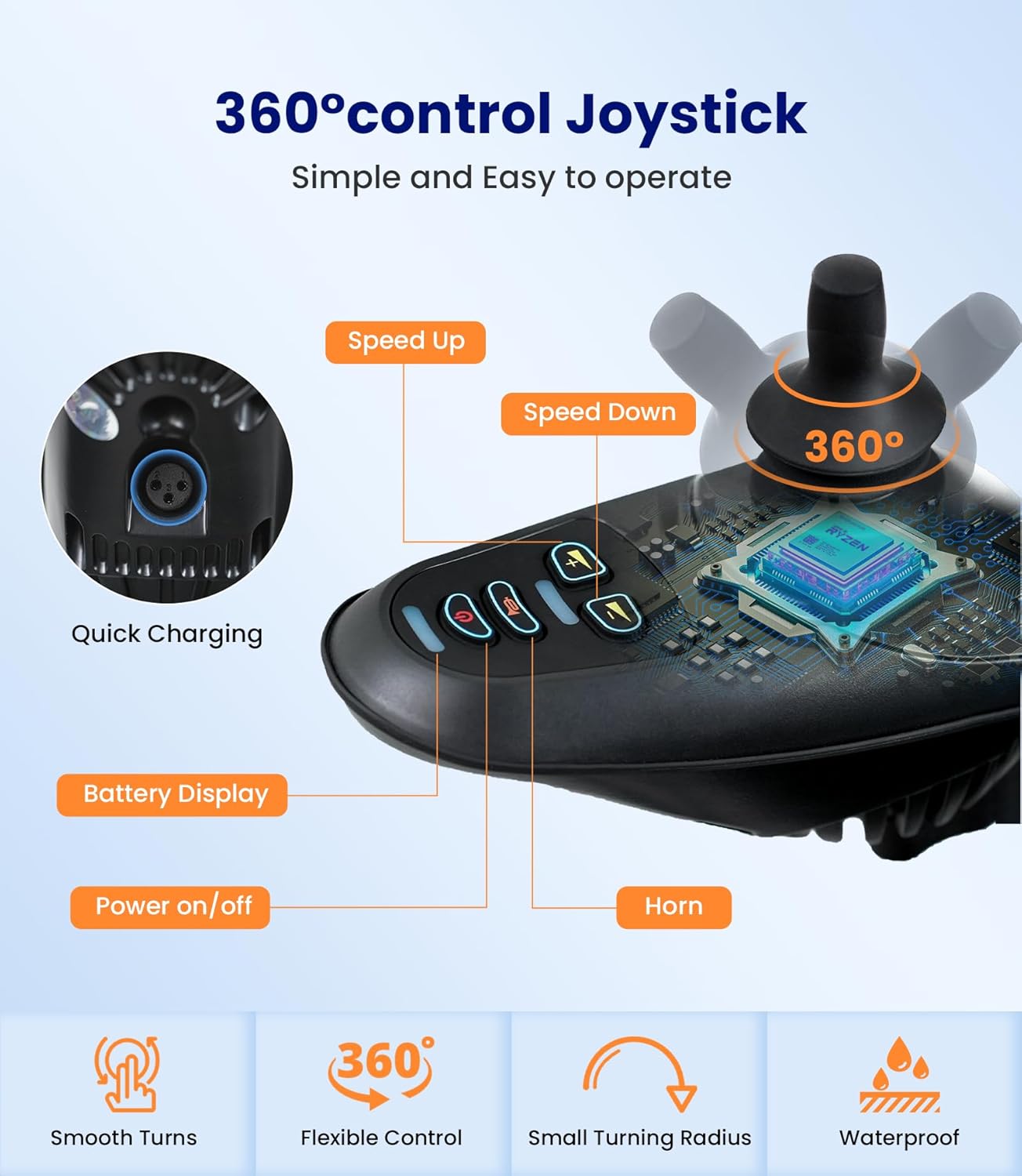
Image: Detailed view of the 360° intelligent joystick controller with power, speed, horn, and battery display functions.

Image: Location of the mode switch on the motor for transitioning between electric and manual operation.
6. Folding and Portability
The V62 Pro is designed for quick folding and easy transport.
- Folding: Pull the black button outwards until it disengages. Then, grasp the backrest with one hand and press downwards until the wheelchair is completely folded.
- Traction Rod: Pull the traction rod located on the footrest to easily roll the folded wheelchair like luggage.
Video: Demonstration of folding the VOCIC V62 Pro Electric Wheelchair and its portability features.

Image: The VOCIC V62 Pro Electric Wheelchair in its compact, folded state, ideal for storage or transport.
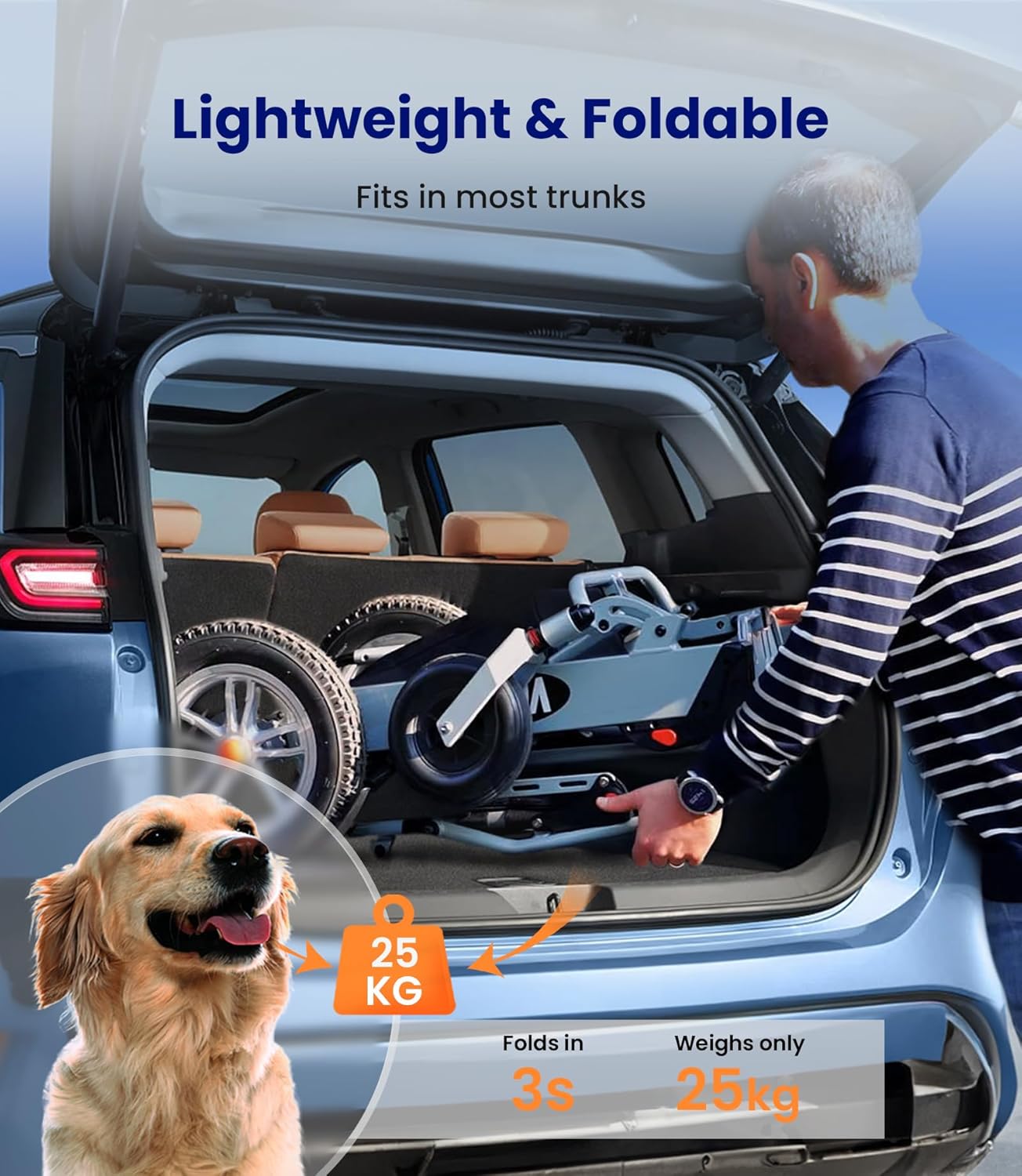
Image: A person easily loading the folded VOCIC V62 Pro Electric Wheelchair into a car trunk, highlighting its portability.
7. Battery and Charging
The V62 Pro is equipped with an innovative dual battery system for extended range.
- Battery Type: Two 24V/10Ah lithium batteries.
- Charging Methods: The batteries can be charged in two ways:
- Via Controller: Plug the charger directly into the charging port on the joystick controller.
- Separate Battery Charging: Remove the battery from the wheelchair and plug the charger directly into the battery's charging port. This allows for charging one battery while using the other.
- Initial Charge: Charge for 6 to 8 hours before first use.
- Regular Charging: If not used frequently, charge the batteries once a month to maintain their health.
Video: Instructions on how to charge the VOCIC V62 Pro Electric Wheelchair batteries.

Image: Charging the wheelchair battery directly through the controller port.

Image: A battery removed from the wheelchair and connected to a charger for independent charging.
8. Features Overview
- Ultralight and Portable: Constructed from high-quality aluminum alloy, weighing only 25kg (including 2 batteries, gross weight: 28kg). Folds quickly in 3 seconds to a compact size of 66x35x80 cm.
- Powerful Motor: Equipped with a 500W brushless motor for longer life, energy efficiency, and quiet operation. Capable of navigating complex terrains.
- Premium Inflatable Tires: 30 cm inflatable rubber rear wheels provide excellent shock absorption, allowing smooth travel over uneven surfaces like gravel, grass, mud, marble, and wood.

Image: The durable inflatable tires of the VOCIC V62 Pro, designed for stability and comfort across diverse terrains.
- Advanced Safety: Features an intelligent electromagnetic braking system that activates even during power failure. Includes 4 additional shock-absorbing springs, safety belts, and anti-roll wheels for enhanced user well-being.
- Comfort and Storage: A 4 cm thick breathable seat cushion and backrest provide comfortable support, preventing pressure sores during long periods of sitting. Includes a large 10.5-liter removable storage bag and a rear pocket on the backrest.

Image: The adjustable footrest and integrated safety features of the VOCIC V62 Pro Electric Wheelchair.
9. Specifications
| Feature | Detail |
|---|---|
| Model Name | VOCIC V62 Pro |
| Manufacturer Reference | V-EW-V62-E-SV- |
| ASIN | B0CGHT4D55 |
| Dimensions (L x W x H) | 66 x 35 x 53 cm (unfolded) |
| Folded Size | 66 x 35 x 80 cm |
| Item Weight | 28 kg (including 2 batteries) |
| Maximum Weight Recommendation | 136 kg |
| Material | Aluminum |
| Batteries | 2 Lithium-ion (24V/10Ah each) - included |
| Maximum Range | Up to 25 km |
| Motor Power | 500W Brushless |
| Wheel Size | 30 cm (rear inflatable) |
| Turning Radius | 15 cm |
| Brake Type | Electromagnetic |
| Max Speed | 8 km/h |
| Seat Depth | 53 cm |

Image: Diagram illustrating the key dimensions of the VOCIC V62 Pro Electric Wheelchair, both unfolded and folded.
10. Maintenance
Regular maintenance ensures the longevity and optimal performance of your wheelchair.
- Cleaning: Wipe down the frame and seat with a damp cloth. Avoid using harsh chemicals.
- Battery Care: As mentioned in the safety section, charge batteries for 6-8 hours initially and monthly if not in regular use. Store batteries in a cool, dry place.
- Tire Pressure: Periodically check the pressure of the inflatable tires and inflate as needed to the recommended level.
- General Inspection: Regularly inspect all connections, screws, and moving parts for any signs of wear or looseness. Tighten or replace as necessary.
11. Troubleshooting
If you encounter any issues, refer to the following common problems and solutions:
- Wheelchair Emits Warning Sounds and Does Not Start: Ensure the wheelchair is switched to 'D' (electric) mode. Both motor switches must be engaged simultaneously. Check battery charge level.
- Reduced Range or Power: Check battery connections and ensure batteries are fully charged. Battery performance can decrease over time; consider replacing if significantly degraded.
- Unusual Noises: Inspect wheels, motor, and frame for any loose parts or obstructions. If the noise persists, contact customer support.
- Controller Not Responding: Ensure the controller is securely connected and powered on. Check for any visible damage to the cable.
For issues not listed here or if solutions do not resolve the problem, please contact VOCIC customer support.
12. Warranty and Support
VOCIC is committed to providing high-quality products and excellent customer service.
- Warranty: We offer an extended 5-year warranty on this product.
- Customer Support: Our professional after-sales team is available to assist you. All problems will be resolved within 24 hours.
- Contact: For any warranty claims, technical assistance, or product inquiries, please refer to the contact information provided with your purchase or visit the official VOCIC website.

Image: VOCIC customer support details, highlighting 24/7 support, 5-year warranty, and 30-day free returns.