
Bumpboxx Remixx
Bumpboxx Remixx Retro Bluetooth Boombox
User Manual
Model: Remixx | Brand: Bumpboxx
Introduction
Thank you for choosing the Bumpboxx Remixx Retro Bluetooth Boombox. This portable cassette-style speaker combines vintage aesthetics with modern audio technology, offering high-fidelity sound, wireless connectivity, and a range of features for an enhanced listening experience. This manual provides essential information for setting up, operating, maintaining, and troubleshooting your device.
Package Contents
Please ensure all items are present in your package:
- Bumpboxx Remixx Bluetooth Boombox
- Wireless Microphone
- Carrying Shoulder Strap
- Power Adapter (for charging)
- 3.5mm Aux Cable
- Remote Control
Product Overview
Familiarize yourself with the main components and controls of your Bumpboxx Remixx.
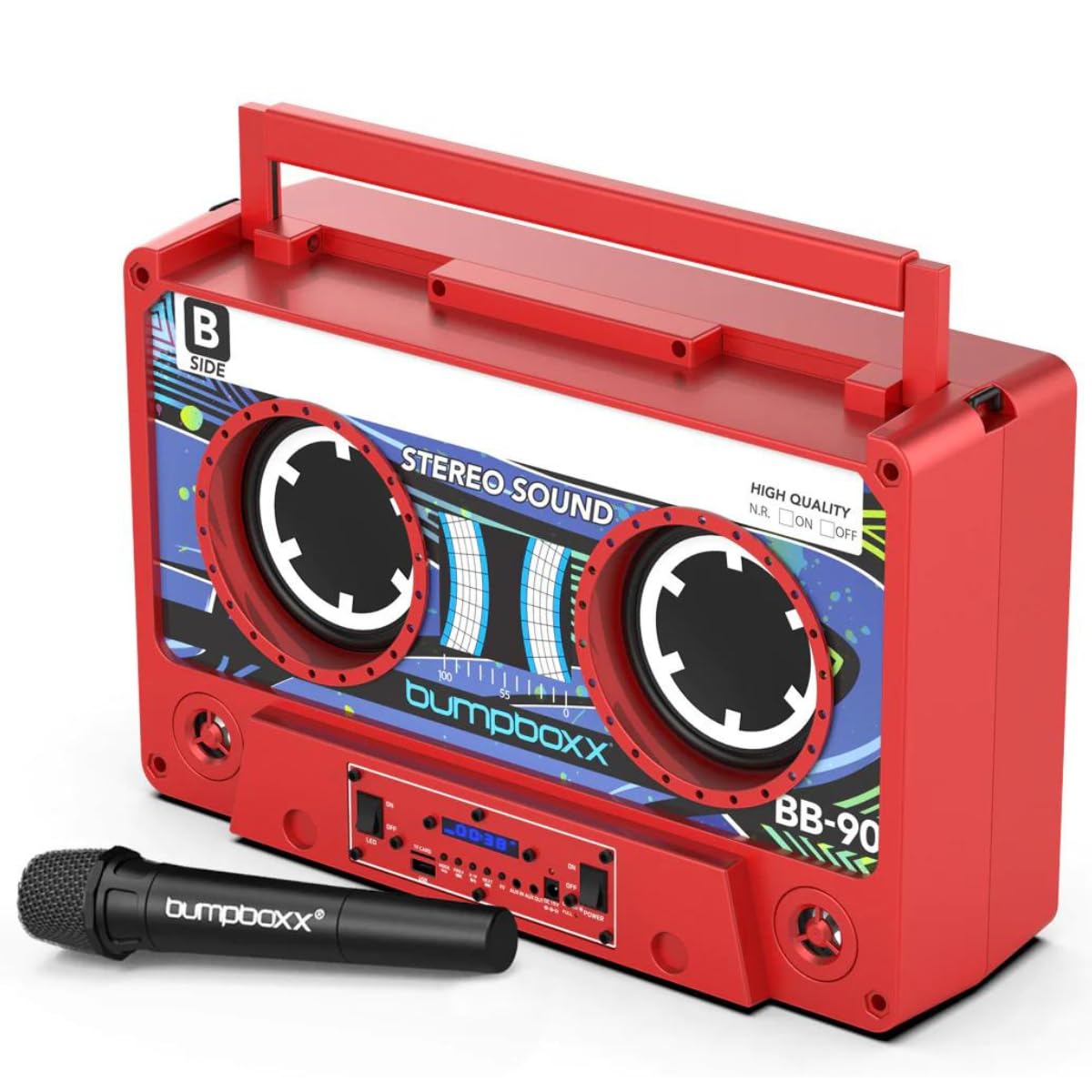
Figure 1: Front view of the Bumpboxx Remixx Boombox.

Figure 2: Side control panel with various ports and switches.
Controls and Ports:
- Volume Knob: Adjusts the overall sound output level.
- Bass Knob: Adjusts the low-frequency sound levels.
- Treble Knob: Adjusts the high-frequency sound levels.
- Power Switch: Turns the device On/Off.
- LED Switch: Turns the LED lights On/Off.
- USB Port: For playing MP3 files from a USB drive or charging external devices.
- TF Card Slot: For playing MP3 files from a TF (MicroSD) card.
- Mode Button: Switches between input modes (Bluetooth, USB, TF Card, Aux In).
- Previous/Next Buttons: Navigates tracks during playback.
- Play/Pause Button: Controls media playback.
- EQ Button: Cycles through 5 preset equalizer settings.
- Aux In (3.5mm): Connect external audio devices.
- Aux Out (3.5mm): Connect to other audio systems.
- DC 15V Input: Power adapter connection for charging.
- Charge/Full LED Indicators: Shows battery charging status.
Setup
1. Charging the Battery:
- Connect the provided power adapter to the DC 15V input port on the side of the boombox.
- Plug the adapter into a standard wall outlet.
- The 'Charge' indicator LED will illuminate during charging. Once fully charged, the 'Full' indicator LED will light up.
- A full charge provides approximately 12 hours of playtime.
2. Powering On/Off:
- To power on the boombox, slide the Power switch to the 'ON' position.
- To power off, slide the Power switch to the 'OFF' position.
Operating Instructions
1. Bluetooth Pairing:
- Power on the Bumpboxx Remixx. The device will automatically enter Bluetooth pairing mode, indicated by a flashing Bluetooth icon on the display.
- On your mobile device (smartphone, tablet, etc.), enable Bluetooth and search for available devices.
- Select "Bumpboxx Remixx" from the list of devices.
- Once connected, the Bluetooth icon will stop flashing, and a confirmation tone may sound.
- You can now play audio from your device through the boombox.
2. Auxiliary Input (AUX In):
- Connect one end of the 3.5mm Aux cable to the Aux In port on the boombox.
- Connect the other end to the headphone jack or audio output of your external audio device.
- Press the Mode button on the boombox until "AUX" is displayed.
- Control playback and volume from your external device.
3. USB/TF Card Playback:
- Insert a USB drive into the USB port or a TF (MicroSD) card into the TF Card slot.
- The boombox will automatically switch to USB or TF Card mode and begin playing compatible MP3 files. If not, press the Mode button to select the correct input.
- Use the Previous/Next and Play/Pause buttons to control playback.
4. Wireless Microphone Usage:
- Ensure the wireless microphone is powered on and within range of the boombox.
- The microphone will automatically connect to the boombox.
- Adjust the microphone volume using the dedicated control on the microphone or the boombox (if available).
5. EQ Settings:
- Press the EQ button to cycle through the 5 preset equalizer settings (e.g., Pop, Rock, Jazz, Classic, Flat).
- Select the setting that best suits your audio preference.
6. TWS (True Wireless Stereo) Pairing:
The Bumpboxx Remixx supports TWS pairing, allowing two Remixx units to connect wirelessly for a stereo sound experience.
- Ensure both Bumpboxx Remixx units are powered on and in Bluetooth mode, but not connected to any other device.
- On one unit (this will be the primary unit), press and hold the Mode button for a few seconds until you hear a pairing tone.
- The two units will automatically connect to each other. A confirmation tone will sound once connected.
- Now, connect your mobile device to the primary Bumpboxx Remixx via Bluetooth as described in step 1.
- Audio will now play in stereo across both units.
Video 1: Demonstrating the Bumpboxx Remixx in action, showcasing its design and features.
Video 2: A closer look at the Bumpboxx Remixx speaker, highlighting its audio capabilities.
Maintenance
1. Cleaning:
- Wipe the exterior of the boombox with a soft, dry cloth.
- Do not use abrasive cleaners, waxes, or solvents as they may damage the finish.
- Keep the ports free from dust and debris.
2. Storage:
- Store the boombox in a cool, dry place away from direct sunlight and extreme temperatures.
- If storing for an extended period, ensure the battery is partially charged (around 50%) to prolong its lifespan.
Troubleshooting
No Power:
- Ensure the power adapter is securely connected to both the boombox and a working power outlet.
- Check if the battery is charged. If not, charge the device for several hours.
- Verify the Power switch is in the 'ON' position.
No Sound:
- Increase the volume on both the boombox and your connected audio device.
- Ensure the correct input mode (Bluetooth, AUX, USB, TF Card) is selected.
- If using Bluetooth, ensure the device is properly paired and connected.
- If using AUX, check the cable connection and ensure it is fully inserted.
Bluetooth Not Connecting:
- Ensure the boombox is in Bluetooth pairing mode (flashing Bluetooth icon).
- Make sure your mobile device's Bluetooth is enabled and searching for devices.
- Move your mobile device closer to the boombox.
- Try forgetting the device from your mobile device's Bluetooth settings and re-pairing.
- Ensure no other devices are currently connected to the boombox.
Specifications
- Model Name: Remixx
- Brand: Bumpboxx
- Speaker Type: Built-In
- Connectivity Technology: Bluetooth
- Audio Output Mode: Stereo
- Power Source: Battery Powered (1 Lithium Ion battery included)
- Battery Life: Up to 12 hours (rechargeable)
- Product Dimensions: 17.5" (Length) x 6.25" (Width) x 11.5" (Height)
- Item Weight: 12.5 lbs
- Special Features: Wireless Microphone, 5 EQ Settings, TWS Wireless Pairing, USB/TF MP3 Player, 3.5mm Line In/Line Out
- Color: Electric Red
- Material: Plastic
- Control Method: Touch, Remote
Warranty and Support
The Bumpboxx Remixx Retro Bluetooth Boombox comes with a 1-year manufacturer's warranty covering defects in materials and workmanship.
For warranty claims, technical support, or any questions regarding your product, please contact Bumpboxx customer service through their official website or the retailer where the product was purchased. Please retain your proof of purchase for warranty validation.
Ask a question about this manual
Ask about setup, troubleshooting, compatibility, parts, safety, or missing instructions. Manuals+ will review the question and use this page’s manual context to help answer it.