
1. Introduction
Thank you for choosing the AzarPixel Ultra Bright 4500 Lumens Professional Eye Care LED Desk Lamp. This manual provides essential information for the safe and efficient use of your new lamp. Please read these instructions thoroughly before installation and operation, and retain them for future reference.
This LED desk lamp is designed to provide powerful, eye-friendly illumination for various tasks, including reading, office work, crafting, and detailed projects. Its adjustable design and dimmable brightness levels offer versatile lighting solutions for any workspace.
2. Safety Instructions
- Electrical Safety: Ensure the power supply voltage matches the lamp's requirements (120V AC). Do not use the lamp with damaged cords or plugs.
- Indoor Use Only: This lamp is designed for indoor use. Do not expose it to water or high humidity.
- Stable Installation: Always ensure the clamp is securely fastened to a stable surface to prevent the lamp from falling.
- Avoid Direct Eye Exposure: Do not stare directly into the LED light source for extended periods, as it may cause eye strain.
- Cleaning: Disconnect the power before cleaning. Use a soft, dry cloth. Do not use abrasive cleaners or solvents.
- Maintenance: Do not attempt to disassemble or repair the lamp yourself. Contact qualified service personnel for any repairs.
3. Package Contents
Verify that all components are present in the package:
- LED Desk Lamp Head with Integrated Arm
- Desk Clamp
- Power Adapter
- User Manual (this document)
4. Setup and Installation
Follow these steps to set up your AzarPixel LED Desk Lamp:
- Attach the Clamp: Securely fasten the desk clamp to the edge of your desk or workbench. Ensure the surface thickness is compatible with the clamp's opening (up to 2 inches).
- Insert the Lamp Arm: Insert the base of the lamp arm into the hole on the clamp. Tighten the screw on the clamp to firmly hold the lamp in place.
- Connect Power: Plug the power adapter into the lamp's power input port, then plug the adapter into a standard 120V AC electrical outlet.
- Adjust the Lamp: The lamp features a multi-jointed swing arm and a rotatable lamp head for flexible positioning. Adjust the lamp to your desired height and angle.

Image: The AzarPixel LED Desk Lamp, fully assembled and clamped to a desk, providing an overview of its design.
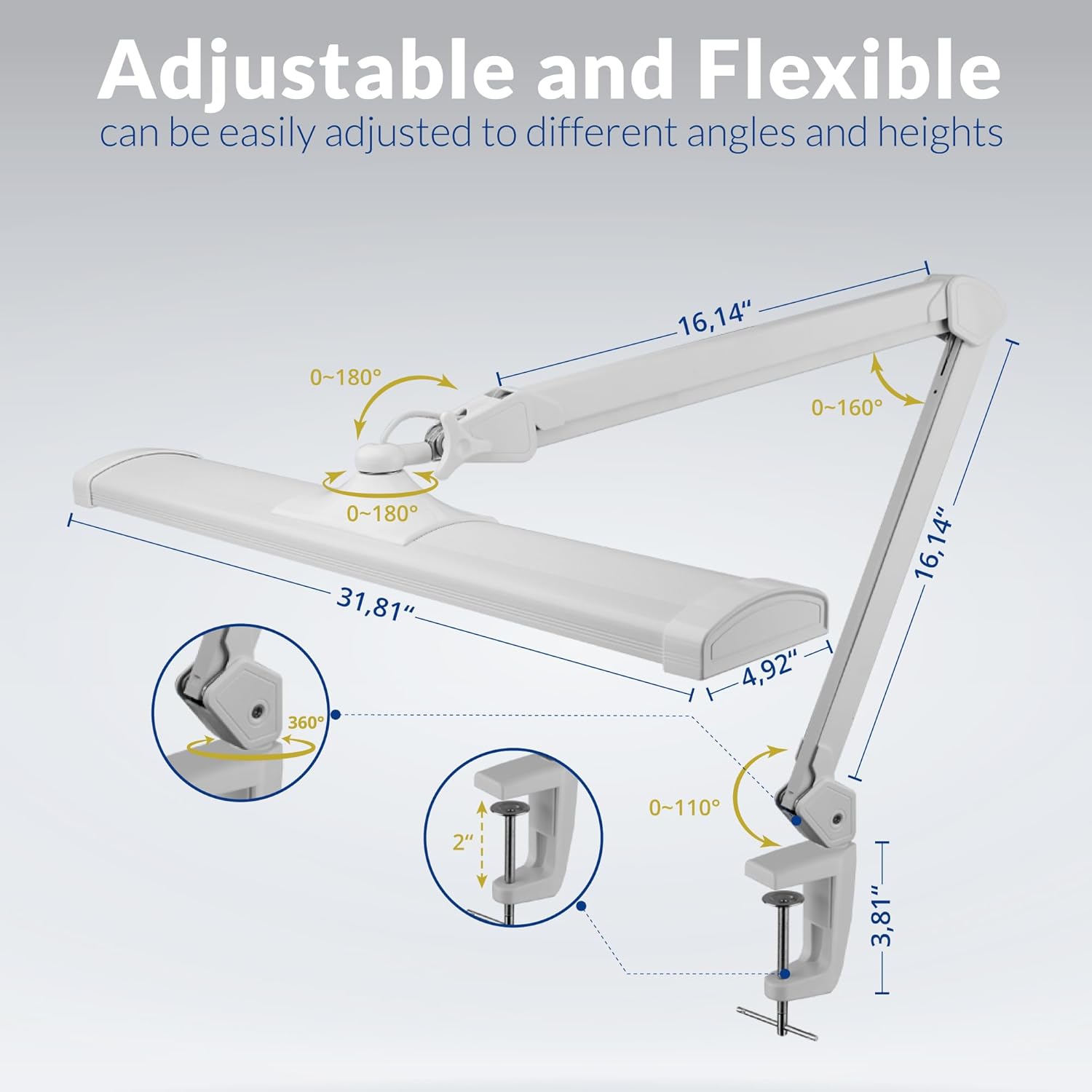
Image: A detailed diagram illustrating the adjustable joints (0-180°, 0-160°, 0-110° rotation) and dimensions (31.81" length, 4.92" width, 37.4" height) of the lamp, along with the clamp mechanism.
Video: This video demonstrates the installation process of the AzarPixel LED Desk Lamp, showing how to attach the clamp to a desk and adjust the lamp's arm and head for optimal positioning.
5. Operating Instructions
The AzarPixel LED Desk Lamp features intuitive touch controls for easy operation:
- Power On/Off: Tap the touch control button located on the lamp head to turn the lamp on or off.
- Adjust Brightness: While the lamp is on, repeatedly tap the touch control button to cycle through the 5 available brightness levels (20%, 40%, 60%, 80%, 100%).

Image: An illustration demonstrating the five distinct brightness levels (100%, 80%, 60%, 40%, 20%) achievable with the lamp's touch control, showing how the light intensity changes.
6. Features
- Ultra Bright LED Lighting: Provides 4500 lumens of powerful, sunlight-like illumination for enhanced visibility and productivity.
- Versatile Task Lighting: Suitable for a wide range of activities including nail art, tattooing, electronic repairs, crafting, sewing, and general office work.
- Flexible and Adjustable Design: Features a 360-degree rotating head, swing arm, and adjustable joints for customizable lighting angles and optimal illumination.
- Eye-Friendly Light: Designed with eye comfort in mind, boasting a high Color Rendering Index (CRI > 90), flicker-free, and glare-free operation to minimize eye strain and reduce blue light hazards.
- Touch Control & Easy Operation: Simple touch interface allows for effortless adjustment through 5 dimmable brightness levels to suit various tasks and ambiance requirements.

Image: A close-up view of the lamp head, emphasizing its high-quality LED light, 90 CRI for true colors, 4500 lumens brightness, eye care features, 342 SMD LEDs, energy efficiency, and durable aluminum casing for thermal control.

Image: A man working on a detailed task at a workbench, illuminated by the AzarPixel LED Desk Lamp, demonstrating comfortable and focused lighting for work.

Image: A nail technician meticulously working on a client's nails, benefiting from the bright and detailed illumination provided by the AzarPixel LED Desk Lamp.
7. Maintenance
- Cleaning: To clean the lamp, first unplug it from the power outlet. Use a soft, dry, or slightly damp cloth to wipe the surfaces. Avoid using harsh chemicals or abrasive materials that could damage the finish.
- Dust Removal: Regularly dust the lamp head and arm to maintain optimal light output and prevent dust buildup.
- Cable Care: Inspect the power cord periodically for any signs of damage. If the cord is damaged, discontinue use and contact customer support.
8. Troubleshooting
If you encounter any issues with your lamp, refer to the following common problems and solutions:
| Problem | Possible Cause | Solution |
|---|---|---|
| Lamp does not turn on. | No power supply. | Check if the power adapter is securely plugged into both the lamp and the wall outlet. Test the outlet with another device. |
| Light flickers or is unstable. | Loose connection or power issue. | Ensure all connections are secure. Try plugging the lamp into a different outlet. |
| Brightness adjustment not working. | Touch control malfunction. | Ensure your finger is making proper contact with the touch control area. Try unplugging and re-plugging the lamp to reset it. |
| Lamp arm is loose. | Clamp or joint screws are not tight. | Tighten the screw on the desk clamp. Check and tighten any visible screws on the lamp's adjustable joints. |
If the problem persists after attempting these solutions, please contact AzarPixel customer support for assistance.
9. Specifications
| Model Number | TL508LED-C |
| Brand | AzarPixel |
| Light Source Type | LED |
| Wattage | 50 watts |
| Lumen Output | 4500 Lumens |
| Color Rendering Index (CRI) | > 90 |
| Control Method | Touch (5 Dimmable Levels) |
| Power Source | Corded Electric |
| Voltage | 120 Volts (AC) |
| Mounting Type | Tabletop Clamp |
| Product Dimensions (D x W x H) | 31.81" x 4.92" x 37.4" |
| Base Material | Metal |
| Shade Material | Plastic |
| Color | White |
10. Warranty and Support
Manufacturer Warranty: This AzarPixel LED Desk Lamp comes with a 2-year manufacturer's warranty from the date of purchase. This warranty covers defects in materials and workmanship under normal use.
What is Not Covered: The warranty does not cover damage caused by misuse, accidents, unauthorized modifications, improper installation, or normal wear and tear.
Customer Support: For warranty claims, technical assistance, or any questions regarding your product, please contact AzarPixel customer support through the retailer's platform or the official AzarPixel website. Please have your purchase receipt and model number (TL508LED-C) available when contacting support.