
NoahTec MONITORA7
NoahTec Solar Security Camera User Manual
Model: MONITORA7
Introduction
The NoahTec Solar Security Camera is a wireless outdoor surveillance solution designed for comprehensive home security. Featuring 2K HD resolution, it operates on a built-in rechargeable battery powered by an efficient 3W solar panel, ensuring continuous operation without the need for frequent recharging. This camera integrates advanced AI motion detection, a powerful siren, and a spotlight for enhanced security. It supports both color and infrared night vision, two-way audio communication, and can be remotely monitored via iOS and Android devices using the EseeCloud app. The camera connects via 2.4GHz WiFi and is built to withstand various weather conditions with its IP67 rating.

Image: The NoahTec Solar Security Camera, a white spherical camera unit connected to a black solar panel, mounted on a wall bracket.

Image: An infographic highlighting the camera's key features such as 2K FHD, solar power, IP67 waterproofing, two-way audio, and AI motion detection.
What's in the Box
Upon unboxing your NoahTec Solar Security Camera, please ensure all the following components are present:
- NoahTec Solar Security Camera Unit
- Solar Panel (3W)
- USB Charging Cable
- Mounting Bracket
- Screws and Wall Anchors
- Quick Start Guide (This document serves as the comprehensive user manual)
Setup Guide
Initial Charging
Before the first use, fully charge the camera's built-in rechargeable battery using the provided USB cable. This ensures optimal performance and battery life from the start.
App Download and Connection
The NoahTec camera is controlled via the EseeCloud app, available for both iOS and Android devices. Follow these steps to connect your camera:
- Download the EseeCloud APP: Search for "EseeCloud" in your device's app store and install it.
- Account Registration: Open the app and register for a new account or log in if you already have one.
- Add Device: Follow the in-app instructions to add your new camera. This typically involves scanning a QR code on the camera or using Bluetooth for initial pairing.
- Wi-Fi Connection: Connect the camera to your home's 2.4GHz Wi-Fi network. Note that this camera only supports 2.4GHz Wi-Fi.

Image: Visual guide showing the three main steps for quick installation: downloading the app, charging and connecting to Wi-Fi, and readiness for protection.
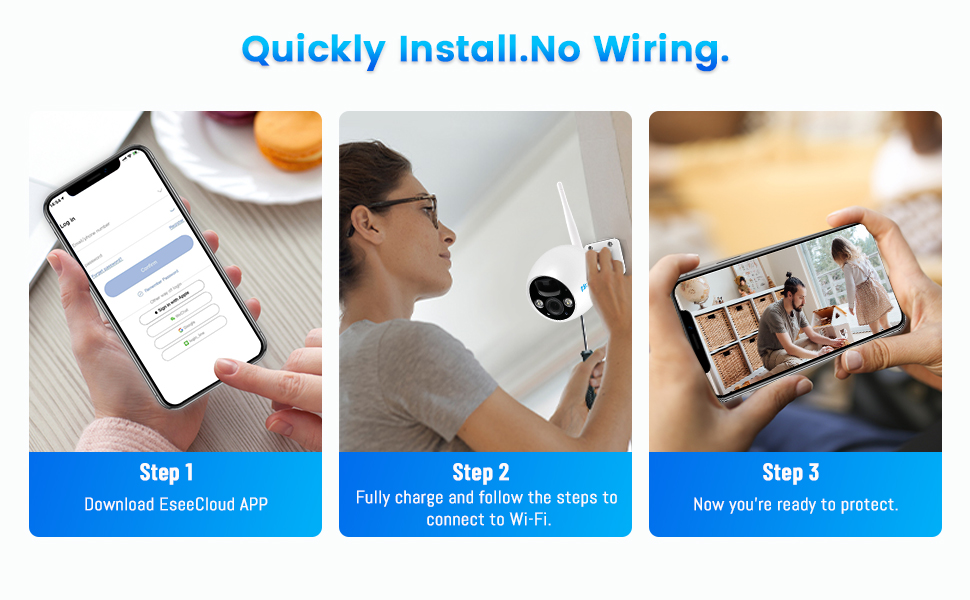
Image: A diagram illustrating that the camera exclusively supports 2.4GHz Wi-Fi, with a phone screen showing Wi-Fi connection status.
Installation
The wire-free design allows for flexible placement. Choose a location with good 2.4GHz Wi-Fi signal and sufficient sunlight exposure for the solar panel. Use the provided mounting bracket, screws, and wall anchors to securely attach the camera and solar panel to a wall or suitable surface.

Image: The camera and solar panel installed outdoors, emphasizing its IP67 waterproof rating and resistance to extreme temperatures.
Operating Instructions
Remote Monitoring and Control
Once connected, you can remotely monitor your property from anywhere using the EseeCloud app on your iOS or Android phone. The app provides real-time viewing of 2K HD video. You can also control certain camera functions, including activating the siren or spotlight, directly from the app. The camera is also compatible with Amazon Alexa for voice control.

Image: A depiction of multiple users accessing live camera feeds remotely, showcasing the multi-user sharing capability of the NoahTec security cameras.
AI Motion Detection and Alerts
The camera utilizes advanced AI technology for intelligent motion detection, capable of identifying persons, pets, and vehicles. When motion is detected, you will receive instant alarm notifications on your phone. The camera's floodlight will automatically illuminate at night when humanoid motion is triggered, serving as a deterrent to intruders.

Image: A split image showing the camera's 2K FHD color night vision capability and its PIR motion detection with spotlight activation at night.

Image: A smartphone screen showing a list of alarm messages with thumbnails, demonstrating the camera's smart AI detection for persons, pets, and cars.

Image: Icons representing the camera's specific detection capabilities: Person Detection, Pets Shot, Vehicle Detection, and Package Detection.
Night Vision Modes
The camera offers both color night vision and infrared night vision modes, ensuring clear footage even in low-light conditions. The floodlight assists in providing full-color images at night when motion is detected.
Two-Way Audio
With the built-in microphone and speaker, you can engage in two-way audio communication through the app. This allows you to speak to visitors or deter unwanted individuals remotely.

Image: A scene demonstrating clear two-way audio, where a user can listen and talk to someone via the camera's app.
Storage Options
The camera supports two storage methods for recorded video footage:
- TF Card Storage: Insert a TF card (up to 128GB, not included) into the camera for local storage.
- Cloud Storage: The camera offers cloud storage options for convenient access to your recordings.
You can easily share recordings or live footage with family members by scanning an APP QR code.

Image: Icons indicating support for 7-day free cloud storage and SD card storage.
Maintenance
To ensure the longevity and optimal performance of your NoahTec Solar Security Camera, consider the following maintenance tips:
- Weather Resistance: The camera has an IP67 rating, meaning it is designed to withstand rain, hail, and shine. However, extreme weather conditions over prolonged periods may affect performance.
- Solar Panel Cleaning: Periodically clean the surface of the solar panel to remove dust, dirt, or debris that may accumulate and reduce charging efficiency. Use a soft, damp cloth.
- Battery Health: While solar-powered, ensure the camera receives adequate sunlight to keep the battery charged. If the camera is in a shaded area for extended periods, occasional USB charging may be necessary.
- Lens Cleaning: Gently clean the camera lens with a microfiber cloth to ensure clear image quality. Avoid abrasive materials that could scratch the lens.
Troubleshooting
If you encounter issues with your NoahTec Solar Security Camera, please refer to the following common solutions:
- Camera Not Turning On: Ensure the camera's battery is fully charged. Connect it to the USB cable for a few hours to confirm.
- Cannot Connect to Wi-Fi:
- Verify that your Wi-Fi network is 2.4GHz. This camera does not support 5GHz Wi-Fi.
- Check your Wi-Fi signal strength at the camera's installation location using the EseeCloud app.
- Ensure your Wi-Fi password is entered correctly during setup.
- Restart your Wi-Fi router and the camera.
- Motion Detection Not Working:
- Check the motion detection settings in the EseeCloud app to ensure it's enabled and sensitivity is adjusted appropriately.
- Ensure there are no obstructions blocking the camera's view.
- Poor Night Vision:
- Ensure the camera lens is clean.
- Check if the night vision mode is enabled in the app.
- Verify that the spotlight is functioning if color night vision is desired.
- Two-Way Audio Issues:
- Check the microphone and speaker settings in the EseeCloud app.
- Ensure your phone's volume is up and the app has microphone permissions.
- Recording Issues (SD Card/Cloud):
- For SD card: Ensure the TF card is inserted correctly and is not full. Format the card via the app if necessary.
- For Cloud: Verify your cloud storage subscription status and internet connection.
If these steps do not resolve your issue, please contact NoahTec customer support for further assistance.
Specifications
| Feature | Detail |
|---|---|
| Model Number | MONITORA7 |
| Video Capture Resolution | 4 MP (2K HD) |
| Power Source | Solar Powered, Battery Powered |
| Connectivity Technology | Wireless (2.4GHz Wi-Fi) |
| Compatible Devices | Android/iOS |
| Indoor/Outdoor Usage | Outdoor |
| Special Features | Night Vision (Color/Infrared), Motion Sensor (AI Human Detection), Spotlight, Siren, Two-Way Talk |
| International Protection Rating | IP67 |
| Night Vision Range | 33 Feet |
| Storage | TF Card (up to 128GB), Cloud Storage |
| Material | Plastic |
| Item Dimensions L x W x H | 7.45 x 5.79 x 5.04 inches |
| Item Weight | 1.43 pounds |
| Manufacturer | NoahTec |
| UPC | 710329414968 |
Warranty and Support
NoahTec is committed to customer satisfaction. We adhere to the principle of customer first and serve customers wholeheartedly. If you encounter any problems during use, please do not hesitate to contact us.
Our support includes:
- Lifetime Professional Technical Team support
- Quick response to inquiries
- Dedicated support tailored to your needs

Image: Icons illustrating NoahTec's commitment to lifetime professional technical support and quick responses.
Ask a question about this manual
Ask about setup, troubleshooting, compatibility, parts, safety, or missing instructions. Manuals+ will review the question and use this page’s manual context to help answer it.